
Why I Am Switching to Apple Maps From Google Maps in 2023
Adios, Google Maps. It is time for me to move on.

When smartphones were still a novelty, Google Maps became my digital North Star. And back then, I had an Android phone, and it was the only option.
Every hidden cafe, every shortcut through the city’s maze, Google Maps knew it all. It felt like the seasoned guide every explorer wished for.
Then, Apple Maps stepped into the game. Given Apple’s track record, expectations were skyscraper-high. But its debut? Let’s just say it was not one of Apple’s good moments.
We all remember its inconsistencies and bugs, from sending you on a longer route to your destination to the infamous melting bridges. Google Maps was still the undisputed king, but Apple Maps was just getting started.

But here’s where the plot thickens. Despite its initial stumbles, Apple Maps wasn’t about to throw in the towel; you know Apple, they must be the best at everything they do.
Fast forward to today, and the tables are turning. Apple Maps is no longer the punchline but a strong contender.
In this post, I will lay out in detail how Apple Maps has improved over the years and why I, a once loyal Google Maps user with Local Guide Level 8, am finally switching over to Apple Maps for good.
Let’s navigate this together, shall we?
From Embarrassment to Excellence
When Apple Maps first hit the market, it was like watching a high-budget movie with B-list actors.
The app was riddled with inaccuracies, from misplaced landmarks to roads that seemed to defy the laws of physics. But Apple, being Apple, wasn’t going to let their map app be the laughingstock of the tech world. They rolled up their sleeves and got to work.

Over the years, Apple invested billions, acquiring companies with mapping tech and even deploying their fleet of data-collecting vehicles. They revamped the entire data structure, ensuring the information was accurate, relevant, and, most importantly, up-to-date.
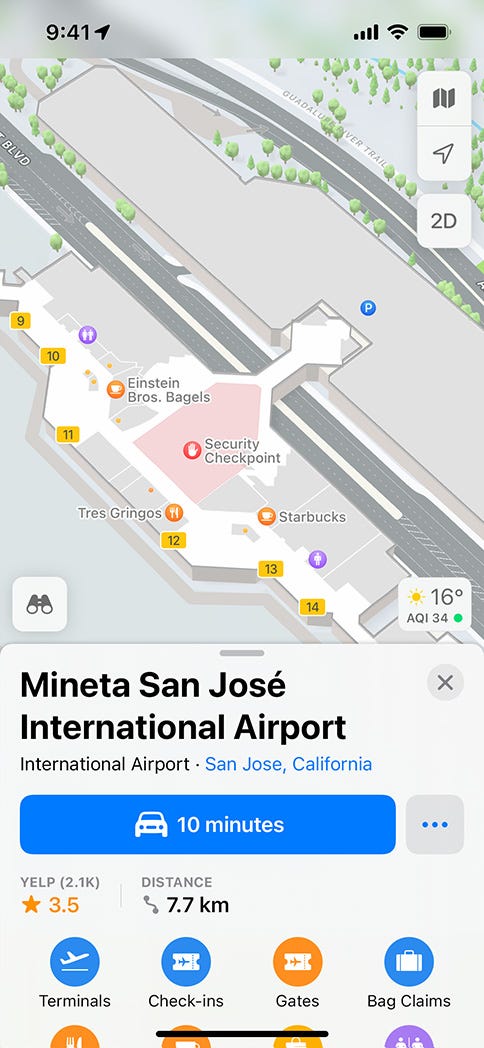
Apple Maps also introduced innovative features, like detailed indoor maps of airports and shopping centers and immersive 3D city tours for popular countries worldwide.
Apple was on a mission: to transform Apple Maps from a meme-worthy mess to a top-tier navigation tool good enough to rival Google Maps.
My First Impressions of Apple Maps
I still remember the day I hesitantly opened Apple Maps for the first time. It was when I got my first iPhone in 2019 and wanted to try something different for a change. Also, Apple introduced many new features and additions to the Maps app in WWDC 2019, which made it intriguing.
Given its rocky start, I was half-expecting to be directed to a different continent. But to my surprise, the interface was sleek, intuitive, and user-friendly. The detailed city views, 3D structures, and real-time traffic updates were a visual treat. Remember, this was four years ago, so things were still improving.
What really caught my attention, though, was the ‘Look Around’ feature. It was Apple’s answer to Google’s Street View but with a smoother, more refined experience. It made navigating through streets feel fluid, and the integration with Siri for voice-guided navigation was surprisingly seamless.
But it wasn’t just about the fancy features. Apple Maps felt more privacy-focused, ensuring that personal data wasn’t exploited. The more I used it, the more I realized that Apple Maps wasn’t just trying to catch up to Google Maps; it was trying to redefine the navigation experience.
As I delved deeper into Apple Maps, it became clear that it wasn’t the same app that had once directed people into lakes. It was mature, refined, constantly improving, and ready to go head-to-head with any maps app.
Apple Maps Today
Apple Maps has come a long way from its initial days; today, it stands tall as a formidable contender in digital navigation.
One of its most commendable strengths is public transit directions. Apple Maps offers real-time transit info, service disruptions, and even indoor maps of major stations, ensuring you never miss that last train home.
Another standout feature of Apple Maps is its design philosophy, as with every other Apple product out there.
In a world where information overload is real, Apple Maps offers a breath of fresh air with its cleaner and less cluttered interface. Looking at you, Google Maps.
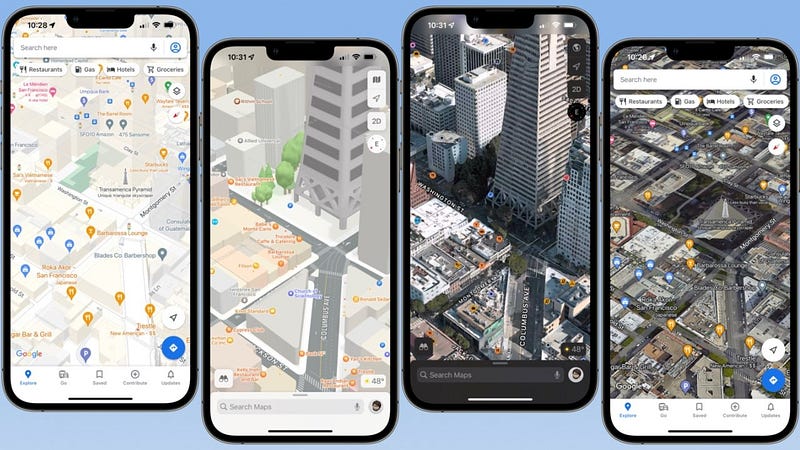
The map visuals are crisp, focusing on displaying only the essential data, reducing distractions. The color palette is subtle, making it easier on the eyes, especially during those long drives at night.
Apple has put a lot of thought into ensuring that the user’s attention remains on the road and not on deciphering a cluttered map.
Comparing Features of Apple Maps and Google Maps
→ Navigation and Accuracy
Apple Maps and Google Maps excel in this department, but their approach differs slightly.
While Google Maps often relies on its vast user base for real-time traffic updates and route suggestions, Apple Maps has been deploying its fleet of data-collection vehicles and integrating user feedback. It has significantly improved its accuracy, leveraging high-resolution satellite imagery.
The result?
Both apps offer reliable navigation, but your preference might tilt based on whether you value crowd-sourced or controlled data collection.
→ User Interface and Experience
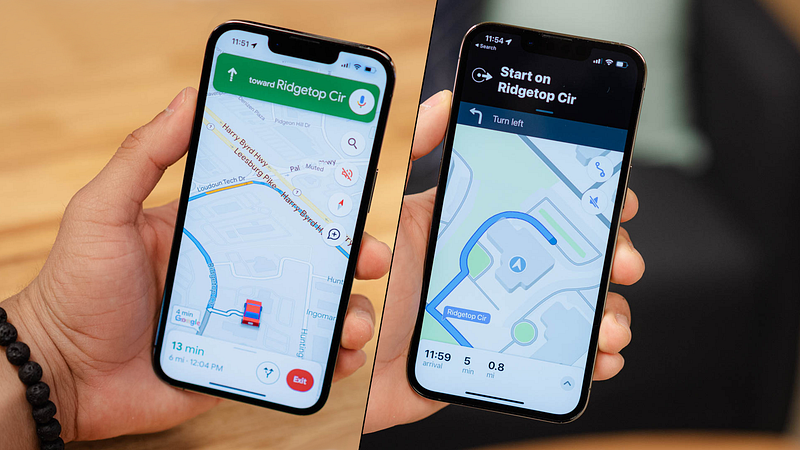
With its massive list of features, Google Maps can sometimes feel overwhelming, and the interface looks crowded. There’s a lot it offers, from restaurant reviews to street views.
Apple Maps, on the other hand, leans towards minimalism. Its intuitive interface makes it easy for users to find what they’re looking for without diving deep into menus.
→ Integration with Other Apps and Devices
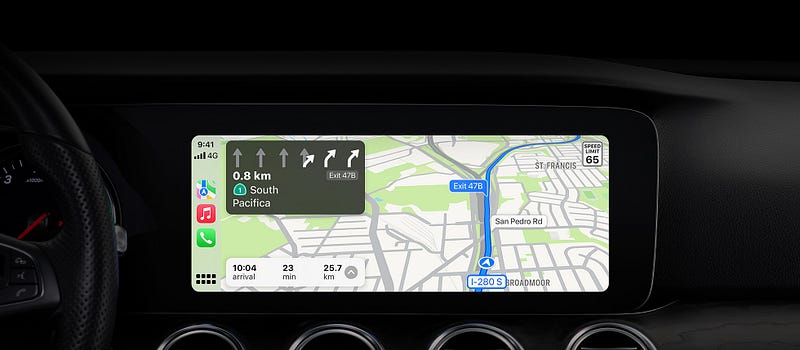
Apple Maps, being a native app, integrates seamlessly with the Apple ecosystem. Whether it’s asking Siri for directions, marking locations in Calendar, or using it with CarPlay, the experience is fluid.
While not as tightly integrated into Android, Google Maps offers a broader range of compatibility across devices, including those outside the Google sphere.
→ Privacy Concerns and Data Usage
Apple has always championed user privacy, taking a clear stance on this with Apple Maps as well. It doesn’t store personal data or search history, ensuring that your whereabouts remain your business and your location data is anonymized and not linked to your Apple ID.
While it offers personalized experiences based on search history and preferences, Google Maps has often been scrutinized for its data collection practices and might be a concern for the privacy-conscious.
While both Apple Maps and Google Maps have their strengths and weaknesses, the choice boils down to personal preference. You might have to pick your poison based on whether you prioritize design aesthetics, data privacy, or the breadth of features. As you know, I chose Apple Maps.
Apple Maps Features That Pushed Me to Make the Shift
Integration with SpotHero
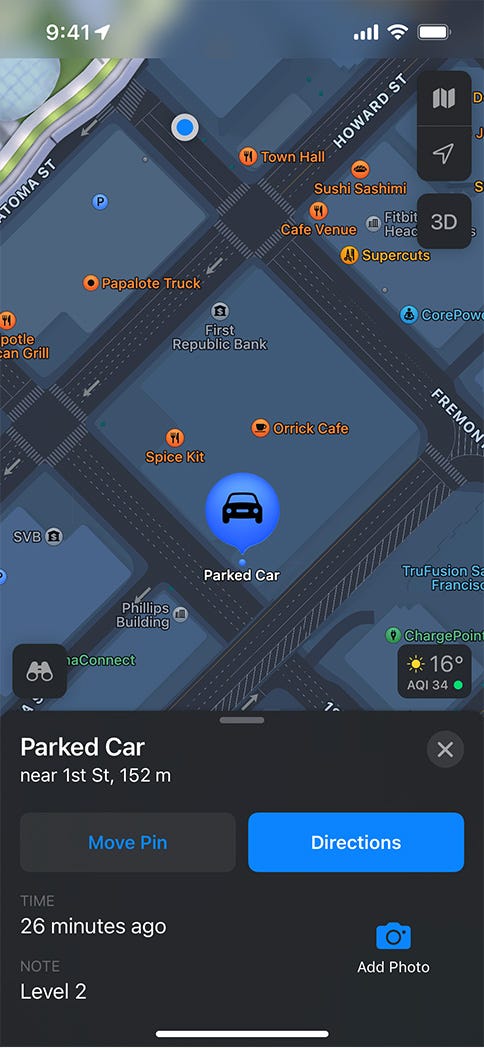
Have you ever circled a block, desperately hunting for parking? Apple Maps feels your pain. Its integration with SpotHero helps you find and reserve parking spots in supported cities.
Redesign and 3D City Features
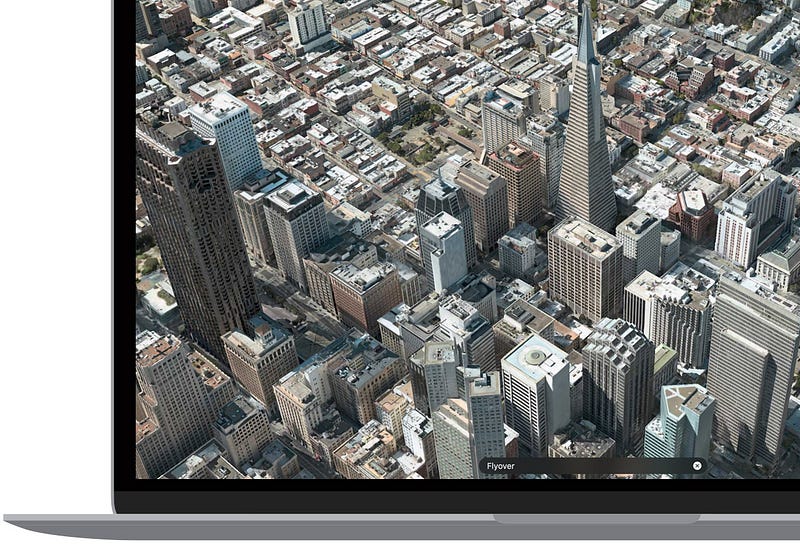
Apple Maps underwent a significant redesign in the past couple of years, and the results are stunning.
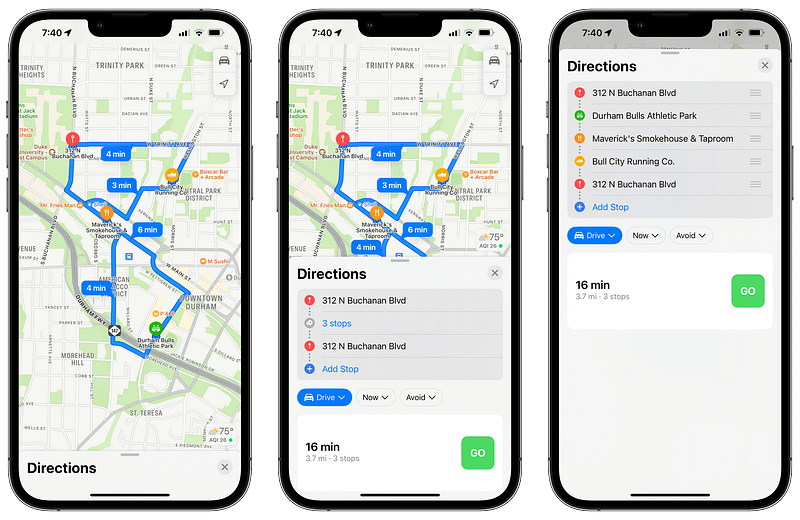
The 3D city features aren’t just for show; they offer a more immersive experience, allowing you to explore supported cities in intricate detail. It’s like a mini virtual vacation whenever you plan a route, helping you choose the most scenic route possible before leaving your couch.
Multistop Routing and Siri Integration
Are you planning a road trip or just running errands? The multistop routing feature lets you add multiple destinations, ensuring you take the most efficient route. And with Siri integration, the process is entirely hands-free.
Public Transit Enhancements and Fare Information:
Apple Maps has upped its game for those who rely on public transit. It displays detailed transit routes, accurate departure times, and even fare information in some cities.
Offline Maps
I know Apple is late to the party, but Offline Maps is finally here, and it even prompts you to download offline maps when planning to travel to a remote location with weak or no service.
Interface Updates and Volume Adjustments
Last but not least the interface. Apple Maps has always been about simplicity and elegance. The recent updates make the app even more user-friendly. The volume adjustments ensure that voice directions don’t blast out during your favorite song or podcast.
With these standout features, it’s not just about getting from point A to B; it’s about enhancing the entire journey. Apple Maps is worth a second look, even if you are a Google Maps loyalist.
How Apple Maps Values Its Users
Let’s talk about something we all cherish: respect.
In a digital age where every click, search, and movement can be tracked, it’s refreshing to see a tech giant like Apple prioritize user respect, especially with Apple Maps.
→ No Overt Advertisements
Have you ever been bombarded with ads when you only wanted to find the quickest route to your destination? With Apple Maps, that’s a non-issue. The platform is refreshingly ad-free, ensuring that your navigation experience remains uninterrupted. I hope Apple maintains this for as long as possible.
→ User Data Protection and Privacy
Apple’s commitment to user privacy isn’t just talk. With Apple Maps, your location data isn’t used to create a profile for advertisers.
Instead, Apple uses a method called ‘differential privacy’ to gather and use data without compromising individual privacy, allowing them to get a tailored experience without feeling like they’re under a microscope.
→ Features Tailored to Enhance User Experience
Apple Maps isn’t just about getting you to your destination; it’s about making the journey enjoyable. Features like the detailed 3D city view or integration with SpotHero aren’t there to push an agenda or promote a service. They’re there purely to enhance your experience.

In essence, Apple Maps embodies Apple’s broader philosophy: to create products that genuinely enrich our lives. It’s not about data mining or pushing ads; it’s about respect, privacy, and a seamless user experience. And in today’s world, that’s a route worth taking.
Fresh Perspectives offered by Apple Maps
Navigating the world of digital maps, it’s easy to think Google Maps, Waze, and Bing Maps are all the same. But Apple Maps begs to differ.
Unique Features Not Found in Google Maps
Apple Maps has been playing catch-up, but in doing so, it’s brought some unique tools to the table.
Take the ‘Look Around’ feature, for instance. It’s Apple’s answer to Google’s Street View but with a smoother, more immersive experience. The transitions between locations are fluid, making virtual strolls feel almost lifelike.
Then there’s the integration with iCloud, allowing users to sync their favorite places across all Apple devices seamlessly. And let’s not forget the indoor maps for airports and shopping centers, making it easier to find that last-minute gate change or the nearest restroom.
Apple has deployed fleets of cars, drones, and even people with backpacks to gather data and improve map accuracy. The focus on privacy, with features like ‘Sign in with Apple,’ ensures that user data remains protected even as the app becomes more personalized.
Their commitment to the environment is evident with features highlighting electric vehicle charging stations and cycling routes. I feel that Apple Maps genuinely strives to redefine our mapping expectations, proving that there’s always room for a fresh perspective.
Here is when I finally decided to give up on Google Maps
A couple of months back, I had planned a weekend getaway to a quaint little town. Having always been a Google Maps loyalist, I naturally keyed in the destination and set off.
Halfway through, I hit a roadblock, quite literally. A major road was closed for repairs, and Google Maps seemed clueless, rerouting me in circles.
Frustrated, I decided to give Apple Maps a shot. To my surprise, it immediately picked up on the closure and suggested an alternative scenic route. This detour was breathtakingly beautiful and even introduced me to a cozy cafe perfect for a spontaneous coffee break.
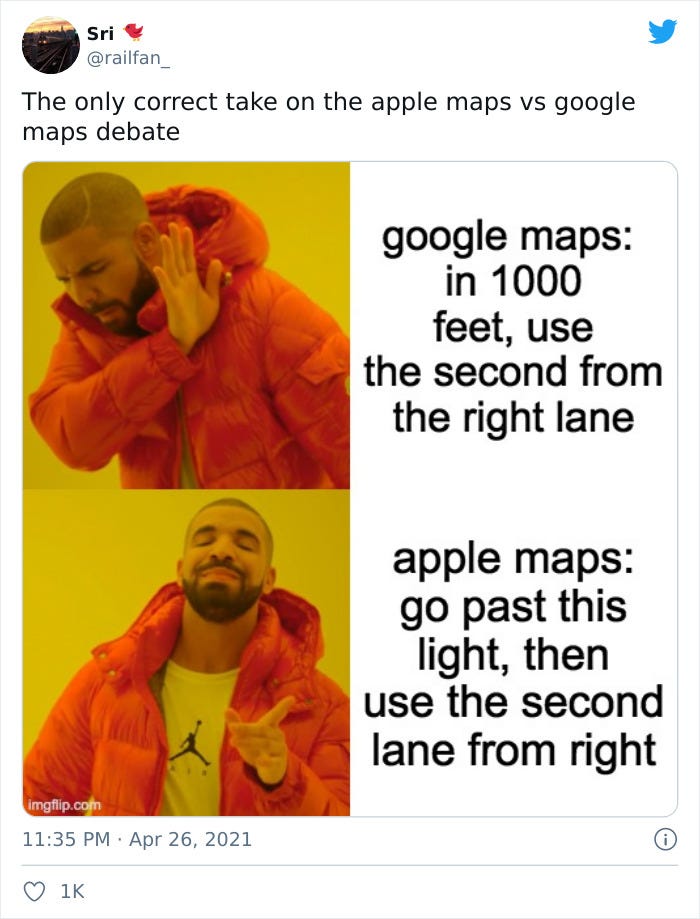
Sure, Apple Maps had its issues, but this experience was eye-opening. It wasn’t just about getting from point A to B; it was about the journey, the discoveries along the way, and having a reliable companion.
Combining this with all the other features and things I mentioned earlier, along with a clutter-free, ad-free, and privacy-focused experience, it was clear to me what choice I had to make, however tricky.
Apple Maps — 1 Google Maps — 0.
The Bigger Picture of My Switch
Switching to Apple Maps has subtly reshaped my daily routines. No longer am I second-guessing routes or fretting over data privacy. My morning commutes are smoother, and those weekend drives are more adventurous.
But let’s zoom out a bit. Imagine if a significant chunk of users made the switch. We’d likely see a ripple effect.
Businesses might prioritize their visibility on Apple Maps, leading to more accurate and diverse location data. With more feedback and user interaction, Apple Maps could evolve faster, refining its features based on real-world user needs.
Apple Maps in the Apple Ecosystem
Apple’s strength has always been its ecosystem; Apple Maps is no exception.
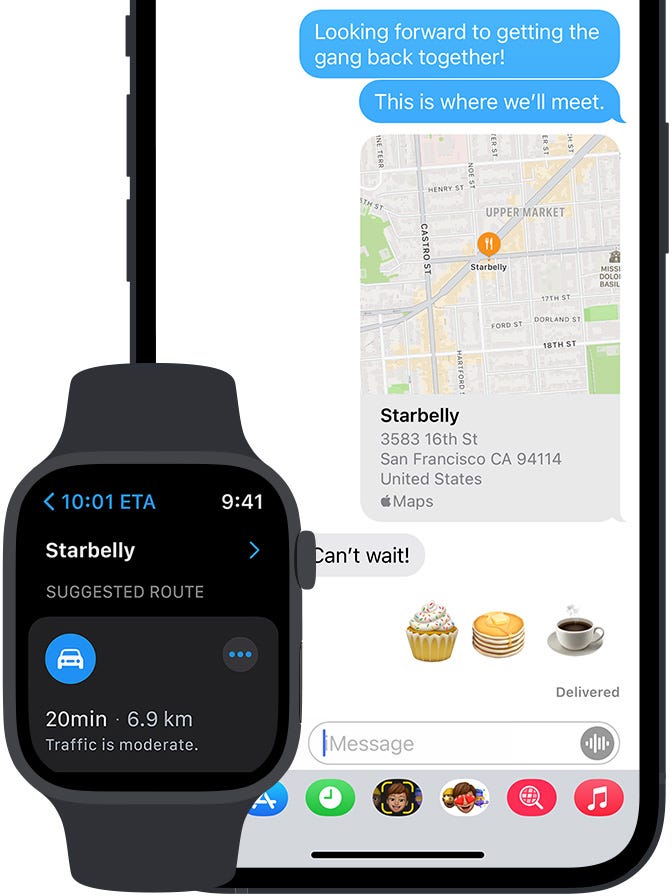
Take the Apple Watch, for instance. Getting turn-by-turn directions on your wrist while cycling or walking and even seeing the actual Map on your wrist? It’s game-changing.
No more fumbling with your phone at every intersection. And with the CarPlay integration, driving becomes a more seamless experience, with maps, music, and calls all in one place.
Privacy, a cornerstone of Apple’s ethos, shines through in Apple Maps. Unlike some competitors (*ahem* Google Maps *ahem*), Apple doesn’t trade your location data for ads.
Your routes, your frequented spots, they remain yours. It’s a refreshing approach in an age where personal data often feels up for grabs.
And with the upcoming release of iOS 17, things will only get better from here, with Offline Maps support, alerts when you are about to enter a low service area, EV charging station availabilities, and Siri Volume customization.
Looking back and ahead
Navigating the digital world is like finding your way through a maze while blindfolded.
My switch to Apple Maps wasn’t just because I fancied a change of scenery or because I lost a bet. It was Apple’s unwavering commitment to user privacy, its innovative features, and a simple and user-centric design.
Apple Maps has grown from an awkward teenager of navigation apps to the calm, confident adult we all secretly want to be. It’s grown up and learned from its mistakes, just like we all wish to do.
With the launch of Apple Vision Pro and the rumored Apple Car, the future of Apple Maps seems more sci-fi than reality. Think Apple Maps with AR dragons showing you the way, or maybe it’ll telepathically tell you where to find the best tacos.
I envision a promising future for Apple Maps, and I hope I won’t regret making this switch. Here’s to more adventures, fewer wrong turns, and maybe, just maybe, that AR dragon guide.
If you like discovering and using new apps to enhance your experience on your iPhone and Mac, you should definitely check out Setapp, an app store that has a massive library of 250+ apps, and for just $9.99/month, you can get access to all of these apps, and I would say it is well worth its price.
The best part is if you Sign Up to Setapp using my affiliate link below, you can try out all 250+ apps in Setapp completely for free for 30 days. Use the code ‘usefultech’ to avail this exclusive offer. Also, you would be supporting me directly. So, if you ask me, it is a win-win situation.
Subscribe to Medium and support The Useful Tech!
Join the Medium membership program to access unlimited articles across Medium on topics like Tech, Business, and Productivity, and support The Useful Tech and all of your favorite authors for only $5 a month!


