
Why & How I Take Notes
This coming week, I’m starting a new learning experience — Nick Milo’s Linking Your Thinking course. This makes it a good time to begin a possibly every six months review of how I take notes for work, for personal learning, and for content creation. I was a bit inspired to do this by a recent episode of the Focused Podcast featuring @Mike Schmitz and David Sparks . The episode was called “The Art of Note-Taking”.
What is the purpose of taking notes?
For many people, they either stopped taking notes when they left school OR, perhaps worse, they still take notes exactly as the took them in school — and never really learned how to use them effectively. I think there is a lot of value in taking notes — and learning to use your notes effectively — which means to improve yourself and/or to take actions that are aligned with your values.
For me, there are four purposes for taking notes today.
Purpose 1: Documenting what happened
This is probably the closest to what I think of when I think of school notes. In school notes, I actively replicated what the teacher wrote on the whiteboard or discussed. In my “adult” life this translated to going to meeting upon meeting upon meeting and making notes about the items we discussed.
These are useful notes as they can serve as a basis for freeing your working memory for other things rather than trying to remember who said what in what conversation.
This type of note, in many cases, goes in a folder and nothing happens with it. It is not a note that creates action.
Purpose 2: Making notes to remember things
This is the same as when we “make a note” in our calendar of something we want to remember — say a birthday or an event. We make a note of it in a place we know we’ll come back to so that we can see it at an appropriate time to plan for it. This is a note that can and should create actions. For example, here are two “notes” from my calendar for this week: - Sleepover with L - Meeting with C about grant
As I look over my calendar each week, I know that there may be tasks hidden in there. For instance, for the sleepover with L (my great-niece), I need to identify an activity for us, make sure we have tickets and any safety clearance she needs from her parents in advance (e.g. the Skyzone near my house requires a signed waiver from a parent), and make sure I have something fun for us to make together like a craft or a special meal as she loves that kind of stuff and I enjoy doing it with her. When I put the sleepover on my calendar, I didn’t note these tasks in my task management system even though I did think through them a bit because a) I have a bunch of crafts to do and foods she loves usually in stock — plus I do a grocery order every week or two and b) most activities are pretty easy to take on as long as the weather is nice. So, unlike hosting Thanksgiving which is a note looming out on my calendar in Thanksgiving there is no project associated with it. On the other hand, Thanksgiving is a project in my productivity system that I made as soon as I made the note in my calendar. It is a note that generated action to do more planning.
The Meeting with C (a client) just got added to my calendar last week through calendly and needs an agenda and a couple of files that I need to pull together prior to the meeting. These are easy prep tasks that can be taken care of in about 5 minutes as I already have a standard agenda template for meetings. I can quickly edit that and add in the attachments to our progress files for discussion.
Purpose 3: Making Notes to learn things
This is one of the key reasons I take notes now. I take these notes in a lot of ways
Each day in my daily note (I use a tool called Obsidian which you can learn more above below), I have a section where I write in anything I learned that day. Sometimes I am actively adding to that section as I am going through the day and sometimes I just add a sentence at the end of the day. Rarely, nothing will get written in that section.
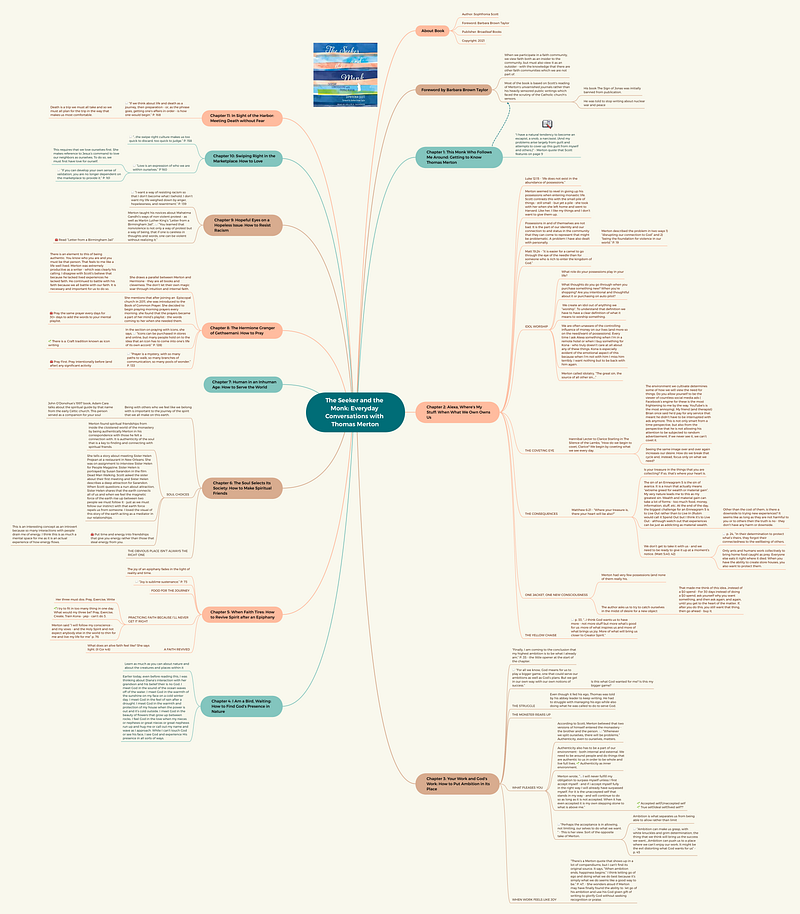
When I’m reading non-fiction books, I use a combination of Readwise and creating a mind map of the book using xMind. Readwise is used to capture my highlights from the book. In xMind, I capture my notes in my own words about and thoughts on the book (along with a few key quotes or passages). You can also do this in Readwise but I have found the mind maps help me focus a little more on not simply restating what’s already in the book.
Here is a recent mind map from Sophronia Scott’s outstanding book, The Seeker and The Monk.
From the Readwise notes and the mind map, I may do a number of things:
- Decide to try out some of the tools or techniques identified in the book. These would get implemented in my daily or weekly notes template, added to my calendar, or in some other way made visible in my life so I don’t forget them.
- Make a book summary page to post on my web site. I have about three of these done so far and I’m excited to announce their availability shortly.
- Further review the note and divide it out into its atomic parts (more on this below) so that I can connect ideas and elements of this book to other things I’m reading.
Purpose 4: Making Notes to Clarify My Own Thinking
In essence, you are reading one of these types of notes. This is a note I wrote to clarify my own thinking on note-taking. It’s a note I anticipate updating many times over the years. I’ll enjoy seeing how my own thoughts on this topic change over the years.
This note is a bit different in that it used some of the other types of notes listed above to create it. I began by looking through all of the different kinds of documents in Google Drive and Obsidian to see what the purposes were for them — and the four purposes you see here emerged from that. I also had a note on writing as a thinking tool which I included here.
Will more come out some day or will some go away in a future iteration? Most certainly! I’ll learn and grow and my work will change as a result of that.
What are the tools and skills for note-taking?
Before I dive into specifics on tools and skills there is a general combination of these two that I think is important which is that you MUST ALWAYS BE ABLE TO CAPTURE A NOTE. Whether it’s with a Siri voice command that saves to Drafts, a small notebook in your pocket, or a quick email you send to yourself, figuring out how you will capture ideas in any context you could find yourself in is critical in my mind.
Tools
I think tool stacks are interesting to look at but also dangerous. I’m going to share my stack with you and it works for me. If you have something similar in your stack that works for you — GREAT! Keep it.
I’m also going to focus ONLY on capturing “notes” — not necessarily on where you put those notes (e.g. a calendar, a task system, etc.). Those tools are important to — and I write about them a lot — but they are not my focus for today.
Analog tools:
- Small notebook. I keep a small Field Notes notebook or small spiral bound notebook in every bag I carry. There is also one of these on my nightstand as well as in my car in the console between the seats. I keep a pen with each of these.
- Aqua Notes. In the shower, I SWEAR by Aqua Notes (it comes with a Pencil). You can buy these on Amazon and they aren’t that expensive. Some of my very best work has come from Aqua Notes.
Digital Tools
- Google Keep. I use this as my quick digital inbox. It connects to my Samsung watch so I don’t even have to take my phone out of my pocket but it is also SUPER FAST to take a note right from my phone.
- Obsidian. Obsidian is where all of my notes get stored and used. I’m writing the first pass at this article in Obsidian. But Obsidian is also where I take my daily notes, do my journaling, take meeting notes, record learning notes, and even put my mind maps.
Skills
- Capture everything. As I mentioned above, I’d rather you capture something you’ll never use than not capture an idea that could have been key to your next book or article. Of the things I write in my field notes or in Google Keep, probably half of them get done simply because I wrote the things down and I don’t need to capture the idea anywhere else. The act of writing it served as the reminder to not forget. But for everything else, you need the next skill.
- Review and clean daily. I spend about 10 minutes each day (it realistically probably only takes above 5 minutes now) reviewing all of my notes from the day and making sure they are properly stored in Obsidian. This simply means collecting any pieces of paper from those notebooks and then cleaning out any notes in Google Keep to make sure items are properly stored in Obsidian.
- Store items atomically for re-use. I divide my notes that are related to multiple topics out into the smallest unit possible — this is the principle of atomicity. So, for example if you look back at the book note from The Seeker and the Monk, you’ll see this quote:
“…I think God wants us to have more — not more stuff but more of what’s good for us: more of what inspires us and more of what brings us joy. More of what will bring us closer to Creator Spirit.” p. 33
In Obsidian, that quote is stored in a page of its own and is then linked back to the main note for the book. The reason for this is that this quote is also tagged with concepts like minimalism, abundance mindset, inspiration, joy and relationship with the divine. Each of these, on their own, are topics I write and think above. While the entire book is not about those topics, this specific quote is. If I’m writing or thinking about one of those topics in the future, I can easily retrieve this quote in a quick search for tags related to that specific concept. And, because it appears in this article, that note is also now linked to the note for this article.
I’d love to know how you take notes. Post a comment on this article and let me know what resonates with you or what you disagree with.
🧠 Would you like to know more about Obsidian? I write many articles here on Medium — and publish videos on my YouTube channel — many of them include in-depth how-to and guides on Obsidian. Subscribe here on Medium to always get notified
📰 Want to make sure you never miss a story from me? Subscribe to my newsletter — I send out a fresh new article and do a round up of everything I published that week. It releases for free every Monday morning.
✋🏻Want to support my work? Subscribe to Medium so you can get access to ALL the articles published by me and other great content creators. A portion of your Medium membership gets paid to me each month you’re a member if you join through my affiliate link.


