
Why And How To Lazy Load Angular Libraries
This article is based on a real life experience from a large enterprise environment with more than 60 SPAs and cca 30 libraries…
🤫 Wanna know how we can manage such a large environment without going full crazy 😵 Check out Omniboard!😉
Angular libraries are great way to organize code! Angular CLI comes with an amazing built-in support to create, build and test library projects inside of the standard workspace.
Libraries shine the most in environments with multiple Angular applications with a large potential for code reuse and composition!
Libraries can also be of great help in shops which need to spit out client projects at a high cadence! In that case the libraries can represent reusable configurable add-ons from simple ones like music player or social feed to more complex one like full blown admin with multiple sub-routes!
Libraries are currently built with the help of ng-packagr which together with the advancements in the dependency injection mechanism (
providedIn: 'root' syntax ) lead to small tree-shakeable packages! That represents yet another reason to embrace libraries as a unit of shared code in the Angular ecosystem!
👨💻️ Concepts explained in this article are demonstrated using working code snippets and example GitHub project with live demo!
What are we going to learn?
- Taxonomy of the Angular libraries based on their purpose
- Different ways of implementing library (Angular CLI workspace vs monorepo)
- Standard lazy loading of the application modules
- How to NOT lazy load modules from Angular libraries
- How to DO proper lazy loading of modules from Angular libraries
- How will this change (for better) with Angular IVY
Taxonomy of the Angular libraries
Angular libraries can come in different shapes and for different purposes!
- utils — a collection of various utilities, usually in form of stateless services
- component library — a collection of reusable simple (dumb) components with only plain API facilitated using mostly
@Inputand@Outputdecorators - drop in component — a more complex component with its own state handling / data fetching which can still communicate with the parent application using
@Inputand@Output(eg pass in configuration or let the parent know about the outcome of some operation…) - sub-application — the most complex library which could also run as a stand alone application if the need be. Such a library can come with multiple modules with their own routes, components and services…
- other? — let me know in the responses so I can add your use case to this list!
Of course it’s not always so clean cut and lines between the types can get blurry…
Our focus in this guide will be on the most complex “sub-application” like libraries!
Challenges that can be solved using sub-application libraries
- shared complex functionality across many apps (eg search page, settings page)
- splitting up features of the large application (with many lazy routes) into multiple libraries to further enhance isolation, speed up build / testing process, provide independent life-cycle and make it possible to run them as standalone apps
- lego (add-on) style modules, application where people can enable / buy additional features
Ways to implement Angular libraries in 2019 (Angular CLI vs nrwl/nx)
Angular CLI got much better over time and currently provides very solid developer experience out of the box! Libraries developed in Angular CLI by default get their own package.json file so they are supposed to be published independently to npm repository as a standalone artifacts that are then consumed using npm install.
On the other hand, nrwl/nx gives us a monorepo style workspace with only single package.json file. Libraries are still imported with familiar from ‘@my-org/some-lib’; but this is now facilitated by the Typescript compiler aliases with relative paths to the local library directories instead of standard node node_modules/ resolution. Also, when published to npm, all the apps and libraries will be using the same version which is a monorepo approach to managing life-cycle!
It doesn’t really mater which style of development we choose. In the end, we still have to find a way to reference our library to be able to lazy load it and that’s what we are going to learn next!
How to lazy load libraries
Let’s start with something standard. We usually define lazy loaded routes as a relative path to some module in the local application codebase…
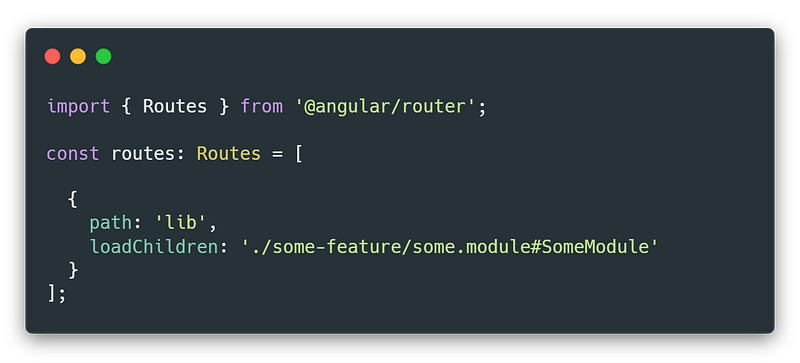
What would it mean if we wanted to adjust this to lazy load a module from a library?
The library can either come from node_modules/ as a standalone lib installed from npm or it can be a local library project in the Angular CLI (or nx) workspace.
Can we just reference lib with the string in these two cases?
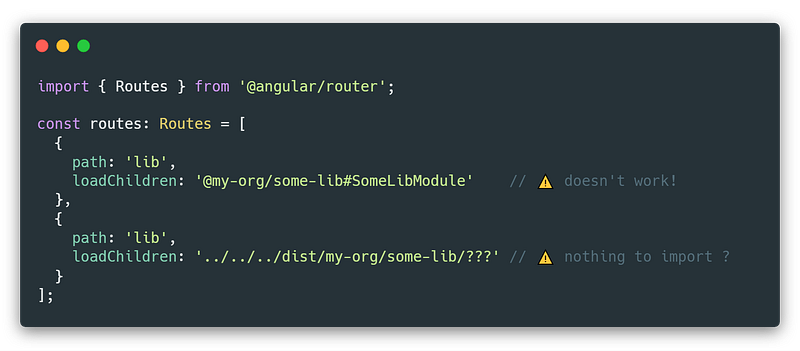
These approaches don’t work!
How can we lazy load our library module using the expected syntax as shown in the first example above? In other words how can we provide our library module in a way so that we can reference it with a relative path like ./some-path/some.module#SomeModule ?
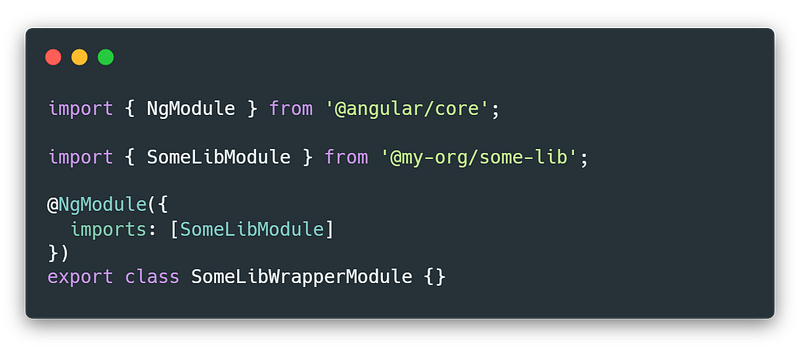
Luckily, there is a way where we can create extremely minimal wrapper modules locally inside of the consumer application codebase which will import the module from the library in a standard way using import { SomeLibModule } from '@my-org/some-lib' and then import that module inside of the @NgModule decorators imports: [SomeLibModule] array as show below.
Follow me on Twitter to get notified about the newest Angular blog posts and interesting frontend stuff!🐤
The last step
Once we have our wrapper module ready we can reference it in the route using a standard relative path because the wrapped module belongs to the application project itself.
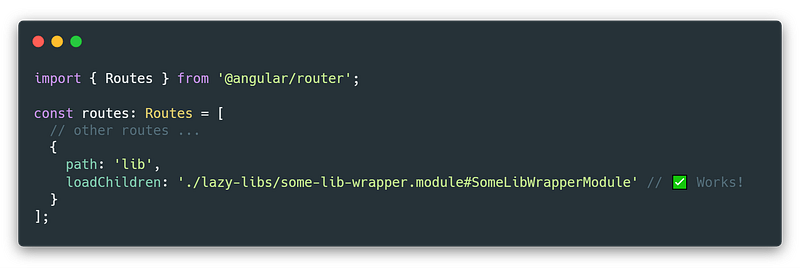
Cool! Now we have an Angular application which seamlessly lazy loads feature module from other independently developed library!
All we had to do was to create minimal wrapper module and everything works as expected!
🌿 Future with Angular Ivy
In the future there will probably be a possibility to lazy load modules using standard JavaScript async import() syntax instead of the Angular CLI specific magic string like loadChildren: './some.module#SomeModule'.
In that case it will look something like loadChildren : () => import('@my-org/some-lib').then(m => m.SomeLibModule) which would remove the necessity to use wrapper modules.
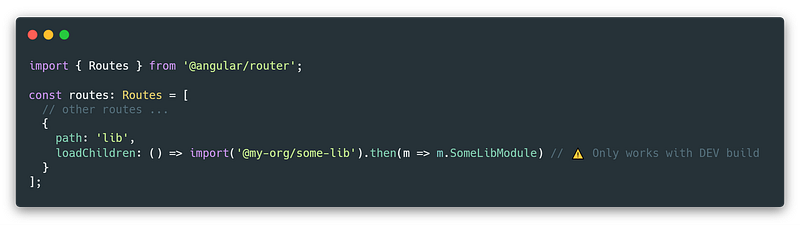
Currently it is possible to make this work without IVY by adjusting tsonfig.json. We have to use "modules": "esnext" instead of default "modules": "es2015" but it will only work when using DEV build…
Unfortunately, running ng build --prod will break this and we will get Error: Uncaught (in promise): Error: Runtime compiler is not loaded when we try to navigate to route using dynamic import. (Maybe we could make this work by bringing @angular/compiler into the prod build but I didn’t test that)
For now, we have to stick with the wrapper module solution!
EDIT: Thanks to Igor Minar for feedback on Twitter:
One not/correction: import() syntax for router lazy loading is not Ivy specific. We worked extra hard to decouple it from Ivy and we’ll make it available to ViewEngine (pre-Ivy) pipeline as well in version 8.
So this sounds even better, thanks to Angular team for amazing work! 🎉
Summary
We have learned that we can implement reusable “sub-applications” in form of Angular libraries which can be implemented in total isolation and be lazy-loaded on demand and also come with their own routes!
Currently we can achieve this by using minimal wrapper module which we use to import lib module and then reference it as a lazy loaded route!
Check out implementation and live demo on GitHub!
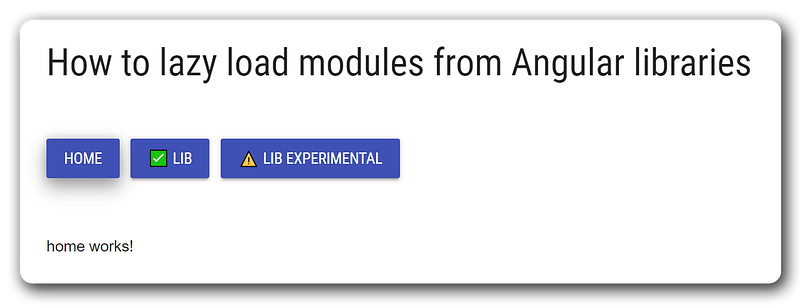
Most important files being:
💥 Booom, we’re done!
I hope you enjoyed this guide and will make your applications even more performant and maintainable by splitting them into separate reusable libraries which can be developed in isolation by separate teams! This approach can tremendously help in the enterprise organization setting!
Please support this article with your 👏👏👏 to help it spread to a wider audience 🙏.
Also, don’t hesitate to ping me if you have any questions using the article responses or Twitter DMs @tomastrajan.

Do you find the information in this article useful?
We are providing tailored expert support for developing of your Angular applications. Explore our wide range offers on angularexperts.ch
And never forget, future is bright

🤫 Psst! Do you think that NgRx or Redux are overkill for your needs? Looking for something simpler? Check out @angular-extensions/model library!

Starting an Angular project? Check out Angular NgRx Material Starter!

If you made it this far, feel free to check out some of my other articles about Angular and frontend software development in general…


