
Where Did My Subtitle Go?
A Medium mystery — and its solution

May 19th was the last normal day on Medium for me. Since then, the articles I’ve published have been strangely lacking in subtitles.
It’s not that I didn’t give them subtitles. They just didn’t show up.
First, the subtitles were failing to show up in the embedded links. I asked other people if they were having issues. I sent in a request to Medium support.
Other people’s subtitles were just fine. Medium answered that they were having trouble reproducing the problem. I worked in technical support long enough to know that’s support-speak for “user error”.
The final blow, though, was when the subtitle failed to show up on the home page of my publication. This had gone from an annoyance to a real problem.
An extra-challenging challenge
The first appearance of the problem was in my 30-day challenge pledge. I keep a running list of articles published during the month at the bottom of the article. When I added in the last batch, they came out like this:
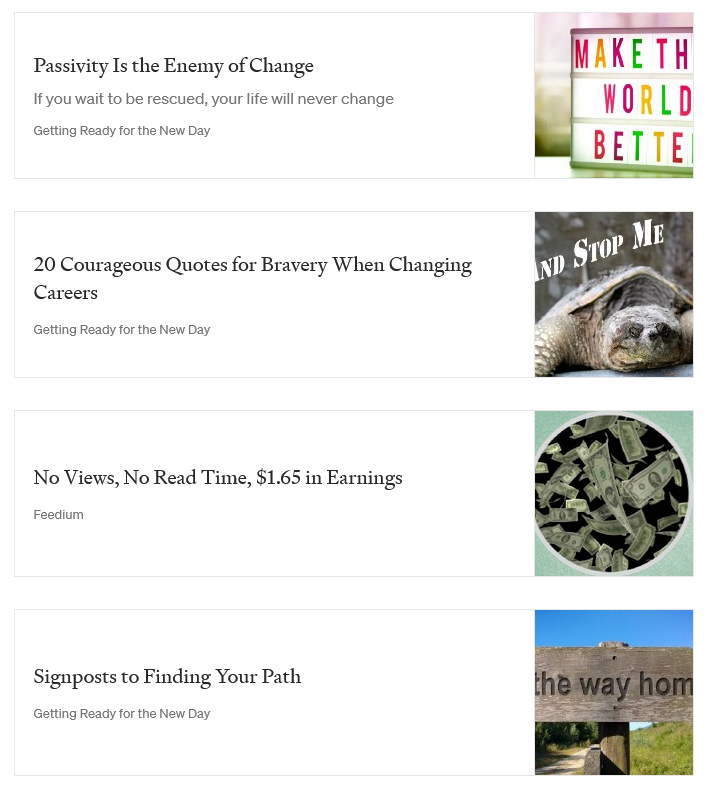
At first, I thought it was no big deal. I go in and change the link at the bottom from medium.com to the name of the publication where the article appeared. How hard could it be to simply add the subtitle back in?
Turns out, that’s very hard. Impossible, actually.
I tried to copy and paste the interior of one of the other working links into the interior of one of the failing links.
If I copied everything, it simply added another copy of the working card. If I only copied part of the interior, it divided the interior into columns. It looked horrible.
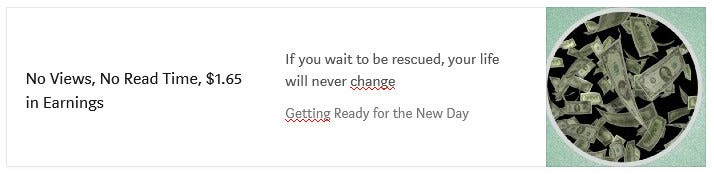
The same problem occurred when I tried to add an extra line with a carriage return. (That’s an Enter key for those of you who learned to type on computer keyboards.) The new line showed up as a new column.
I’ve got a programming and web developer background. I had to look at the source code, to see what was happening.
Turns out, the properly formatted embedded links had three lines: an h2 class, an mn class, and an mp class. The badly formatted links were missing the mn class line in the middle.
But why? Why was it missing? And how could I get it back?
Medium support comes through
Support started with the insulting questions support always starts with. “Are you sure there actually is a subtitle?”
Again, I used to work in customer support. They ask such stupid questions because frequently, that really is the problem.
I was once flown out to a customer location to troubleshoot a problem with our software. The head of the customer’s IT department was on the verge of ripping out our very expensive solution. When I got there, I had him show me what he was doing. He was using the wrong key to navigate between windows — killing the window instead of escaping. I told him to use the Escape key. Problem solved, for the cost of a day of my time and a round-trip air fare. Because it hadn’t occurred to anyone that the head of IT could be that stupid.
So, I gave the Medium support contact everything they needed. I gave them screen shots, links to articles, everything.
They chewed on them for a while, trying to figure out what was happening. They cloned my article, and reproduced my errors. And when they got back in touch with me, they had a solution. At least, it had worked on their cloned copy, and they wanted me to try it.
“Edit the story, and select Change display title / subtitle. Delete the existing subtitle, and retype it.”
It worked! My subtitle appeared exactly where it was supposed to.
So what was happening?
There was an invisible character trapped in the subtitle dialogue. It was invisible to any person looking at it. But the computer read it and interpreted it to mean “erase the subtitle”.
I use a template to write my stories, with the CTA at the bottom. So each new story gets written on top of the last one I wrote.
That’s why once the invisible character got in there, it continued to show up in article after article. Because I was deleting the text I saw, not the text I couldn’t see.
I went back to my article template and completely erased the title and subtitle lines. I typed two new lines of text, and turned them into a new title and subtitle. My template should be good to go, now.
But how did it get in there in the first place?
User error.
I copied something into the document. It could have come from Microsoft Word, or it could have come from Headline Studio.
I mistakenly used “paste” instead of “paste as plain text”. The vast majority of times this mistake would not be a problem. This one time, it bit me on the backside.
Final thoughts
Complex computer systems, even user-friendly ones, have many ways to get screwed up. Because it doesn’t matter how many ways the developers try to plan for user errors. Users will always find new ways to introduce errors.
As the popular quote says, you can never finish idiot-proofing software. The instant you think you have, you’ll find a bigger idiot.
If you experience strange errors that no one else does, the problem may be invisible. Try copying the entire article somewhere as plain text, then create a new article.
And if that still doesn’t solve the problem, contact Medium support. They’re very helpful and willing to dig deep to uncover the cause of your problem. Once they’re sure you’re not an idiot, that is.
Ready to have a better tomorrow?
I’ve created a guide to help you increase your confidence and improve your life. If you follow these tips, you will level up your life very quickly!