avatar💡Mike Shakhomirov

Free AI web copilot to create summaries, insights and extended knowledge, download it at here

14737

Abstract

ts from over 15k users. Open the link above and click <b>Preview</b>. It won't cost anything to run a Preview on any table:</p><figure id="3b21"><img src="https://cdn-images-1.readmedium.com/v2/resize:fit:800/0*XKC4nsGwwjBZ5BRO.png"><figcaption>Public dataset. Image by author</figcaption></figure><p id="ad23">So let’s say we want to export the data. Run this SQL in BigQuery:</p><div id="2791"><pre>EXPORT DATA OPTIONS ( uri <span class="hljs-operator">=</span> <span class="hljs-string">'gs://events-export-json/public-project/events-.json'</span>, format <span class="hljs-operator">=</span> <span class="hljs-string">'JSON'</span>, compression <span class="hljs-operator">=</span> <span class="hljs-string">'GZIP'</span>, <span class="hljs-comment">-- SNAPPY and DEFLATE not supported for JSON</span> overwrite <span class="hljs-operator">=</span> <span class="hljs-literal">true</span> ) <span class="hljs-keyword">AS</span> ( <span class="hljs-keyword">SELECT</span> <span class="hljs-operator"></span> <span class="hljs-keyword">FROM</span> firebase<span class="hljs-operator">-</span>public<span class="hljs-operator">-</span>project.analytics_153293282.events_20181003 );</pre></div><p id="44b1">Let’s check the size:</p><div id="8929"><pre>gsutil <span class="hljs-built_in">ls</span> -r -L gs://events-export-json gsutil <span class="hljs-built_in">du</span> -s -a gs://events-export-json

<span class="hljs-comment"># 98163921 gs://events-export-json uncompressed</span> <span class="hljs-comment"># 2619406 gs://events-export-json if we use GZIP compression</span></pre></div><h1 id="c8bd">Load data back to BigQuery</h1><p id="e4a1">We might want to load historical data back to run analytical queries. Even if the table doesn’t exist, the SQL below will work:</p><div id="5220"><pre>LOAD DATA <span class="hljs-keyword">INTO</span> source.json_external_test <span class="hljs-keyword">FROM</span> FILES( format<span class="hljs-operator">=</span><span class="hljs-string">'JSON'</span>, uris <span class="hljs-operator">=</span> [<span class="hljs-string">'gs://events-export-json/'</span>] )</pre></div><h1 id="3cc8">Export data warehouse data as Parquet</h1><p id="2b7a">Let’s create a new bucket first:</p><div id="a199"><pre>gsutil mb -c regional -l US-CENTRAL1 gs://events-export-parquet <span class="hljs-comment"># there is no point in creating a bucket in a multi location. It will just increase storage costs:</span> <span class="hljs-comment"># gsutil mb -l US gs://events-export-parquet</span></pre></div><blockquote id="0c72"><p><i>There is no point in creating a bucket in a multi location. It will just increase storage costs. Create a co-located single-region instead.</i></p></blockquote><div id="4e4c"><pre>EXPORT DATA OPTIONS ( uri <span class="hljs-operator">=</span> <span class="hljs-string">'gs://events-export-parquet/2018/10/02/events-'</span>, format <span class="hljs-operator">=</span> <span class="hljs-string">'PARQUET'</span>, compression <span class="hljs-operator">=</span> <span class="hljs-string">'SNAPPY'</span>, <span class="hljs-comment">-- GZIP, SNAPPY. DEFLATE not supported for parquet.</span> overwrite <span class="hljs-operator">=</span> <span class="hljs-literal">true</span> ) <span class="hljs-keyword">AS</span> ( <span class="hljs-keyword">SELECT</span> <span class="hljs-operator">*</span> <span class="hljs-keyword">FROM</span> firebase<span class="hljs-operator">-</span>public<span class="hljs-operator">-</span>project.analytics_153293282.events_20181002 );

EXPORT DATA OPTIONS ( uri <span class="hljs-operator">=</span> <span class="hljs-string">'gs://events-export-parquet/2018/10/03/events-'</span>, format <span class="hljs-operator">=</span> <span class="hljs-string">'PARQUET'</span>, compression <span class="hljs-operator">=</span> <span class="hljs-string">'GZIP'</span>, <span class="hljs-comment">-- GZIP, SNAPPY. DEFLATE not supported for parquet.</span> overwrite <span class="hljs-operator">=</span> <span class="hljs-literal">true</span> ) <span class="hljs-keyword">AS</span> ( <span class="hljs-keyword">SELECT</span> <span class="hljs-operator"></span> <span class="hljs-keyword">FROM</span> firebase<span class="hljs-operator">-</span>public<span class="hljs-operator">-</span>project.analytics_153293282.events_20181003 );</pre></div><p id="6f96">Let’s check if the data is there:</p><div id="ce96"><pre>gsutil <span class="hljs-built_in">ls</span> -r -L gs://events-export-parquet <span class="hljs-comment"># gsutil ls -L -b gs://events-export-parquet</span></pre></div><p id="f050">Run this to check the size of the bucket:</p><div id="9a97"><pre>gsutil <span class="hljs-built_in">du</span> -s -a gs://events-export-parquet <span class="hljs-comment"># 2441069 gs://events-export-parquet compressed with SNAPPY</span> <span class="hljs-comment"># 4180518 gs://events-export-parquet compressed with GZIP</span></pre></div><p id="3ba8">Tidy up and delete the bucket:</p><div id="5e11"><pre>gcloud storage <span class="hljs-built_in">rm</span> --recursive gs://events-export-parquet/</pre></div><h1 id="e13a">Load parquet data into BigQuery</h1><p id="c848">Now we can either <i>load data</i> into the table with a predefined autodetected schema or <i>create an external</i> table.</p><div id="228f"><pre>LOAD DATA <span class="hljs-keyword">INTO</span> source.parquet_external_test <span class="hljs-keyword">FROM</span> FILES( format<span class="hljs-operator">=</span><span class="hljs-string">'PARQUET'</span>, uris <span class="hljs-operator">=</span> [<span class="hljs-string">'gs://events-export-parquet/'</span>] )</pre></div><h1 id="1e1f">Create an external table using Parquet</h1><blockquote id="b323"><p><i>External tables are a lot slower than standard tables in modern data warehouses and have some well-known limitations:</i></p></blockquote><ul><li>For example, we can’t modify them with DML statements, and data consistency is not guaranteed. Having said that, if the underlying data was changed during the processing, we might not get consistent results.</li><li>External tables do not work with <b>clustering</b> and will not let <b>export</b> data from them.</li><li>It will not let us use wildcards to reference table names.</li><li>Have usually a limited number of concurrent queries in modern data warehouses, i.e., 4 in BigQuery.</li></ul><div id="c697"><pre><span class="hljs-keyword">CREATE</span> <span class="hljs-keyword">OR</span> REPLACE <span class="hljs-keyword">EXTERNAL</span> <span class="hljs-keyword">TABLE</span> analytics.parquet_external_test OPTIONS ( format <span class="hljs-operator">=</span> <span class="hljs-string">'PARQUET'</span>, uris <span class="hljs-operator">=</span> [<span class="hljs-string">'gs://events-export-parquet/public-project/events-'</span>] );

<span class="hljs-keyword">select</span> <span class="hljs-operator"></span> <span class="hljs-keyword">from</span> analytics.parquet_external_test ;</pre></div><h1 id="2251">Extract data warehouse data as AVRO</h1><p id="7502">Let’s create a new bucket first:</p><div id="9a34"><pre>gsutil mb -c regional -l US-CENTRAL1 gs://events-export-avro</pre></div><p id="5307">Now let’s extract:</p><div id="4c8e"><pre>EXPORT DATA OPTIONS ( uri <span class="hljs-operator">=</span> <span class="hljs-string">'gs://events-export-avro/public-project/events-'</span>, format <span class="hljs-operator">=</span> <span class="hljs-string">'AVRO'</span>, compression <span class="hljs-operator">=</span> <span class="hljs-string">'SNAPPY'</span>, overwrite <span class="hljs-operator">=</span> <span class="hljs-literal">true</span> ) <span class="hljs-keyword">AS</span> ( <span class="hljs-keyword">SELECT</span> <span class="hljs-operator">*</span> <span class="hljs-keyword">FROM</span> firebase<span class="hljs-operator">-</span>public<span class="hljs-operator">-</span>project.analytics_153293282.events_20181003 );

EXPORT DATA OPTIONS ( uri <span class="hljs-operator">=</span> <span class="hljs-string">'gs://events-export-avro/public-project/events-'</span>, format <span class="hljs-operator">=</span> <span class="hljs-string">'AVRO'</span>, compression <span class="hljs-operator">=</span> <span class="hljs-string">'DEFLATE'</span>, overwrite <span class="hljs-operator">=</span> <span class="hljs-literal">true</span> ) <span class="hljs-keyword">AS</span> ( <span class="hljs-keyword">SELECT</span> <span class="hljs-operator"></span> <span class="hljs-keyword">FROM</span> firebase<span class="hljs-operator">-</span>public<span class="hljs-operator">-</span>project.analytics_153293282.events_20181003 );</pre></div><p id="a970">Let’s list the bucket to check the files:</p><div id="e7e1"><pre>gsutil <span class="hljs-built_in">ls</span> -r -L gs://events-export-avro <span class="hljs-comment"># gsutil ls -L -b gs://events-export-avro</span></pre></div><p id="d6da">Run this to check the size of the bucket:</p><div id="657d"><pre>gsutil <span class="hljs-built_in">du</span> -s -a gs://events-export-avro <span class="hljs-comment"># 6252551 gs://events-export-avro compressed with SNAPPY</span> <span class="hljs-comment"># 4082993 gs://events-export-avro compressed with DEFLATE</span></pre></div><blockquote id="9b63"><p><i>Avro Data Files are always splittable. However, it is not splittable wile using a <code>DEFLATE</code> compression (which is similar to <code>GZIP</code>)</i></p></blockquote><p id="316e"><b>Read</b> speed is fairly constant for AVRO with any compression, whereas <b>write</b> speed might vary, so you might want to run a few tests. It depends on the data.</p><p id="85fe">Tidy up and delete the bucket in case you want to:</p><div id="9e17"><pre>gcloud storage <span class="hljs-built_in">rm</span> --recursive gs://events-export-avro/</pre></div><h1 id="81ce">Load data back to BigQuery using AVRO</h1><p id="2066">We might want to load historical data back to run analytical queries. Even if the table doesn’t exist, the SQL below will work because the AVRO format is self-describing (with schema):</p><div id="00a8"><pre>LOAD DATA <span class="hljs-keyword">INTO</span> source.avro_external_test <span class="hljs-keyword">FROM</span> FILES( format<span class="hljs-operator">=</span><span class="hljs-string">'AVRO'</span>, uris <span class="hljs-operator">=</span> [<span class="hljs-string">'gs://events-export-avro/'</span>] )</pre></div><h1 id="9e3c">A few things to consider while choosing Big Data File Format</h1><p id="04c4">Parquet and JSON offer the best compression rates. In some data warehouses extract load of Parquet might change the schema in nested fields. Consider these, for example:</p><p id="b226">Table schema after loading from parquet will look like that:</p><figure id="d542"><img src="https://cdn-images-1.readmedium.com/v2/resize:fit:800/0*0Vy92mpT7DcxrZOY.png"><figcaption>Table from Parquet. Image by author</figcaption></figure><blockquote id="550f"><p><i>The Parquet schema represents nested data as a group and repeated records as repeated groups.</i></p></blockquote><p id="6e36">When in AVRO, JSON, and real-world Firebase/GA4 scenarios it is this:</p><figure id="870c"><img src="https://cdn-images-1.readmedium.com/v2/resize:fit:800/0*gvqCeU9VvcreAZxb.png"><figcaption>Real schema. Image by author</figcaption></figure><p id="83c0">When we <i>extract</i> as <b>JSON</b> symbols like <b>&</b> are converted by using the Unicode notation \uNNNN, where N is a hexadecimal digit. For example, profit&loss becomes profit\u0026loss. This Unicode conversion was introduced to fix security vulnerabilities. Also, INT64 (integer) data types are encoded as JSON strings. This is done to keep 64-bit precision for other systems.</p><p id="0c7f">In BigQuery, we can export only to Cloud Storage and Google Drive with a file limit of 1 TB. That will split large tables into multiple files.</p><h1 id="ca4f">Wrapping unloads with a script</h1><p id="d660">Let’s say we would want to upload all historical data older than 12 months to cloud storage and <b>archive</b> it there. If we consider Google Cloud Storage, then storage Type <b>ARCHIVE</b> in a single-region bucket is the cheapest.</p><figure id="15aa"><img src="https://cdn-images-1.readmedium.com/v2/resize:fit:800/0*6j9LwWkUlvpH3vZR.png"><figcaption>Cloud Storage class comaprison. Image by author</figcaption></figure><p id="c3bb">This will save a lot of money, and we can achieve two goals at the same time.</p><blockquote id="fd9c"><p><i>If we need to load it back again at some point then it will be very simple <b>data load</b> operation.</i></p></blockquote><p id="0666">For example, let’s create a script to scan our <i>wildcard</i> table with Firebase events and <b>export</b> the data.</p><p id="3904" type="7">Just keep in mind that it might be expensive to run on real production data. Try it on public dataset.</p><blockquote id="8ac8"><p><i>Even though BigQuery will not allow us to use a date parameter to get that particular wildcard table we need we can use a SQL script instead</i></p></blockquote><p id="4c6a">The one I used in this article below can be easily changed to help us to achieve what we need.</p><div id="b928" class="link-block"> <a href="https://towardsdatascience.com/how-to-extract-real-time-intraday-data-from-google-analytics-4-and-firebase-in-bigquery-65c9b859550c"> <div> <div> <h2>How to extract real-time intraday data from Google Analytics 4 and Firebase in BigQuery</h2> <div><h3>And always have an up-to-date data for your custom reports</h3></div> <div><p>towardsdatascience.com</p></div> </div> <div> <div style="background-image: url(https://miro.readmedium.com/v2/resize:fit:320/0*TGzLKbxMOQHsgOOz)"></div> </div> </div> </a> </div><p id="9f22">We can get a date like that:</p><figure id="2d9c"><img src="https://cdn-images-1.readmedium.com/v2/resize:fit:800/0*bHY4ZqHZ4dd7ppyZ.png"><figcaption></figcaption></figure><blockquote id="b682"><p><i>Next, we will create a SQL STRING to execute it within BigQuery as a script</i></p></blockquote><div id="c07f"><pre><span class="hljs-keyword">DECLARE</span> select_query STRING; <span class="hljs-keyword">DECLARE</span> from_query string; <span class="hljs-keyword">DECLARE</span> results_query string; <span class="hljs-keyword">DECLARE</span> dt STRING; <span class="hljs-keyword">DECLARE</span> file_suffix STRING; <span class="hljs-keyword">DECLARE</span> uri STRING;

<span class="hljs-keyword">SET</span> dt <span

Options

class="hljs-operator">=</span> (<span class="hljs-keyword">select</span> FORMAT_DATE("%Y%m%d", date_sub(<span class="hljs-type">date</span>(<span class="hljs-string">'2019-10-03'</span>), <span class="hljs-type">interval</span> <span class="hljs-number">365</span> <span class="hljs-keyword">day</span>) )); <span class="hljs-keyword">SET</span> file_suffix <span class="hljs-operator">=</span> (<span class="hljs-keyword">select</span> FORMAT_DATE("%Y/%m/%d", date_sub(<span class="hljs-type">date</span>(<span class="hljs-string">'2019-10-03'</span>), <span class="hljs-type">interval</span> <span class="hljs-number">365</span> <span class="hljs-keyword">day</span>) )); <span class="hljs-keyword">SET</span> uri <span class="hljs-operator">=</span> <span class="hljs-string">'gs://events-export-avro/public-project/'</span> <span class="hljs-operator">||</span> file_suffix <span class="hljs-operator">||</span> <span class="hljs-string">'/events-*.avro'</span> ;

<span class="hljs-keyword">SET</span> select_query <span class="hljs-operator">=</span> """ EXPORT DATA OPTIONS ( uri = @s, format = 'AVRO', compression = 'DEFLATE', overwrite = true ) AS ( SELECT * """ ; <span class="hljs-keyword">SET</span> from_query <span class="hljs-operator">=</span> CONCAT(<span class="hljs-string">'FROM firebase-public-project.analytics_153293282.events_'</span>,dt,<span class="hljs-string">''</span> <span class="hljs-comment">-- events_20181003</span> ,<span class="hljs-string">');'</span> ); <span class="hljs-comment">-- Finally execute</span> <span class="hljs-keyword">EXECUTE</span> IMMEDIATE select_query <span class="hljs-operator">||</span> from_query <span class="hljs-keyword">using</span> uri <span class="hljs-keyword">as</span> s <span class="hljs-comment">--USING dt as a will not work in this: FROM firebase-public-project.analytics_153293282.events_@a'</span> <span class="hljs-comment">-- It is a well-known fact that BigQuery doesn't support parameters in table names.</span> ;</pre></div><figure id="d022"><img src="https://cdn-images-1.readmedium.com/v2/resize:fit:800/0*x9v-tYyBGy1pCunF.png"><figcaption></figcaption></figure><p id="c355">Let’s check the data:</p><div id="d5cc"><pre>gsutil <span class="hljs-built_in">ls</span> -r gs://events-export-avro <span class="hljs-comment"># gs://events-export-avro/public-project/2018/10/03/events-000000000000.avro</span></pre></div><h1 id="30fd">How to create Partitioned buckets</h1><p id="2f67">We might want to create partitioned buckets for data we <b>extract</b> with YYYY/MM/DD pattern, i.e.</p><div id="3c4c"><pre>gs://events-export-avro/public-project/2018/10/02/* gs://events-export-avro/public-project/2018/10/03/*</pre></div><blockquote id="5d60"><p><i>This can be also achieved with scripting</i></p></blockquote><p id="855d">Let’s create an array of dates to extract and then <i>LOOP</i> through it.</p><div id="0c04"><pre><span class="hljs-keyword">DECLARE</span> select_query STRING; <span class="hljs-keyword">DECLARE</span> from_query string; <span class="hljs-keyword">DECLARE</span> results_query string; <span class="hljs-keyword">DECLARE</span> dt STRING; <span class="hljs-keyword">DECLARE</span> file_suffix STRING; <span class="hljs-keyword">DECLARE</span> uri STRING;

<span class="hljs-keyword">DECLARE</span> dates <span class="hljs-keyword">ARRAY</span><span class="hljs-operator"><</span><span class="hljs-type">DATE</span><span class="hljs-operator">></span>; <span class="hljs-keyword">DECLARE</span> i INT64 <span class="hljs-keyword">DEFAULT</span> <span class="hljs-number">0</span>;

<span class="hljs-keyword">SET</span> dates <span class="hljs-operator">=</span> GENERATE_DATE_ARRAY(<span class="hljs-string">'2018-10-01'</span>, <span class="hljs-string">'2018-10-02'</span>, <span class="hljs-type">INTERVAL</span> <span class="hljs-number">1</span> <span class="hljs-keyword">DAY</span>);

<span class="hljs-keyword">SET</span> select_query <span class="hljs-operator">=</span> """ EXPORT DATA OPTIONS ( uri = @s, format = 'AVRO', compression = 'DEFLATE', overwrite = true ) AS ( SELECT * """ ;

LOOP <span class="hljs-keyword">SET</span> i <span class="hljs-operator">=</span> i <span class="hljs-operator">+</span> <span class="hljs-number">1</span>; IF i <span class="hljs-operator">></span> ARRAY_LENGTH(dates) <span class="hljs-keyword">THEN</span> LEAVE; <span class="hljs-keyword">END</span> IF; <span class="hljs-keyword">SET</span> dt <span class="hljs-operator">=</span> FORMAT_DATE("%Y%m%d", dates[ORDINAL(i)]); <span class="hljs-keyword">SET</span> from_query <span class="hljs-operator">=</span> CONCAT(<span class="hljs-string">'FROM firebase-public-project.analytics_153293282.events_'</span>,dt,<span class="hljs-string">''</span> <span class="hljs-comment">-- events_20181003</span> ,<span class="hljs-string">');'</span> ); <span class="hljs-keyword">SET</span> file_suffix <span class="hljs-operator">=</span> FORMAT_DATE("%Y/%m/%d", dates[ORDINAL(i)]); <span class="hljs-keyword">SET</span> uri <span class="hljs-operator">=</span> <span class="hljs-string">'gs://events-export-avro/public-project/'</span> <span class="hljs-operator">||</span> file_suffix <span class="hljs-operator">||</span> <span class="hljs-string">'/events-*.avro'</span>; <span class="hljs-keyword">EXECUTE</span> IMMEDIATE select_query <span class="hljs-operator">||</span> from_query <span class="hljs-keyword">using</span> uri <span class="hljs-keyword">as</span> s;

<span class="hljs-keyword">END</span> LOOP;</pre></div><p id="9999">After execution, we will see the results for our LOOP:</p><figure id="4496"><img src="https://cdn-images-1.readmedium.com/v2/resize:fit:800/0*nEZuBXSAlt5o2QJr.png"><figcaption></figcaption></figure><p id="e7ee">Let’s have a look:</p><div id="4a25"><pre>gsutil <span class="hljs-built_in">ls</span> -r gs://events-export-avro

<span class="hljs-comment"># gs://events-export-avro/public-project/2018/10/:</span> <span class="hljs-comment"># gs://events-export-avro/public-project/2018/10/01/:</span> <span class="hljs-comment"># gs://events-export-avro/public-project/2018/10/01/events-000000000000.avro</span> <span class="hljs-comment"># gs://events-export-avro/public-project/2018/10/02/:</span> <span class="hljs-comment"># gs://events-export-avro/public-project/2018/10/02/events-000000000000.avro</span></pre></div><h1 id="d374">Adding Hive partition layout</h1><p id="fcd1">In case we need to use <i>externally partitioned data</i> in BigQuery, we would want to store data in cloud storage using the <b>default Hive partitioning layout</b>. In this case, we can create externally partitioned tables on Avro, CSV, JSON, ORC, and Parquet files.</p><blockquote id="be8c"><p>Let’s change the script to reflect Hive layouts:</p></blockquote><ul><li>partition keys are always in the same order</li><li>instead of <code>YYYY/MM/DD</code> we will use key = value pairs which will be partitioning columns and storage folders at the same time</li></ul><p id="1218">Example:</p><div id="25c3"><pre>gs://events-export-avro/public-project/avro_external_test/dt=2018-10-01/lang=en/partitionKey gs://events-export-avro/public-project/avro_external_test/dt=2018-10-02/lang=fr/partitionKey</pre></div><p id="43c1"><b>Script:</b></p><div id="6ec5"><pre><span class="hljs-keyword">DECLARE</span> select_query STRING; <span class="hljs-keyword">DECLARE</span> from_query string; <span class="hljs-keyword">DECLARE</span> results_query string; <span class="hljs-keyword">DECLARE</span> dt STRING; <span class="hljs-keyword">DECLARE</span> file_suffix STRING; <span class="hljs-keyword">DECLARE</span> uri STRING;

<span class="hljs-keyword">DECLARE</span> dates <span class="hljs-keyword">ARRAY</span><span class="hljs-operator"><</span><span class="hljs-type">DATE</span><span class="hljs-operator">></span>; <span class="hljs-keyword">DECLARE</span> i INT64 <span class="hljs-keyword">DEFAULT</span> <span class="hljs-number">0</span>;

<span class="hljs-keyword">SET</span> dates <span class="hljs-operator">=</span> GENERATE_DATE_ARRAY(<span class="hljs-string">'2018-10-01'</span>, <span class="hljs-string">'2018-10-02'</span>, <span class="hljs-type">INTERVAL</span> <span class="hljs-number">1</span> <span class="hljs-keyword">DAY</span>);

<span class="hljs-keyword">SET</span> select_query <span class="hljs-operator">=</span> """ EXPORT DATA OPTIONS ( uri = @s, format = 'AVRO', compression = 'DEFLATE', overwrite = true ) AS ( SELECT * """ ;

LOOP <span class="hljs-keyword">SET</span> i <span class="hljs-operator">=</span> i <span class="hljs-operator">+</span> <span class="hljs-number">1</span>; IF i <span class="hljs-operator">></span> ARRAY_LENGTH(dates) <span class="hljs-keyword">THEN</span> LEAVE; <span class="hljs-keyword">END</span> IF; <span class="hljs-keyword">SET</span> dt <span class="hljs-operator">=</span> FORMAT_DATE("%Y%m%d", dates[ORDINAL(i)]); <span class="hljs-keyword">SET</span> from_query <span class="hljs-operator">=</span> CONCAT(<span class="hljs-string">'FROM firebase-public-project.analytics_153293282.events_'</span>,dt,<span class="hljs-string">''</span> <span class="hljs-comment">-- events_20181003</span> ,<span class="hljs-string">');'</span> ); <span class="hljs-keyword">SET</span> file_suffix <span class="hljs-operator">=</span> FORMAT_DATE("dt=%Y-%m-%d", dates[ORDINAL(i)]); <span class="hljs-keyword">SET</span> uri <span class="hljs-operator">=</span> <span class="hljs-string">'gs://events-export-avro/public-project/avro_external_test/'</span> <span class="hljs-operator">||</span> file_suffix <span class="hljs-operator">||</span> <span class="hljs-string">'/lang=fr/partitionKey/events-*.avro'</span>; <span class="hljs-keyword">EXECUTE</span> IMMEDIATE select_query <span class="hljs-operator">||</span> from_query <span class="hljs-keyword">using</span> uri <span class="hljs-keyword">as</span> s;

<span class="hljs-keyword">END</span> LOOP;</pre></div><p id="710c"><b>How to create an External custom hive-partitioned table in BigQuery:</b></p><div id="382f"><pre><span class="hljs-keyword">CREATE</span> <span class="hljs-keyword">OR</span> REPLACE <span class="hljs-keyword">EXTERNAL</span> <span class="hljs-keyword">TABLE</span> source.custom_hive_partitioned_table <span class="hljs-keyword">WITH</span> <span class="hljs-keyword">PARTITION</span> COLUMNS ( dt STRING, <span class="hljs-comment">-- column order must match the external path</span> lang STRING) OPTIONS ( uris <span class="hljs-operator">=</span> [<span class="hljs-string">'gs://events-export-avro/public-project/avro_external_test/*'</span>], format <span class="hljs-operator">=</span> <span class="hljs-string">'AVRO'</span>, hive_partition_uri_prefix <span class="hljs-operator">=</span> <span class="hljs-string">'gs://events-export-avro/public-project/avro_external_test'</span>, require_hive_partition_filter <span class="hljs-operator">=</span> <span class="hljs-literal">false</span>) ;</pre></div><figure id="705c"><img src="https://cdn-images-1.readmedium.com/v2/resize:fit:800/0*R-Y_irPoKjIpcaVi.png"><figcaption>External Hive partitioned table. Image by author</figcaption></figure><h1 id="d98a">Conclusion</h1><p id="4ad6">With the collection of code snippets from this article, we can play around, export the data and run some tests on file formats and compression types.</p><p id="66ff">By <b>unloading</b> the data that is no longer needed in OLAP pipelines, we can optimize the <i>storage</i> by reducing costs. If our strategy is to save as much money as possible, and the availability of historical data is not a priority, then this approach is the way to go.</p><blockquote id="13d9"><p><i>Unloading historical raw event data can decrease storage costs 10 times down.</i></p></blockquote><p id="cf7f">Every Big Data file format has its own benefits and compression types. It might be tough to figure out which one is better than the other.</p><p id="19b1">When we need a better compression ratio, then ORC or Parquet would suit us better. It actually depends on which tool we are going to use to run analytical queries on our data. ORC is better optimized for HIVE and Pig framework workloads, whereas Parquet is a default file format for Spark.</p><p id="7047"><code>GZIP</code>, <code>DEFLATE</code> and other non-splittable compression types would suit better for cold storage with infrequent access to data.</p><p id="fbaf">When all fields must be accessible, row-based storage makes AVRO would be the preferable option. It also offers more advanced schema evolution support and is more efficient in queries with <i>write-intensive</i>, big-data operations. Therefore, it suits better for data loading from the landing area of our data platform.</p><h1 id="cd49">Recommended read</h1><p id="b16c"><a href="https://cloud.google.com/bigquery/docs/external-data-cloud-storage">1. https://cloud.google.com/bigquery/docs/external-data-cloud-storage</a></p><p id="ad24"><a href="https://cloud.google.com/bigquery/docs/reference/standard-sql/other-statements#export_data_statement">2. https://cloud.google.com/bigquery/docs/reference/standard-sql/other-statements#export_data_statement</a></p><p id="da9f"><a href="https://cloud.google.com/bigquery/docs/external-tables#external_table_limitations">3. https://cloud.google.com/bigquery/docs/external-tables#external_table_limitations</a></p><p id="0c7e"><a href="https://cloud.google.com/bigquery/docs/hive-partitioned-queries">4. https://cloud.google.com/bigquery/docs/hive-partitioned-queries</a></p><p id="61a0"><a href="https://cloud.google.com/storage/docs/locations">5. https://cloud.google.com/storage/docs/locations</a></p><p id="5915"><a href="https://cloud.google.com/bigquery/docs/exporting-data">6. https://cloud.google.com/bigquery/docs/exporting-data</a></p><p id="1e0c"><a href="https://cloud.google.com/bigquery/docs/hive-partitioned-queries">7. https://cloud.google.com/bigquery/docs/hive-partitioned-queries</a></p><p id="24dc"><a href="https://parquet.apache.org/">8. https://parquet.apache.org/</a></p><p id="e1dc"><a href="https://avro.apache.org/">9. https://avro.apache.org/</a></p><p id="5a00">10. <a href="https://cloud.google.com/storage/pricing#early-delete">https://cloud.google.com/storage/pricing#early-delete</a></p><p id="a266">11. <a href="https://cwiki.apache.org/confluence/display/hive/languagemanual+orc">https://cwiki.apache.org/confluence/display/hive/languagemanual+orc</a></p><p id="2543"><i>Originally published at <a href="https://mydataschool.com/blog/external-tables-and-data-file-formats/">https://mydataschool.com</a>.</i></p></article></body>

When your Stack is a Lake House

External Tables, File Formats, Storage Costs, and Other considerations

Photo by Adam Vradenburg on Unsplash

It’s never just a data warehouse

… yet another way to improve the data platform. If your architecture requires a data lake, then this article is for you.

Code snippets you will find below explain how to work with data in AVRO, Parquet , ORC, or JSON and create externally partitioned tables in case you need to add a bit of a data mesh component to process datasets using data lake tools, like EMR and Hadoop. Feel free to use this code to create a data lake infrastructure, including storage and partition layouts.

Why external? Why lake?

Traditionally data lakes are less expensive than data warehouses.
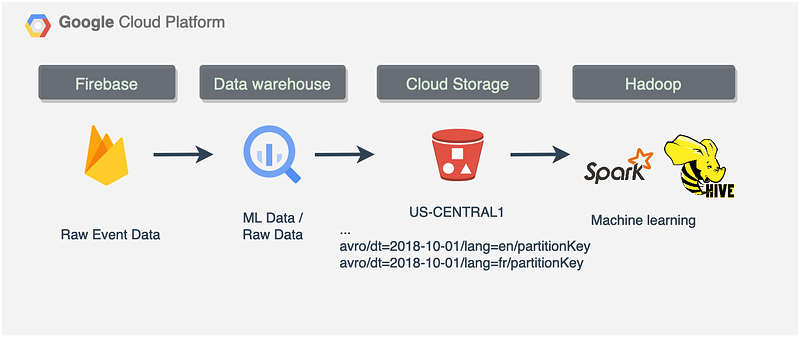
Sample pipeline. Image by author

Unloading data might help to optimize data warehouse Storage costs.

In this article, you will find the comparison and code to unload the data and automate the process.

The second reason is the cost of compute component. In data warehouses, it is typically higher. Depending on your data platform architecture type, you might want to use something different to process and transform the data.

Data pipeline design defines the selection of tools to use and at some point we might want to keep a portion of data in the lake rather than a data warehouse.

A new Machine learning pipeline where a model trainer application would use the data from the lake is a good example. In that case, we will need externally partitioned data to pass it to the Spark application or something else that scales well.

Data mesh came to our life quickly with a variety of data tools and storage types. A company using only one data processing/transformation solution is a rare find.

In a real-life scenario, we process the data with data lake tools in the first place and then load the results into a production schema somewhere else, i.e., data warehouse. After that Business Intelligence (BI) team would pick up from there, creating their own OLAP cubes in BI tools like Looker, Sisense, Mode, etc.
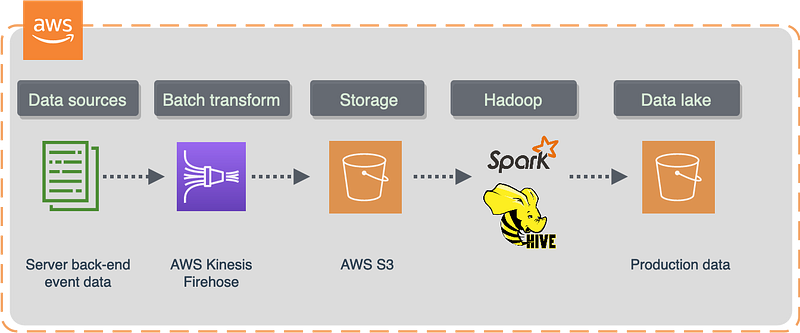
Sample pipeline. Image by author

My data platform is a lake house. Main data transformation scripts run in the data warehouse solution which is Google BigQuery following ELT pattern.

However, there is a reason I still want to keep a portion of the data in the lake. Firstly, keeping the data in the data lake helps to investigate data loading errors, and we can store data for just a couple of days in a standard storage type bucket after ingestion into the data warehouse.

Secondly, we might want to unload historical data we are no longer interested in to optimize storage costs.

Unload and archive

Most modern data warehouse solutions offer data export features with SQL or Python. I will use Google BigQuery as an example.

There is currently no charge for exporting data from BigQuery, but exports are subject to BigQuery’s Quotas and limits.

However, this is not entirely true.

This is a common misconception, while it’s true that the export itself isn’t billed, the query still is.

I work with Firebase event data a lot, and these tables are expensive.

Firebase tables are usually quite heavy and contain a lot of user engagement data. So in my case raw event data have been building up over the last couple of years, started to generate some considerable costs, and reached a critical point of somewhat around $2600 a month just for the long-term storage in BigQuery.

I made the decision to keep only the most recent data for 90 days and unload everything else older than that to the Cloud Storage archive.

The idea behind this is to query historical data directly from Cloud Storage only if needed.

Storage costs

This is definitely something you would want to consider building a data warehouse.

For example, according to Google, in BigQuery everything older than 90 days goes to long-term storage.

Long-term storage includes any table or table partition that has not been modified for 90 consecutive days. The price of storage for that table automatically drops by approximately 50%. There is no difference in performance, durability, or availability between active and long-term storage.
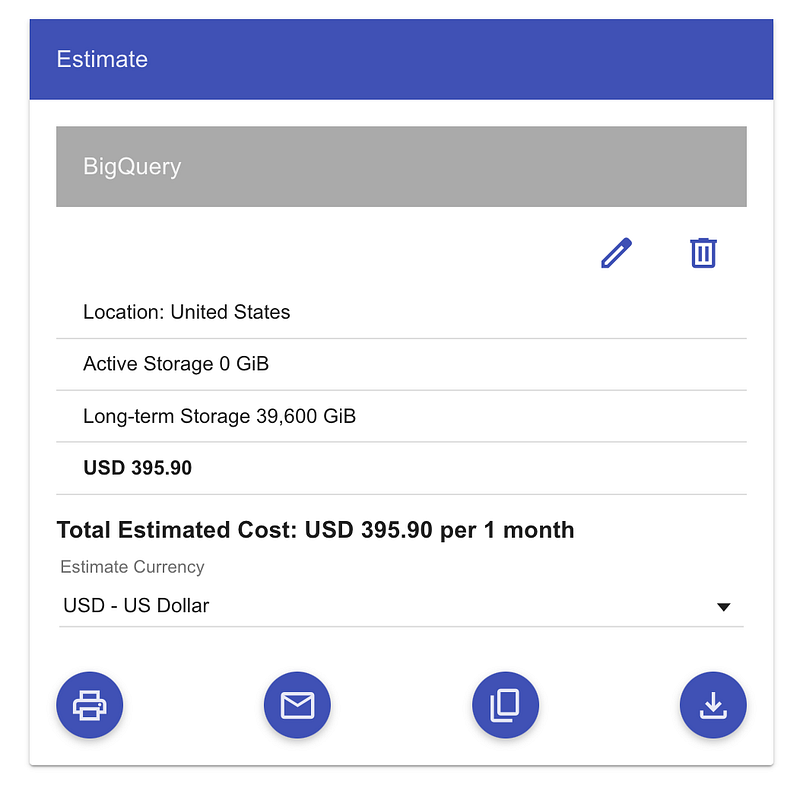
BigQuery estimates from Calculator. Image by author.

It is not too bad. However, at some point, we might want to archive our data.

We should keep in mind that if we query data older than 90 days, that will activate early deletion and retrieval fees in Cloud storage and, similarly, move data from long-term to active storage class in BigQuery. I’ll put a link with the example at the bottom of this article.

I would say, I’d like to process raw event data just once in one landing-to-production operation and then archive it the same day.

We can achieve this by unloading data into Cloud Storage. Should we choose to export our table data, it has to be located in the same region as the Cloud Storage bucket.

Depending on the bucket type, we get a different price. Multi-regional buckets are expensive compared to single-region ones.
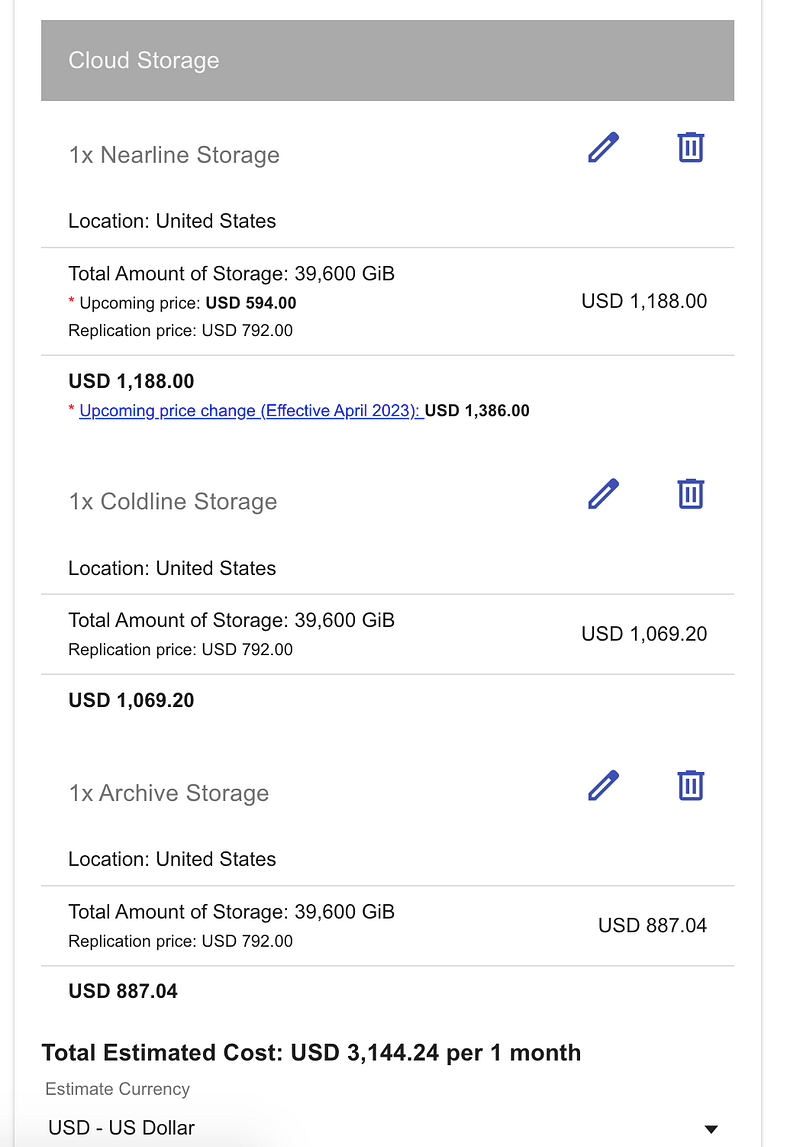
Multi-region US storage costs. Image by author

Everything has to be colocated in the same region if we want it work at 100% capacity

This includes data transfers, BigQuery scripts, moving data between storage buckets, etc.
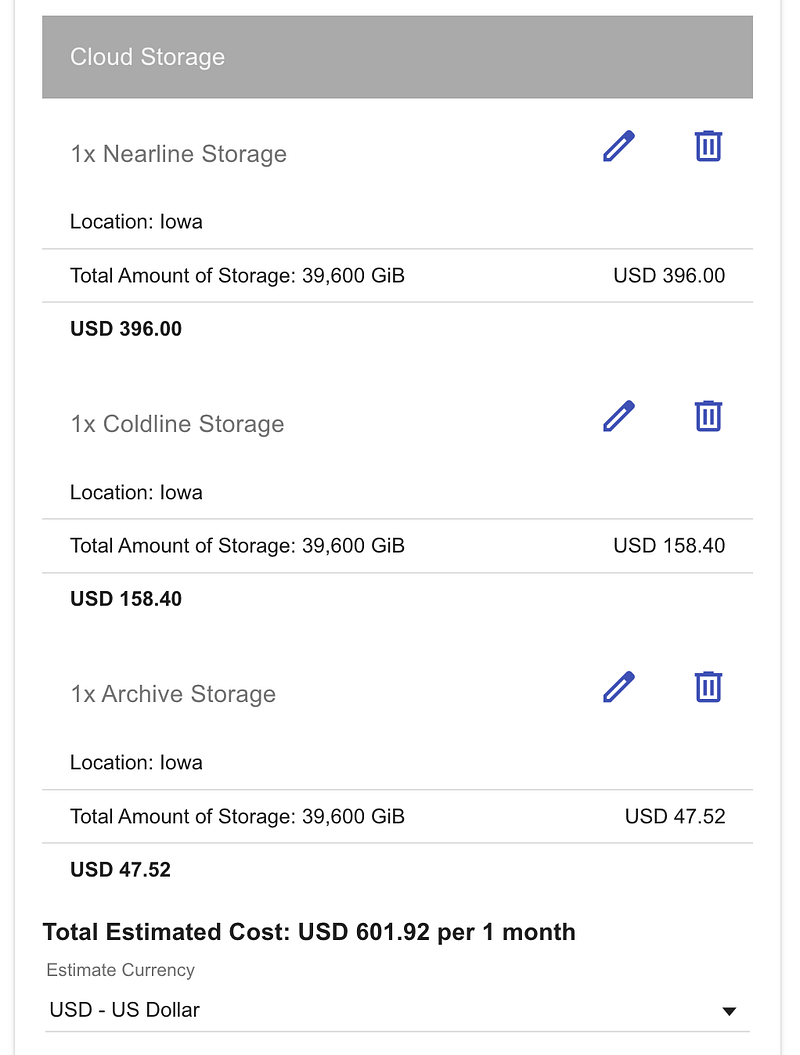
Single-region bucket costs from Calculator. Image by author

We can see that BigQuery long-term storage costs are similar to Nearline Storage costs for a single-region bucket.

So, for example, if we have a Firebase dataset in the US (multiple regions) in BigQuery and would like to do some cost optimization then we would want to do the following:

  • Transfer our dataset to a single-region location
  • Create a single-region Cloud Storage bucket in the same region with the Storage class Archive
  • Use a SQL/Python script to export data from our dataset to this bucket daily/monthly.

In this case we can get up to 10 times more cost-effective storage solution

ORC vs Parquet vs AVRO

No JSON?

In the application world, a huge amount of data is gathered and kept in a JSON format. So why not store it in JSON? Simply because JSON doesn’t carry any schema information on board, dealing with it in big data, Hadoop tools might be slow. Basically, it’s a no-go for Big Data processing frameworks. This is the main reason Parquet and ORC formats were created.

These three data formats were designed to store and process large amounts of big data. They are self-describing with schema included, meaning we can load data into different nodes, and systems will still be able to recognize it. They all work with compression very well, which means fewer storage costs. And they all were designed with parallel computation in mind meaning we can speed up queries by loading them into parallel nodes or disks. Parquet and ORC store data in columns and offer a compression ratio higher than AVRO. BigQuery doesn’t support export in ORC format and works only with AVRO, CSV, JSON, and PARQUET. However, in BigQuery, you can load ORC files easily into a table from Cloud Storage.

Long story short, if you data structure might change over time and you need a schema evolution support then choose AVRO.

It will store data in a row-based format using JSON to describe the data. It is using the binary format to reduce storage size yet offers less compression than ORC and Parquet. AVRO also offers a faster writing speed and

might be a good choice for data format in source/landing layer where we need to ingest data as a whole file anyway.

In this case, AVRO allows faster processing and offers a reasonable compression rate with SNAPPY (still Hadoop splittable).

If you need faster data access for your analytical queries, then the columnar format might be a better choice. Also, if you require a higher compression ratio, then ORC and Parquet would suit you better.

ORC is usually considered as the best file format option for HIVE, whereas Parquet is considered as the optimal solution across the Hadoop ecosystem.

In fact, Parquet is a default file format for Spark and works better than anything there.

What is splittable?

Splittable means that Hadoop will be able to split data into blocks and send them to the mapper instead of processing the file as a whole. This will enable distributed computing and process data in parallel.

Block-level compression, which is implemented in compressing codecs like SNAPPY, allows mappers to read a single file in blocks concurrently, even if it is a very big file.

From the data warehouse to cloud storage

Let’s create a bucket for our data export

This is a trivial operation if you have gsutil installed. You can create either regional or multi-regional buckets in GCP. Regional buckets are less expensive. However, your dataset must be in the same location as your bucket or at least co-located within the multi-region. For example, if your BigQuery dataset is in the US multi-region, the Cloud Storage bucket can be located in the US-CENTRAL1 region, which is within the US.

Very often Firebase projects are being created by default in multi-region locations, i.e. US. Therefore, dataset exports to BigQuery will share the same multi-region location.

In this case, you would want to use a multi-region bucket:

gsutil mb -l US gs://events-export-json

gsutil ls -L -b gs://events-export-json
# gs://events-export-json/ :
#         Storage class:                  STANDARD
#         Location type:                  multi-region
#         Location constraint:            US

Alternatively, we can create a bucket located in one of the US regions located inside a multi-region like US

And that would be a much more cost-effective option:

gsutil mb -c regional -l US-CENTRAL1 gs://events-export-json

Delete the bucket

gcloud storage rm --recursive gs://events-export-json/

run gcloud components update if the previous command didn't work

Export data warehouse table as JSON

We can use some publicly available Firebase data from firebase-public-project. For example, Google has a sample dataset for a mobile game app called "Flood It!" (Android, iOS), and you can find it here. This dataset contains 5.7M events from over 15k users. Open the link above and click Preview. It won't cost anything to run a Preview on any table:
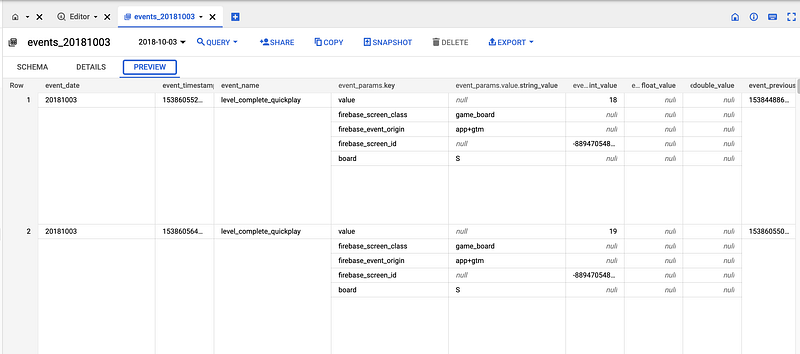
Public dataset. Image by author

So let’s say we want to export the data. Run this SQL in BigQuery:

EXPORT DATA
OPTIONS (
  uri = 'gs://events-export-json/public-project/events-*.json',
  format = 'JSON',
  compression = 'GZIP', -- SNAPPY and DEFLATE not supported for JSON
  overwrite = true
)
AS (
SELECT *
FROM `firebase-public-project.analytics_153293282.events_20181003`
);

Let’s check the size:

gsutil ls -r -L gs://events-export-json
gsutil du -s -a  gs://events-export-json

# 98163921     gs://events-export-json uncompressed
# 2619406      gs://events-export-json if we use GZIP compression

Load data back to BigQuery

We might want to load historical data back to run analytical queries. Even if the table doesn’t exist, the SQL below will work:

LOAD DATA INTO source.json_external_test
FROM FILES(
  format='JSON',
  uris = ['gs://events-export-json/*']
)

Export data warehouse data as Parquet

Let’s create a new bucket first:

gsutil mb -c regional -l US-CENTRAL1 gs://events-export-parquet
# there is no point in creating a bucket in a multi location. It will just increase storage costs:
# gsutil mb -l US gs://events-export-parquet

There is no point in creating a bucket in a multi location. It will just increase storage costs. Create a co-located single-region instead.

EXPORT DATA
OPTIONS (
  uri = 'gs://events-export-parquet/2018/10/02/events-*',
  format = 'PARQUET',
  compression = 'SNAPPY', -- GZIP, SNAPPY. DEFLATE not supported for parquet.
  overwrite = true
)
AS (
SELECT *
FROM `firebase-public-project.analytics_153293282.events_20181002`
);

EXPORT DATA
OPTIONS (
  uri = 'gs://events-export-parquet/2018/10/03/events-*',
  format = 'PARQUET',
  compression = 'GZIP', -- GZIP, SNAPPY. DEFLATE not supported for parquet.
  overwrite = true
)
AS (
SELECT *
FROM `firebase-public-project.analytics_153293282.events_20181003`
);

Let’s check if the data is there:

gsutil ls -r -L gs://events-export-parquet
# gsutil ls -L -b gs://events-export-parquet

Run this to check the size of the bucket:

gsutil du -s -a  gs://events-export-parquet
# 2441069      gs://events-export-parquet compressed with SNAPPY
# 4180518      gs://events-export-parquet compressed with GZIP

Tidy up and delete the bucket:

gcloud storage rm --recursive gs://events-export-parquet/

Load parquet data into BigQuery

Now we can either load data into the table with a predefined autodetected schema or create an external table.

LOAD DATA INTO source.parquet_external_test
FROM FILES(
  format='PARQUET',
  uris = ['gs://events-export-parquet/*']
)

Create an external table using Parquet

External tables are a lot slower than standard tables in modern data warehouses and have some well-known limitations:

  • For example, we can’t modify them with DML statements, and data consistency is not guaranteed. Having said that, if the underlying data was changed during the processing, we might not get consistent results.
  • External tables do not work with clustering and will not let export data from them.
  • It will not let us use wildcards to reference table names.
  • Have usually a limited number of concurrent queries in modern data warehouses, i.e., 4 in BigQuery.
CREATE OR REPLACE EXTERNAL TABLE analytics.parquet_external_test OPTIONS (
  format = 'PARQUET',
  uris = ['gs://events-export-parquet/public-project/events-*']
);

select * from analytics.parquet_external_test
;

Extract data warehouse data as AVRO

Let’s create a new bucket first:

gsutil mb -c regional -l US-CENTRAL1 gs://events-export-avro

Now let’s extract:

EXPORT DATA
OPTIONS (
  uri = 'gs://events-export-avro/public-project/events-*',
  format = 'AVRO',
  compression = 'SNAPPY',
  overwrite = true
)
AS (
SELECT *
FROM `firebase-public-project.analytics_153293282.events_20181003`
);

EXPORT DATA
OPTIONS (
  uri = 'gs://events-export-avro/public-project/events-*',
  format = 'AVRO',
  compression = 'DEFLATE',
  overwrite = true
)
AS (
SELECT *
FROM `firebase-public-project.analytics_153293282.events_20181003`
);

Let’s list the bucket to check the files:

gsutil ls -r -L gs://events-export-avro
# gsutil ls -L -b gs://events-export-avro

Run this to check the size of the bucket:

gsutil du -s -a  gs://events-export-avro
# 6252551      gs://events-export-avro compressed with SNAPPY
# 4082993      gs://events-export-avro compressed with DEFLATE

Avro Data Files are always splittable. However, it is not splittable wile using a DEFLATE compression (which is similar to GZIP)

Read speed is fairly constant for AVRO with any compression, whereas write speed might vary, so you might want to run a few tests. It depends on the data.

Tidy up and delete the bucket in case you want to:

gcloud storage rm --recursive gs://events-export-avro/*

Load data back to BigQuery using AVRO

We might want to load historical data back to run analytical queries. Even if the table doesn’t exist, the SQL below will work because the AVRO format is self-describing (with schema):

LOAD DATA INTO source.avro_external_test
FROM FILES(
  format='AVRO',
  uris = ['gs://events-export-avro/*']
)

A few things to consider while choosing Big Data File Format

Parquet and JSON offer the best compression rates. In some data warehouses extract load of Parquet might change the schema in nested fields. Consider these, for example:

Table schema after loading from parquet will look like that:
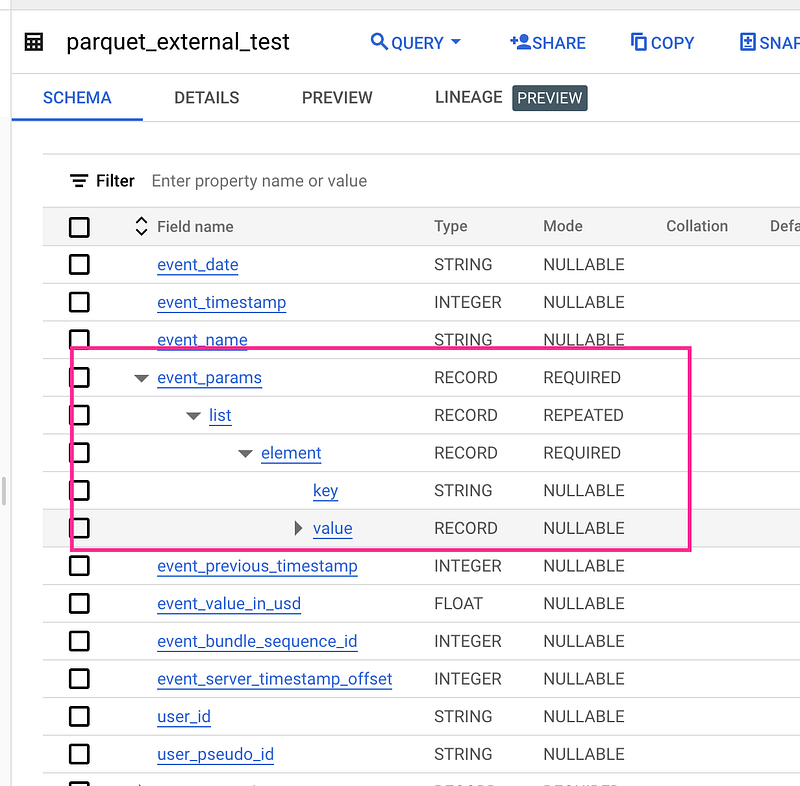
Table from Parquet. Image by author

The Parquet schema represents nested data as a group and repeated records as repeated groups.

When in AVRO, JSON, and real-world Firebase/GA4 scenarios it is this:
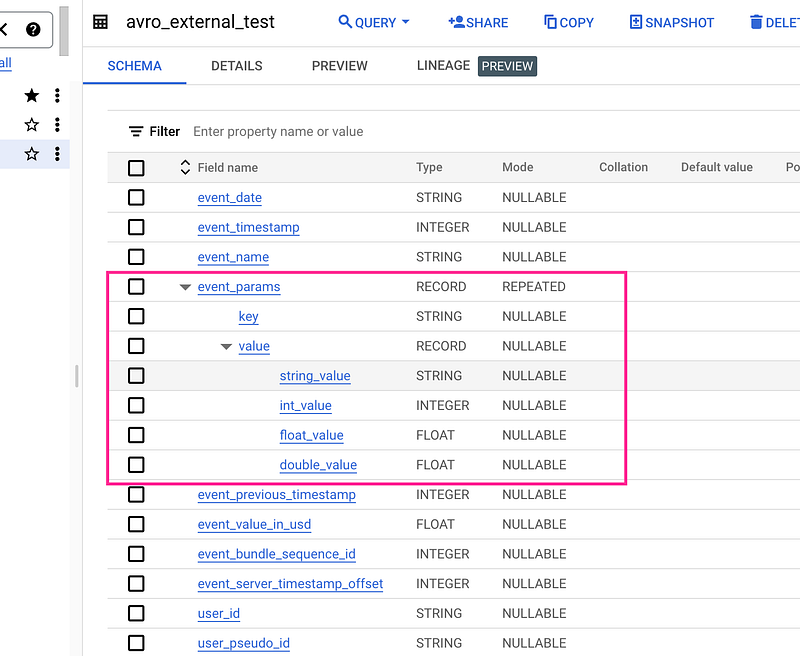
Real schema. Image by author

When we extract as JSON symbols like & are converted by using the Unicode notation \uNNNN, where N is a hexadecimal digit. For example, profit&loss becomes profit\u0026loss. This Unicode conversion was introduced to fix security vulnerabilities. Also, INT64 (integer) data types are encoded as JSON strings. This is done to keep 64-bit precision for other systems.

In BigQuery, we can export only to Cloud Storage and Google Drive with a file limit of 1 TB. That will split large tables into multiple files.

Wrapping unloads with a script

Let’s say we would want to upload all historical data older than 12 months to cloud storage and archive it there. If we consider Google Cloud Storage, then storage Type ARCHIVE in a single-region bucket is the cheapest.
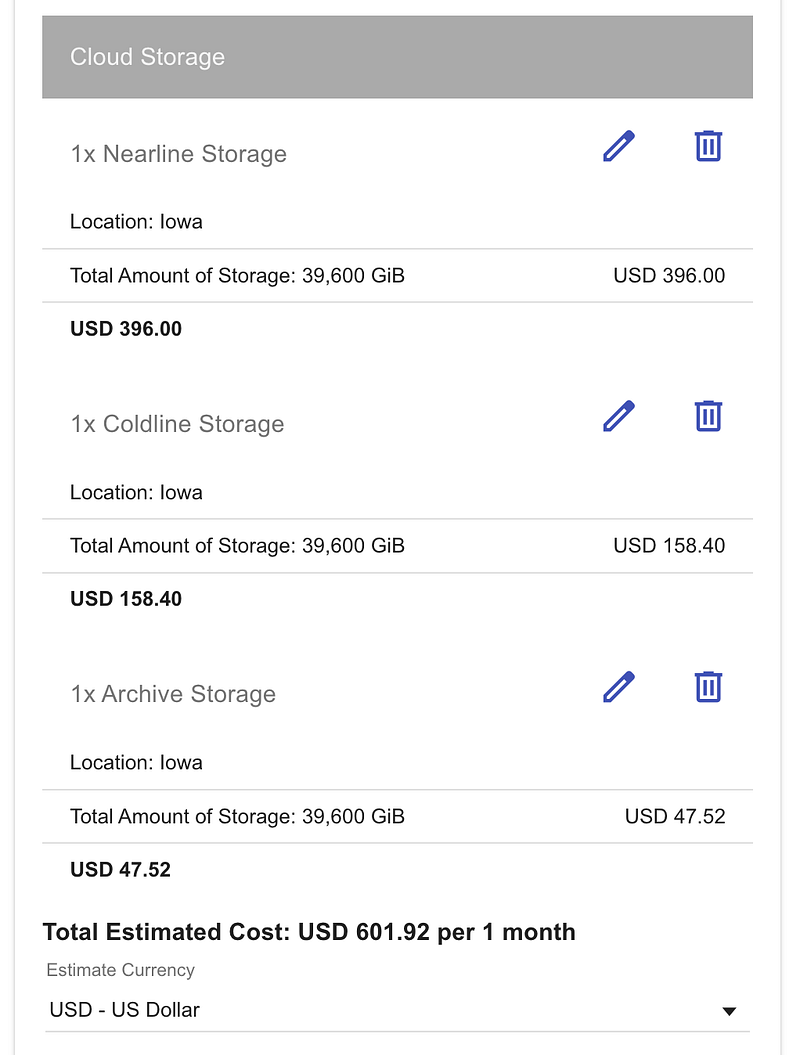
Cloud Storage class comaprison. Image by author

This will save a lot of money, and we can achieve two goals at the same time.

If we need to load it back again at some point then it will be very simple data load operation.

For example, let’s create a script to scan our wildcard table with Firebase events and export the data.

Just keep in mind that it might be expensive to run on real production data. Try it on public dataset.

Even though BigQuery will not allow us to use a date parameter to get that particular wildcard table we need we can use a SQL script instead

The one I used in this article below can be easily changed to help us to achieve what we need.

We can get a date like that:
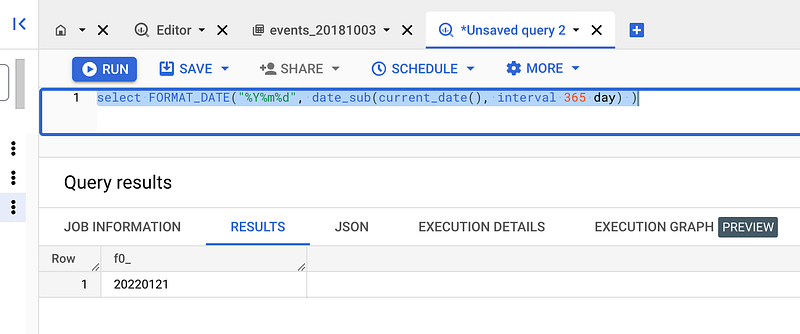
Next, we will create a SQL STRING to execute it within BigQuery as a script

DECLARE select_query STRING;
DECLARE from_query string;
DECLARE results_query string;
DECLARE dt STRING;
DECLARE file_suffix STRING;
DECLARE uri STRING;

SET dt = (select FORMAT_DATE("%Y%m%d", date_sub(date('2019-10-03'), interval 365 day) ));
SET file_suffix = (select FORMAT_DATE("%Y/%m/%d", date_sub(date('2019-10-03'), interval 365 day) ));
SET uri = 'gs://events-export-avro/public-project/' || file_suffix || '/events-*.avro'
;


SET select_query = """
EXPORT DATA
OPTIONS (
  uri = @s,
  format = 'AVRO',
  compression = 'DEFLATE',
  overwrite = true
)
AS (
SELECT *
"""
;
SET from_query = CONCAT('FROM `firebase-public-project.analytics_153293282.events_',dt,'`'  -- events_20181003
,');'
);
-- Finally execute
EXECUTE IMMEDIATE select_query || from_query using uri as s
--USING dt as a will not work in this: FROM `firebase-public-project.analytics_153293282.events_@a`'
-- It is a well-known fact that BigQuery doesn't support parameters in table names.
;
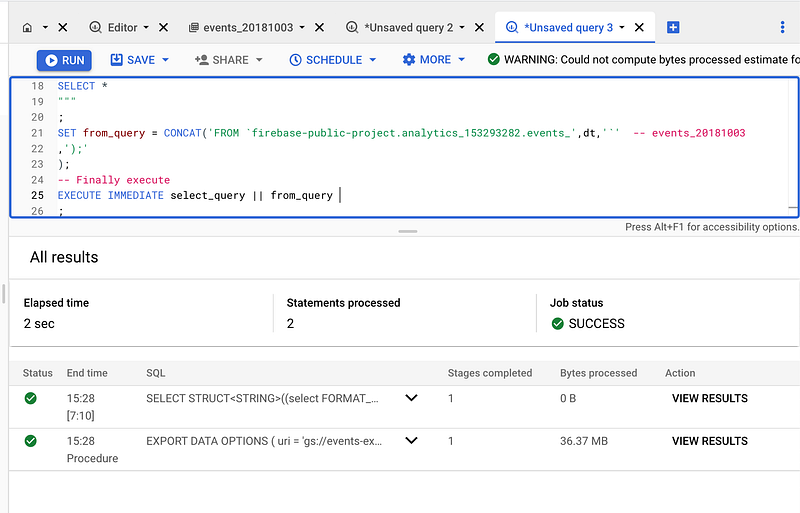
Let’s check the data:

gsutil ls -r gs://events-export-avro
# gs://events-export-avro/public-project/2018/10/03/events-000000000000.avro

How to create Partitioned buckets

We might want to create partitioned buckets for data we extract with YYYY/MM/DD pattern, i.e.

gs://events-export-avro/public-project/2018/10/02/*
gs://events-export-avro/public-project/2018/10/03/*

This can be also achieved with scripting

Let’s create an array of dates to extract and then LOOP through it.

DECLARE select_query STRING;
DECLARE from_query string;
DECLARE results_query string;
DECLARE dt STRING;
DECLARE file_suffix STRING;
DECLARE uri STRING;

DECLARE dates ARRAY<DATE>;
DECLARE i INT64 DEFAULT 0;

SET dates = GENERATE_DATE_ARRAY('2018-10-01', '2018-10-02', INTERVAL 1 DAY);

SET select_query = """
EXPORT DATA
OPTIONS (
  uri = @s,
  format = 'AVRO',
  compression = 'DEFLATE',
  overwrite = true
)
AS (
SELECT *
"""
;

LOOP
  SET i = i + 1;
   IF i > ARRAY_LENGTH(dates) THEN
  LEAVE;
  END IF;
  SET dt = FORMAT_DATE("%Y%m%d",  dates[ORDINAL(i)]);
  SET from_query = CONCAT('FROM `firebase-public-project.analytics_153293282.events_',dt,'`'  -- events_20181003
      ,');'
  );
  SET file_suffix = FORMAT_DATE("%Y/%m/%d",  dates[ORDINAL(i)]);
  SET uri = 'gs://events-export-avro/public-project/' || file_suffix || '/events-*.avro';
  EXECUTE IMMEDIATE select_query || from_query using uri as s;

END LOOP;

After execution, we will see the results for our LOOP:
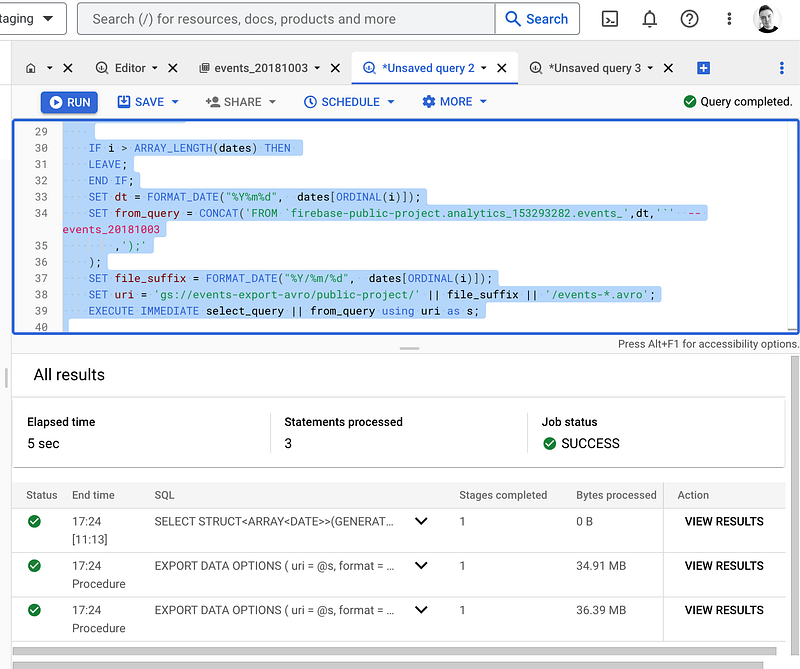
Let’s have a look:

gsutil ls -r gs://events-export-avro

# gs://events-export-avro/public-project/2018/10/:
# gs://events-export-avro/public-project/2018/10/01/:
# gs://events-export-avro/public-project/2018/10/01/events-000000000000.avro
# gs://events-export-avro/public-project/2018/10/02/:
# gs://events-export-avro/public-project/2018/10/02/events-000000000000.avro

Adding Hive partition layout

In case we need to use externally partitioned data in BigQuery, we would want to store data in cloud storage using the default Hive partitioning layout. In this case, we can create externally partitioned tables on Avro, CSV, JSON, ORC, and Parquet files.

Let’s change the script to reflect Hive layouts:

  • partition keys are always in the same order
  • instead of YYYY/MM/DD we will use key = value pairs which will be partitioning columns and storage folders at the same time

Example:

gs://events-export-avro/public-project/avro_external_test/dt=2018-10-01/lang=en/partitionKey
gs://events-export-avro/public-project/avro_external_test/dt=2018-10-02/lang=fr/partitionKey

Script:

DECLARE select_query STRING;
DECLARE from_query string;
DECLARE results_query string;
DECLARE dt STRING;
DECLARE file_suffix STRING;
DECLARE uri STRING;

DECLARE dates ARRAY<DATE>;
DECLARE i INT64 DEFAULT 0;

SET dates = GENERATE_DATE_ARRAY('2018-10-01', '2018-10-02', INTERVAL 1 DAY);

SET select_query = """
EXPORT DATA
OPTIONS (
  uri = @s,
  format = 'AVRO',
  compression = 'DEFLATE',
  overwrite = true
)
AS (
SELECT *
"""
;

LOOP
  SET i = i + 1;
   IF i > ARRAY_LENGTH(dates) THEN
  LEAVE;
  END IF;
  SET dt = FORMAT_DATE("%Y%m%d",  dates[ORDINAL(i)]);
  SET from_query = CONCAT('FROM `firebase-public-project.analytics_153293282.events_',dt,'`'  -- events_20181003
      ,');'
  );
  SET file_suffix = FORMAT_DATE("dt=%Y-%m-%d",  dates[ORDINAL(i)]);
  SET uri = 'gs://events-export-avro/public-project/avro_external_test/' || file_suffix || '/lang=fr/partitionKey/events-*.avro';
  EXECUTE IMMEDIATE select_query || from_query using uri as s;

END LOOP;

How to create an External custom hive-partitioned table in BigQuery:

CREATE OR REPLACE EXTERNAL TABLE source.custom_hive_partitioned_table
WITH PARTITION COLUMNS (
dt STRING, -- column order must match the external path
lang STRING)
OPTIONS (
uris = ['gs://events-export-avro/public-project/avro_external_test/*'],
format = 'AVRO',
hive_partition_uri_prefix = 'gs://events-export-avro/public-project/avro_external_test',
require_hive_partition_filter = false)
;
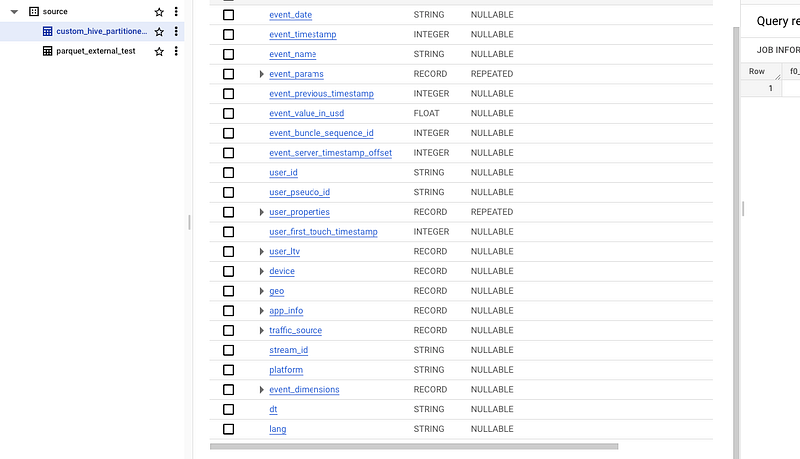
External Hive partitioned table. Image by author

Conclusion

With the collection of code snippets from this article, we can play around, export the data and run some tests on file formats and compression types.

By unloading the data that is no longer needed in OLAP pipelines, we can optimize the storage by reducing costs. If our strategy is to save as much money as possible, and the availability of historical data is not a priority, then this approach is the way to go.

Unloading historical raw event data can decrease storage costs 10 times down.

Every Big Data file format has its own benefits and compression types. It might be tough to figure out which one is better than the other.

When we need a better compression ratio, then ORC or Parquet would suit us better. It actually depends on which tool we are going to use to run analytical queries on our data. ORC is better optimized for HIVE and Pig framework workloads, whereas Parquet is a default file format for Spark.

GZIP, DEFLATE and other non-splittable compression types would suit better for cold storage with infrequent access to data.

When all fields must be accessible, row-based storage makes AVRO would be the preferable option. It also offers more advanced schema evolution support and is more efficient in queries with write-intensive, big-data operations. Therefore, it suits better for data loading from the landing area of our data platform.

Recommended read

1. https://cloud.google.com/bigquery/docs/external-data-cloud-storage

2. https://cloud.google.com/bigquery/docs/reference/standard-sql/other-statements#export_data_statement

3. https://cloud.google.com/bigquery/docs/external-tables#external_table_limitations

4. https://cloud.google.com/bigquery/docs/hive-partitioned-queries

5. https://cloud.google.com/storage/docs/locations

6. https://cloud.google.com/bigquery/docs/exporting-data

7. https://cloud.google.com/bigquery/docs/hive-partitioned-queries

8. https://parquet.apache.org/

9. https://avro.apache.org/

10. https://cloud.google.com/storage/pricing#early-delete

11. https://cwiki.apache.org/confluence/display/hive/languagemanual+orc

Originally published at https://mydataschool.com.

Data Engineering
Big Data
Bigquery
Data Science
Data Lake
Recommended from ReadMedium