
When Web Browsers Go BAD… Securing Your Metamask
Has anyone logged into their computer, made their way over to their Chrome browser, opened up their Metamask extension, and saw something that might be wrong?
Maybe where that comforting number you always see sitting there showing you have ~$15K of various shitcoins is now showing a big fat $0?

Obviously a refresh error right? RIGHT??
Have you ever felt that cold heavy brick feeling in your gut as your brain starts to fully comprehend the fact that IT IS ALL GONE?
All you DRIP-pers out there…have you contemplated how horrific it would be if your DRIP account wallet was compromised? If you are lucky they won’t realize that the wallet address is attached to a DRIP account and once anything else is cleaned out, they move on. But that is a big IF! Since everything is on the blockchain, it is a simple matter to see what you have in that wallet.
How Did It Happen?
If you haven’t experienced this yet then count yourself lucky. But the number of people getting scammed through Metamask is on the rise. There are a handful of attack vectors that you must be aware of in order to be an informed net denizen.
START: Did you lock your Metamask?
Yep…if you have unlocked your Metamask wallet, you expose your current open address to every tab opened in your browser. If you switch accounts in your Metamask, every single tab in your browser is going to know about that new account you switched to as well.
Just knowing your wallet address is enough to allow a nefarious scammer to check on incoming and outgoing crypto purchase history. For a fun little exercise, go to a popular token getting traded and grab some of the addresses trading larger amounts. Put them into BSCScan and look at the purchase history. You can usually see a lot of info on what that person is doing. A scammer does the same thing. Armed with this info they can implement some measures to trick you…beware!!
Gambit 1: “Your Last Transaction Failed”
Here is an example of a fake MetaMask notification stating that your most recent outgoing transaction failed. The fake notification is going to have all the real details about your last outgoing transaction, including its value, the destination address, and the date.
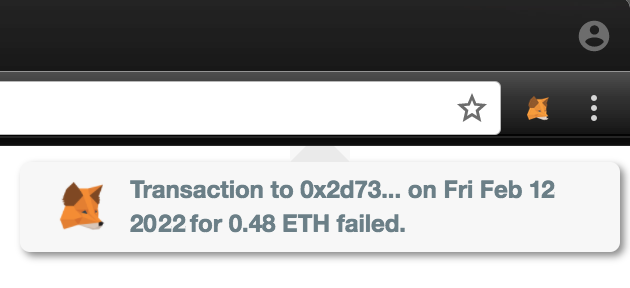
That notification is dangerous. Do not click on it for it most likely will take you to an official-looking metamask.io spoofed site for you to “try” your transaction again. However, the wallet address will have been slightly changed to the spammer’s address and you would just be sending that money to his account. This is very effective when implemented with Gambit #6 below.
There just aren’t any standards as to how Chrome extensions show you notifications so you will not know if it is safe.
Gambit 2: “Sign Your Most Recent Transaction”
Moving into more sophistication, this attack vector relies on the ignorance of a novice user to the fact that incoming transactions NEVER require action on the recipient’s side. I will repeat myself…
Incoming transactions Never Require Action On The Receiver’s Side
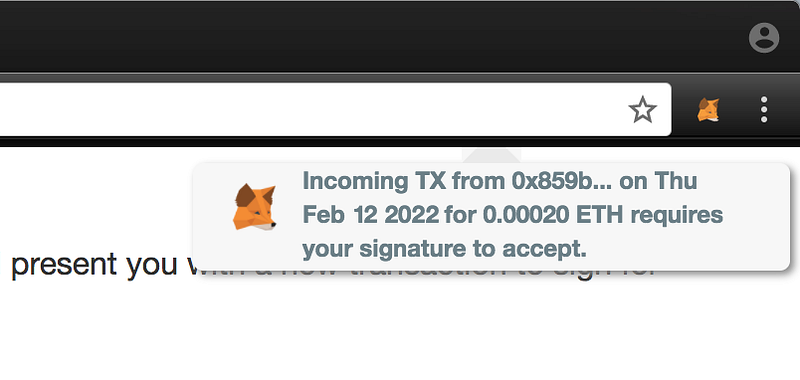
This one is another popup except that this one using your most recent transaction details like the sender address, amount of token, and the date, and claiming that it needs a signature on your end to accept it. Check it out and DO NOT DO THIS!! It is a scam.
Why do people do it anyway? A lot of this is simple social behaviors that we have been trained to do. This is really no different than signing for a package from the FedEx delivery person except this one is a nasty surprise.
Gambit 3: Cloning The Metamask CSS
This one is a lovely piece of work. This one occurs when a scammer takes the CSS of the Metamask popout and populates it with the information it has pulled about your recent transactions. It populates itself with your blockchain transaction history but takes the most recent transaction and makes it show as failed. That popout will then encourage re-issuance of the transaction but the original address is swapped out for the scammer’s address. The scary thing here is it looks exactly like how Metamask shows you the real transaction has failed.
Okay…Fine! I Will Just Make Sure My Metamask Is Locked
Sweet! Good choice! If you browse the internet with your Metamask wallet locked then no site can see your Metamask wallet addresses. But the here is the wrinkle…the browser still tells every site you visit that you are a Metamask user. That is just the thing a scammer is watching for.
Gambit 4: Trick You Into Unlocking Your Metamask
A bad actor is going to do their best to get you to unlock your account. Usually by something along the lines like throwing a pop up saying there is an incoming transaction. AGAIN…DON’T BE FOOLED. YOU NEVER HAVE TO SIGN TO RECEIVE A TRANSACTION.
Gambit 5: Simple Phishing Attack
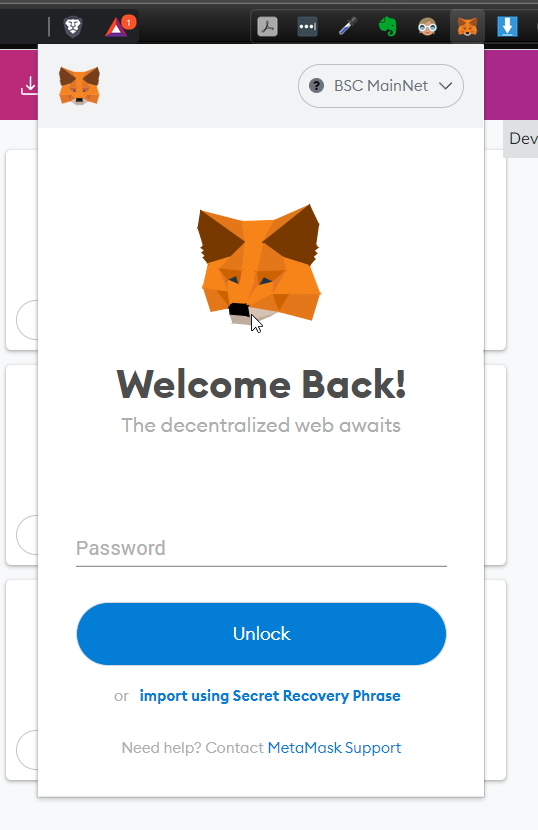
If they can’t get you to log into your Metamask then they can create a fake Metamask popout for the user to enter something like their password, seed phrase, or a private key. In the general scheme of things a password is valuable for the scammer but they still need the encrypted keys. A seed phrase or private key is jackpot for a hacker…not so good for you, say goodbye to your funds.
Think you won’t get fooled by a fake popout? How about if you see this? If you didn’t pay attention you will be sorry.
Gambit 6: Timed Attack
Probably one of the more sophisticated attacks is a timed attack that is fired off automatically. This is how it works. You have been surfing and you have a bunch of browser tabs open. You unlocked Metamask on another tab because you might be making a transaction or signing into a Dapp. The malicious site can present you a transaction immediately upon detecting that Metamask has been unlocked. Metamask does not tell you which tab called the popout so you might think it is legit since you are interacting with something that needs your Metamask as a sign in.
Man!! You Got Me Paranoid…Now What?
A healthy dose of paranoia will do you good. Develop good habits now and they will save you from pain and heartache down the road. The first thing you should do is go turn your Metamask extension off. In any browser you will want to go to your extensions screen. This is where it is located in Brave browser.
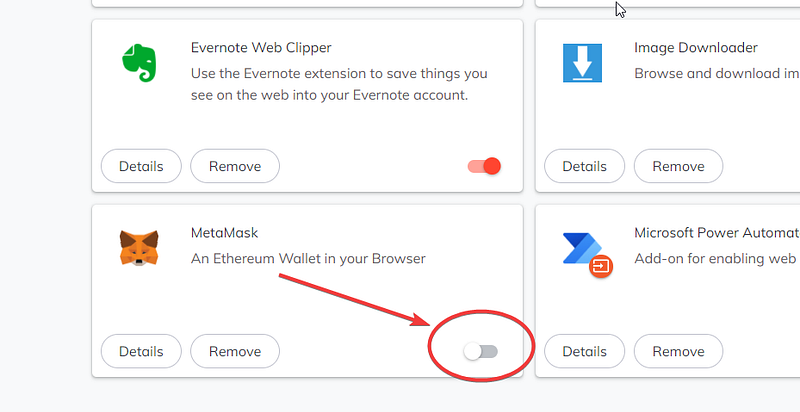
Again, I am going to stress that you just need to toggle extension off. You don’t need to Remove your extension. This will ensure any website you surf to will not see Metamask as one of your browser extensions and therefore hide you from being targeted.
It is ultra critical you protect yourself especially with any wallets that are permanently tied into a Smart Contract like DRIP Network. There is absolutely no recourse for you to be able to move it to another safe wallet.
Another thing you must do is pair Metamask with a cold wallet like Ledger or Trezor. Trust me, once you have tokens worth tens of thousands of dollars in your wallet, paranoia will come live in your head. I have both so I will do a future step-by-step on how to protect yourself using both of these awesome pieces of technology the correct way and pairing them with a dummy wallet.
What is DRIP?
DRIP is a DeFi project that can provide passive income. You purchase your DRIP and deposit it into the faucet (where it is locked), then the faucet pays you 1% per day every single day in new DRIP tokens. You can choose to Hydrate (compound) your daily 1% back into your deposit so you receive more tomorrow, or you can choose to claim your earnings back out. That is an extremely simplified version, but hits the highlights.
To follow along with other stories of my start in DRIP check out my other articles.
Is DRIP A Realistic Investment For Me If I Don’t Have Much Money? https://cryptozoa.com/is-drip-a-realistic-investment-for-me-if-i-dont-have-much-money-afd38092746c
Use DRIP To Stop Scammers In Their Tracks https://cryptozoa.com/use-drip-to-stop-scammers-in-their-tracks-1dbd366aaaf4
How to Start With DRIP
- Go to https://drip.community/fountain and exchange BNB for DRIP. — If you’re having trouble getting some BNB, go check out this article it’s got a great step by step guide for how I do it.
- Then go to: https://drip.community/faucet, and scroll down to Get a Buddy.
- You have to enter a Buddy address in the Referral section. Consider adding my address for your Buddy: 0x027E500e832aba4d29FB49d042e435bdf78A497F (You can click the “Buddy Detected” button if you use the link above to get there.
- Then scroll back up to Deposit and deposit at least 1 DRIP (Ensure you have enough BNB to pay for the gas fees.)
- You’re setup on DRIP. Get ready to receive 1% daily!
I am part of the Cryptozoa DRIP team. We are a global community of DRIP enthusiasts who are welcoming and helpful. We converse on our own private Telegram group where we share DRIP tips, strategies, breaking news, and more. If you would like to join in the conversation, please join the Cryptozoa team (buy getting into DRIP and using my Buddy address above), and then head over to the Cryptozoa Telegram Gateway.
Copy and paste the below message to make things easy on you and the admin on duty-and post it in the chat when you get into the group.
Hi! I just joined DRIP and used CryptoNuts as my Buddy. His Buddy’s ID is: 0x027E500e832aba4d29FB49d042e435bdf78A497F
Once you are onboard find me and DM me, I’d love to hear from you!
Buy The Manor Farm: https://themanor.farm/referrals/0x8a9281ECEcE9b599C2f42d829C3d0d8e74b7083e/0x027E500e832aba4d29FB49d042e435bdf78A497F
Manor Farm Lightpaper: https://themanor.farm/docs/The_Manor_Farm_and_The_Animal_Farm_Pre_Sale,_Farm_Mechanics_&_LP.pdf
DRIP Lightpaper — https://www.docdroid.net/0i3RJTu/drip-lightpaper-pdf
Buy bR34P: https://exchange.pancakeswap.finance/#/swap?inputCurrency=0xa86d305a36cdb815af991834b46ad3d7fbb38523
NOTE: The amount compounded goes into your Deposits, 90% which are burned, and you can not withdraw. In exchange you receive 1% of that staked amount which is claimable in a 24 hr basis.
Nothing in this article is to be construed as investment advice. Neither the author nor the publication takes any responsibility or liability for any investments, profits or losses you may incur as a result of this information. The article may contain affiliate links. ALWAYS DO YOUR OWN RESEARCH!


