avatarHari Karthigasu

Free AI web copilot to create summaries, insights and extended knowledge, download it at here

2172

Abstract

network migration can be a hassle. Therefore, we chose to decline this option.</li><li>Create a new VPC with a different CIDR <code><b>10.2.0.0/26</b></code>, attach it to the transit gateway and enable VPC peering between <code><b>10.1.0.0/26</b></code> and <code><b>10.2.0.0/26</b></code><b>. </b>Add a route <code><b>10.0.0.0/8 -> TRANSIT GATEWAY</b></code> in <code><b>10.2.0.0/26</b></code><b> .</b></li></ul><figure id="73b8"><img src="https://cdn-images-1.readmedium.com/v2/resize:fit:800/1*yBM9JfrF76KJGao4KYR1eA.png"><figcaption></figcaption></figure><blockquote id="4657"><p><b><i>The VPC peering option didn’t work as VPC peering doesn’t support transit networks. :(</i></b></p></blockquote><h2 id="1e89">So, What should be done, when multiple identical VPC CIDRs compete for an AWS Transit Gateway?</h2><p id="0293">There may be several solutions to rectify it. Here I’ll share the solution that we implemented and worked for us.</p><p id="64e2"><b>3. SOLUTION</b></p><p id="d0cb">We need a non-conflicting VPC CIDR, such as <code><b>10.2.0.0/26</b></code>, that can be attached to the transit gateway. Traffic from <code><b>10.1.0.0/26</b></code> to <code><b>10.0.0.0/8</b></code>` should be routed or NATed via<code><b>10.2.0.0/26</b></code>.</p><ul><li><b>AWS VPC secondary CIDR</b></li></ul><blockquote id="eee0"><p>In AWS, a secondary CIDR block can be associated with a Virtual Private Cloud (VPC) to expand the address range of the VPC. AWS can have up to four secondary CIDR blocks associated with it. Each secondary CIDR block must be unique and non-overlapping with the VPC’s primary CIDR block as well as any other secondary CIDR blocks associated with the VPC.</p></blockquote><figure id="e5f7"><img src="https://cdn-images-1.readmedium.com/v2/resize:fit:800/1*ahP2K3RfoRjmujnXNRIRGA.png"><figcaption>Add a secondary CIDR to VPC</figcaption></figure><figure id="9b5d"><img src="https://cdn-images-1.readmedium.com/v2/resize:fit:800/1*3DSE4JZORM_FAZJZqwjUpg.png"><figcaption></figcaption></figure><figure id="54c2"><img src="https://cdn-images-1.readmedium.com/v2/resize:fit:800/1*VG_LgrZZpyyLADIkTmD7WA.png"><figcaption>VPC with two CIDRs</figca

Options

ption></figure><figure id="2d24"><img src="https://cdn-images-1.readmedium.com/v2/resize:fit:800/1*-dCNIwTGTOvjJZ1vPGF0Aw.png"><figcaption>Routes between two VPC CIDRs</figcaption></figure><p id="f1bf">When you associate a secondary CIDR block with a VPC in AWS, the associated route is automatically added to the main route table of the VPC. Therefore, you don’t need to manually add a route for the secondary CIDR block in this case. This entry tells the VPC that it can reach the <code><b>10.2.0.0/26</b></code> and <code><b>10.1.0.0/26</b></code>subnets locally.</p><p id="fec5">It allows us to route traffic from <code><b>10.1.0.0/26</b></code><b> </b>to<b> <code>10.2.0.0/26</code> </b>effortlessly and same time we can attach <code><b>10.2.0.0/26</b></code><b> </b>to the transit gateway.</p><p id="0c75"><b>What’s next?</b> we need a NAT gateway in secondary CIDR to NAT and forward the traffic to the destination.</p><ul><li><b>Private NAT Gateway</b></li></ul><blockquote id="b039"><p>Private NAT gateway uses a unique private IP address to perform network address translation for the overlapping source IP address, and a unique destination IP address that load balances the destination overlapping IP address. You can route traffic from your private NAT gateway to other VPCs or on-premises network using Transit Gateway or virtual private gateway <a href="https://docs.aws.amazon.com/whitepapers/latest/building-scalable-secure-multi-vpc-network-infrastructure/private-nat-gateway.html">(Source)</a>.</p></blockquote><figure id="c347"><img src="https://cdn-images-1.readmedium.com/v2/resize:fit:800/1*vCtlS5ZM5wjVEghL--79Ag.png"><figcaption></figcaption></figure><p id="fef2">We cooked our recipe using these two ingredients. As shown in the diagram traffic of <code><b>10.0.0.0/8</b></code>from <code><b>10.1.0.0/26</b></code><b> </b>will be routed to the NAT gateway running on <code><b>10.2.0.0/26</b></code> . From there, it’ll be NATed and routed to the transit gateway.</p><p id="25de">In conclusion, this setup efficiently manages the flow of traffic, ensuring a smooth and secure network operation.</p><p id="3eca">HAPPY NETWORKING!</p></article></body>

When multiple identical VPC CIDRs compete for an AWS Transit Gateway!

We recently had to integrate with one of our service providers in my organization. Both entities operate on AWS, and the service provider exclusively supports Transit Gateway integration.

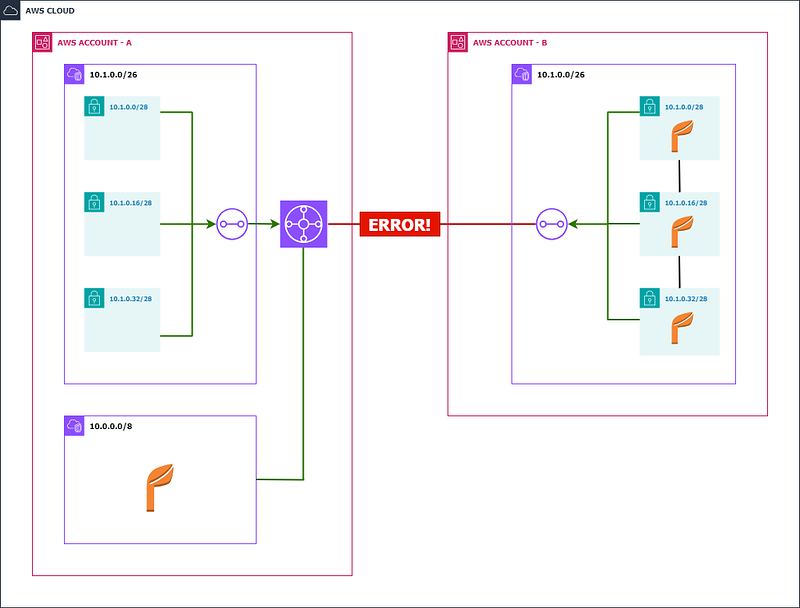
Throughout the integration process, we faced an issue with VPC CIDR overlap. We were not able to attach our VPC to their transit gateway due to a VPC CIDR overlap.
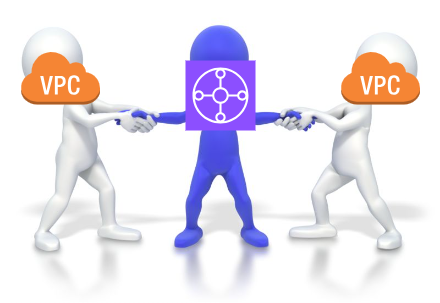
Image Source

What is IP overlapping?

IP overlap occurs when two or more networks use the same ranges of IP addresses.

  1. PROBLEM

SERVICE Bshould be able to access SERVICE Avia the transit gateway. However account B’s CIDR could not attach, as the transit gateway already has an equivalent CIDR attachment.
Q: Does AWS Transit Gateway support overlapping VPC CIDRs?

Amazon Transit Gateway doesn’t support routing between Amazon VPCs with overlapping CIDRs. If you attach a new Amazon VPC that has a CIDR which overlaps with an already attached Amazon VPC, Amazon Transit Gateway will not propagate the new Amazon VPC route into the Amazon Transit Gateway route table. (Source)

2. PROPOSALS

  • Creating a new VPC with a different CIDR and attaching it to the transit gateway would easily resolve this issue. However, in reality, network migration can be a hassle. Therefore, we chose to decline this option.
  • Create a new VPC with a different CIDR 10.2.0.0/26, attach it to the transit gateway and enable VPC peering between 10.1.0.0/26 and 10.2.0.0/26. Add a route 10.0.0.0/8 -> TRANSIT GATEWAY in 10.2.0.0/26 .

The VPC peering option didn’t work as VPC peering doesn’t support transit networks. :(

So, What should be done, when multiple identical VPC CIDRs compete for an AWS Transit Gateway?

There may be several solutions to rectify it. Here I’ll share the solution that we implemented and worked for us.

3. SOLUTION

We need a non-conflicting VPC CIDR, such as 10.2.0.0/26, that can be attached to the transit gateway. Traffic from 10.1.0.0/26 to 10.0.0.0/8` should be routed or NATed via10.2.0.0/26.

  • AWS VPC secondary CIDR

In AWS, a secondary CIDR block can be associated with a Virtual Private Cloud (VPC) to expand the address range of the VPC. AWS can have up to four secondary CIDR blocks associated with it. Each secondary CIDR block must be unique and non-overlapping with the VPC’s primary CIDR block as well as any other secondary CIDR blocks associated with the VPC.

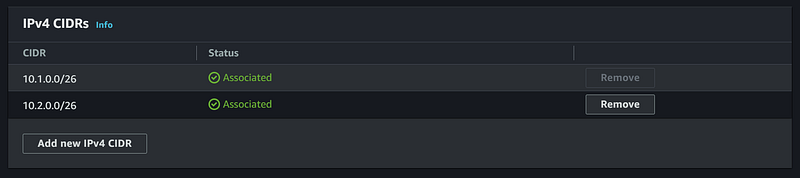
Add a secondary CIDR to VPC
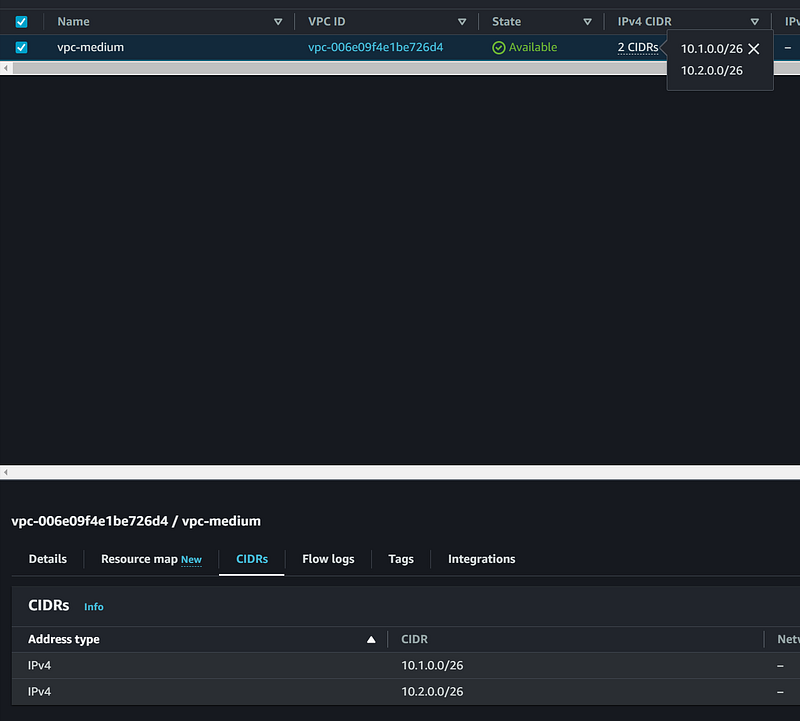
VPC with two CIDRs
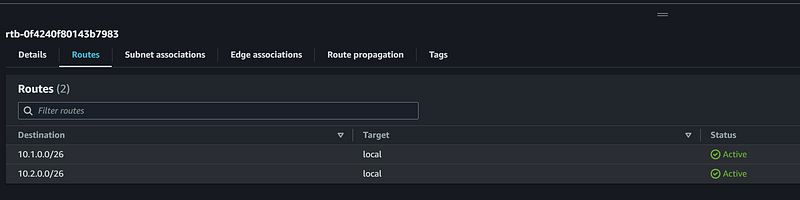
Routes between two VPC CIDRs

When you associate a secondary CIDR block with a VPC in AWS, the associated route is automatically added to the main route table of the VPC. Therefore, you don’t need to manually add a route for the secondary CIDR block in this case. This entry tells the VPC that it can reach the 10.2.0.0/26 and 10.1.0.0/26subnets locally.

It allows us to route traffic from 10.1.0.0/26 to 10.2.0.0/26 effortlessly and same time we can attach 10.2.0.0/26 to the transit gateway.

What’s next? we need a NAT gateway in secondary CIDR to NAT and forward the traffic to the destination.

  • Private NAT Gateway

Private NAT gateway uses a unique private IP address to perform network address translation for the overlapping source IP address, and a unique destination IP address that load balances the destination overlapping IP address. You can route traffic from your private NAT gateway to other VPCs or on-premises network using Transit Gateway or virtual private gateway (Source).
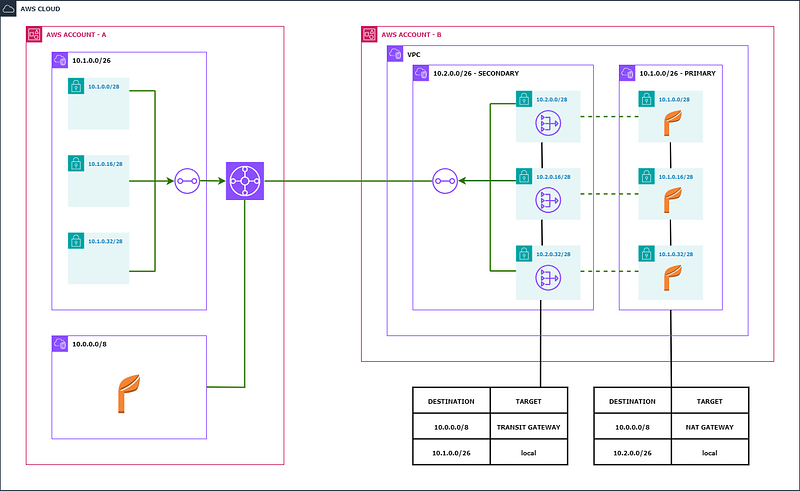
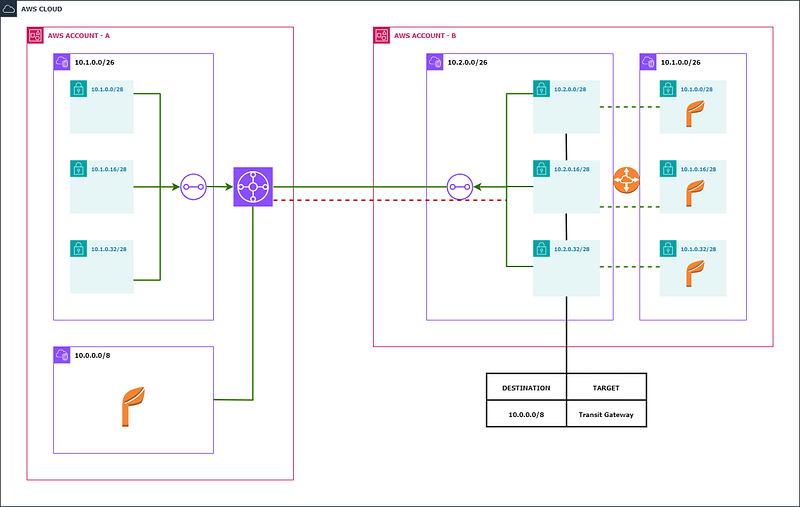
We cooked our recipe using these two ingredients. As shown in the diagram traffic of 10.0.0.0/8from 10.1.0.0/26 will be routed to the NAT gateway running on 10.2.0.0/26 . From there, it’ll be NATed and routed to the transit gateway.

In conclusion, this setup efficiently manages the flow of traffic, ensuring a smooth and secure network operation.

HAPPY NETWORKING!

AWS
Network Security
Aws Networking
Cloud Computing
Vpc
Recommended from ReadMedium