avatarVairavan Srinivasan

Free AI web copilot to create summaries, insights and extended knowledge, download it at here

517

Abstract

rd">fun</span> <span class="hljs-title">onBackPressed</span><span class="hljs-params">()</span></span> { <span class="hljs-keyword">if</span>(drawerLayout.isDrawerOpen(navView)) { drawerLayout.closeDrawers() } <span class="hljs-keyword">else</span> { <span class="hljs-keyword">super</span>.onBackPressed() } }</pre></div><p id="254d">In the world of OnBackPressedDispatcher, it is replaced with this one time setup from onCreate.</p><figure id="5a54"><img src="https://cdn-images-1.readme

Options

dium.com/v2/resize:fit:800/1*5qV2gDgpBRbPrPGOgIxVLA.png"><figcaption></figcaption></figure><p id="8ec7">The logic to dismiss the navigation view is implemented as a callback of instance OnBackPressedCallback and is registered using Activity’s onBackPressedDispatcher. The conditional logic is implemented by enabling or disabling the callback. In this case, it is enabled as soon when the Navigation View is opened.</p><p id="2565">Quite a verbose code but really shines when used with Fragments.</p></article></body>

Whats the fuss about OnBackPressedDispatcher

Recent versions of Android X has had quite a few updates about handling back press event especially when dealing with hosted Fragments within Activity. So whats the fuss about it?

Here is a typical usage of handling back press in an activity to intercept and dismiss Navigation View, if open.

override fun onBackPressed() {
    if(drawerLayout.isDrawerOpen(navView)) {
        drawerLayout.closeDrawers()
    } else {
        super.onBackPressed()
    }
}

In the world of OnBackPressedDispatcher, it is replaced with this one time setup from onCreate.
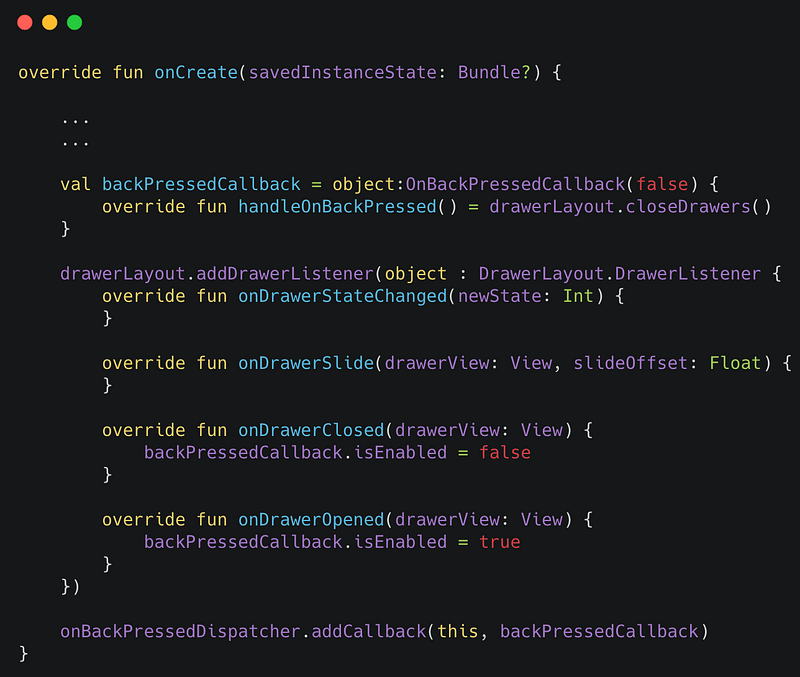
The logic to dismiss the navigation view is implemented as a callback of instance OnBackPressedCallback and is registered using Activity’s onBackPressedDispatcher. The conditional logic is implemented by enabling or disabling the callback. In this case, it is enabled as soon when the Navigation View is opened.

Quite a verbose code but really shines when used with Fragments.

Android App Development
Android
Recommended from ReadMedium