avatarPINAR TURGUT

Free AI web copilot to create summaries, insights and extended knowledge, download it at here

2401

Abstract

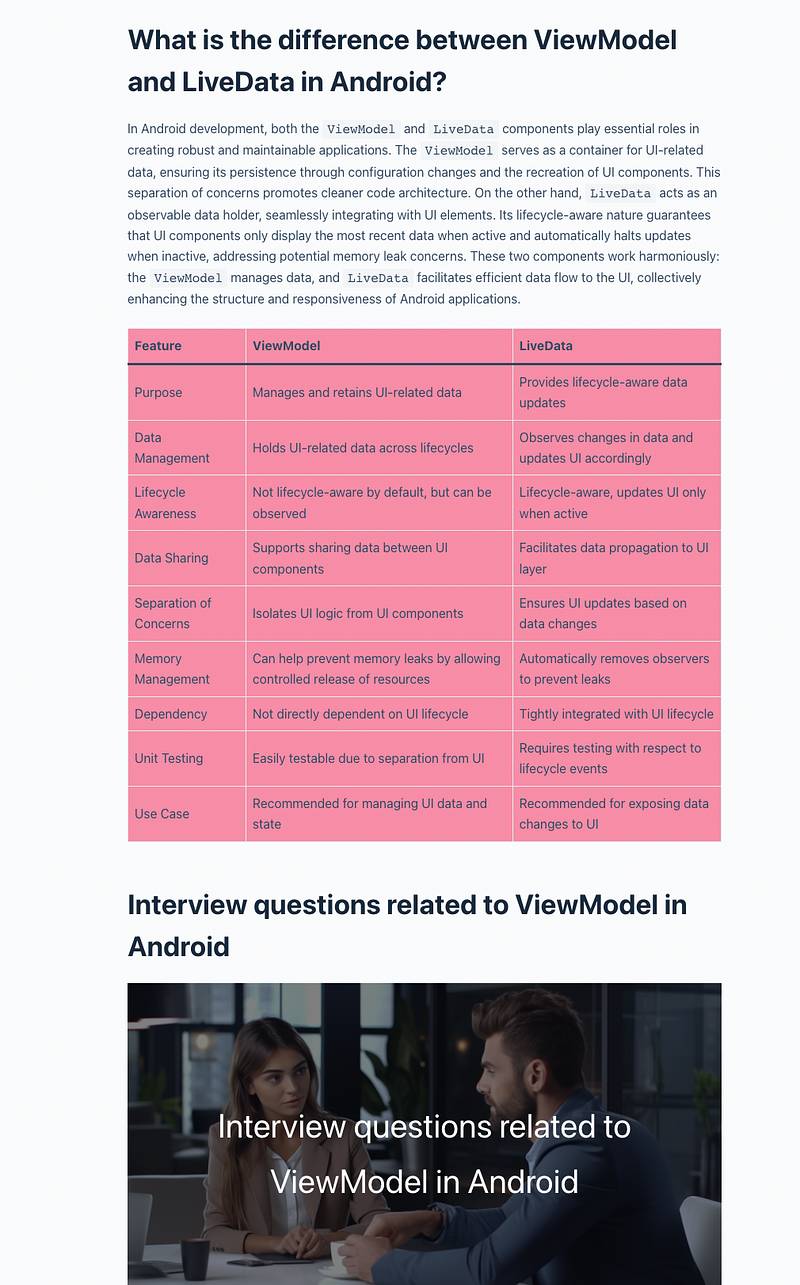
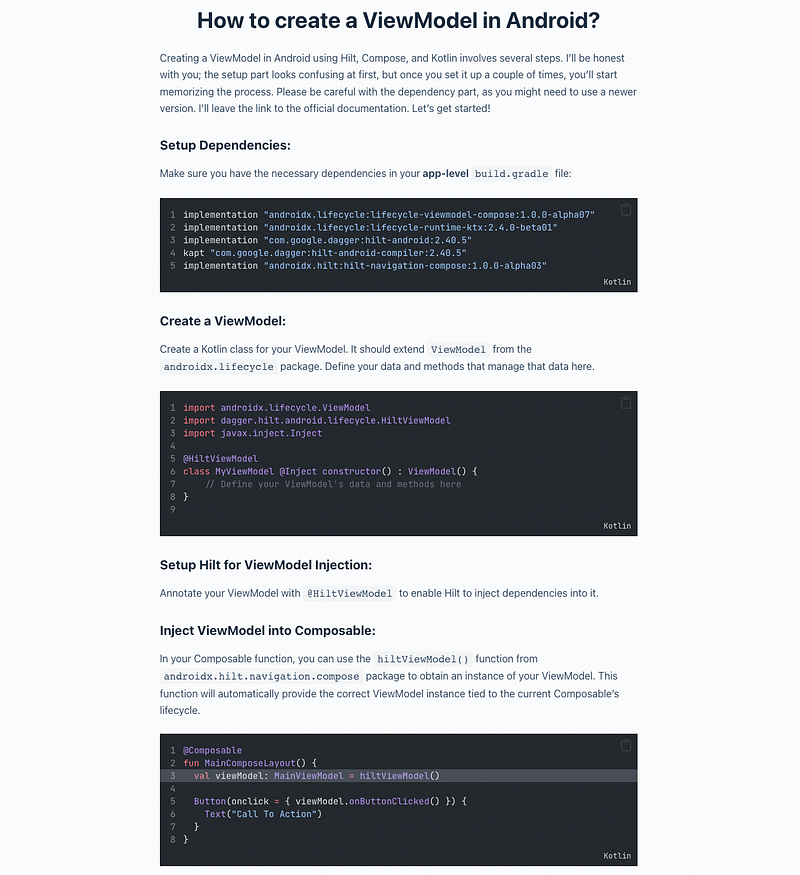
n-android-a-good-guide-for-beginners/#is-view-model-part-of-ui">Is ViewModel part of UI?</a></li><li><a href="https://pinartechtips.com/what-is-viewmodel-in-android-a-good-guide-for-beginners/#relationship-between-view-model-and-the-android-ui-components-activity-fragment">Relationship between ViewModel and the Android UI components (Activity/Fragment)</a></li><li><a href="https://pinartechtips.com/what-is-viewmodel-in-android-a-good-guide-for-beginners/#when-should-i-use-view-model-android">When should I use ViewModel Android?</a></li><li><a href="https://pinartechtips.com/what-is-viewmodel-in-android-a-good-guide-for-beginners/#what-is-the-difference-between-view-model-and-live-data-in-android">What is the difference between ViewModel and LiveData in Android?</a></li><li><a href="https://pinartechtips.com/what-is-viewmodel-in-android-a-good-guide-for-beginners/#interview-questions-related-to-view-model-in-android">Interview questions related to ViewModel in Android</a></li></ul><p id="0796">Ever started building an Android app and stumbled upon the word “ViewModel”? Don’t worry if it sounds like tech-talk from another planet. Think of ViewModel as your app’s expert organizer for handling data, even when your screen flips or things change. We’re here to guide you, starting from scratch, and help you make sense of ViewModel’s magic. By the end, you’ll be confidently using it to build better apps. Ready to dive in? Let’s go!</p><p id="e86d">I will assume that you know nothing about Android ViewModel, and then I will use more technical words to explain the ViewModel</p><h1 id="db72">What’s the Deal with Android ViewModel?</h1><p id="97fb">Alright, so here’s the scoop: Android ViewModel is like a special tool that helps each game remember stuff without getting mixed up. Just like how you use folders to keep your drawings organized, ViewModel keeps important information safe and neat for each game.</p><p id="125b">Let’s say you’re playing that awesome puzzle game. You’ve solved a bunch of levels, and suddenly your friend calls you to play a different game. No problem! Android ViewModel makes sure that the puzzle game remembers exactly where you left off and all the levels you’ve solved. It’s like magic!</p><h1 id="0f58">What is the difference between view and ViewModel in Android?</h1><p id="2aad">Imagine you’re creating a painting — you have the canvas (which is

Options

like the screen of your phone) where you’ll put all the colors and shapes to make your picture (which is your app). In this scenario, the “view” is like the canvas; it’s what people see on the screen, like buttons, images, and text. It’s where everything visually happens.</p><p id="ce41">Now, think of the “ViewModel” as your personal helper who makes sure your colors and shapes stay organized while you’re painting. This helper knows how to keep things neat, even if you need to take a break or if someone turns your canvas around. They remember where each color goes and how to fix things if something changes.</p><p id="cd54">So, in simple words, the “view” is what you see on the screen, and the “ViewModel” is the behind-the-scenes friend that helps keep everything in order and makes sure your app looks and works just the way you want it to, no matter what happens.</p><figure id="b170"><img src="https://cdn-images-1.readmedium.com/v2/resize:fit:800/1*5pXWFgNTXKOylpG5t63ldg.png"><figcaption></figcaption></figure><figure id="572f"><img src="https://cdn-images-1.readmedium.com/v2/resize:fit:800/1*PGshtTxz1o5b3rL9UCWDkg.png"><figcaption></figcaption></figure><figure id="1aff"><img src="https://cdn-images-1.readmedium.com/v2/resize:fit:800/1*Vjg_0RfC0dYWUEKJPjRz5g.png"><figcaption></figcaption></figure><figure id="c7db"><img src="https://cdn-images-1.readmedium.com/v2/resize:fit:800/1*hubiVxGdVi7k0zMfOOdLDw.png"><figcaption></figcaption></figure><blockquote id="6faa"><p><i>Rest of the blog on my own website please visit <a href="https://pinartechtips.com/what-is-viewmodel-in-android-a-good-guide-for-beginners/">my website</a></i></p></blockquote><p id="1235">I want to help people as much as I can. I have my own <a href="https://pinartechtips.com/">website</a>, where I write about Android and Web development, tech, productivity, and money. My goal is to explain things in a very basic and clear manner.</p><p id="64d5">Thank you very much</p><p id="3dd8"><i>You can get full access to every story on Medium for just $5/month by signing up through this <a href="/@pinarturgut09/membership">link</a></i></p><p id="c693">Ready to level up your software skills? Join my email list for free insights on software and Android development, plus valuable tips for personal growth. Don’t miss out — <a href="https://pinarturgut09.medium.com/subscribe">sign up now!</a></p></article></body>

What is ViewModel in Android?

Table of Contents

Ever started building an Android app and stumbled upon the word “ViewModel”? Don’t worry if it sounds like tech-talk from another planet. Think of ViewModel as your app’s expert organizer for handling data, even when your screen flips or things change. We’re here to guide you, starting from scratch, and help you make sense of ViewModel’s magic. By the end, you’ll be confidently using it to build better apps. Ready to dive in? Let’s go!

I will assume that you know nothing about Android ViewModel, and then I will use more technical words to explain the ViewModel

What’s the Deal with Android ViewModel?

Alright, so here’s the scoop: Android ViewModel is like a special tool that helps each game remember stuff without getting mixed up. Just like how you use folders to keep your drawings organized, ViewModel keeps important information safe and neat for each game.

Let’s say you’re playing that awesome puzzle game. You’ve solved a bunch of levels, and suddenly your friend calls you to play a different game. No problem! Android ViewModel makes sure that the puzzle game remembers exactly where you left off and all the levels you’ve solved. It’s like magic!

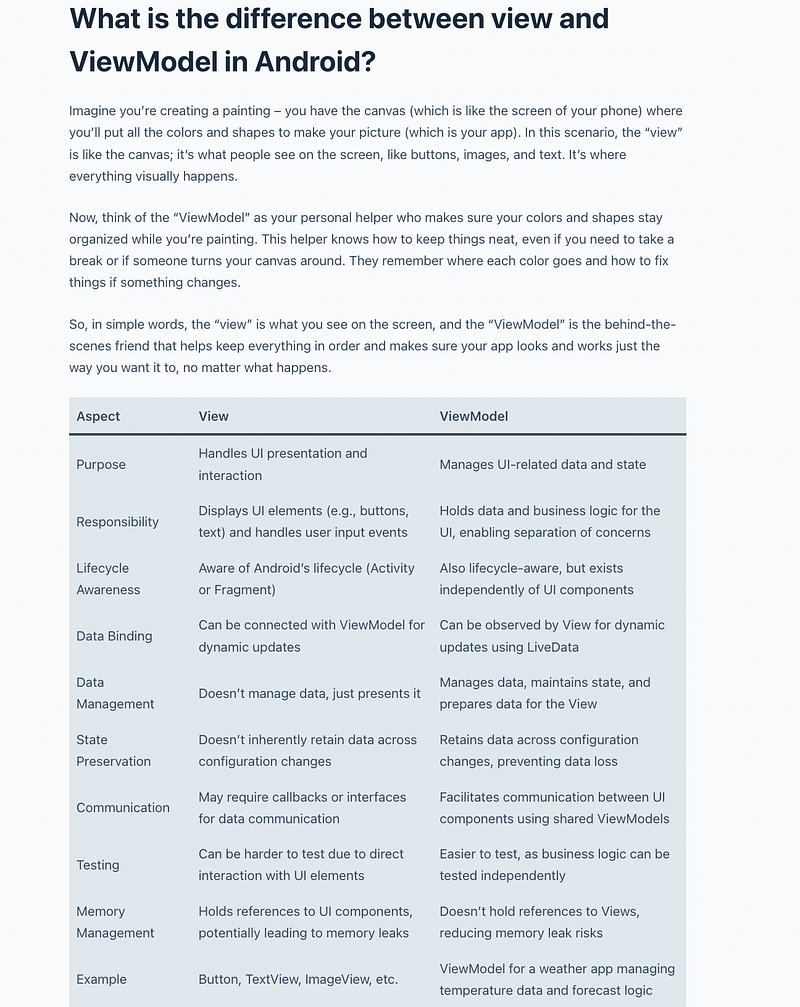
What is the difference between view and ViewModel in Android?

Imagine you’re creating a painting — you have the canvas (which is like the screen of your phone) where you’ll put all the colors and shapes to make your picture (which is your app). In this scenario, the “view” is like the canvas; it’s what people see on the screen, like buttons, images, and text. It’s where everything visually happens.

Now, think of the “ViewModel” as your personal helper who makes sure your colors and shapes stay organized while you’re painting. This helper knows how to keep things neat, even if you need to take a break or if someone turns your canvas around. They remember where each color goes and how to fix things if something changes.

So, in simple words, the “view” is what you see on the screen, and the “ViewModel” is the behind-the-scenes friend that helps keep everything in order and makes sure your app looks and works just the way you want it to, no matter what happens.
Rest of the blog on my own website please visit my website

I want to help people as much as I can. I have my own website, where I write about Android and Web development, tech, productivity, and money. My goal is to explain things in a very basic and clear manner.

Thank you very much

You can get full access to every story on Medium for just $5/month by signing up through this link

Ready to level up your software skills? Join my email list for free insights on software and Android development, plus valuable tips for personal growth. Don’t miss out — sign up now!

Android App Development
Viewmodel
Kotlin
Jetpack Compose
Android
Recommended from ReadMedium