
What Is a Target Fragment?
How to effectively communicate from a ChildFragment to a ParentFragment in Android
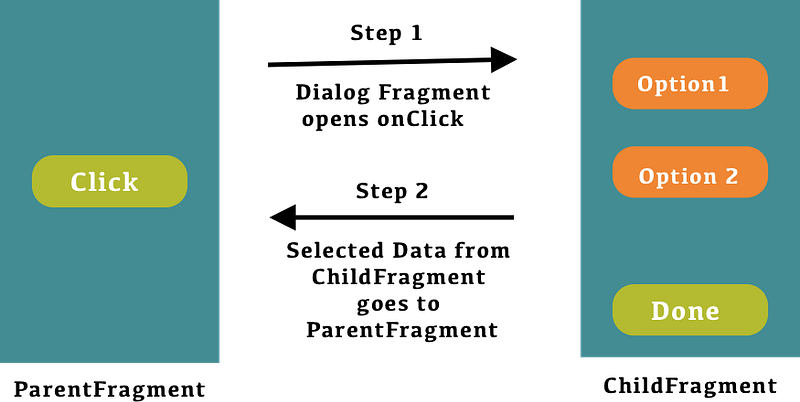
A fragment is a piece of an application’s user interface or behavior that can be placed in an activity.
Interaction with fragments is done through FragmentManager, which can be obtained via Activity.getFragmentManager() and Fragment.getFragmentManager().
A fragment is closely tied to the activity it is in and can not be used apart from one. Although a fragment defines its own lifecycle, that lifecycle is dependent on its activity. If the activity is stopped, no fragments inside of it can be started. When the activity is destroyed, all fragments will be destroyed.
There are various ways to communicate between fragments like Interface, shared ViewModel, etc.
But did you know that we can easily communicate from child fragment to parent fragment and receive a callback in onActivityResult() in the parent fragment by using the standard methods setTargetFragment() and getTargetFragment()?
Use case
When we open a dialog fragment from where the user needs to select an option from a list of options available and later, when they click on the OK button, we need to return the selected option to the parent fragment.
Steps
- If we want to communicate from one fragment to another fragment then from
ParentFragmentwe have to usesetTargetFragment(ParentFragmentinstance,RequestCode). - After that, we call the
show()method on the dialog fragment to display a list of available options. - Then use
onActivityResult(RequestCode,Activity.RESULT_OK, intent). So, the callback from theChildFragmentcan be received in the override methodonActivityResultofParentFragment. - From the
ChildFragment, we have to usegetTargetFragment()which returns theParentFragmentinstance if anything is set usingsetTargetFragment().
Let’s better understand it with an example.
Step 1: Let’s call showOptionsDialog() in the parent fragment which shows an OptionsDialogFragment with a list of options.
Step 2: Implement onActivityResult() in the ParentFragment where we receive the callback from ChildFragment and perform an action based on the result.
Step 3: When the user clicks on an option in the OptionsDialogFragment then call onExit(selection: String) where we write our logic to return the callback to ParentFragment.
From the documentation setTargetFragment().
From the documentation getTargetFragment().
/**
 * Return the target fragment set by {#setTargetFragment}.
 */
@Nullable
final public Fragment getTargetFragment() {
  ............
}
Please let me know your suggestions and comments.
Thanks for reading!