
What is Pip, Conda, Anaconda, Spyder, Jupyter Notebook, Pycharm, Pandas, TensorFlow, and Django?
Python-related environments, package managers, libraries, and frameworks explanations
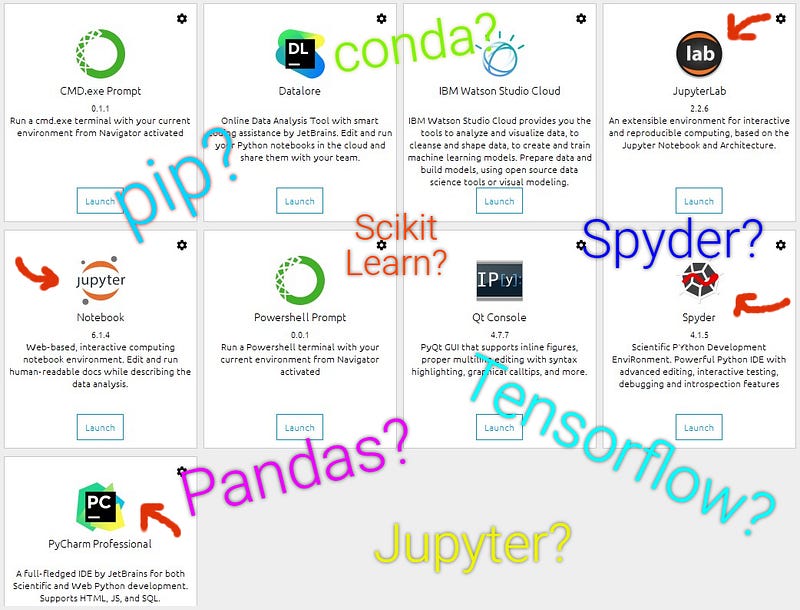
Anaconda is a Python distribution with many software tools in it.
Spyder is an IDE and Jupyter Notebook is a web-based program to code Python for scientific purposes in Anaconda.
PyCharm is a popular Python IDE for general purposes.
Conda and pip are environment and package managers that make it easy to install, upgrade and remove packages on the virtual environments.
Pandas, Scikit Learn and Tensorflow are Python libraries that are used for data analysis and machine learning.
Flask and Django are Python frameworks that are used for web development.
If my short answers didn’t satisfy you and you want to learn more, I wrote more details in the article. I will be also answering the following questions.
What is a Python distribution?
What is a package manager?
What is the difference between package, library, and framework?
What is the difference between JupyterLab and Jupyter Notebook?
What should I use, Spyder or PyCharm?
What is the relation between PyCharm and Anaconda?
What is Anaconda Navigator?
What is Python?
What is Python?
Python is a programming language. You can use it for many purposes as you use other programming languages.
The key point about Python for our article is about packages. It is the packages and libraries that allow Python to do many different things.
All the popular terms you see in the title are either a framework or a library or something about managing and using Python packages.
Before going further, here is a very quick, nice video that answers what Python is and the reasons why you should use Python.
What is Anaconda?
It is a Python (and also R) distribution. A Python distribution is a program that allows you to use Python. It may contain more than one program in it.
Check this link for a longer answer for what Python Distribution is.
Anaconda contains multiple programs that let you use Python. Jupyter Notebook and Spyder are two of these programs.
These programs in Anaconda are specialized in data science (e.g. you can’t develop a website).
So if you want to continue on data science, learn more about Anaconda but if you want to build an app (that doesn’t include data science) with Python, don’t think about Anaconda much.
What is Jupyter Notebook?
It is a web-based program under Anaconda distribution and it let you code Python. You can also call it a web application under Anaconda.
It is good for data analysis. You can visualize data easily. It is very interactive and lets you run partial codes.
What is JupyterLab?
It lets you collect multiple Jupyter Notebooks under one tab.
You can open Jupyter Notebooks on multiple web tabs but if you are used to using IDEs, it might seem more user-friendly to use JupyterLab.
It is also under Anaconda.
What is Anaconda Navigator?
It is the GUI of Anaconda distribution. You can manage the programs and all other features of Anaconda. Below is a screenshot from my Anaconda Navigator.
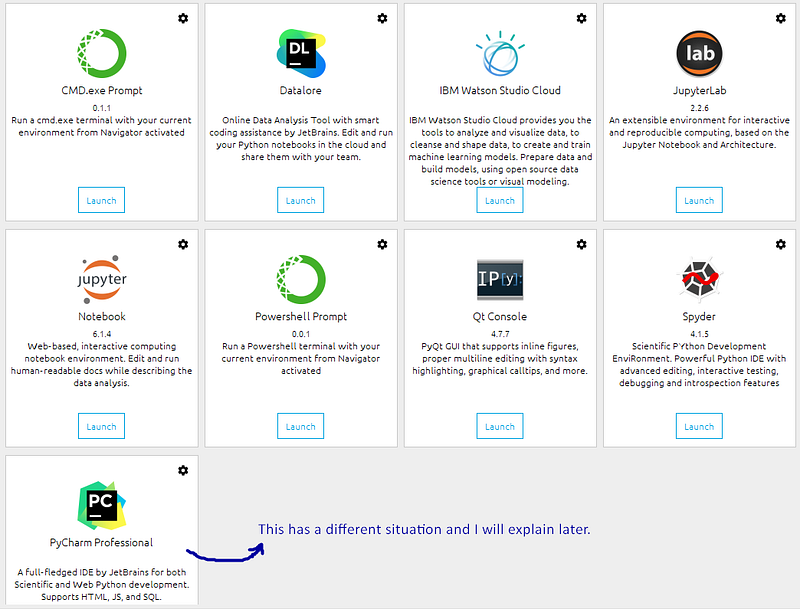
You see some programs under this distribution. Notice that JupyterLab and Notebook are launching differently.
Also notice PyCharm and Spyder because they are our next topics.
Don’t forget that this is not the whole list.
What is Spyder?
It is an IDE for Python under Anaconda. Again you can code Python here but there are some differences with Jupyter Notebook.
Spyder is not interactive as Jupyter but more efficient for building a whole data science application.
What to use, Spyder or Jupyter Notebook?
You may prefer Jupyter Notebook for data analysis, data visualization during the process of decisions and presentations.
Once you are done with the analysis and decision process and want to build a data science application, you may prefer to jump to Spyder.
Here is a nice video covering Anaconda, Jupyter Notebook, and Spyder.
What is PyCharm?
It is Python IDE like Spyder. You can use it for not only data science but multiple purposes such as web development and desktop app development.
PyCharm is a very popular IDE among developers because it has strong debug and refactoring options.
Relation between Pycharm and Anaconda
It was not under Anaconda originally but they have integrated. Here is the comment of Scott Collison, the CEO of Anaconda, about this integration:
“It is an exciting time for developers who want to do data science in an IDE they know and love.”
In short, PyCharm is for general use whereas Anaconda programs are specifically for science.
What are Pandas, Scikit Learn, and Tensorflow?
They are Python libraries that are very helpful for data analysis and machine learning.
You can manage your data easily with Pandas and model your data with Scikit Learn and Tensorflow.
Numpy and matplotlib are some other library examples.
What is the difference between a package and a library?
Packages are a set of modules that contain scripts and functions. You can write your own modules and packages.
When many packages come together, they build libraries.
A package manager also manages the libraries because libraries are the collections of packages.
What is Conda?
It is an environment and package manager. A package manager makes it easy to install, upgrade, remove packages to a virtual environment.
Conda makes it easy to manage Python and R packages to Conda environments.
What is Pip?
It is a package manager. It manages (install, upgrade, remove, etc.) Python packages in any Python virtual environment.
So, pip is for any Python environment whereas conda is for Conda environments that are the programs under Anaconda.
Here are some examples with both pip and conda:
pip install pandasconda install pandaspip install tensorflow --upgradeconda update scikit-learnpip uninstall scikit-learnconda remove scikit-learnWhat are Django and Flask?
They are frameworks for web development. You can build websites and web applications with them. To see the difference between them, you can visit this website.
What is a framework?
Frameworks let you build software tools by making the coding process easier and more efficient.
They are composed of libraries but the main difference is different. You can call a function of a library; however, a framework calls your function.
You have more control when you use a library but you have to follow the rules of a framework. Watch this clear video if you want to understand the concept better.
That’s all about Python-related things for now. Thank you for reading.
Schedule a DDIChat Session in Coding, Software, and Mobile Development:
Apply to be a DDIChat Expert here. Work with DDI: https://datadriveninvestor.com/collaborate Subscribe to DDIntel here.


