
What Is [object Object] in JavaScript: Object.prototype.toString
A deeper explanation of [object Object]

Whilst working as a JavaScript developer, you might have used the toString method or heard of it at least.
And, if you are passionate to contribute your experiences to an open-source GitHub project, you would also have some opportunities to see how they check an argument’s type.
One day, I saw something that was quite weird — [object Object]. Um, I had no clue what it meant when I saw it for the first time.
I thought it was some sort of console mistake when printing data out, so I used to use console.dir, instead of console.log for objects.
Then, I saw this from MDN:
“Every object has a toString() method that is automatically called when the object is to be represented as a text value or when an object is referred to in a manner in which a string is expected.”
Prerequisites
To better understand what this post will talk about, you should know what prototype and prototype chain are in JavaScript.
TL;DR
Object.prototype.toString is a method that prints out the name of the class that you passed into toString.
There are several values you can get from it, based on ECMAScript’s specifications. This could be helpful when you check the type of a class of your object.
Types of JavaScript Objects
toString is a method for representing …what?
To understand what the heck this means, you should know what data types JavaScript has. Basically, JavaScript has seven primitive data types and other types, Object.
Some of them are instances of Object, and some aren’t. What toString prints out with each type is slightly different, but they all work under the same logic.
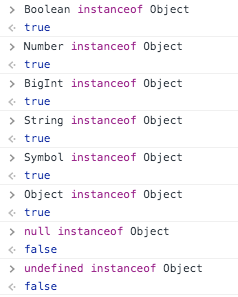
Let’s check out if there’s a way to see their type.
Except for Null and Undefined, every member of the list is an instance of the Object class.
If an object is an instance of Object, it means the object’s [[prototype]], which is __proto__ in most browsers, refers to Object.prototype as its final linked-place of the prototype chain.
Let’s look at this short example:
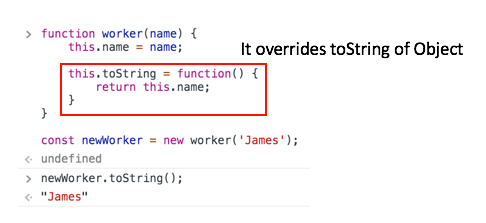
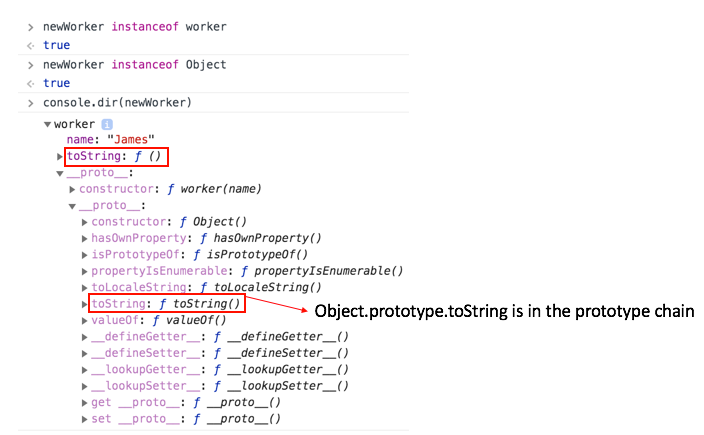
I created a random function class called worker whose method overrode Object.prototype.toString which prints something (we will deep-dive into it soon, don’t worry).
Then, I printed newWorker’s name by calling toString. So, why does this matter?
In JavaScript, any objects can possess their own methods, even though the name is redundant to q method from their super classes. Once you call toString in that example, the JavaScript engine starts to look for whether newWorker has toString in its scope.
If it does, the engine grabs it and invokes it. If it doesn’t, then the engine looks for [[prototype]](again, it’s __proto__ in most browsers) of newWorker and looks for toString in [[prototype]]’s scope.
If there is, then the engine grabs it and calls it and if there isn’t, it does the same thing when it looked for [[prototype]] of newWorker.
For the second instance, it’d be [[prototype]] of [[prototype]] of newWorker. The engine stops if [[prototype]] is null, when it reaches Object, or toString exists in a scope of this process.
This is called prototype-chaining.
[object Object] Is a Result of a Well-Trimmed Algorithm of Object.prototype.toString
Then what does Object.prototype.toString really do? It detects the class of an object and tells you what it is. Let’s look at some examples.
Every data type that I mentioned earlier in this post can be passed into toString as the argument and Object.prototype.toString prints the name of a class of the argument passed in.
One thing to remember when you use toString to obtain the class type is to make sure to use Function.prototype.call or Function.prototype.apply on Object.
'call' in Object; //trueThen, why do you need to call Function.prototype.call or Function.prototype.apply?
First of all, let’s think about what those two functions do. What they do is allow you to pass a certain object into call or apply to use the argument as their thisArg property, which is known as this.
function print() {
  console.log(this);
}print(); // Window
print.call([1, 2, 3]); // [1, 2, 3]
print.apply([1, 2, 3]); // [1, 2, 3]As you can see in the example, call and apply made [1, 2, 3] the this of print, while print()’s this was just the Window object.
And here’s what the documentation tells us about how toString works:
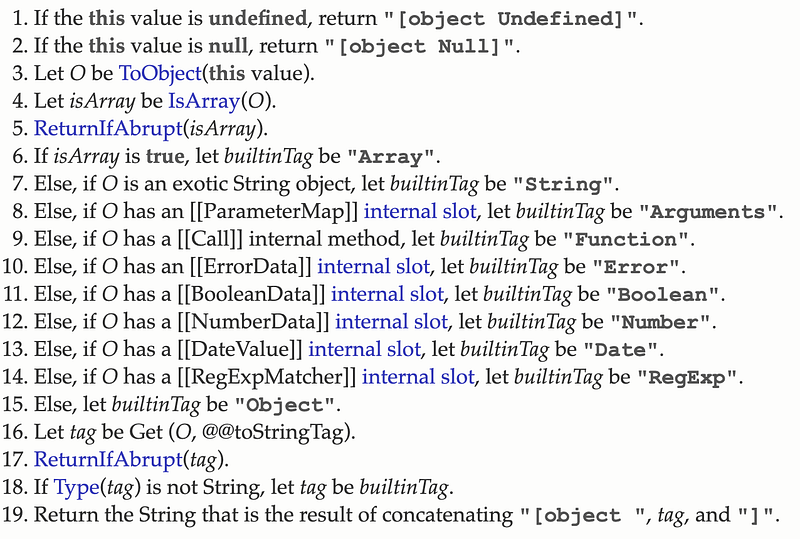
Let’s take the first one. Imagine this code is like the below.
Object.prototype.toString.call(undefined);In this context, “If the this value is undefined”, this refers to the object you handed into toString calling Function.prototype.call or Function.prototype.apply.
Remember those functions make the argument toss thisArg, which is this? That’s why we had to use call or apply, because of the very first condition of toString. In this case, this is undefined. So, return [object Undefined].

Very true! Next!
Object.prototype.toString.call(null);this of this argument, null, isn’t undefined, so it skips the first condition.
But the second one, “If the this value is null”, is the perfect one for this example! Then, let’s see if this example prints [object Null] for sure, as the second condition says.

Yeah, easy mode!
What about Array? I didn’t put it in the list of the data types at the beginning of this post. Isn’t Array also a type of class that JavaScript has? Well, it sounds like it makes sense. Look at the third to sixth condition.
- Let
ObeToObject(this value) - Let
isArraybeIsArray(O) - If
isArrayis true, letbuiltinTagbe“Array”
So, even though we don’t know what ToObject and IsArray are, we know these conditions talk about printing “Array” if we pass the Array type object into toString.
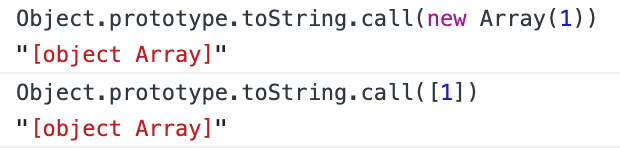
Again, it’s correct! Now, it’s your turn to compare all the data types I listed at the beginning of this post to the results from the algorithm of toString.
Customized toString
We checked out the newWorker code briefly. In that example, we customized the toString method as it prints the name we set when we created an instance of the worker class.
And I also explained how it was possible. Like this, there is an object that inherits Object but has a customized toString method inside.
Math is a wonderful mathematical built-in JavaScript library that helps us to get many different kinds of pre-calculated values or methods for easier calculation.
Math instanceof Object; // true
'toString' in Math; // true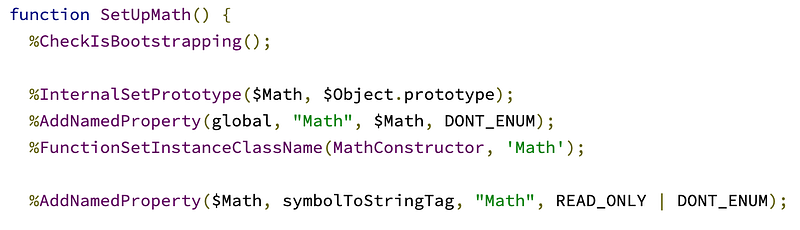
In Chromium, when math.js is compiled by the engine, SetUpMath is run and you’ll see this:
%AddNamedProperty($Math, symbolToStringTag, "Math", ...);Although we don’t know what exactly this code does, one thing we can know is that when Math is declared, its property, named symbolToStringTag, will be assigned to “Math”.
And for real, you can check this in the browser console.

Then, what does Symbol.toStringTag do?
The Symbol.toStringTag’s well-known symbol is a string-valued property that is used in the creation of the default string description of an object. It is accessed internally by the Object.prototype.toString() method.
So, in summary, there are some built-in JavaScript objects that have a customized toString method that prints a different return value, which isn’t one of the cases in the ECMAScript toString Edition we saw earlier.
The reason why this is possible is because of Symbol.toStringTag, which calls Object.prototype.toString by default, declared in some core script files.
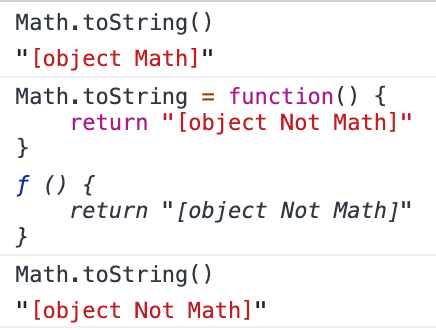
And you can also make your own toString.
typeof vs. toString
You might have heard of the typeof operator in JavaScript which is for checking the type.
But, it seems that toString is also possible to check types because there will always be something tacked on “[object]”, like [object Math]. typeof gives the string back to you that indicates the type of the unevaluated operand.
typeof Math; // "object"
typeof true; // "boolean"
typeof 42; // "number"
Then, what’s different?
The simple difference between those is you can’t override a function of typeof while you can with toString.
And, it’s simpler to use typeof instead of toString since you should parse and cut the string to get the “type” part, such as “Math” from [object Math]. But, typeof doesn’t always replace what Object.prototype.toString does.
Conclusion
Function.prototype.apply, due to its core logic, returns you a class of an object you passed into the method.
Some built-in functions have their own customized toString method, like Math and HTMLDocument. To ensure the type of an object in your codes, you should decide well between typeof and toString.


