avatarMohit

Free AI web copilot to create summaries, insights and extended knowledge, download it at here

3454

Abstract

to a <b>Dispatcher, </b>the Dispatcher’s role is to send every action to subscribed stores. We can have as many stores and each of them can act differently in response to the user’s action.</p><p id="6c21"><b>For Example:</b></p><ul><li>Let us say you are building a<b> cart-based</b> application, where a user can tap the screen to add some item to the cart, and the respective action is <b><i>dispatched</i></b> and your cart store reacts to it. In the end, the view layer is updated with the new state.</li></ul><p id="3cc5">To enhance the<b> MVC pattern</b>, let’s remind ourselves how it looks:</p><figure id="9d82"><img src="https://cdn-images-1.readmedium.com/v2/resize:fit:800/1*4Hvt_ASganrlRyHFuuTR9w.png"><figcaption><b>MVC Pattern</b></figcaption></figure><ul><li><b>Action: </b>A user’s action, such as a button tap, scrolling, or navigation change.</li><li><b>Controller:</b> A piece responsible for handling the action and displaying the appropriate native view.</li><li><b>Model:</b> A data structure that holds information separated from the view.</li><li><b>View: </b>This is what the end-user sees, the view describes all the markup code which can later on be styled. The view can be sometimes coupled to styles and referred to as one piece.</li></ul><blockquote id="68b1"><p><b>But as the application grows your little architecture will start looking like the following:</b></p></blockquote><figure id="c544"><img src="https://cdn-images-1.readmedium.com/v2/resize:fit:800/1*-Zng-OMWePGRPNOdAv35oQ.png"><figcaption></figcaption></figure><p id="c320">This approach is not considered bad, even this architecture works to some extent in its own way. But the problem arises when you try to identify a bug and find yourself unable to locate where and why something is going wrong.</p><p id="615f">Being more precise you will lose control over the flow of information, and you will end up in a situation where so many processes are occurring and at the same moment you cannot easily spot what is responsible for the failure and why it is happing. If you look at the diagram above you will spot the problem of bidirectional flow of data in model-view communication <b><i>(it goes in both directions).</i></b></p><ul><li>To solve this problem we can afford <b>one-directional </b>data flow which will effectively make the architecture predictable and if our controllers only had a series of input data, where we are supposed to deliver a new state of the view, it would feel much clearer.</li><li>Unit tests could provide a series of data such as input and assert on an output.</li></ul><blockquote id="6da0"><p>Now let’s take a look at <b>Flux dataflow:</b></p></blockquote><figure id="e115"><img src="https://cdn-images-1.readmedium.com/v2/resize:fit:800/1*oU6WgXnQMYvI8YOcUd_rpg.png"><figcaption><b>Flux Data Flow</b></figcaption></figure><p id="aef8">Here all the data go through the <b>Dispatcher</b> and then sent to registered store <b>callbacks</b>. In the end, the store contents are mapped to a view. This pattern will also get complicated with time as the application grows (a similar condition to two-way data flow, but here our views are composed into one final view that the user sees).</p><p id="a9e9">And if something changes, another action is dispatched into the stores. This a much simpler approach and we can track which action led to unwanted changes in the stores.</p><figure id="a72f"><img src="https://cdn-images-1.rea

Options

dmedium.com/v2/resize:fit:800/1*AAkFB3jLa_9HaabXptGjTw.png"><figcaption><b>Flux Data Flow (After Application Grows )</b></figcaption></figure><h1 id="1e76">Implementing Flux In React Native Application</h1><p id="2407">To understand this concept more further we will create a simple task application using the Flux library provided by <b>Facebook</b>, includes all the pieces we need to make the application according to the new Flux flow.</p><p id="3218">To Install Flux In Your React-Native Project:</p><p id="5d4f"><b><i>yarn add flux immutable</i></b></p><p id="fca9">So at first, we need to create the <b>Dispatcher</b>, <b>Task Store</b>, and <b>Task Actions.</b></p><ul><li>A <b>Dispatcher</b> will be used to dispatch actions, and we need to create the actions first.</li></ul><figure id="5575"><img src="https://cdn-images-1.readmedium.com/v2/resize:fit:800/1*5HG_Gf9fhPmr8v6mK6yAaQ.png"><figcaption></figcaption></figure><ul><li>Following the documentation advice I will create the action types as the first step:</li></ul><figure id="5ffc"><img src="https://cdn-images-1.readmedium.com/v2/resize:fit:800/1*AWCfqc0T9ByHkPJqEcoGfw.png"><figcaption></figcaption></figure><ul><li>So now we have created the types, we will follow the Actions creator.</li></ul><figure id="ba3a"><img src="https://cdn-images-1.readmedium.com/v2/resize:fit:800/1*HRefJiB8-rMrN9hqxMRU_g.png"><figcaption></figcaption></figure><ul><li>Now we have created the actions and a tool to dispatch them, and we are left creating <b>Store </b>which will react to<b> actions. Let’s create TodoStore;</b></li></ul><figure id="5479"><img src="https://cdn-images-1.readmedium.com/v2/resize:fit:800/1*VlvFtGpYqF83emp0RbRsXg.png"><figcaption></figcaption></figure><ul><li>To create the Store, we import <b>ReduceStore</b> from the<b><i> flux/utils</i></b> and the class should be extended to provide the necessary <b><i>API </i></b>methods.</li><li>Separately, let’s create the <b>reduce</b> case for <b>ADD-TASK </b>and the same flow can be tweaked to any other action type you want to create:</li><li>As of now, we have created all the parts for Flux architecture (<b>Action, Dispatcher, Store & View) </b>and we can connect them all together. For this, we have flux/utils which provides a handy container factory method.</li><li>For a clear understanding I have removed the likes counter:</li></ul><figure id="259b"><img src="https://cdn-images-1.readmedium.com/v2/resize:fit:800/1*MWDKnfRvomY5DsLhEP4s6w.png"><figcaption></figcaption></figure><ul><li>Now our application is equipped with the Flux Architecture tools:</li><li>The last step is to refactor all the principles.</li><li>To do that initialize <b>JSON</b> data directly to the view & create an add task form that dispatches an<b> ADD-TAKS </b>action on submit.</li></ul><figure id="8be6"><img src="https://cdn-images-1.readmedium.com/v2/resize:fit:800/1*VlvFtGpYqF83emp0RbRsXg.png"><figcaption></figcaption></figure><ul><li>Now we are required to use the Input component for that we will create a separate file responsible for the whole feature (we will create states for <b>name</b> and <b>description</b>, a <b>handleSubmit</b> function that dispatches the <b>ADD_TASK</b> action, and a <b>render</b> function with the form view markup).</li></ul><figure id="dea2"><img src="https://cdn-images-1.readmedium.com/v2/resize:fit:800/1*AEGzpw8tLa2KX7oH0DY5Lg.png"><figcaption></figcaption></figure></article></body>

What Is Flux Architecture In React Native?

All You Need To Know About Using Flux Pattern In React Native

Flux Architecture

Flux Architecture is simply an architecture for building user interfaces in React. To understand the Flux Architecture we need to first start whats is one-directional data flow pattern in React which will lead us to Flux. You need to understand two key points here, and that is how to separate the code and how to split an application into parts using Flux. These pattern connected together is responsible for everything in modern mobile applications.

What Is One-Directional Data Flow Pattern?

To understand Flux Architecture we need to know why we even need it. Observing Facebook who switched to Flux from the Model-View-Controller (MVC) pattern, where we decouple the business model from the view markup and coded logic. And Logic is encapsulated by a function called a controller and it delegates work to services.

The Problem With One-Way Data Binding In React

In one-way data binding, the view layer is maintained by a component, and only the component can update the view. As the resulting native code is computed by the components render function and displays to the end-user.

And if the view layer needs to respond to the user’s actions, it can only dispatch events that are handled by the component, it can only directly change the state or props.

The Following Diagram Will Give A Better Understanding Of This Concept;
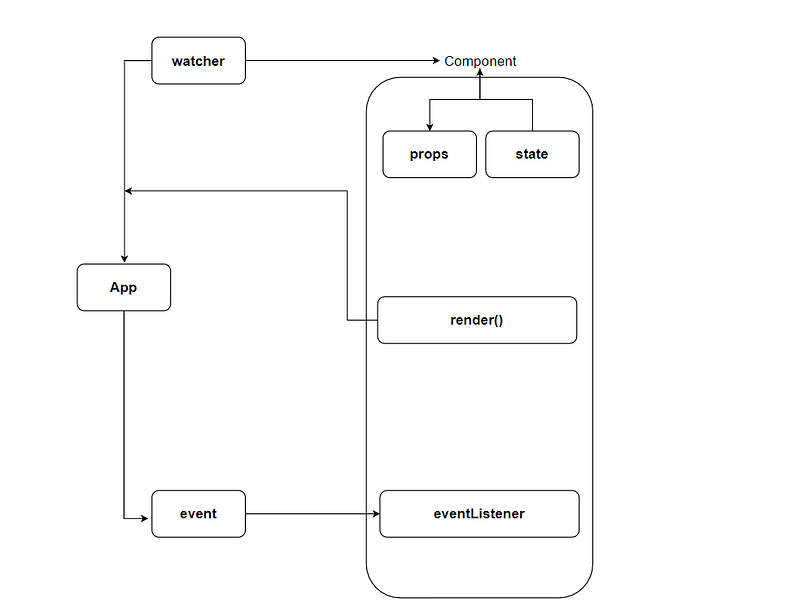
  • The App block represents the state of the native view layer, and the components are implied into three parts: Props, State, the Render function & the event listeners.
  • At the moment anything changes in the props or the state, the watcher calls the render function to update the native view. And once a user performs an action, an event is dispatched and picked up by the event listeners.

But In the Case Of Two — Way Binding the App layer doesn't need to dispatch an event, it can directly modify the state of the component

Also using one-way data binding is not enough as we can easily fall into traps that simulate two-way data binding.

So the big question here: can we use it for larger applications, the answer is NO. To solve this problem we need a predictable model that guarantees that we can find out quickly what happened in the process and especially why it occurs.

If the events are occurring all over the application the developer has to spend a lot of time finding out what specifically causing the detected bug.

And that’s where the Flux Architecture comes into action:

Flux

The main principle is that the application view layer responds to user actions by sending action objects to a Dispatcher, the Dispatcher’s role is to send every action to subscribed stores. We can have as many stores and each of them can act differently in response to the user’s action.

For Example:

  • Let us say you are building a cart-based application, where a user can tap the screen to add some item to the cart, and the respective action is dispatched and your cart store reacts to it. In the end, the view layer is updated with the new state.

To enhance the MVC pattern, let’s remind ourselves how it looks:
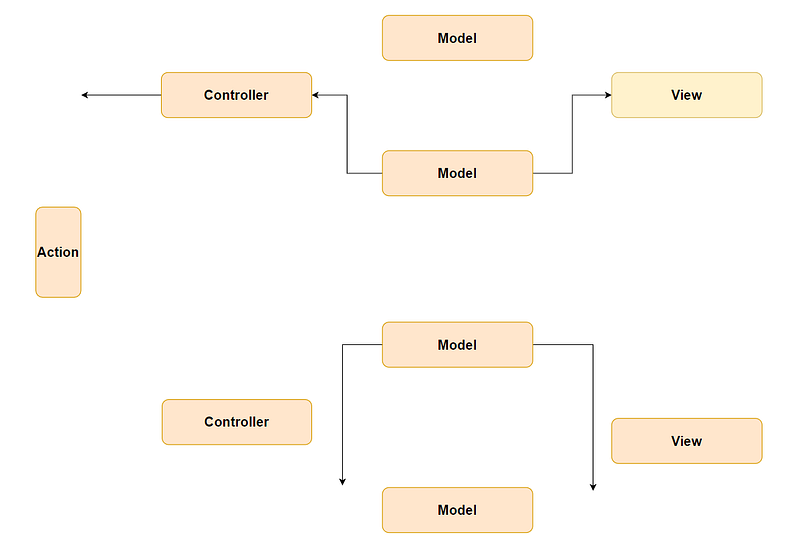
MVC Pattern
  • Action: A user’s action, such as a button tap, scrolling, or navigation change.
  • Controller: A piece responsible for handling the action and displaying the appropriate native view.
  • Model: A data structure that holds information separated from the view.
  • View: This is what the end-user sees, the view describes all the markup code which can later on be styled. The view can be sometimes coupled to styles and referred to as one piece.

But as the application grows your little architecture will start looking like the following:
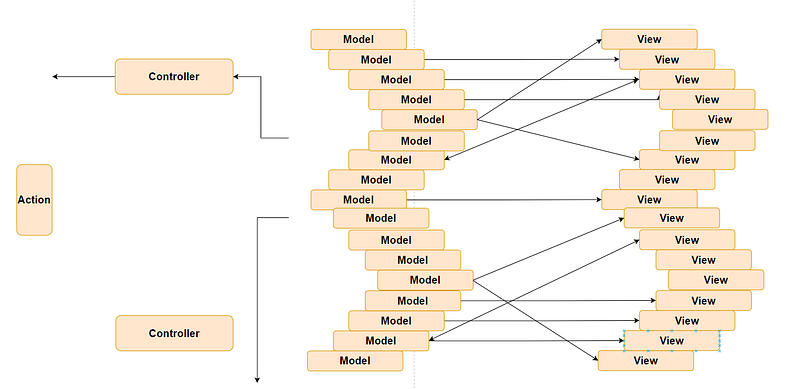
This approach is not considered bad, even this architecture works to some extent in its own way. But the problem arises when you try to identify a bug and find yourself unable to locate where and why something is going wrong.

Being more precise you will lose control over the flow of information, and you will end up in a situation where so many processes are occurring and at the same moment you cannot easily spot what is responsible for the failure and why it is happing. If you look at the diagram above you will spot the problem of bidirectional flow of data in model-view communication (it goes in both directions).

  • To solve this problem we can afford one-directional data flow which will effectively make the architecture predictable and if our controllers only had a series of input data, where we are supposed to deliver a new state of the view, it would feel much clearer.
  • Unit tests could provide a series of data such as input and assert on an output.

Now let’s take a look at Flux dataflow:
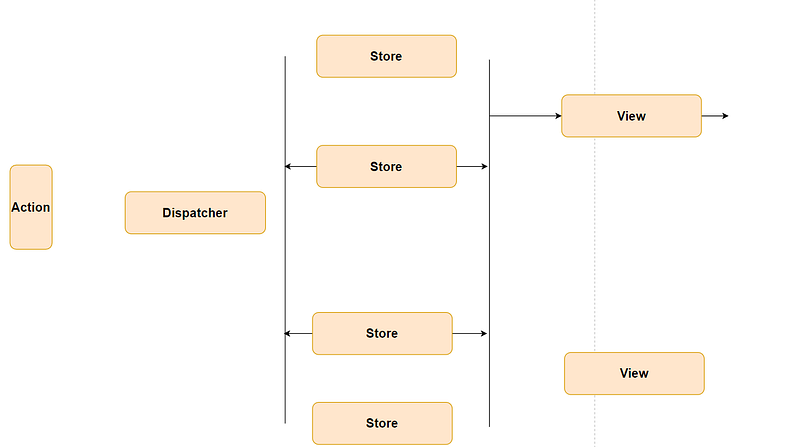
Flux Data Flow

Here all the data go through the Dispatcher and then sent to registered store callbacks. In the end, the store contents are mapped to a view. This pattern will also get complicated with time as the application grows (a similar condition to two-way data flow, but here our views are composed into one final view that the user sees).

And if something changes, another action is dispatched into the stores. This a much simpler approach and we can track which action led to unwanted changes in the stores.
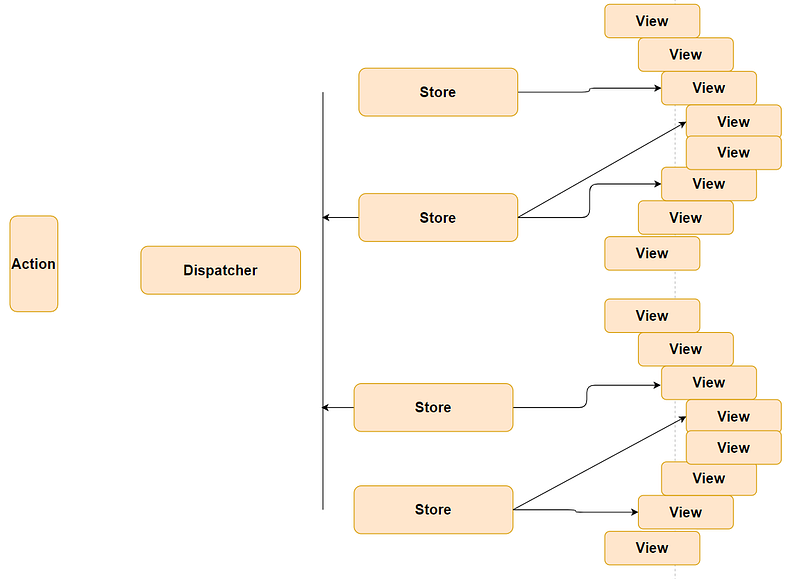
Flux Data Flow (After Application Grows )

Implementing Flux In React Native Application

To understand this concept more further we will create a simple task application using the Flux library provided by Facebook, includes all the pieces we need to make the application according to the new Flux flow.

To Install Flux In Your React-Native Project:

yarn add flux immutable

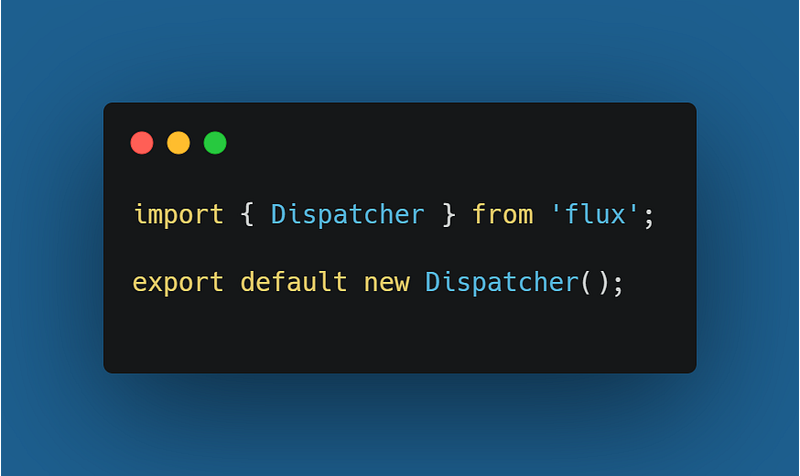
So at first, we need to create the Dispatcher, Task Store, and Task Actions.

  • A Dispatcher will be used to dispatch actions, and we need to create the actions first.
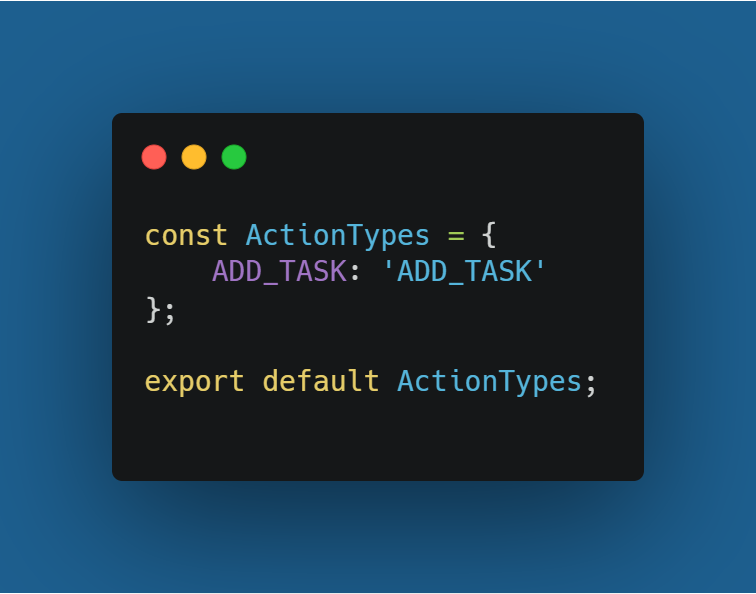
  • Following the documentation advice I will create the action types as the first step:
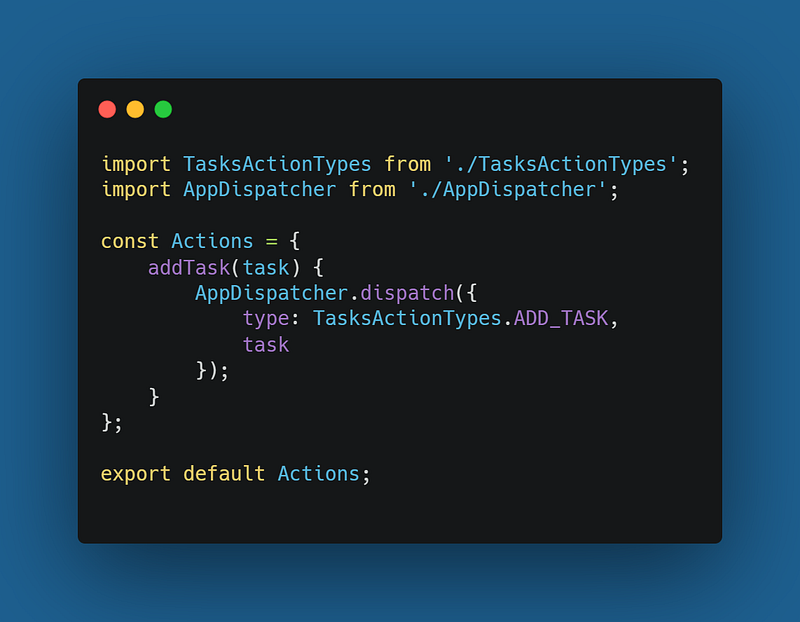
  • So now we have created the types, we will follow the Actions creator.
  • Now we have created the actions and a tool to dispatch them, and we are left creating Store which will react to actions. Let’s create TodoStore;
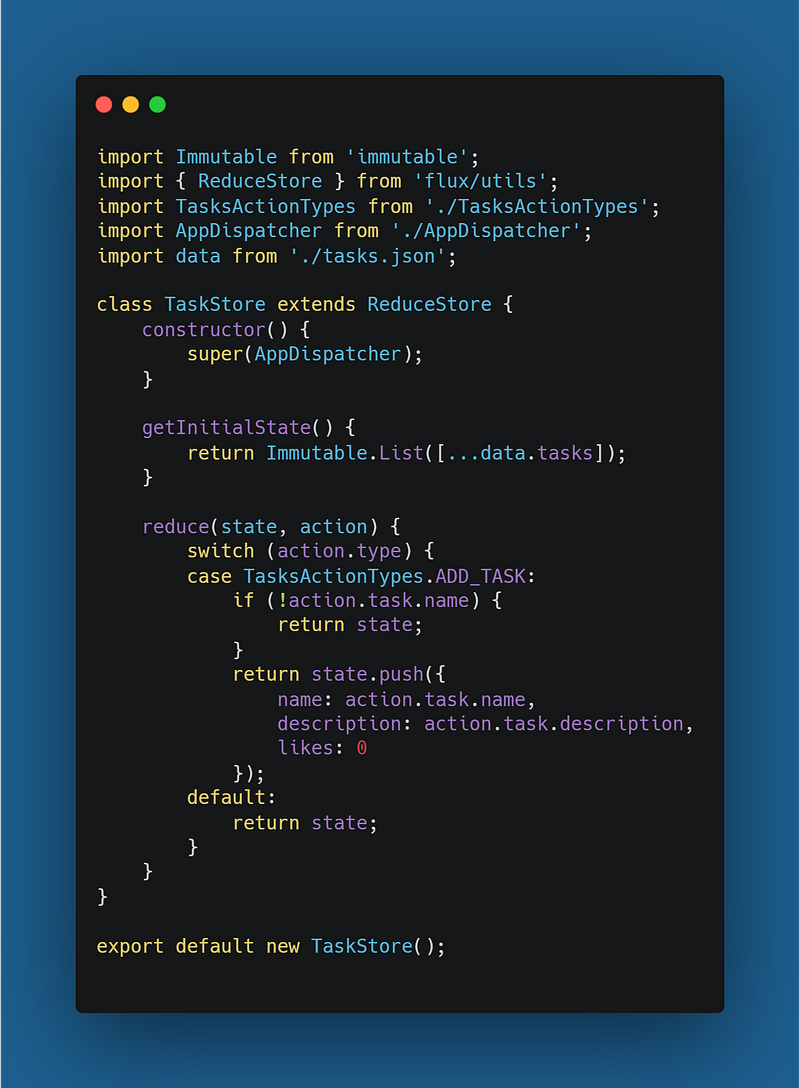
  • To create the Store, we import ReduceStore from the flux/utils and the class should be extended to provide the necessary API methods.
  • Separately, let’s create the reduce case for ADD-TASK and the same flow can be tweaked to any other action type you want to create:
  • As of now, we have created all the parts for Flux architecture (Action, Dispatcher, Store & View) and we can connect them all together. For this, we have flux/utils which provides a handy container factory method.
  • For a clear understanding I have removed the likes counter:
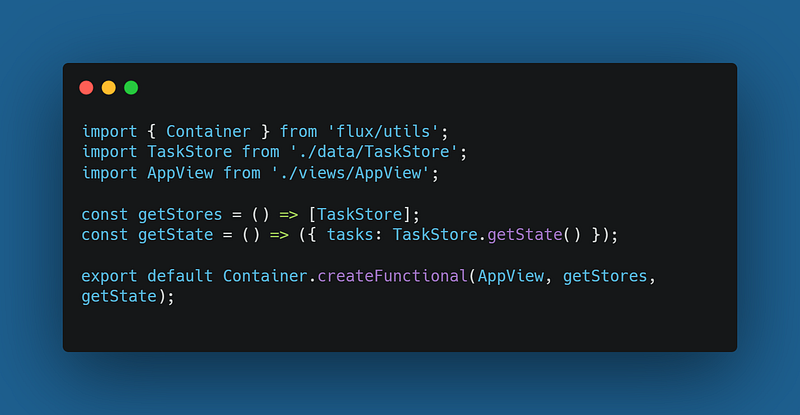
  • Now our application is equipped with the Flux Architecture tools:
  • The last step is to refactor all the principles.
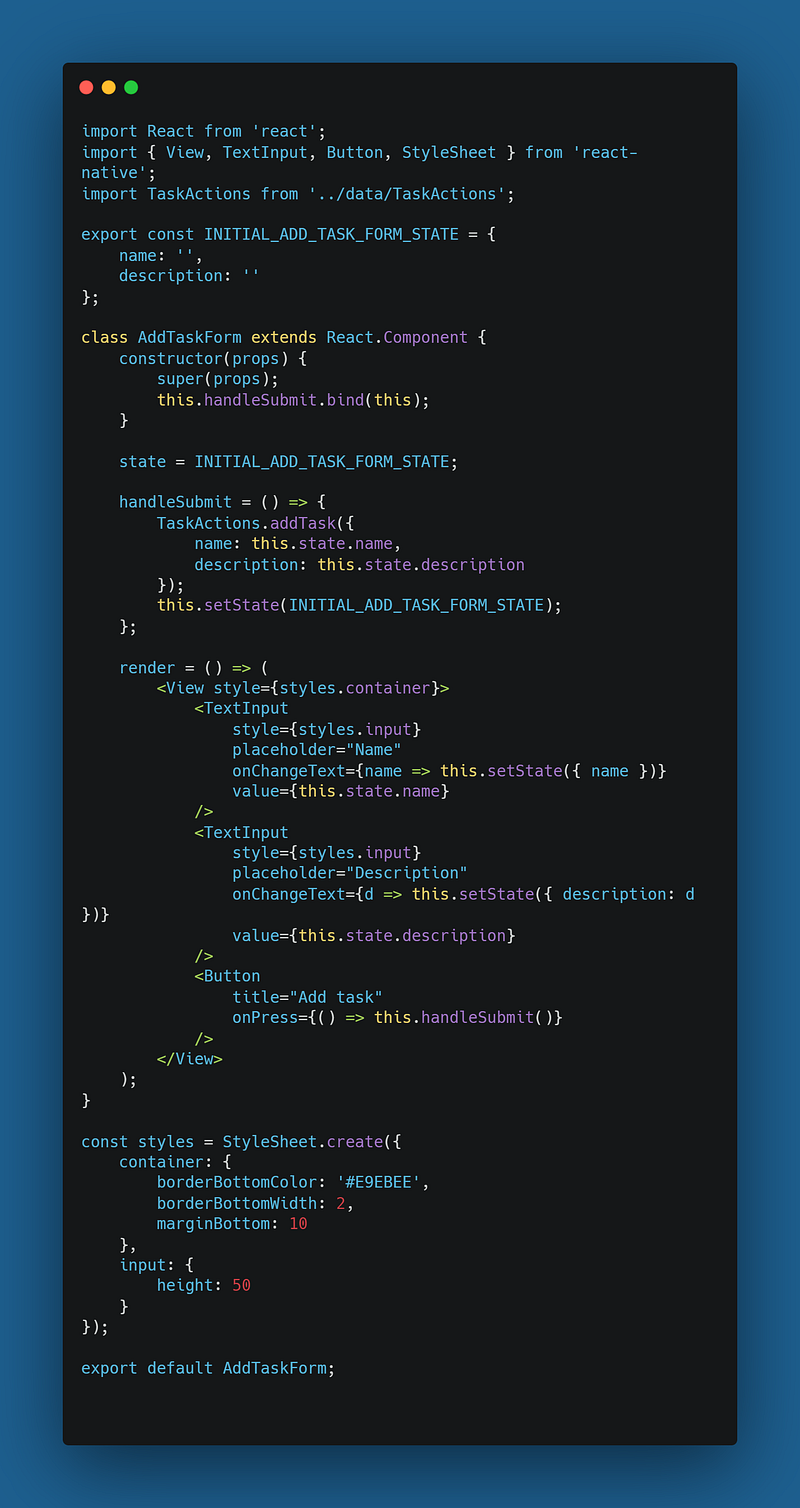
  • To do that initialize JSON data directly to the view & create an add task form that dispatches an ADD-TAKS action on submit.
  • Now we are required to use the Input component for that we will create a separate file responsible for the whole feature (we will create states for name and description, a handleSubmit function that dispatches the ADD_TASK action, and a render function with the form view markup).
JavaScript
Software Development
React Native
Programming
React
Recommended from ReadMedium