
What is the difference between C# and .Net ?
This is a gentle introduction into C# and .Net
I hope this helps!
In Short…
C# is a programming language that is very similar to Java, it was created by Microsoft in 2000.
.Net (dotnet) is the framework that makes C# work on your computer
That’s it!
well, almost…
Let’s dive into it
Agenda
- Introduction C# and .Net, a Microsoft Story
- What is C#?
- What is .Net?
- What are the different .Net and C# versions?
- What is the difference between .Net Framework, .Net Core and .Net?
- How is C# code compiled?
- What is the C# Compiler?
- What is the difference between an executable (exe) and a library file (dll) in C#/ .Net?
- What is the Common Language Runtime (CLR) in .net?
- What are the components of the .net framework?
Introduction C# and .Net
C#
C# (pronounced C sharp), it was unveiled in 2000, the first version C#1.0 was released in January 2002.
The idea was to have a simple, modern, general purpose and object-oriented-language.
Although it stemmed from the C language family (C++ and C), it was (still is) meant to provide an alternative to Java. That’s why both look awfully similar.

A Microsoft story
In the late 90s, Microsoft, under the leadership of Bill Gates, dominated the tech landscape with its Windows monopoly. The U.S. Department of Justice accused Microsoft of employing a strategy known as “Embrace, extend, and extinguish,” where successful technologies were embraced, bundled with Windows, extended beyond the original standard, and rendered incompatible to drive users towards Windows and Microsoft products.

When Sun Microsystems introduced Java in 1995, Microsoft saw the potential and tried to implement this strategy. It introduced its own version of the Java Virtual Machine (JVM) with Internet Explorer 3 (IE3) but went beyond the Java standard. In 1997, Sun sued Microsoft for incompletely implementing the Java 1.1 standard, leading Microsoft to discontinue its implementation.
Rather than adopting Sun’s JVM, Microsoft opted to outpace Sun by creating its language and platform. Anders Hejlsberg, a renowned programming languages designer, was brought in to develop a language, unofficially dubbed a “better Java” in practice. This effort resulted in the birth of C# and the .NET framework.
So what about .Net?
Imagine wanting to write an application, but while doing that, you also need to code how the application is going to work with the operating system, the memory and everything else on your computer.
That’s when in the late ’90s, Microsoft initiated the development of the .NET framework with the goal of creating a platform centered around managed code — code executed under a runtime environment.
The idea is that the runtime will ensure that your code works under any OS/machine.
But Java was already doing it, having the philoshopy of ‘Write Once, Run everywhere’. So Microsoft had to strike back.
The inaugural release of the .NET Framework in 2002 marked the introduction of C#, a language for writing managed code with a design reminiscent of C++
TLDR:
- In the 90s Java is doing great, Microsoft tries to copy Java and fails
- Microsoft comes up with C# as a Java competitor and introduces .Net (a runtime)
- .Net is meant to emulate Java philosophy of “Write once, run everywhere” i.e. Java code can run on all OS thanks to its runtime
Is C# dying?
Microsoft and its all ecosystem is in full swing, C# and .Net are not going anywhere.
In fact it’s thriving!
With billions worth of investments and recent AI (Copilot), Cloud (Azure), DevOps (GitHub) integrations, Microsoft is going for it.
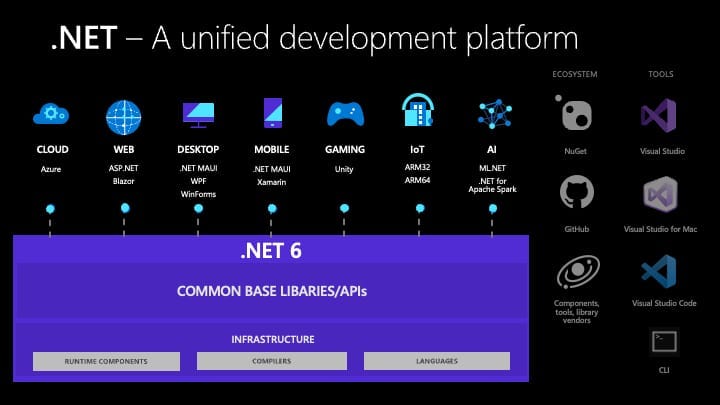
Here are some the things you can write in C#:
- Backend Development (API, EF Core, Linq, Async, OOP)
- Front End (ASP.Net, MVC, Razor, Blazor)
- Mobile (Maui, Xamarin)
- Game (Unity)
- Desktop (Maui, WinForms, WPF)
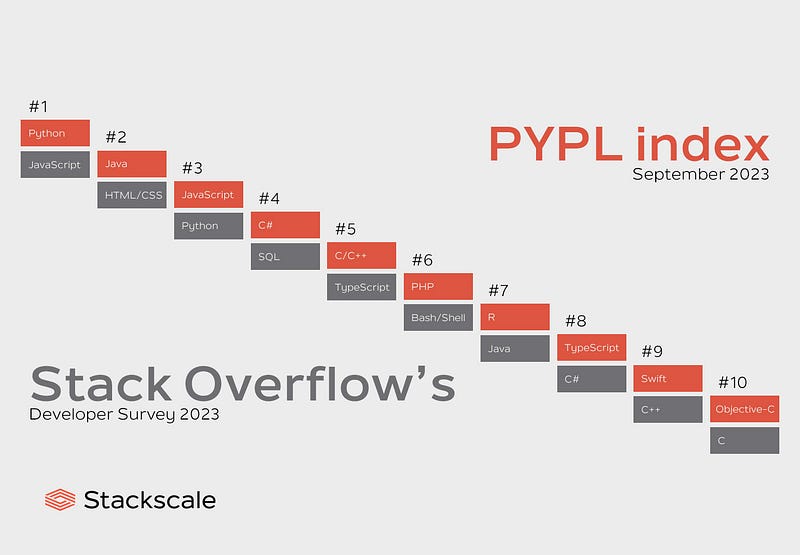
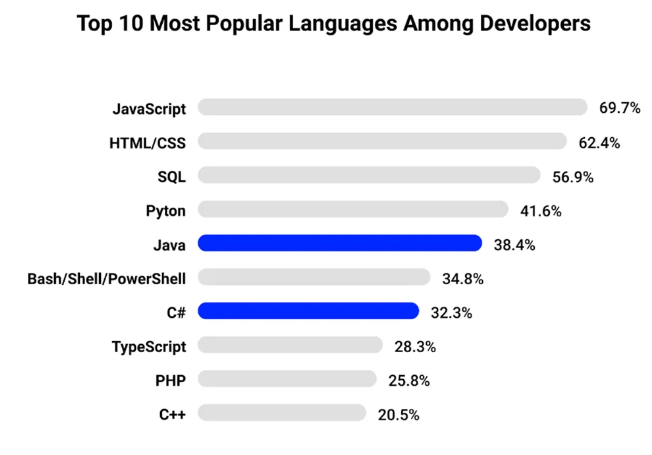
How popular is C#?
At time of writing (early 2024), we can see that C# is ranking in the top 5-10 languages
What is C#?
C# is a programming language and has the following principles:
- Object Oriented
- Strongly typed
- Simple to use and general-purpose
What is Object Oriented Programming in C#?
// In C# we work with objects
// Let's imagine we want to print on the Console a person's name

// First we create an boject (aka a class)
public class Person
{
    // Properties
    public string Name { get; set; }
}

// Now we can use this class to create a person and give a name
Person person1 = new Person(); // create object
person1.Name = "Bob"; // assign value to Name

// The advantage are many, one of them reusability (aka creating many persons)What is strongly typed in C#?
In C# every variable has a type and must comply to the “law” of the type, i.e. trying to pass another type will cause a compilation error
// Declare a variable with an explicit type
int age = 25;

// age = "John"; => wouldn't work
Some cool Features of C#
- Async Method
- Linq
- and many more! nullabe, Properties, Delegates and Events, Pattern matching…
Async
Frees the main thread of doing something else whilst operation is being performed, particularly helpful for database or API operations
public async Task<string> GetPersonByName(string name)
{
    return await _client.GetByName(name);
}
So while the Task GetPersonByName is making an API call, the main thread keeps doing its thing
Linq
Linq is like SQL but in C# code!
// 1st way to use LINQ
var result = from person in people
                     where person.Age >= 30
                     select person;
//2nd way to use LINQ
var result = people.Where(person => person.Age >= 30);
while these two are the most popular features, the language keeps evolving and keeps adding new features (nullabe, Properties, Delegates and Events, Pattern matching…)
// ? for a nullable
int? nullableInt = null;

// so easy to get/set variables in C#!
public string Name { get; set; }

// creating an event
public delegate void MyDelegate(string message);

public event MyDelegate MyEvent;

// Pattern matching
if (shape is Circle c)
{
    // Code for handling Circle
}
What is .Net?
A developer platform meant to write all sorts of apps in a productive and safe manner. Its main components are:
- A C# compiler
- A runtime to execute C#
- Libraries to provide out-of-the-box functionalities
- A garbage collector to manage memory
Oh and .Net is Free & OpenSource
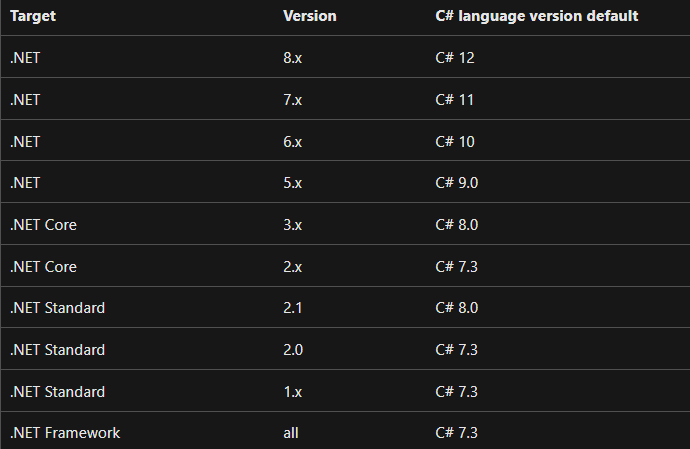
What are the different .Net and C# versions?
.Net and C# have different versions, confusing? I know
What is the difference between .Net Framework, .Net Core and .Net?
Now the real confusion starts
A bit of history

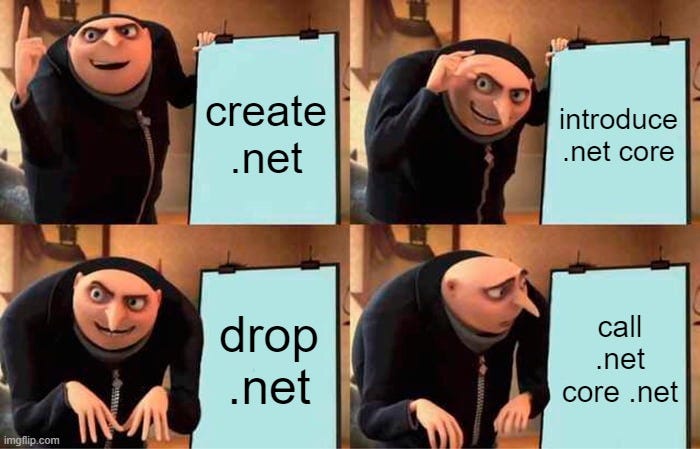
First there was .Net Framework, then came .Net Core which had the advantage of running both on Linux, Windows and MacOS.
Now there is only .Net Core, but to make things confusing it is now called .Net.
Which one to use?
- .Net Framework: Microsoft stopped working on it
- .Net Core: now the de-facto .Net where all new versions are being developed
Since .Net Core 5.0 Microsoft decided to call .Net Core just “.Net” without the Core. This the future of .Net, all newest version are now .Net Core.
Thanks for the confusion
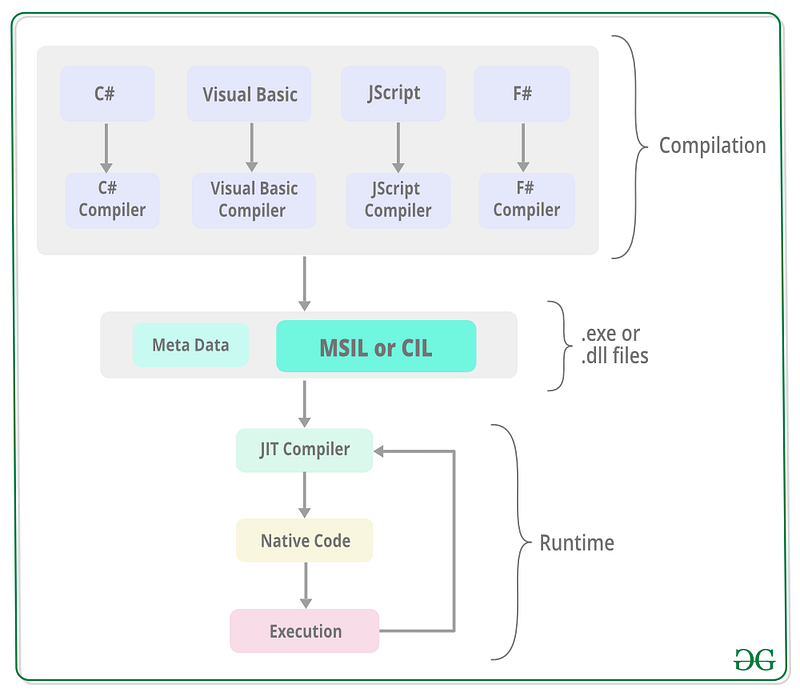
How is C# code compiled?
Compile time
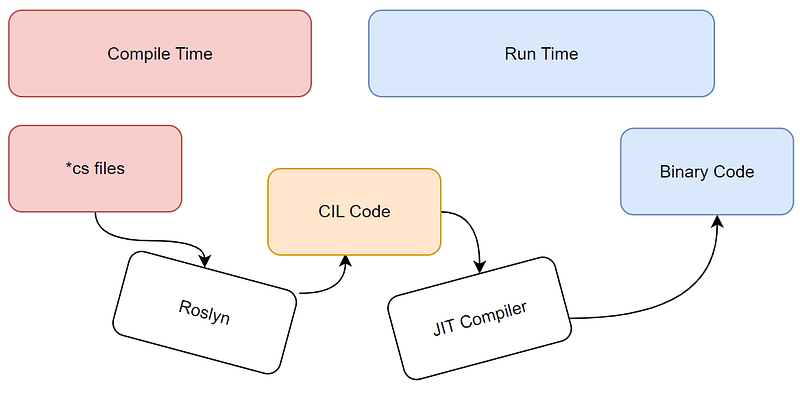
The compile time happens when the application builds, the runtime happens when the application runs
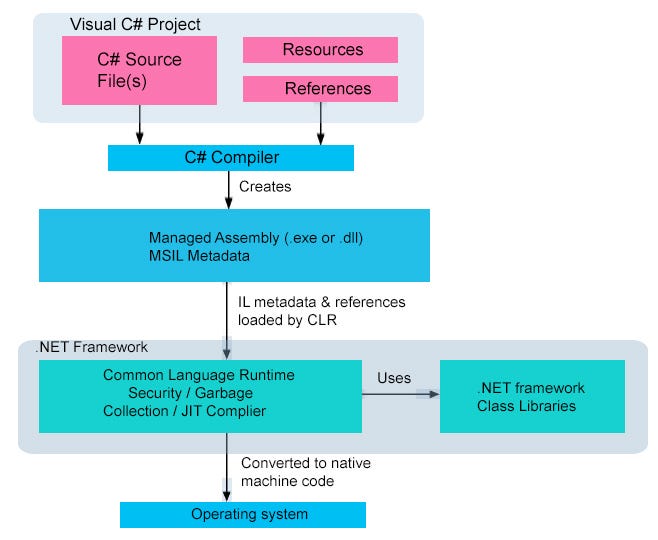
- 1/ Developer writes C# code and clicks on build
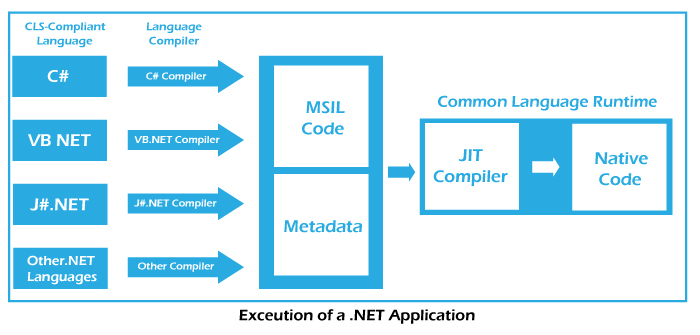
- 2/ The C# compiler translates the C# source code into Common Intermediate Language (CIL)
The compiler is either known as csc.exe (in older versions) or Roslyn (current compiler)
- 3/ Intermediate Language (IL) Generation
The compiler takes all .cs files and generates an assembly containing IL, which is a low-level, platform-agnostic representation of the code.
IL is not machine code but is closer to machine code than the original C# source.
- 4/ Assembly Generation: the generated IL is stored in an assembly.
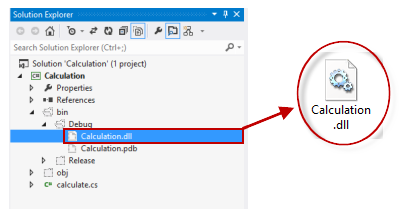
An assembly is a fundamental unit of deployment in .NET and can be either an executable (with the .exe extension) or a library (with the .dll extension).
Runtime
- 5/ Just-In-Time (JIT) Compilation: just before the application is executed, the IL is turned into native machine code
The Common Language Runtime (CLR) is responsible for this process.
- 6/ Execution of machine code. The .Net Runtime keeps running in the background and handles tasks such as memory, error handling…
Why is c# code first compiled into intermediate language (IL)?
- Write Once, run everywhere
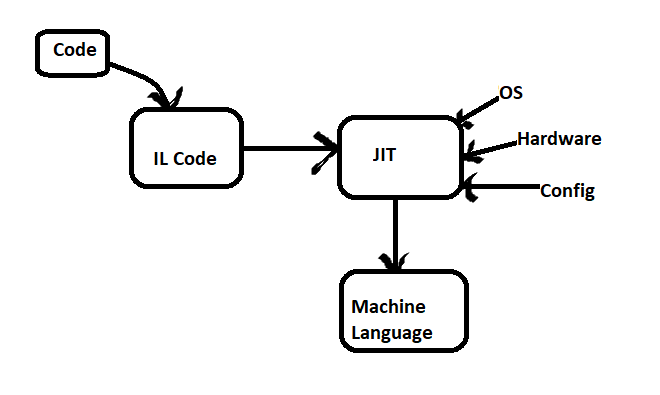
IL is a low-level, platform-agnostic representation of the code. When C# code is compiled into IL, it becomes independent of the underlying hardware and operating system.
This allows the same compiled code (IL) to be executed on any system that has a compatible Common Language Runtime (CLR).
2. Improved performance & security
When the application runs, the CLR on the target system performs JIT compilation to generate native machine code which then becomes optimised for the specific hardware architecture and local OS
Now let’s look at each component one by one to understand them
What is the C# Compiler?
Is it Roslyn or the csc compiler?
- Traditional C# Compiler (
csc.exe):
The traditional C# compiler is a command-line tool named csc.exe. It has been part of the .NET framework since its early versions.
// Example with csc
csc.exe /out:MyProgram.exe MyProgram.cs
2. Roslyn Compiler (C# 6.0 and later):
With the release of Visual Studio 2015 and C# 6.0, Microsoft introduced the .NET Compiler Platform, codenamed “Roslyn.”
Roslyn is now the default compiler used by Visual Studio starting from version 2015.
// Example usage with Roslyn:
dotnet buildWhat does the C# compiler do and how does it work?
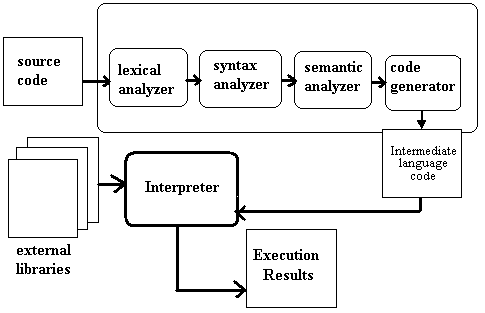
Let’s see how the C# compiler (Roslyn) works
- Source Code: This is the code you wrote
int result = 10 + 5;- Lexical Analysis and parsing: the compiler checks if the code makes sense
Tokens: [int, result, =, 10, +, 5, ;]- Abstract Syntax Tree (AST): the compiler organises your code into a structure
   (Assignment)
    /      \
(result)  (+)
           / \
(10) (5)- Semantic analysis: The compiler performs semantic analysis to check the correctness of the code, including type checking and resolution of symbols.
// can 10 + 5 be added (2 integers can be added together)- Intermediate Language Code (CIL): your code is turned into CIL
IL_0001:  ldc.i4.s   10
IL_0003:  ldc.i4.s   5
IL_0005:  add
IL_0006: stloc.0- Output Generation: the code is turned into an executable (exe) or library files (dll)
What is the difference between an executable (exe) and a library file (dll) in C#/ .Net?

What is an assembly in C#?
Both exe and dll are assemblies, but what are their differences?
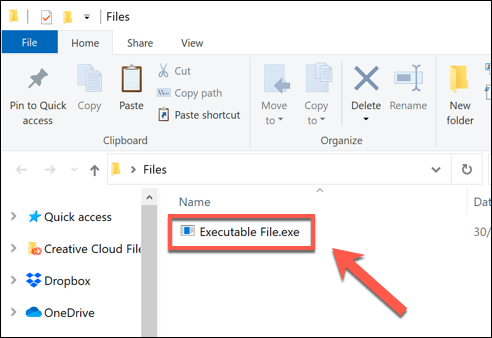
What is an Executable (EXE) File in C#?
Anything that you can run!
- Extension: .exe
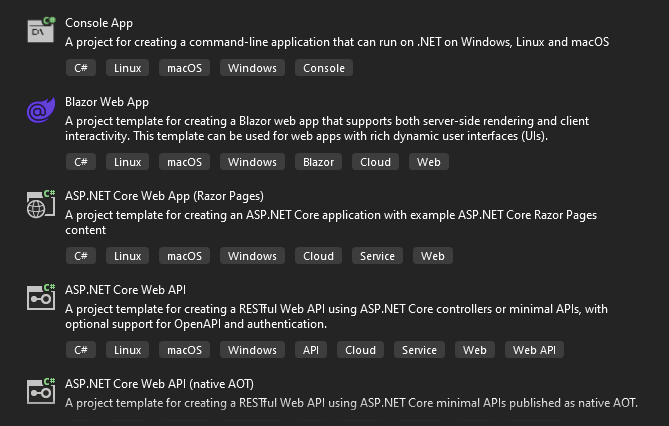
- Example: Console Application, Web App, API, Blazor App…
What is a Dynamic Link Library (DLL) File in C#?
Anything that can be used by multiple programmes but cannot be executed by itself
- Extension: .dll
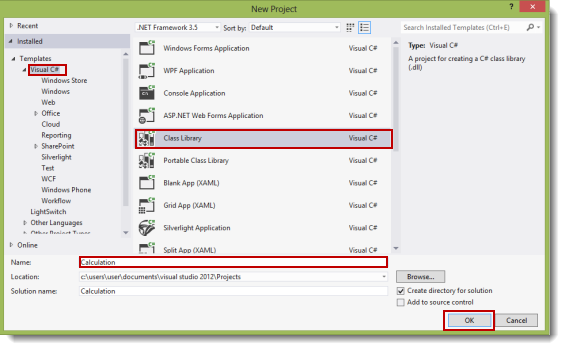
- Example: a class library
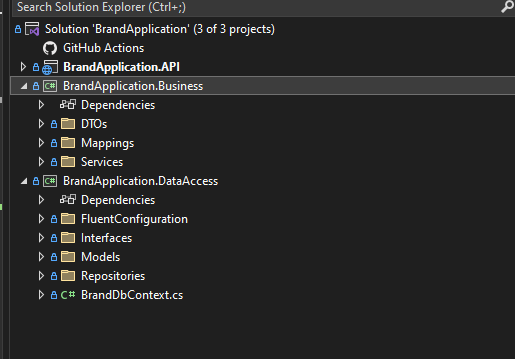
In this example, we have a an API project, the executable, and two class libraries (dll) that are supporting the executable
What is a .cs file in c#?
Now you might think, class libraries and other projects are created with projects that end by .cs, but what are these?
A file with a .cs extension in C# represents a C# source code file.
The .cs extension stands for "C Sharp".
When does a file become either an .exe or a .dll?
So you might wonder, how does it go from .cs to an .exe or .dll?
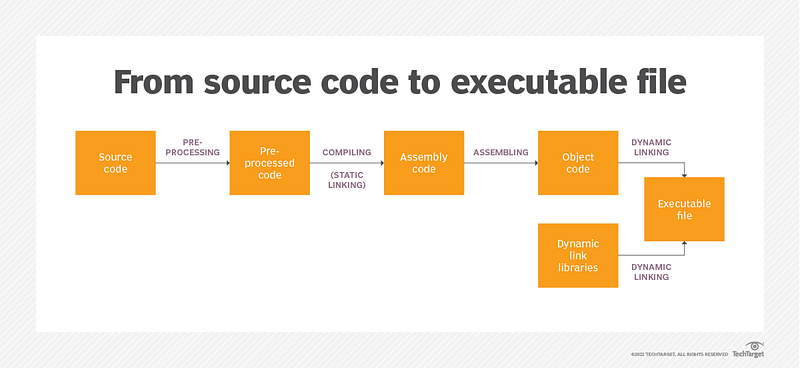
After the intermediate language generation (IL) stage, the code is turned into an assembly (.exe or .dll)
For .exe files, the CLR might run some optmisations based on the target OS
What is the Common Language Runtime (CLR) in .net?
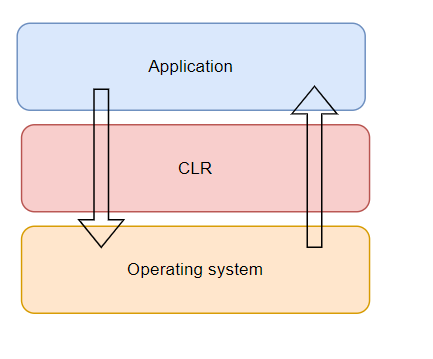
The CLR is an environment that manages the execution of .Net applications
It comes into play at Runtime
When you run your app, these things happen:
- The CLR triggers the JIT to compile your code into native code
- While the app is running the CLR manages all the background tasks
What is Just In Time Compilation (JIT) in .net?
JIT happens when the app runs, JIT takes the Common Intermediate Language and translates it into machine code specific and optimised for the given OS.

JIT carries some important tasks:
- Compiles CIL into binary code at runtime
- Ensures that any OS can run the code
- Optimises code for the host
- Ensures that the CIL complies to Common Type System safety rules
Also, it is good to note that:
- JIT Compilation occurs dynamically at runtime
The conversion of CIL to native binary code happens on-demand, right before the code is executed for the first time.
- When JIT is used, not all code is necessarily compiled.
This is known as “lazy compilation” or “on-demand compilation.” Not all methods or functions are compiled at the beginning; rather, only the necessary parts are compiled as needed during the program’s execution.
- Warm-up Period:
When an application starts, there might be a short delay as the JIT compiler generates native code for frequently used methods. This is sometimes referred to as the “warm-up” period. Subsequent executions benefit from the compiled code, resulting in improved performance.
What does the Common Language Runtime (CLR) Do in .Net?
As the application runs, the CLR performs multiple important tasks:
- The JIT compilation (see previous section)
- Memory management (Garbage collector))
- Error handling
- Thread management
When does the CLR come into play?
- Programmer writes code
- Code compiled to CIL
- CLR comes into play: starts program under local OS
- CLR JIT compiler compiles IL code into binary
- As app runs, CLR runs low-level aspects of the app
What background tasks does the Common Language Runtime do?
Let’s look at the tasks of the CLR into more details (see previous version for JIT)
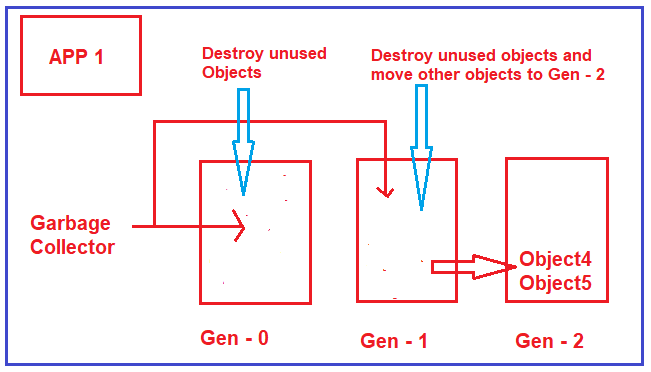
- Manages Memory:
The CLR is responsible for memory management, including allocation and deallocation of memory for objects, as well as garbage collection to reclaim memory that is no longer in use.
Benefits:
- Frees developers from having to manually release memory.
- Allocates objects on the managed heap efficiently.
- Reclaims objects that are no longer being used, clears their memory, and keeps the memory available for future allocations.
- Provides memory safety by making sure that an object can’t use for itself the memory allocated for another object.
- Provides Error Handling:
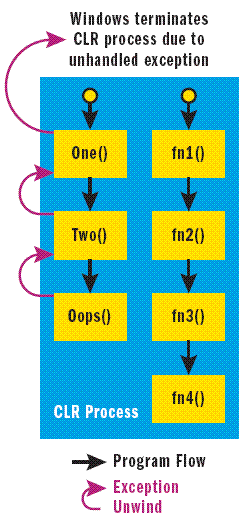
The CLR includes an exception handling mechanism to manage runtime errors.
It allows developers to catch and handle exceptions, promoting robust and reliable application behavior.
- Deals with Threads:
The CLR manages multithreading in .NET applications. It provides facilities for creating, synchronizing, and managing threads.
This includes features such as thread synchronization mechanisms, thread pooling, and other tools to ensure proper handling of concurrent execution.
- Loading and Execution of Assemblies:
The CLR is responsible for loading and executing assemblies, managing dependencies, and resolving references. It ensures that the required components are available and correctly linked during runtime.
Those are some of the features and tasks of the CLR, of course there are many more things that the CLR does!
What are the components of the .net framework?
We have just seen the whole process from c# code to machine code with the .Net Framework.
But that’s not all, there is so much more that .Net provides!
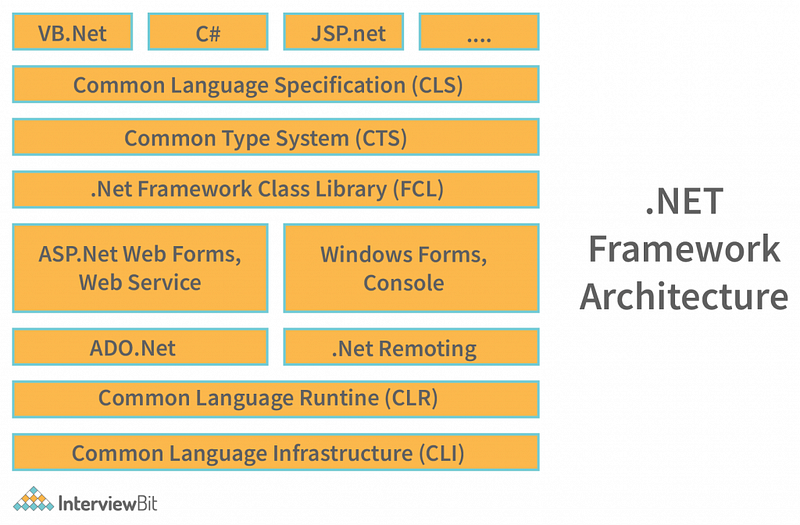
All .Net frameworks include one or more Common Language Runtime (CLR), an AOT runtime (CoreRT, in development), a Base Class Library (BCL), and the .NET SDK.
Let’s zoom on some main components that we haven’t touched upon yet
The .NET Framework class library (FCL) and the Base Classs Library (BCL)
Basically both libraries provide you with classes and methods so you don’t have to write them yourself, thus speeding-up your development.
Framework class library (FCL)
Provides out of the box templates for .Net apps (called application frameworks):
- Building Console Applications
- Windows Forms
- Windows Presentation Foundation
- Web Applications with ASP.NET
- Windows Service Applications
- Service-Oriented Applications with WCF
- Windows Workflow Foundation
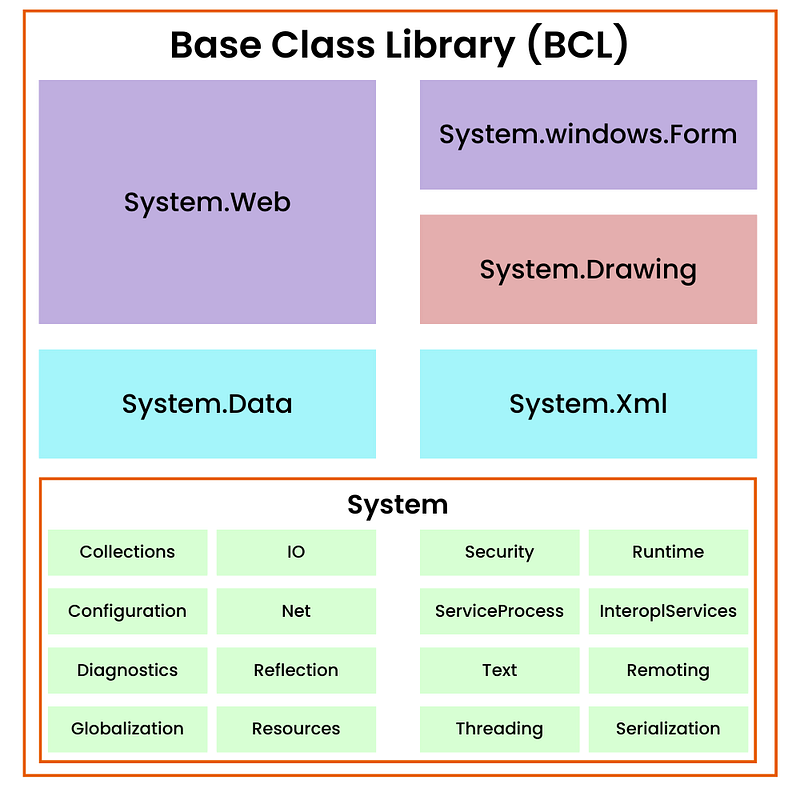
Base Classs Library (BCL)
A set of libraries that comprise the System.* (and to a limited extent Microsoft.*) namespaces. They are also refered to as Runtime libraries
Example:
- System.String
- Microsoft.Extensions.DependencyInjection
The .NET SDK (Software development kit)
SDKs are libraries that extend your code, basically you get out of the box features by installing them.
To get them use the Nuget manager
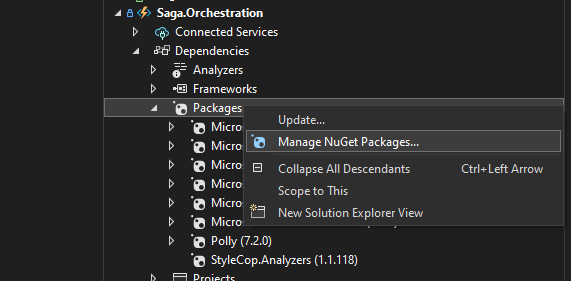
They range from the work of large and robust corporations (like Microsoft) to the work of one individual!
It is thus important to be aware of the potential for security breaches when installing new SDKs.
Here are some of the most downloaded SDKs:
- Entity Framework Core (ORM)
- Azure
- HttpClient
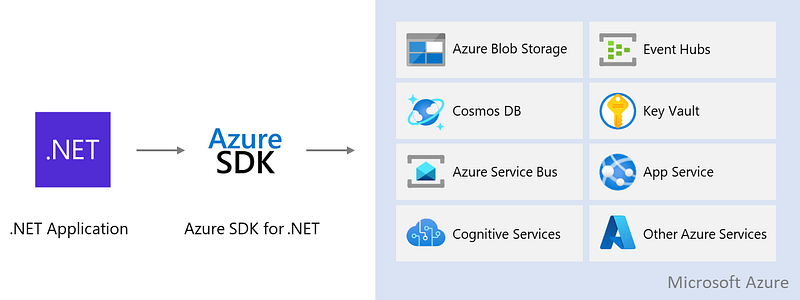
AOT runtime
What is AOT? It’s been introduced in .Net 8
Remember the whole process to compile C# code? Well, everything after CIL, then AOT skips it
Why would one want to do that?
- Faster startup time
- Smaller memory footprint
Basically, tje process skips the JIT and optimisation part, so there is less process happening.
AOT is a new feature in .Net and has to be explicitly indicated like so in the .cs file
<PublishAot>true</PublishAot>


