
What is AWS Amplify? -Advantages and Disadvantages of AWS Amplify
All the information you need to understand AWS Amplify

Today, most companies have moved to a cloud-based model and are prepared to take the chance. Among the numerous cloud adoption services available, Amazon Web Services (AWS) cloud platform — takes the lead around the globe. Amazon’s ever-expanding portfolio now includes over 90 services and products designed to help developers create fast, reliable, serverless, and safe web and mobile applications.
Among many great services from Amazon Web Services, AWS Amplify is one such service that is gaining traction and has greatly simplified and accelerated developer tasks. This article will dive deeper into all the AWS Amplifying features, integrations, pricing models, upsides, and downsides.
All about AWS Amplify
AWS is a full-stack platform designed to assist web and mobile developers in developing full-stack and scalable applications that are hosted by AWS. The platform includes a plethora of tools and services that enable users to easily configure backends, connect apps, deploy static web apps instantly, and manage content outside of the AWS console.
AWS Amplify, which was launched in 2017, is a full-suite package of tools and services designed to help developers easily create and launch apps. It may also include code libraries, ready-to-use components, and a built-in command-line interface (CLI). The most significant advantage of this tool is that it allows you to quickly and securely integrate a wide range of functions ranging from API to AI.
Likewise, the user experience is another reason for the launch of AWS Amplify. The most important aspect that must be considered when developing any application is user experience. AWS Amplify was designed to unify the user experience across multiple platforms, including web and mobile.
It gives users the freedom to build on the platform with which they are most comfortable, which is especially useful for front-end development. Most Amplify users also claim that its scalability factor makes full-stack development much more comfortable.
Now, let’s get familiar with the working mechanism of AWS Amplify.
How does AWS Amplify Work?
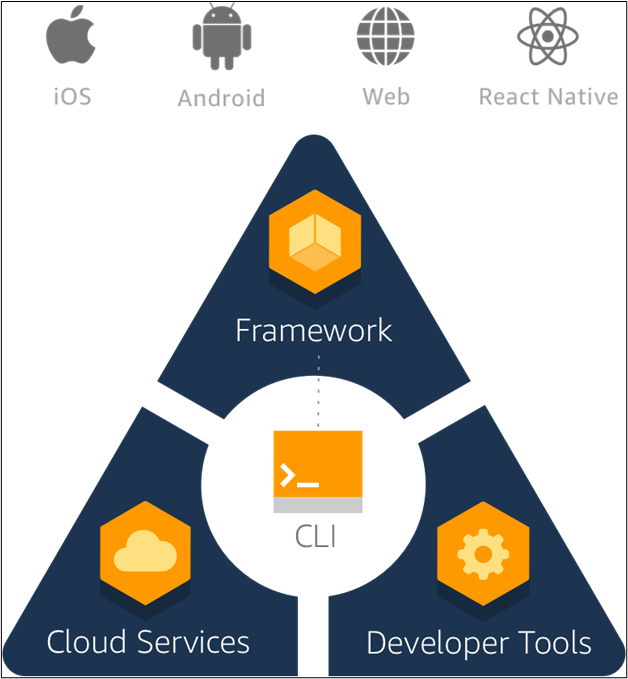
Here, considering AWS Amplify to be a JavaScript library that allows you to create and deploy serverless applications in the cloud. It is a full-stack application platform with both client-side and server-side code. In a nutshell, AWS Amplify is made up of three major parts:
1. Libraries
2. User Interface (UI)
3. Command Line Interface (CLI) Toolchain
Now, all of these elements work together to manage the application development lifecycle. Here’s a quick rundown of each component:
1. Libraries
Using AWS Amplify, you can add, integrate and interact with AWS cloud services through this component. The library also facilitates safe authentication, storage of files, data stocking, serverless APIs, analytics, push notifications, AR/VR, and multiple other applications’ features.
2. User Interface (UI)
Here, in AWS Amplify, the pre-built UI components, including the authentication-requirement component, are developed around cloud workflows in your application.
3. Command Line Interface (CLI) Toolchain
The component Command Line Interface (CLI) Toolchain helps your application to be scaled. Also, if you ever need to add additional cloud services and functions, CLI commands can change your AWS-managed backends efficiently.
Now, let us find out the main advantages of AWS Amplify in the next section.
Advantages of AWS Amplify
1. Free to Start
AWS Amplify offers many free and impressive levels that offer several advantages and zero costs. You only need to establish a paid level if you reach a high threshold of technical requirements.
2. Development is Easy and UI driven
Using AWS Amplify for building mobile and internet appliances, offers a simple, fast and modern user interface approach. Here, everything is provided by the out-of-the-box UI component so that you do not have to code one. Likewise, CLI’s design and workflows are also seamless, speeding up the development of the application.
3. Backend Support
AWS enhances app performance by providing built-in support for backend management,
4. Web-Based Analytics
AWS Amplify comes with a web-based analysis Dashboard for developers, designers, and project managers, which is extremely useful. It tracks not only users and attributes but also includes enforcement metrics. The analytics are always up to date and can be managed and tracked by teams.
5. Usage-Based Payment
Like many other paid AWS Services, you only pay for the services you use, the AWS Amplify payment model is very flexible and cost-effective.
Now that we know about the main advantages of AWS Amplify, we are now diving into its disadvantages.
Disadvantages of AWS Amplify
1. Consistent Changes
This is a platform that is constantly changing, and new changes and features are consistently implemented. This means that an AWS Amplify user always has to stay up to date and explore the platform on a regular basis.
2. Cost
Since AWS Amplify is a managed service, the end-user is less controlled by the environment and the packages installed which can affect your websites. You must also face other disadvantages of managed services.
3. Traffic Distribution
When using AWS Amplify, you cannot distribute load balancers. In some cases, it may be a major drawback, such as the management of traffic spikes and latency problems.
4. Higher Learning Curve
You might know that the time you spare written code is spent on learning the platform when you are a new-born AWS Amplify. Sometimes it is rather difficult for beginners to find the right documentation method, and the various methods and versions can sometimes make navigation difficult.
How does Amplify integrate with other AWS Services?
For cloud-connected workflows, CLI toolchain, and code libraries, AWS Amplify provides user interface elements. These libraries can be used mutually or independently to integrate with other AWS services without adjusting the existing application’s UI. You can add a couple of code lines to the combination of an existing front-end application with Amplify in simple terms.
When combining an actual front-end application with AWS Amplify, few approaches, such as a complete regeneration of resources, can be done using the amplify toolchain.
Top features of AWS Amplify
In AWS Amplify, a variety of apps can be created to communicate easily with the AWS services through the AWS Amplify Framework such as iOS, Android, React Native, Flutter, React and Vue. Let us examine AWS Amplify’s most popular web hosting features:
1. Authentication
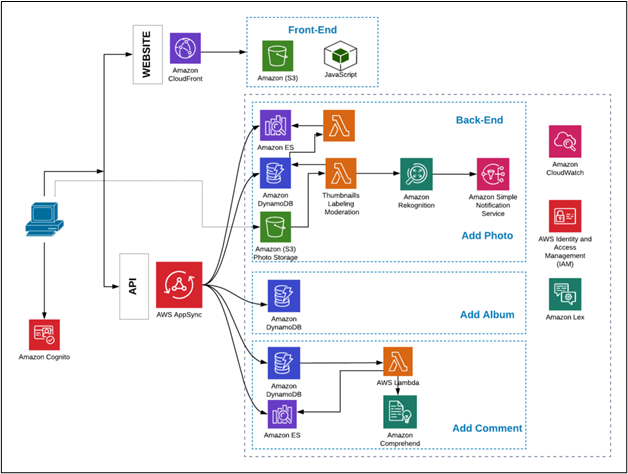
It is easy to create onboard fluxes with a completely managed user directory and pre-built sign-ups and log-in passwords with AWS Amplify. It can also login via social media tools such as Facebook, Google or Amazon. Thorough access control of Amazon Cognito is also available for mobile and web applications.
2. Store and Sync Data Securely
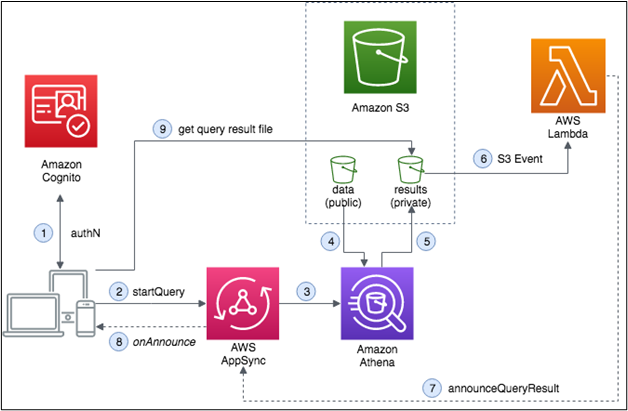
With the help of Amazon AppSync and Amazon S3, AWS Amplify allows you to seamlessly synchronize and store information between applications. It also makes it easy to sync offline.
3. Quick Backend Updates
Since the AWS Amplify is serverless in nature, it has been much easier to modify the back end related functions. This saves time that was previously used to configure and maintain back-end features.
4. Data Store
AWS Amplify offers a Data Store feature that allows to leverage shared and distributed data without having to write additional code on both offline and online use cases. The result is a distributed and cross-user information that is as easy as working with only local data.
5. Deployment and App Development
AWS Amplify supports faster development of apps and is also very helpful in on-going implementation.
6. Machine Learning and AI Requirements
As Amazon Machine Learning services like Amazon SageMaker are supported, AWS Amplify is very useful for implementing machine learning and AI requirements. User cases such as text translation, text generation, interpretation and text transcription can be easily created to name a handful. It also makes it possible to simplify the orchestration of advanced cases like automatic training pictures etc.
7. Analytics
AWS Amplify can be used for auto-tracking to track user sessions and analytics webpage metrics. You can collect data streams and analyze data in real-time to build robust marketing strategies that increase the adoption, commitment and retention rate of customers. The Amazon Pinpoint and Amazon Kinesis power this capability.
8. Interactions
The AWS Amplify allows you to create interactive, engaging conversation bots with like deep learning technologies running Amazon Alexa with a single line of code. Tasks such as automated customer chat support and product information and recommendations can be created with chatbots as great user experiences.
9. PubSub
The AWS Amplify now allowing messages to be sent between your app instances and the backend to create interactive experiences in real-time.
10. Push Notifications
In AWS Amplify, marketing and analytics skills allow you to better target customers. The adjustment of your content is now possible, and the communication is supplied via Amazon Pinpoint via multiple channels such as e-mail, texts and push notifications.
11. Storage
With Amplify, it is now possible to safely store and manage content generated by users including photos or videos on your device or cloud. It offers a simple mechanism for managing user content in three different types of warehousing buckets — public, protected or private.
Likewise, finding your prototype for production is also easy thanks to the ability to scale your applications in the cloud. This capability is enhanced by Amazon S3.
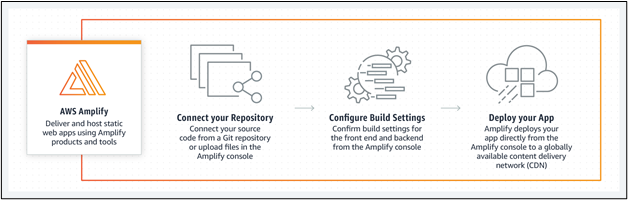
AWS Amplify Pricing
AWS Amplify comes with the following price structure:
- Free Tier: This is one of the first payment methods which can also be called the trial period of 12 months.
- Pay As you Go Model: After the first 12 months, the free tier is converted to a pay-as-you-go model which means you start paying for whatever you use.
Here is a pricing breakdown of all the services included in the pay as you go model:
The components and libraries of the framework are free. The good thing is payment is only required for the services you are utilizing to develop and deploy your app. For example, if S3 is your storage model for Amplify, you will only pay for the regular S3 fees and nothing else.
For app development, deployment, and hosting, the AWS Amplify free tier comes in handy and can be used for 12 months, along with a few restrictions. Afterwards, you will need to pay $0.01 per minute of build, $0.023 per GB of storage monthly, and for every GB used, the cost comes down to only $0.15.

Conclusion
AWS Amplify can be very much useful for web and mobile developers. All built-in authentication, notifications, and APIs can be created with a minimal workload for full-stack applications. It enables you to focus on your priorities by giving your customers the best value instead of wasting time maintaining the application infrastructure.
You will not be disappointed when you want to deploy safe, efficient apps quickly without the underlying infrastructure manager.


