avatarKaren Cherry

Free AI web copilot to create summaries, insights and extended knowledge, download it at here

2305

Abstract

bstack publication, or you can make your own.</p><p id="a30f">Because a wordmark is an image file —accepted formats are png or jpeg — you need to use image-making software to create your own wordmark. The most popular software is <a href="https://www.canva.com/">Canva</a>, but Photoshop, Paint.net and Microsoft Paint are all fine too.</p><p id="3cc2">Canva is online software that is intuitive to use. There are free and paid plans, but you can do almost everything you need for a Substack publication using the free plan.</p><p id="d2b9">To create a wordmark you need an image size of 1344 x 256 pixels. In Canva, click ‘Custom size’ on the home page to make a canvas of the correct size — there are no pre-built templates for this particular size or shape in Canva.</p><p id="f11c">Add text elements to your wordmark design, making sure that the text fills most of the space.</p><figure id="1f03"><img src="https://cdn-images-1.readmedium.com/v2/resize:fit:800/1*z3McwATeEFDCJwfIbDWxPg.png"><figcaption>Make a Substack wordmark using Canva</figcaption></figure><h1 id="41e2">What size is a Substack wordmark?</h1><p id="e46e">For Substack, the wordmark should:</p><ul><li>be at least 1344 × 256 pixels, and</li><li>have a maximum aspect ratio of 21:4.</li></ul><h1 id="2172">How to add a wordmark to Substack</h1><p id="46c2">To add a wordmark to your publication, navigate to the ‘Basics’ section of your publication settings and click ‘Upload wordmark’.</p><p id="f0ed">Publication dashboard > Settings > Basics > Wordmark > Upload wordmark</p><p id="fe5b">If the upload is successful, you will see the wordmark in your publication settings.</p><figure id="b811"><img src="https://cdn-images-1.readmedium.com/v2/resize:fit:800/1*ryn0CA4ZNEtA7EDKzQkquw.png"><figcaption>Upload the wordmark from the ‘Basics’ section of your publication settings</figcaption></figure><h1 id="b37e">Best practices for Substack watermarks</h1><p id="dd52">When designing a watermark, the focus should be on the words. Make them large and easy to read.</p><p id="3561">Check out other publications to see which styles work best.</p><p id="a00a">If you can, use a transparent background for your design, rather than a white or black background. For example, the Deplatformable wordmark pictured near the top of

Options

this post looks great when viewed in screen-dark mode on a black background, but not so great on a screen with a white background.</p><p id="08d4">Transparent backgrounds are only possible with png file formats, not jpeg formats.</p><p id="107f">To get a transparent background you can upgrade to a premium Canva account which will allow you to export your design with a transparent background, or use a free image editing tool like Paint.net to select and delete negative spaces.</p><p id="ad8c">Test your design after you’ve uploaded it by visiting your publication’s pages and posts in dark and light modes to make sure the words are readable.</p><h1 id="787e">Pitfalls to avoid</h1><p id="1b8c">Wordmarks with coloured backgrounds don’t look as good as those with white, black or transparent backgrounds.</p><p id="3fcd">Leaving empty space around the edges of your design is unnecessary and will result in words that are too small on web pages and the Substack app. Substack displays your wordmark with a lot of empty space around it, so you don’t need any space inside your design; bring the words right to the edge of the image.</p><p id="ded7">Don’t overthink it. You don’t need a watermark to have a successful Substack publication and it can take hours of your precious time to make one. Your time is probably better spent on creating top-quality content or improving your About page.</p><h1 id="78a6">Closing thoughts</h1><p id="bb06">You don’t need a watermark for your Substack publication, and there are plenty of successful pubs without one. It’s better to spend your time making high-quality content than fiddling about with wordmark designs.</p><p id="1261">If you do decide to use one, keep the letters large and make sure they extend right to the edges of the image.</p><p id="1bfb">Transparent backgrounds work best.</p><p id="13d3">Upload your wordmark in the basic settings part of your publication dashboard.</p><p id="1307"><i>Join my free ‘<a href="https://pubstacksuccess.substack.com/">How to Succeed on Substack</a>’ newsletter for helpful tips like this straight to your inbox each week. I don’t use your email address for anything else. Here’s that link again: <a href="https://pubstacksuccess.substack.com/">https://pubstacksuccess.substack.com/</a></i></p></article></body>

What is a Substack Wordmark?

And do you need one for your newsletter?

Hi there! I just passed $13K with my B2B Substack. On Medium, I share what I learned along the way, so you can build your own newsletter growth machine too.

In this post I’ll cover:

  • What is a wordmark?
  • Do you need a wordmark?
  • How to get a wordmark
  • What size is a Substack Wordmark?
  • How to add a wordmark to Substack
  • Best practices for Substack wordmarks
  • Pitfalls to avoid

Let’s get to it!

What is a wordmark?

A wordmark is a heading or title that is presented as an image, rather than text. Also known as a logotype, you can think of it as a font-based logo.

On Substack, a publication’s wordmark appears at the top of the publication’s homepage and at the top of each online post and page.


Anne from Cafe Anne and Paul from Deplatformable Newsletter are two Substack publication owners who use wordmarks

Do you have to have a wordmark on Substack?

Many publications use wordmarks because they add personality to a publication’s pages and posts.

Wordmarks are optional. Many popular Substack publications do not have wordmarks.

Without a wordmark, the publication’s name is displayed in a simple font at the top of each post and page, as in the picture below.
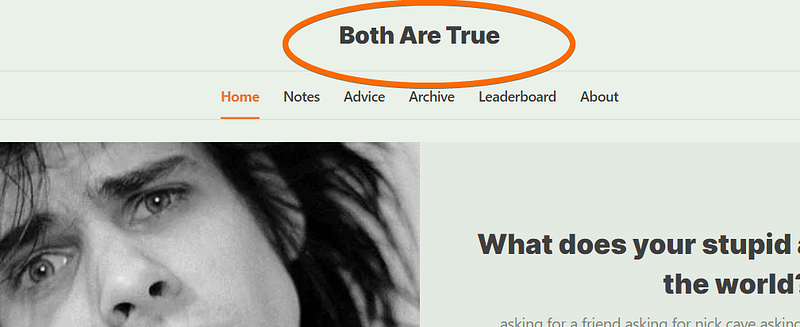
Alex from Both Are True doesn’t use a wordmark in his publication, a top humour newsletter

How to get a wordmark for Substack

You can get a designer to create a wordmark for your Substack publication, or you can make your own.

Because a wordmark is an image file —accepted formats are png or jpeg — you need to use image-making software to create your own wordmark. The most popular software is Canva, but Photoshop, Paint.net and Microsoft Paint are all fine too.

Canva is online software that is intuitive to use. There are free and paid plans, but you can do almost everything you need for a Substack publication using the free plan.

To create a wordmark you need an image size of 1344 x 256 pixels. In Canva, click ‘Custom size’ on the home page to make a canvas of the correct size — there are no pre-built templates for this particular size or shape in Canva.

Add text elements to your wordmark design, making sure that the text fills most of the space.

Make a Substack wordmark using Canva

What size is a Substack wordmark?

For Substack, the wordmark should:

  • be at least 1344 × 256 pixels, and
  • have a maximum aspect ratio of 21:4.

How to add a wordmark to Substack

To add a wordmark to your publication, navigate to the ‘Basics’ section of your publication settings and click ‘Upload wordmark’.

Publication dashboard > Settings > Basics > Wordmark > Upload wordmark

If the upload is successful, you will see the wordmark in your publication settings.

Upload the wordmark from the ‘Basics’ section of your publication settings

Best practices for Substack watermarks

When designing a watermark, the focus should be on the words. Make them large and easy to read.

Check out other publications to see which styles work best.

If you can, use a transparent background for your design, rather than a white or black background. For example, the Deplatformable wordmark pictured near the top of this post looks great when viewed in screen-dark mode on a black background, but not so great on a screen with a white background.

Transparent backgrounds are only possible with png file formats, not jpeg formats.

To get a transparent background you can upgrade to a premium Canva account which will allow you to export your design with a transparent background, or use a free image editing tool like Paint.net to select and delete negative spaces.

Test your design after you’ve uploaded it by visiting your publication’s pages and posts in dark and light modes to make sure the words are readable.

Pitfalls to avoid

Wordmarks with coloured backgrounds don’t look as good as those with white, black or transparent backgrounds.

Leaving empty space around the edges of your design is unnecessary and will result in words that are too small on web pages and the Substack app. Substack displays your wordmark with a lot of empty space around it, so you don’t need any space inside your design; bring the words right to the edge of the image.

Don’t overthink it. You don’t need a watermark to have a successful Substack publication and it can take hours of your precious time to make one. Your time is probably better spent on creating top-quality content or improving your About page.

Closing thoughts

You don’t need a watermark for your Substack publication, and there are plenty of successful pubs without one. It’s better to spend your time making high-quality content than fiddling about with wordmark designs.

If you do decide to use one, keep the letters large and make sure they extend right to the edges of the image.

Transparent backgrounds work best.

Upload your wordmark in the basic settings part of your publication dashboard.

Join my free ‘How to Succeed on Substack’ newsletter for helpful tips like this straight to your inbox each week. I don’t use your email address for anything else. Here’s that link again: https://pubstacksuccess.substack.com/

Substack Tutorial
Newsletter Creation
Newsletter Marketing
Email Marketing Lists
Writing For Money
Recommended from ReadMedium