
What Is A Partition In Oracle?
Here we are going to understand about partition concepts in oracle
What is a partition?
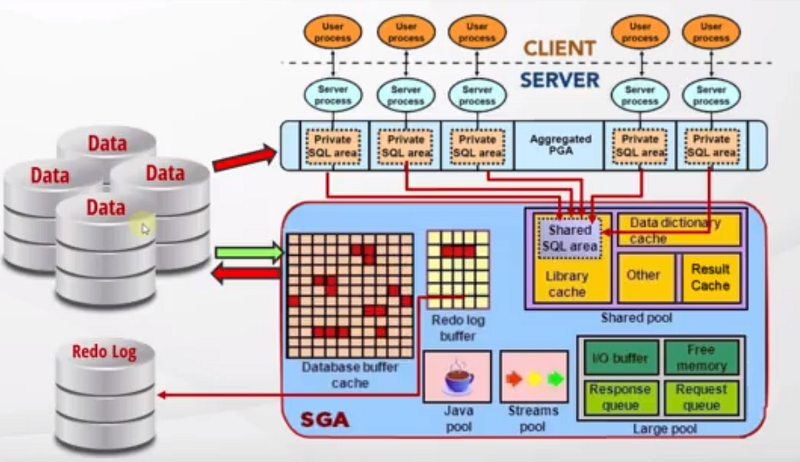
- When we run a query oracle will check whether the query result already exists in the result cache.
- If it’s not there, then it’s time to get from the memory.
- Also, it needs a proper execution plan.
- First, it checks the shared SQL area for a similar execution plan.
- If not, it creates a new execution plan.
- Since we have the execution plan now, it first checks the buffer cache if there is any data related to this query or not.
- If not, it’s time to go to the disc.
- As we know, our table data is stored in the “blocks”. When the server goes to the discs
- It has many different methods of reading from the discs.
- Most of the time, it reads all the blocks of a table to find some data.
- If the table is large this operation becomes very costly to perform.
- Even if you create indexes for this sometimes this will not work. Because, as you might know, indexes go to the rows by their rowids.
- When you search a range of data, indexes will not work so efficient. Because data will be in many different blocks and for each block and row, the server will search the index for each row and go to different blocks for them.
- So this will be a costly operation and the database server will not do that.
- For example, if you have an index in the hire_date column of the employee table, and if you search for a single hire_date, it will work with the indexes well.
- But if you query the employees who were hired between a range of dates, it will not work. Instead, it will read all the tables and then will filter by the dates.
- If your table is pretty big, you may get this result in minutes, maybe in hours.
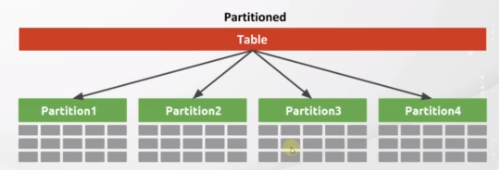
- Oracle published a feature called “table partitioning”. Partition means simply dividing a table into smaller tables physically.
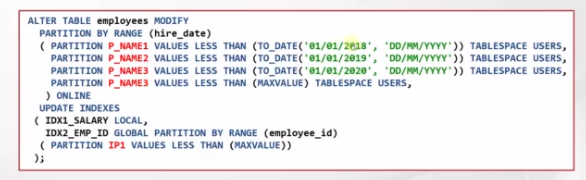
- For example in the query I mentioned, we can divide our table into smaller partitions based on the hire_date column. For instance, we can say that, create a partition for the date up to the first day of 2018, then create a partition up to 2019, and you can create more if you wish.
- You can create as many partitions as you wish.
- So, when you insert a row, for example, if the hire_date in the inserted row is below 2018
- It is inserted into the related partition.
- If the hire_date is above 2018 and below 2019, it is inserted into the related partition, too and this goes on like that.
- So, we will physically group the related data into sub-tables. But you can see and reach these partitions
what is the performance effect of partitioning?
- When we run a query on a table, if our query searches for significant data which is stored in one partition, the server will not search all the data of that table.
- Instead, it will read from only one partition.
- Assume that, if your table has 100 partitions, and the result of your query is in only 1 partition, you will get a 100x faster than a normal table read.
- So if your table is big, you need to divide them into partitions based on the most common filter.
Oracle supports a wide array of partitioning methods:
- Range Partitioning — the data is distributed based on a range of values.
- List Partitioning The data distribution is defined by a discrete list of values. One or multiple columns can be used as the partition key.
- Auto-List Partitioning — extends the capabilities of the list method by automatically defining new partitions for any new partition key values.
- Hash Partitioning — an internal hash algorithm is applied to the partitioning key to determine the partition.
- Composite Partitioning — combinations of two data distribution methods are used. First, the table is partitioned by data distribution method one and then each partition is further subdivided into subpartitions using the second data distribution method.
- Multi-Column Range Partitioning — an option for when the partitioning key is composed of several columns and subsequent columns define a higher level of granularity than the preceding ones.
- Interval Partitioning — extends the capabilities of the range method by automatically defining equipartition ranges for any future partitions using an interval definition as part of the table metadata.
- Reference Partitioning Partitions — a table by leveraging an existing parent-child relationship. The primary key relationship is used to inherit the partitioning strategy of the parent table to its child table.
- Virtual Column Based Partitioning — allows the partitioning key to be an expression, using one or more existing columns of a table, and storing the expression as metadata only.
- Interval Reference Partitioning — an extension to reference partitioning that allows the use of interval partitioned tables as parent tables for reference partitioning.
Conclusion:
- What we can do for partitioning is, if our table is big and if there is a common filter on this that means we need to create partitions for that specific table or index.
- This will improve the performance so much. Alright.
- Increases performance by only working on the relevant data.
- Improves availability through individual partition manageability.
- Decreases cost by storing data appropriately.
- It is easy to implement as it requires no changes to applications and queries.


