
What Happened to My Stripe Account Connected to Medium (Stripe fixed it)
Summarizing how I spent my day yesterday and why
~~~~~~~~~~~~~~~~~~~~~~~~~~~~~~~~~~~~~~~~~~~~~~~~~~~~~~~~~
⚙️ Check out my series on Automating Cybersecurity Metrics. The Code.
🔒 Related Stories: Bugs | Data Breaches | Cybersecurity
💻 Free Content on Jobs in Cybersecurity | ✉️ Sign up for the Email List
~~~~~~~~~~~~~~~~~~~~~~~~~~~~~~~~~~~~~~~~~~~~~~~~~~~~~~~~~
I’m not getting rich off this blog and I don’t write it for the money. They say writers need to write — that’s me and has always been me. I wrote something that I thought was really dumb in fourth grade for a writing competition. I won anyway. I’ve just always been a writer.
Now you may be saying, wow but your grammar is not perfect and there’s a bunch of typos in your blogs, sheesh. For me, at the moment, writing is not about perfection. It’s because I have a very important message I want to share with people — about how to better secure their cloud environments. Attackers are running rampant organizations have zero governance in their accounts.
Tomorrow, I’ll share a story tomorrow I heard from a colleague of mine who is helping a client that gave a contractor full control of their admin account password — with the contractor’s MFA device assigned. Don’t do that! Some people really need help with cloud governance, my topic at the moment. So that’s why I write.
Today, I’m sharing the details of this event or possibly incident (only the companies providing the related services would know that) because if anyone else is having similar issues would like them to know what occurred. I’m also still thinking over all the ways my systems could have been compromised, potentially, and how to address it.
Payments from Medium
I don’t get paid a lot from Medium each month. And I realized a while back I wasn’t getting my payments in my Stripe account, even though Medium was sending me the emails saying I was getting paid every month. I just ignored it because honestly I get paid more in a one hour consulting call for clients through IANS Research than I get paid from Medium in a whole year. It wasn’t worth my time to bother with it.
In fact, all said and done, the total amount since 2019 is less than one hour of consulting. I’m definitely not doing this for the money, at least not directly. I’m hoping that you will want to hire me for training, a cloud security assessment, or a cloud penetration test through my company, 2nd Sight Lab. My website is severely out of date. I’ve been busy. Or perhaps you will want to sign up with IANS and call myself or one of the other cybersecurity experts when you have questions.
Getting around to looking at the problem
For some reason, yesterday, I finally decided to look into why I wasn’t getting payments. I have zero time for this. But once I started looking I got more and more annoyed about where that money was ending up. It was in someone’s bank account, and not mine.
I didn’t even remember how to get into Medium to see my payment settings. It had been so long that I realized I had moved over a year ago and had to update my address. I also noticed that an old email I don’t use much anymore was linked to my Medium account, so I changed it.
Then, I tried to figure out what was going on with my payments and payment settings. I figured out that I need to go to “Partner Settings” in the left menu. Was my banking information correct? Oh, it’s not connected to my bank. It’s connected to Stripe. Well what account is it over at Stripe?
The only thing you get in regards to your connection to Stripe to get your Medium payments (that I can see) is this link below. That link only sends you to the Stripe login page. There is no information about your Stripe account. When you click that link all you get is a Stripe login page.
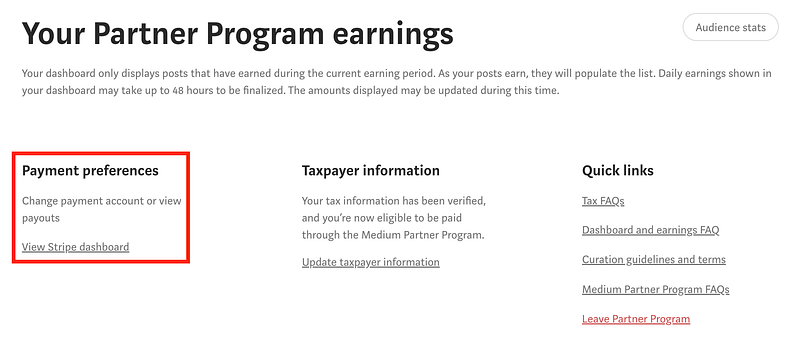
Now on the one hand, this limits risk for Medium because someone can’t say they exposed your Stripe information. On the other hand, it is not very helpful when you haven’t logged in for ages and can’t remember your Stripe login.
Learn from my mistakes! Make sure you put your Stripe information in
a safe place where you can remember it later when you need it.
Well, I presumed the login to Stripe was the email I had associated with my taxes and billing somewhere in the Medium settings. I used that email in the past but it wasn’t one I use any longer, so I reset the email in those settings. I hope that doesn’t affect my payments. It does not say that is the case anywhere on the Medium site.
I asked Medium a couple of times if there was a way to associate my Medium account with a different Stripe account and got no response to that question. I don’t know how or where they link these things up and it makes it very difficult to troubleshoot.
It could make things more secure if they only let a human who knows what they are doing make that change. And that human never makes a mistake. And that human does not get phished. And that human is not an insider making changes to direct funds to the wrong bank account.
An automated and audited process controlled by the end customer — if secured properly — would be better. But if Medium doesn’t have the resources to do that maybe the human approach is better. They just need to make sure you have separation of duties so one person cannot start sending payments to the wrong place. But that was not the problem after troubleshooting further.
First, I tried to login to Stripe with the email I found on Medium. Now, this particular email was an old one I used to use for accounting purposes in my business. I periodically rotate emails and passwords as so many data breaches occur and these things get compromised. If you want to see if your email or password has been compromised you can check here — a site by someone I’ve followed in cybersecurity for a long time, Troy Hunt:
Google catch-all for bounced emails
This email had a problem a while back and was bouncing and I didn’t realize it. Here’s the problem that caused the email bounces. Google and Gmail used to allow you to put in an asterisk as a catch all for all the emails on any domain you manage bounce so you can get them at some administrative account. I always set that up because it helps me monitor what is happening with email accounts associated with my domain. Is someone spoofing and trying to use my emails? Any replies would come back to this catch-all email address.
In fact, any email bounces would also go to that address so you would know something was wrong. That would have helped immensely in this situation.
Somewhere along the way they broke that functionality (which I do not appreciate). The benefit of a catch all is that you can see if your email addresses are being abused. In this case, I was also able to get emails at an old address I had deleted and no longer use, in case I forgot to change it anywhere.
At some point, I recognized what Google had done. I think you can still configure a catchall, which I tried to do though I don’t think it every worked correctly. When I realized this particular email alias associated with some payment accounts was bouncing, I set up an alias on another email address to make sure I got those messages and tested it.
What that means when you set up an “alias” is that if an email goes to for example, [email protected] it will land in the mailbox you specify such as [email protected] (fictitious emails obviously). I know for a fact I did that and I have been receiving some emails monthly at that alias.
Now, when I went over to Stripe and used that email alias (and every other one I could think of that I may have used), Stripe reported “account does not exist.” I had no way to get into Stripe and reset the password because no matter what I tried, no account existed.
I ended up setting up a new Stripe account just to see if I could and that worked. Worst case I would ask Medium to switch my payments to the new account. Or at least that’s what I hoped. At this point I had no idea what was going on.
Hunting down my Stripe account
The only way I could know what my Stripe account was is if someone at Medium told me. I hunted down how to contact Medium support. Unfortunately, it is ultimately an email address. Stripe has the same issue. When I finally got into my Stripe account the first time and tried to contact support there were three options but the only one I could choose was email.
I was able to contact Medium and they did provide the email address associated with my Stripe account. They embedded an image in the text which I didn’t even see at first because I was focusing on the words they wrote. It essentially said my problem was caused by Stripe security restrictions. I couldn’t understand this because I never even do anything with Stripe except to get these Medium payments.
Well, after I realized they had sent me the email and it was the one I had tried the previous day, I tried to do a password reset at Stripe again. The next day, and it worked. I know for a fact I tried that email address multiple times the day prior. So now I’m a bit suspicious of what is going on. Here some scenarios I can think of:
- I have a security problem and someone is intercepting my traffic.
- They have a security problem.
- When Medium contacted them it triggered them to reactivate my account.
Again, I know for 100% certain I tried that email multiple times the day before so it wasn’t like I had a typo trying to access that Stripe account. If there’s one thing I am, it’s persistent and I always try things a few times to make sure I did it right and there’s not some temporary glitch.
So at this point, I can reset the password. I get a password reset email from Stripe — at that address. I reset my password. I login. I start investigating the problem.
There are a couple of error messages at the top of my account. I don’t remember exactly what they said but here’s the gist of it.
- One says I have broken the Stripe Terms of Service. How? I haven’t even done anything in this account other than receive Medium payments.
- It says that I can’t accept payments through my account as a business for some reason and to contact them if I think that is a mistake via a link in the message.
- I don’t remember if this was in the messages but my address was wrong since I had moved so I had to fix that.
Somehow I submitted a support request to Stripe.
I think I also clicked that “contact us” link to reinitiate the process of getting payments as a business in my Stripe account.
Meanwhile, I started reviewing the payment information to see what payments were missing from Medium. Now Medium had responded saying that I wasn’t getting paid due to some security problem with my account, so I presumed the payments were from prior years when I first looked at this payment list. I thought Medium was trying to send the payments, but Stripe was rejecting them, based on that statement.
After subsequent messages from Stripe, I realized that all my Medium payments had been accepted by Stripe, it was just that Stripe wasn’t sending the money to my bank account. I was able to see this dashboard and as you can see, there is nothing here but Medium payments.
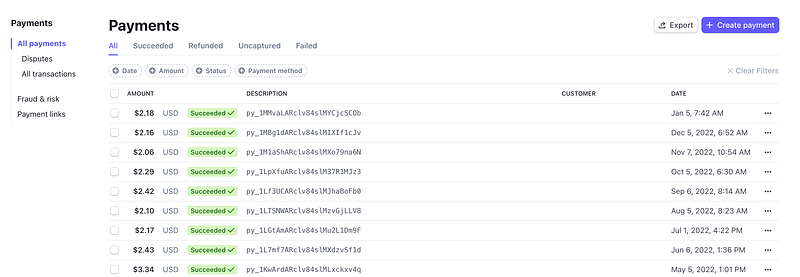
So one question that comes to mind is — if Stripe has rejected my account as a valid business and therefore cannot send money to my account, why are they still accepting the payments from Medium? Shouldn’t they be rejecting those payments so Medium stops paying them to authors that will never receive them? Curious.
Anyway, I was going to check my bank settings but I got an almost immediate email reply from Stripe. Yay! That was quick. How nice.
Now before I proceed, I want to explain why you should not be using email as a support solution — and especially if you are a financial institution. Free consulting right here! This is what I would explain to you if you paid me hundreds of dollars for consulting. I hope enough financial institutions read this to get some traction in the industry on this problem.
The problem with email as a support solution
I highly recommend that organizations look into implementing secure dashboards for support rather than relying on email.
Here’s why:
- Phishing is one of the primary methods of attack that leads to a data breach. Although someone could try to trick you through your support portal (and I have on penetration tests) at least the person has to have a valid login.
- Hopefully your portal has a secure means of transport (TLS, the replacement for SSL, which is no longer secure). That means an attacker cannot intercept the communications with a man/monkey/monster-in-the-middle attack. Traditionally it’s called a Man-In-The-Middle attack when someone gets your messages, reads or alters them, and forwards them on but I’ve noticed people using other term sot make it gender neutral. I really don’t care. Anyway, I think there’s more risk of this with an email account than with a properly configured TLS connection. Can your email administrator read the mail? Can someone at your email provider, like Gmail? How do you know? If you correctly configure TLS I think you’ll have more certainty about the communications.
- If you use a portal, both you and the customer have a thread and record of the communications. Someone can’t simply delete the communications (if your portal is designed correctly). These records may be important later in legal disputes or when a new person joins the thread to try to resolve the problem. Side tangent: MAKE SURE PEOPLE READ THE ENTIRE THREAD. It is so annoying when new support people join and only read the last message and reply with an incorrect solution someone already provided.
- You can assign a ticket number to each request. Then if you are trying to reference the issue, you can reference the ticket number, instead of asking for PII or account IDs.
PII stands for personally identifiable information and refers to things like email, phone numbers, etc. Account numbers identify your account with an organization and attackers may be able to leverage that along with your publicly available information (which is generally a lot) to trick the institution into granting access to your account or making changes that direct your funds elsewhere.
DO NOT ASK PEOPLE FOR PII ON TWITTER. DO NOT GIVE OUT PII ON TWITTER. If you are responding to someone on Twitter do not give out your email, phone number, or any account information. Twitter has been breached in the past and in general, that is not a secure form of communication. As soon as I report any problem like this a bunch of scammers reply saying they can get me back into my account. Look at the follower count. It is usually low. If you see this on Twitter please report these accounts, and the accounts to which they refer you. Report them as spam and choose the first option for deceptive links, etc.
- You will reduce the risk that someone accidentally emails the wrong information to the wrong person. That happens a lot and is the root cause of a number of data breaches and cybersecurity incidents. If a person has to be logged in and looking at a specific account and reply to that account on a page in your portal, there is less chance that person makes such a mistake.
- Better auditing. How are you going to audit what your support people are doing in random emails? Perhaps they are all forwarded to a central account. But with a secure portal, you can set it up in a private network, track connections to it, perform security assessments and penetration test on it, and look at the logs for suspicious logins, network connections, and errors.
I wrote about more issues with insecure mechanisms for support and facilitating transactions in these posts for the mortgage industry. This is huge problem and I’m still dealing with banks who have some of these issues (and will be change that in the near future):
Back to our story…verification problems
Now back to the email I got from Stripe.
They apologized and said they sent me an email back in 2019 that the needed to verify my account for some reason. That’s odd. No other financial institution has needed to “verify my account.” Why is this only a problem with Stripe and why in 2019? At any rate I just want to fix the problem.
The person said that I had to go to some link at Stripe and put in a credit card to verify my account. This is supposedly part of their KYC (know your customer) process. I am familiar with this process because I worked at a bank in the past. I’ve written about some of those experiences on this blog. I used to build back office systems that had to support KYC. No other institution has ever asked me for a credit card as part of this process. You generally have to answer some questions pulled from a credit reporting agency.
Well, I type the link into my browser and verify it is actually a Stripe domain (not some phishing attack). It does go to a Stripe web page with almost nothing on it that asks me to insert my credit card. I use a new business card I have not used regularly too much yet — so I know the source if anything happens to that card. When I submit the page it just presents this spinning wheel that never stops.
I watched it for like five minutes before I sent a message to support and explained that it was not working. I asked the support person to make sure that the submission was OK and my account was restored.
About that same time I got kicked out of Stripe and at this point, I could not login again with the password I just set. Now, I thought perhaps I had made a typo because my dog was trying to get all my attention right when I changed the password and added a hardware security key for MFA. But I was pretty sure he interrupted me during the MFA process, not the password process.
And that’s another odd thing. I always, always, always use MFA. There was no MFA on my Stripe account after I reset my password. Resetting my password should not remove MFA. Or had someone gotten into my account? So many mysteries to which we may never know the answer.
At this point I attempted to reset my password — but I never got the password reset email. I tried a few times. I also hit the resend link. No dice. I sent another message to Stripe indicating I could not reset my password. I wasn’t getting the email.
At this point, a person responded to my first email about the verification link not working, telling me to login and try again. Um, I would if I could. Apparently this person didn’t see the message saying now I can’t login or reset my password. I reiterated this problem saying that password reset doesn’t work. I’m not getting the emails.
It was at this point when communication with Stripe seriously deteriorated. I had been going back and forth with them and the conversation just ended. I went to work on other things. Sometime around 5:30 p.m. ET I looked at my email again and “Freya” said that she understood that I couldn’t log into my email and that I should contact my email provider.
What.
Freya didn’t understand anything. I only include that name in case it was not actually a “Freya” or Freya needs more training.
At this point I’m getting a bit frustrated. I reply that is not the problem. I’m not getting the password reset emails. I explain it in very lengthy terms to make sure it is very clear.
The amount of money is so not worth the time I spent on this but now I’m wondering if something else is going on. I start to wonder if Stripe was compromised in the past and someone got into my account or if there’s something else I don’t know about Stripe security. I start to search around online to see what I can find.
What I discover is that Stripe did have a security incident — ironically in 2019 when they claim the email was sent. I have no idea if this related but I found this data breach incident notification. I found this notification for multiple states, one of which has been deleted, but I found the original on the Wayback Machine: https://archive.org/web/
This one is still up for California:
This doesn’t seem to be related since it has to do with corporate filings via an Atlas service. Also is Stripe GEP really Stripe? Well the Atlas terms of service are here at a Stripe domain:
I do not have enough information to determine if any of this is related, but the timing is a bit coincidental. I never used the Atlas service, but saying they cannot accept my payments due to some problem identifying my business is odd.
Disputes
At some point in addition to Freya’s email I got another email saying that Stripe cannot accept anymore payments because my business is too high of a risk due to “disputes” and they are going to refund all my credit card payments.
Ok now I’m really baffled.
First of all you have to understand what a dispute is and how it relates to receiving credit card payments. I used to resell what are called merchant accounts when I ran my prior e-commerce business. In order to accept credit cards you have to have what is known as a merchant account from a bank. Likely when you get an account at Stripe through Medium you are somehow getting a merchant account behind the scenes.
If you’re setting up a website to receive e-commerce payments, you can sometimes get the merchant account separately and then use what is known as an e-commerce gateway account to accept the payments. But in the case of getting Medium payments this is all rolled up together for you. It is convenient, but for organizations that make a lot of money through e-commerce transactions they often want to separate the two and negotiate better terms per transaction from banks directly on their merchant accounts and also the e-commerce gateway. Or perhaps one of the other can give an overall lower price by combining the two.
Anyway back to disputes. When you charge people’s credit cards it goes into your merchant account and then to your regular bank account. If customers “dispute” a transaction it gets held up or refunded by the company or financial institution that facilitates the payment until the dispute is resolved. A merchant must prove that the customer did, in fact, make the purchase via various means.
It is important for merchants to ensure that they have correctly set up their collection processes with proper documentation to ensure receipt of funds and a low dispute ratio. If a merchant gets too many disputes, the financial institution might view that merchant as a risk and close their account.
Now at this point, I’m like, can somebody tell me who is disputing payments made to my account? Since Medium is the only one paying me, is Medium disputing what they are sending me? I have no control over that and I seriously doubt that is the case. Are Medium payments even considered credit card payments? Are disputes even possible? I had already seen that the only payments I had were from Medium unless there was something buried back in history I could not longer see or research since I could not login.
By the way, after finally getting back into my account, you can see that there are ZERO disputes. That’s not to say one didn’t exist that was cleared out while I could not get into the account.
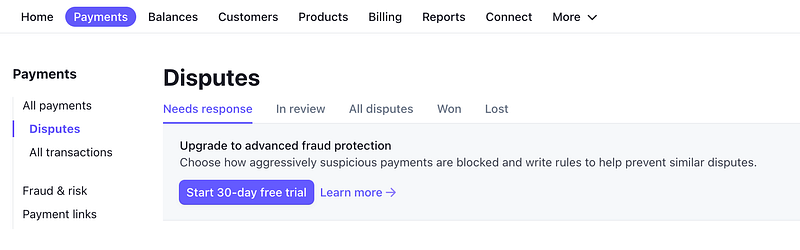
Hey look, you can buy a service to help prevent disputes. I wonder how many companies that collect credit card transactions charge extra for this service instead of including it when you sign up.
Twitter to the rescue
I was trying to avoid this but since it was clear I was not going to get help through the support channels at Stripe I took to Twitter. This is not ideal but sometimes a company has people working in low level support that do not understand what’s happening. They may be doing their job perfectly, exactly as expected, and following proper procedures. It’s just that someone who is aware of the procedures could be abusing the system, or it could simply be that the process is not working.
I wrote up a thread on Twitter in hopes of getting visibility to someone who could fix the problem. I also contacted Medium and explained to them what was going on, and what I was doing. I asked them again if I could change my Stripe account to a different one and I asked them if they had been refunded by Stripe — because that’s what Stripe was claiming it was going to do. I never got a response from Medium but I let them know the next day that the problem was resolved. I’m not sure if they were talking to Stripe or not behind the scenes.
Once I got on Twitter I got replies quickly from Stripe. Unfortunately they were not helpful. They were asking for PII (account information that I would never put on Twitter, because I have no idea how secure Twitter’s internal systems are at the moment, and it is not a banking platform.) I asked them to connect with support to get the messages I already sent and at first whomever was manning the Twitter account acted like they could not help me because I would not provide PII.
TRAIN YOUR SUPPORT PEOPLE NOT TO DO THAT.
That happens all. the. time. on Twitter. It is an excuse to say, “well, we want to help this customer but we can’t because they will not provide the information we need.” Companies can do better. Not just Stripe — many, many, many companies with support teams on Twitter. Ultimately Stripe got someone else involved who fixed the problem and I appreciate that.
What I ended up doing was submitting my Twitter handle to the support team and asked them to connect with whomever was replying to me on Twitter. I also posted on Twitter that I had done that.
Then I waited.
I went on to do other things and wasn’t really confident at this point the problem would be resolved as I was getting replies from neither company. But perhaps they were working on it behind the scenes. I made one last-ditch effort before I went to bed on Twitter as I pondered my options. The money wasn’t a big deal but moving my whole blog over this would be quite painful. Ugh. Just fix it please.
I went on Twitter and explained that I had worked in e-commerce before, there are no disputes on my account, and I had already explained that the only payments were from Medium. I also explained that I used to work on back-office support systems for banks and I know they can find my case if they wanted.
Finally, an immediate response. But it gets weird at this point and I really can’t explain it just yet. Stripe apologizes and says my account is fully restored. (Thank you. Thank you. Thank you.)
But from here on out I don’t know if I ever will be able to know what really happened because I don’t have access to the necessary logs and information. And this is one of the points where using a cloud service breaks down. I’ve written about it before — specifically in relation to email.
An email address that worked earlier in the day is now bouncing — and ultimately only emails from Stripe
Stripe says they sent me a message regarding the matter and my email bounced. And I’m baffled. I’ve managed email systems before — like installing Exchange and other cheaper options on a server I built myself. I’m quite familiar with how they work. An email server was involved in my first data breach I wrote about here:
So my two questions at this point, given the information I’ve already written above are:
- Is my email really bouncing? Because I got a password reset email from Stripe earlier today — at the email address they claim is now bouncing. I posted a copy with the address redacted on Twitter so Stripe — and Google — can see the timestamp.
- If it is bouncing now, why?
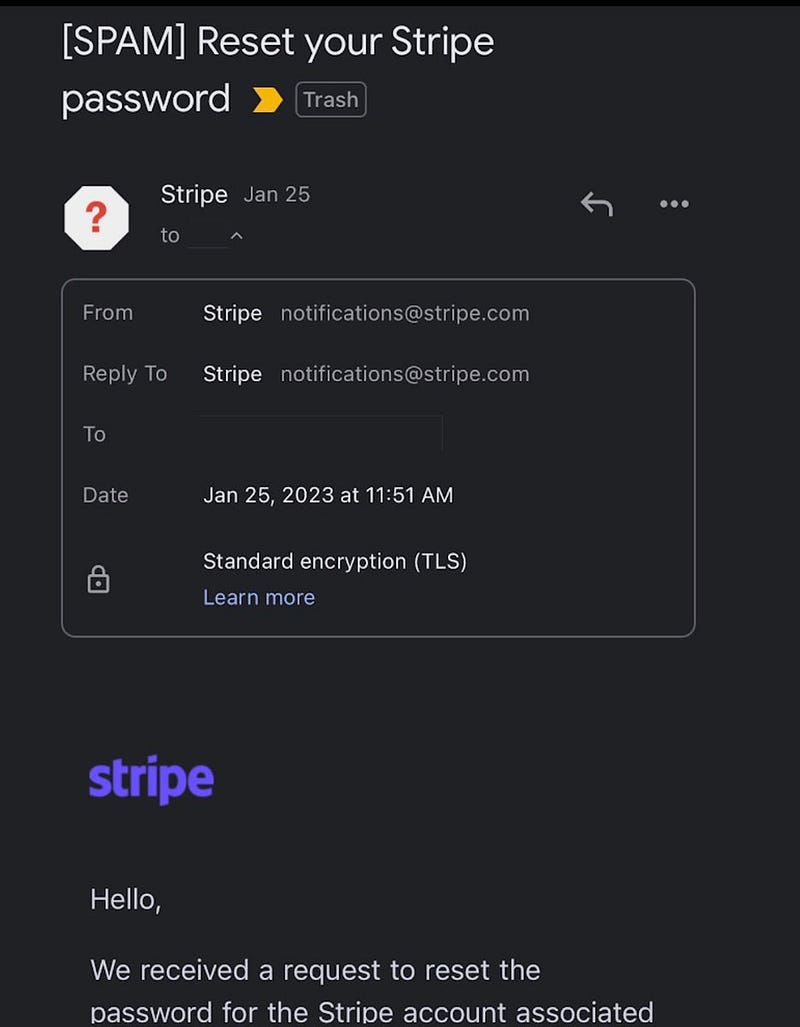
First thing I do is login and test the email and yes, messages to that address bounce. That’s really strange. I search my inbox and see that I have been getting emails at that address for months. I also got one Stripe password reset earlier today.
Next I login to my Google Workspace to find out if something is wrong with that email alias — which I KNOW exists. I specifically had to recreate it when the catch-all function stopped working.
If someone has deleted it I have a big problem — because in that case — someone accessed the admin portal for that email address. Luckily, I do not use that same email admin account for all my email addresses, so the impact would be somewhat limited. However, it’s still not good.
So I login to the email admin site and look at the aliases. The specific email alias related to Stripe is missing. I create it. I test again. The alias works.
And at this point I’m thinking about the only call I got on my phone associated with my financial accounts — from China. And I wonder what is going on. Has something, somewhere been breached? My own laptop? Ugh.
Then I go look at the Google Workspace audit logs to see when the email alias got deleted, and it gets even weirder. I can see in those logs actions that indicate creation and deletion of email aliases, but there are no prior logs for either creation or deletion of the alias used with Stripe, other than the creation action I just took.
Mind you, I had restored this email alias for the reasons above at some point. Also, I have been receiving mail from that email alias perfectly fine up to this point. And this problem with Stripe started in 2019 apparently.
I also had searched my mail prior to all this for messages from Stripe and had none — not at that address or any other — except for those related to the new account I created and the one password reset. That particular email address was created probably in 2019, or possibly 2018 when I set up that domain and started my business. I should have some messages from Stripe somewhere when I set up the account initially to use with Medium. I couldn’t find any in any of my mailboxes. If I close an email address I always migrate the email to some other account. I have no record of this email Stripe sent in 2019.
So what is going on here.
I go back to test the Stripe account again. The password I set earlier today is not working. I try to reset the password again and I am still not getting the password reset emails. I try emailing my alias again from emails outside my gmail organization and they work. But still no Stripe emails.
So back to Twitter and I inform Stripe that although the email is not bouncing, I am still not getting Stripe password resets. I mention that Google may be blocking them. And at this point it is 2:30 a.m. and I go to bed.
Too much time — for what?
I really hope this blog post helps someone because I spent entirely too much time on this for the return in payment from my Medium funds. As I wrote to Medium, it’s not really about me getting the money at this point — it is that someone else is getting that money and it’s not me.
One of my coworkers once called me “The Eagle” back in the day when e-commerce web sites were a new thing. There were no components to create an e-commerce grid. There was no code to copy online and no Stack Exchange to get help. I and my coworkers were trying to work out the logic to create a display where you cloud click next and back and get a grid of products — like 9 x 9 or whatever. Now this seems simple and obvious but if no one has never one it before, not so much.
My coworkers all gave up, but I persisted. Because sometimes it’s just about solving the problem. He said I was like an eagle — they will drown trying to hold onto a fish before letting it go. Yes, I know. It’s not always a good trait and not always appreciated. I was afraid that Stripe was going to just shut down my account and say “too bad” for being a pain in the rear. But they didn’t. Some companies would rather not hear about the problem — especially when you have less than $200 in payments in your account.
But Stripe fixed the problem, and I appreciate it.
The next day I had an email from Stripe. I tried to reset the password again, and it worked. I don’t have time to dig into all of this but I hope the companies involved will take the time to consider what led up to this and how to fix the various issues — including whatever happened with my email alias hosted by Google. I know for sure I set up that email alias in the past. I know for sure the email worked earlier in the day and then stopped working. I don’t have access to Google’s logs to inspect this further. And if someone deleted the logs — they won’t show the true actions that occurred on my account.
On my end, I checked that all my systems are up to date. One issue is that I allow a particular phone to read emails for that account related to the Stripe alias. If my iPhone got compromised somehow surfing the web or reading Twitter, then perhaps an attacker could get to the admin site on that phone somehow.
That’s why I have a separate account for other email addresses, but I forgot about this Stripe account. I need to revisit what is going on with that phone and Google Workspace to see if there is anything suspicious — and I will be changing that alias used for Stripe to some other account.
I just hope that doesn’t break my Medium payments — Medium has not responded on that point yet but I submitted a new support request to make sure that doesn’t break anything and if it will — how can I securely provide the new alias to them (not in email).
Update 1/27/2023 10:44 a.m.
- Still waiting for a response from Medium. Support request was sent 1/26/2023 at 4:23 from the email I now have associated with my Medium account. Sometimes it takes a while for Medium to respond. I’ll update this when they do. I need to know if changing the email on my Stripe account will still allow me to get payments from Medium or how I can change it on their side.
Follow for updates.
Teri Radichel | © 2nd Sight Lab 2023
About Teri Radichel:
~~~~~~~~~~~~~~~~~~~~
⭐️ Author: Cybersecurity Books
⭐️ Presentations: Presentations by Teri Radichel
⭐️ Recognition: SANS Award, AWS Security Hero, IANS Faculty
⭐️ Certifications: SANS ~ GSE 240
⭐️ Education: BA Business, Master of Software Engineering, Master of Infosec
⭐️ Company: Penetration Tests, Assessments, Phone Consulting ~ 2nd Sight Lab
Need Help With Cybersecurity, Cloud, or Application Security?
~~~~~~~~~~~~~~~~~~~~~~~~~~~~~~~~~~~~~~~~~~~~~~~~~~~~~~~~~~~~~
🔒 Request a penetration test or security assessment
🔒 Schedule a consulting call
🔒 Cybersecurity Speaker for PresentationFollow for more stories like this:
~~~~~~~~~~~~~~~~~~~~~~~~~~~~~~~~~~~~~~~~~~~~~~~~~~~~~~~~~~~~~
❤️ Sign Up my Medium Email List
❤️ Twitter: @teriradichel
❤️ LinkedIn: https://www.linkedin.com/in/teriradichel
❤️ Mastodon: @teriradichel@infosec.exchange
❤️ Facebook: 2nd Sight Lab
❤️ YouTube: @2ndsightlab


