avatarSteven Curtis

Free AI web copilot to create summaries, insights and extended knowledge, download it at here

1760

Abstract

can be to display information. Let us imagine that we are displaying a list of emails from a mailing list. Here are the requirements:</p><ol><li>When the user opens the App make an API call to list emails</li><li>Display the emails in a UITableView</li><li>When the user clicks on an email, display a detail view controller (name, date of birth)</li><li>When the user slides to delete a cell in the initial UITableView, this should be removed from the model if it is not a special permanent email (the user’s direct collegues, for example)</li><li>The user can edit a cell and make changes to the email address supplied</li></ol><h2 id="4a65">So…</h2><p id="df01">The <b>View</b> knows only about the ViewModel and displays the email information on the sceen.</p><p id="ae68">When the user marks an email as deleted, the controller notifies the model to delete the entry.</p><h1 id="b2e6">The location of elements within the App</h1><h2 id="9a5c">Model</h2><p id="ac38">Business Data + Business Logic + Business Rules</p><h2 id="e057">View</h2><p id="e536">Application UI</p><h2 id="cbb0">ViewModel</h2><p id="815f">A conversion process to make the model easily readable or bindable to the view.</p><h1 id="b785">The location of elements within the example</h1><h2 id="0640">Networking as a service</h2><p id="d3dc">The networking classes are a service that can be called by the ViewModel.</p><h2 id="b867">Model</h2><p id="9802">The class or struct with the data. Contains the business logic for the model (for example deciding whether an email is able to be updated)</p><h2 id="1562">View</h2><p id="cbe8">The UI displaying the emails, given in an easily processable from from the ViewModel.</p><h2 id="6eea">ViewModel</h2><p id="ca2e">A validator for the

Options

email when entered (if a not valid email is entered, the ViewModel sends a message back to the view to notify the user).</p><p id="4c7a">The ViewModel is responsible for providing data to the view. For this reason, it makes the API calls through the network (as a service in this instance).</p><h2 id="fbc8">A description</h2><p id="58e0">The view represents the model. This means that it should not perform any sort of business logic, but rather represents the rules somehow. In the example above the permanent flag can be marked with a friendly looking star on the appropriate row of the UITableView.</p><p id="9b26">The model can check to see whether the email address can be deleted or not, as it contains the business logic.</p><p id="31a6">The ViewModel is the glue that holds the App together, and makes the model displayable for the view. The ViewModel is the right location for API calls since the ViewModel is responsible for providing data. If the model is not populated, the ViewModel is in the right place to make that decision and make the correct API call.</p><p id="ec14"><b>Want to get in contact? Try the link here:</b></p><div id="96f9" class="link-block"> <a href="https://twitter.com/stevenpcurtis"> <div> <div> <h2>Steven Curtis</h2> <div><h3>The latest Tweets from Steven Curtis (@stevenpcurtis). Studying for a Masters in Computing while developing iOS Apps…</h3></div> <div><p>twitter.com</p></div> </div> <div> <div style="background-image: url(https://miro.readmedium.com/v2/resize:fit:320/0*GHE45vucYlwoy6mT)"></div> </div> </div> </a> </div></article></body>

What goes where in the MVVM architecture, for iOS

Confused between the Model, View and ViewModel? Here is the guide you need:

MVVM is still well-used in the iOS App domain. However, there are many misapprehensions and misunderstandings that can arise from the simple question: What goes where in MVVM?

Prerequisites:

  • Some understanding of OO terminology
  • Some Swift experience

Terminology

Model: The real state of the content.

View: The appearance of the App, the things that are seen on the screen.

View Controller: Within IOS this can be seen to represent the view, or the link to the view.

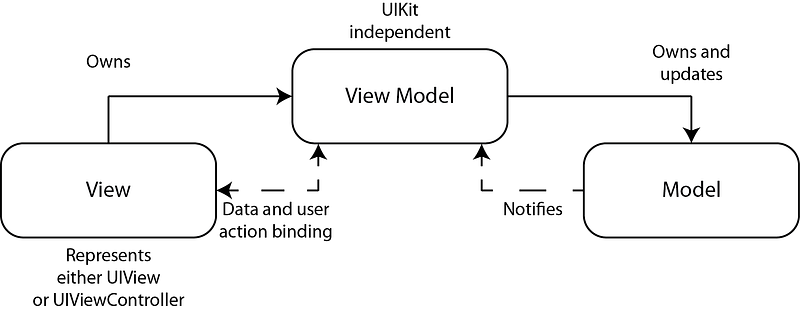
ViewModel: Binds the view to the model.

The diagram:
The explanation:

The problem in understanding MVVM does not entirely come from lazy devs. There are many opportunities for confusion in placing logic, classes and UI elements in an App — and this is something which this article seeks to bring clarity to.

The rules

  1. Never put a view into the model. Preferably don’t even have UIKit as a dependency.
  2. The View should not have any knowledge of the model.
  3. The View Model connects the view to the model and other logic

An example

A common use for an App can be to display information. Let us imagine that we are displaying a list of emails from a mailing list. Here are the requirements:

  1. When the user opens the App make an API call to list emails
  2. Display the emails in a UITableView
  3. When the user clicks on an email, display a detail view controller (name, date of birth)
  4. When the user slides to delete a cell in the initial UITableView, this should be removed from the model if it is not a special *permanent* email (the user’s direct collegues, for example)
  5. The user can edit a cell and make changes to the email address supplied

So…

The View knows only about the ViewModel and displays the email information on the sceen.

When the user marks an email as deleted, the controller notifies the model to delete the entry.

The location of elements within the App

Model

Business Data + Business Logic + Business Rules

View

Application UI

ViewModel

A conversion process to make the model easily readable or bindable to the view.

The location of elements within the example

Networking as a service

The networking classes are a service that can be called by the ViewModel.

Model

The class or struct with the data. Contains the business logic for the model (for example deciding whether an email is able to be updated)

View

The UI displaying the emails, given in an easily processable from from the ViewModel.

ViewModel

A validator for the email when entered (if a not valid email is entered, the ViewModel sends a message back to the view to notify the user).

The ViewModel is responsible for providing data to the view. For this reason, it makes the API calls through the network (as a service in this instance).

A description

The view represents the model. This means that it should not perform any sort of business logic, but rather represents the rules somehow. In the example above the permanent flag can be marked with a friendly looking star on the appropriate row of the UITableView.

The model can check to see whether the email address can be deleted or not, as it contains the business logic.

The ViewModel is the glue that holds the App together, and makes the model displayable for the view. The ViewModel is the right location for API calls since the ViewModel is responsible for providing data. If the model is not populated, the ViewModel is in the right place to make that decision and make the correct API call.

Want to get in contact? Try the link here:

iOS
Mobile
Software Development
Swift
Recommended from ReadMedium