
What Causes Syntax Errors And How To Avoid Them| How Java Compiler Detect Syntax Errors
The most common and frustrating types of error students make when learning to code are syntax (and related) errors. In fact, they account for a vast majority of the incorrect code students run as they attempt to solve simple questions.
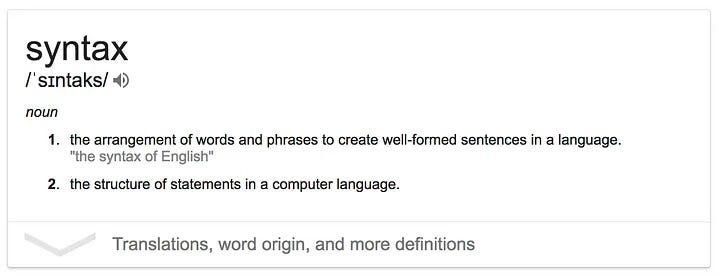
To understand syntax errors in programming, it helps to think about syntax errors in a natural (human) language like English. Syntax is the part of grammar that deals with how how the words in a language are arranged to create sentences.
Say a student writes one of the following sentences as part of a story about their weekend:
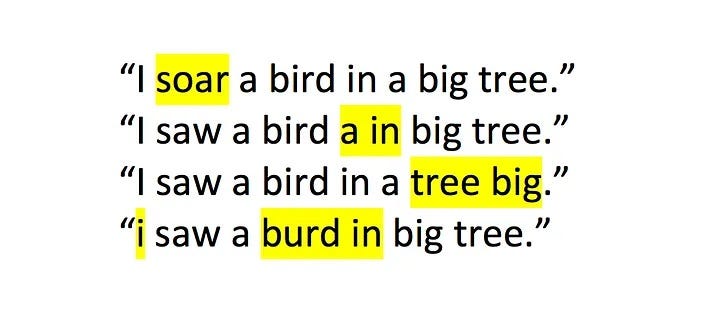
Each of these is incorrect in a small way, but to a reader, the meaning of all of the sentences is clear. We humans have an amazing capacity to correct spelling or grammar mistakes based on the context of the sentence or paragraph. In verbal communication we are even more flexible, which is why transcripts of casual conversations are riddled with grammatical errors that you only notice when they are written down.
Programming languages such as Python or Java are very simple compared to natural languages such as English, Spanish or Japanese. However, they do have a lot of things in common:
- it matters what order the words are in;
- they both have syntax (that is, a grammar) that define how the words can be combined together;
- you have to spell words correctly;
- you can translate between one programming language and another;
- they both use punctuation to structure and organise words and sentences;
- there are multiple ways of writing the same code or “paragraph” to describe the same thing.
However, there are many ways that programming languages and human languages are different. One really important one is that human languages (and humans) can cope with ambiguity, but programming languages (and computers) generally can’t.
what are syntax errors?
Just like when you are writing in a natural language, it is easy to make spelling errors and typos through carelessness. However, when coding there is a larger conceptual issue at play. A lot of new programmers don’t realise that computers are completely literal and that they have no ability to guess what we mean. To a human, the meaning of:

s obvious because it is very close to the correct statement. But to a computer this may as well be a different language. Once students realise this it can make a big difference to how quickly they learn to code.
Syntax error is an error that occurs when a compiler or interpreter cannot understand the source code statement in order to generate machine code. In other words Syntax errors occur when syntactical problems occur in a Java program due to incorrect use of Java syntax.
For example, if you try to create an if statement that doesn’t include the condition in parentheses, even when the condition is present on the same line as the if statement, that’s a syntax error.
Syntax errors and “semantic” errors are not the same. The syntax error is an incorrect construction of the source code, whereas a semantic error is erroneous logic that produces the wrong result when executed.
How Syntax errors are detected?
Syntax errors are easy to spot and rectify because the Java compiler finds them for you. The compiler will tell you which piece of code in the program got in trouble and its best guess as to what you did wrong. Usually, the compiler indicates the exact line where the error is, or sometimes the line just before it.
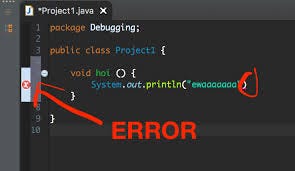
The compiler will catch most of these errors for you. If the syntax of your code is incorrect, then in most cases the compiler can’t use the code to create byte code for the JRE.
When the Java compiler encounters syntax errors in a program, it prevents the code from compiling successfully and will not create a .class file until errors are corrected. An error message will be displayed on the output screen.
These errors are detected by the Java compiler at compile time of the program which is why they are also known as compile-time errors.
What Causes Syntax Errors?
Using incorrect capitalization
One of the most common syntax errors that new developers make is to capitalize keywords, rather than use lowercase. Java is case sensitive, so using the proper case when you type your code is essential.
This same error can occur with class names, variables, or any other code you type as part of your Java application. A variable named MyVar is always different from one named myVar.
Splitting a string over two lines
In most cases, Java doesn’t care if your code appears on one or more lines. However, if you split a string across lines so that the string contains a newline character, then the compiler will object.
The answer is to end the string on the first line with a double quote, add a plus sign to tell the compiler you want to concatenate (add) this string with another string, and then continue the string on the next line like this:
System.out.print("This is a really long " +
 "string that appears on two lines.");
Treating a static method as an instance method
Static methods are those that are associated with a specific class, while instance methods are associated with an object created from the class.
Forgetting the class or object name as part of a method call
You always include the class or object associated with a method before making the method call. For example, Character.toUpperCase() and System.out.print() are correct, but simply calling toUpperCase() or print() is incorrect.
Omitting the break clause from switch statements
It’s easy to forget to add the break clauses to a switch statement. In addition, the compiler won’t catch this error. As a consequence of leaving out the break clause, your application will continue to execute the code in a switch statement until it encounters a break clause or the switch statement is complete.
For example, the following snippet of code demonstrates executing a default task, but the break clauses are commented out.
// Import the required API classes.
import java.util.Scanner;
import java.lang.Character;
public class UseAMenu03
{
   public static void main(String[] args)
   {
      // Create the scanner.
      Scanner GetChoice = new Scanner(System.in);
      // Obtain input from the user.
      System.out.println("Optionsn");
      System.out.println("A. Yellow");
      System.out.println("B. Orange");
      System.out.println("C. Greenn");
      System.out.print("Choose your favorite color: ");
      char Choice = GetChoice.findInLine(".").charAt(0);
      // Convert the input to uppercase.
      Choice = Character.toUpperCase(Choice);
      // Choose the right color based on a switch statement.
      switch (Choice)
      {
         case 'A':
            System.out.println("Your favorite color is Yellow!");
            //break;
         case 'B':
            System.out.println("Your favorite color is Orange!");
            //break;
         case 'C':
            System.out.println("Your favorite color is Green!");
            //break;
         default:
            System.out.println(
                  "Type A, B, or C to select a color.");
            //break;
      }
   }
}
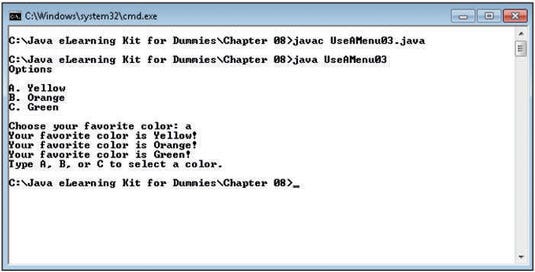
When you execute this code and answer A, the application outputs all the possible responses, as shown in this figure.
Omitting a return statement
When you create a method that’s supposed to return a value and then don’t provide a return statement to return the value, the compiler will complain.
Mistyping the header for the main() method
The compiler won’t complain about this problem, but you’ll see it immediately when you try to start the application. Java will complain that it can’t find the main() method. Remember that a main() method must appear like this:
public static void main (String []args)You can create many other syntax errors. As you’ve discovered by reading this list, the compiler will find some of them, the JRE will find others, but some, like omitting the break clause of a switch statement, are left for you to figure out. Of the three main types of error, syntactical errors tend to be the easiest to find.
Missing semicolon
class SyntaxError {
    public static void main(String[] args) {
        int a = 2;
        int b = 4 //Missing semicolon
        System.out.println(a+b);
    }
}
Output :
javac /tmp/UDRgGsLLQ6/SyntaxError.java
/tmp/UDRgGsLLQ6/SyntaxError.java:4: error: ';' expected
int b = 4
1 error
Explanation : In the above code semicolon is missing at the end of the int b=4 statement.
Missing parentheses
If you make a method call and don’t include the parentheses after the method name (even if you aren’t sending any arguments to the method), the compiler registers an error. For example, this code is incorrect because print() requires parentheses after it:
System.out.print;
Missing bracket
Anytime you want a Java feature to apply to multiple lines of code, you must enclose the entire block within curly braces ({}). In most cases, the compiler will catch this error for you.
For example, if you try to end a class without including the closing curly brace, the compiler will generate an error. This is one error where the compiler may not show you the precise location of the error because it can’t detect where the curly brace is missing — it simply knows that one is missing.
This sort of error can also create runtime errors. For example, when an if statement is supposed to apply to multiple lines of code, but you leave out the curly braces, the if statement affects only the next line of code, and the application works incorrectly.
class SyntaxError {
    public static void main(String[] args) {
        int a = 2;
        int b = 4;
        System.out.println(a+b);
        // Missing closing bracket
}
Output :
javac /tmp/UDRgGsLLQ6/SyntaxError.java
/tmp/UDRgGsLLQ6/SyntaxError.java:7: error: reached end of file while parsing
}
^
1 error
Explanation : In the above code the closing curly bracket of the main() method is missing.
Missing double-quote in String
class SyntaxError {
    public static void main(String[] args) {
        System.out.println(Hello World!);
    }
}
Output :
javac /tmp/UDRgGsLLQ6/SyntaxError.java
/tmp/UDRgGsLLQ6/SyntaxError.java:3: error: ')' expected
System.out.println(Hello World!);
^
/tmp/UDRgGsLLQ6/SyntaxError.java:3: error: not a statement
System.out.println(Hello World!);
^
/tmp/UDRgGsLLQ6/SyntaxError.java:3: error: ';' expected
System.out.println(Hello World!);
^
3 errors
Explanation : In the above code the Java compiler is throwing multiple errors because it is not considering the “Hello World!” as a String as it is missing the double quotes.
Misspelled Keyword
class SyntaxError {
  public static void main(String[] args) {
    int a = 2;
    int b = 4;
    system.out.println(a + b); // small s at start of System
  }
}
Output :
javac /tmp/UDRgGsLLQ6/SyntaxError.java
/tmp/UDRgGsLLQ6/SyntaxError.java:5: error: package system does not exist
system.out.println(a+b); // small s at start of System
^
1 error
Explanation : In the above code, the System keyword in System.out.println() name is misspelled as a system.
Invalid Variable or Function or Class name
There are certain rules to name an identifier(variable, function, and class name are called identifiers) in Java :
- All identifiers should begin with a letter (A to Z or a to z), a currency character ($), or an underscore (_).
- After the first character, identifiers can have any combination of characters.
- A keyword cannot be used as an identifier.
- Most importantly, identifiers are case-sensitive.
- Examples of legal identifiers : name3, $uid, _value, _3b__age, roll_no.
- Examples of illegal identifiers : 13ab, -age.
class 1SyntaxError {
    public static void main(String[] args) {
        int a = 2;
        int b = 4;
        System.out.println(a+b);
    }
}
Output :
javac /tmp/UDRgGsLLQ6/1SyntaxError.java
/tmp/UDRgGsLLQ6/1SyntaxError.java:1: error: identifier expected
class 1SyntaxError {
^
1 error
Explanation : In the above code, the name of the main class is invalid as it starts from a number.
Forgetting to import a class
Whenever you want to use a particular Java API feature, you must import the associated class into your application. For example, if your application contains String userName;, then you must add import java.lang.String; to import the String class.
class SyntaxError {
  public static void main(String[] args) {
    int a = -2;
    Scanner sc = new Scanner(System.in);
    int b = sc.nextInt();
    System.out.println(a + b);
  }
}
Output :
javac /tmp/UDRgGsLLQ6/SyntaxError.java
/tmp/UDRgGsLLQ6/SyntaxError.java:4: error: cannot find symbol
Scanner sc = new Scanner(System.in);
^
symbol: class Scanner
location: class SyntaxError
/tmp/UDRgGsLLQ6/SyntaxError.java:4: error: cannot find symbol
Scanner sc = new Scanner(System.in);
--------------------^
symbol: class Scanner
location: class SyntaxError
2 errors
Explanation : In the above code, we have not imported the java.util.Scanner package and using Scanner to take integer input. This has caused the error.
unclosed string literal
The “unclosed string literal” error message is created when the string literal ends without quotation marks and the message will appear on the same line as the error. (@DreamInCode) A literal is a source code of a value
Commonly, this happens when:
- The string literal does not end with quote marks. This is easy to correct by closing the string literal with the needed quote mark.
- The string literal extends beyond a line. Long string literals can be broken into multiple literals and concatenated with a plus sign (“+”).
- Quote marks that are part of the string literal are not escaped with a backslash (“\”).
unreachable statement
The Unreachable statements refers to statements that won’t get executed during the execution of the program are called Unreachable Statements. These statements might be unreachable because of the following reasons: Have a return or break statement before them. Have an infinite loop before them.
for(;;){
   break;
   ... // unreachable statement
}
int i=1;
if(i==1)
 ...
else
 ... // dead code
Often simply moving the return statement will fix the error. Read the discussion of how to fix unreachable statement Java software error. (@StackOverflow)
Return a value from method whose result type is void
This Java error occurs when a void method tries to return any value, such as in the following example:
public static void move()Often this is fixed by changing to method signature to match the type in the return statement. In this case, instances of void can be changed to int:
public static int move(){

System.out.println("What do you want to do?");
    Scanner scan = new Scanner(System.in);
    int userMove = scan.nextInt();
    return userMove;
}
{
    System.out.println("What do you want to do?");
    Scanner scan = new Scanner(System.in);
    int userMove = scan.nextInt();
    return userMove;
}

public static void usersMove(String playerName, int gesture)
{
    int userMove = move();

    if (userMove == -1)
    {
    break;
    }
Calling a method with wrong parameters
“method
This Java software error message is one of the more helpful error messages. It explains how the method signature is calling the wrong parameters.
RandomNumbers.java:9: error: method generateNumbers
  in class RandomNumbers cannot be applied to given types;
generateNumbers();
required: int[]
found:generateNumbers();
reason: actual and formal argument lists differ in length
The method called is expecting certain arguments defined in the method’s declaration. Check the method declaration and call carefully to make sure they are compatible.
Invalid method declaration (return type required)
This Java software error message means the return type of a method was not explicitly stated in the method signature.
public class Circle
{
    private double radius;
    public CircleR(double r)
    {
        radius = r;
    }
    public diameter()
    {
       double d = radius * 2;
       return d;
    }
}
There are a few ways to trigger the “invalid method declaration; return type required” error:
- Forgetting to state the type
- If the method does not return a value then “void” needs to be stated as the type in the method signature.
- Constructor names do not need to state type. But if there is an error in the constructor name, then the compiler will treat the constructor as a method without a stated type.

Do support our publication by following it


