
Best 5 Charting Software and Tools for Trading Crypto 2022
If you are serious about trading cryptocurrency, knowledge of the best charting tools is important.
This article outlines the best options, summarising the advantages and disadvantages of each.
What constitutes the “best” charting platform depends on what you want to do. Maybe you want to place trades seamlessly from the platform. Or perhaps you want to chart every altcoin in existence. Do you want to use a particular indicator (or even create your own)?
Read on to find out more.
If you are looking for daily crypto analysis for free, please join our CoinCodeCap Telegram channel.
1. TradingView
TradingView is the most popular charting website that provides a wide breadth of technical indicators and cryptocurrency pairs. Since TradingView was established in June 2012, it is perhaps the oldest and best charting platform for cryptocurrencies like Bitcoin and has attracted a large community of active traders.
You can also chart markets outside of cryptocurrency. This may be useful for a crypto-trader as TradingView allows them to analyze trading ideas for companies that may have some exposure to Bitcoin/cryptocurrency, e.g., AMD or Nvidia.
The stand-out features of TradingView are the social aspect of the platform and the ability to create your own indicators using the Pine editor.
The social aspect of TradingView is second to none. Below is a non-exhaustive list of some of the things you can do:
- Create your own profile as you would on Twitter or Instagram,
- Join chat rooms for specific markets (e.g., cryptocurrency, commodities, forex),
- Follow other traders. Comment on, like, and share their ideas.
- Build your reputation by posting good ideas and gaining followers.
These features mean that TradingView is a buzzing and lively venue for cryptocurrency traders, who can chart their ideas, post them for others to see and get recognition if they were right. Also, it is a great environment to learn, as you can see how people apply their best crypto trading tools and strategies in practice.
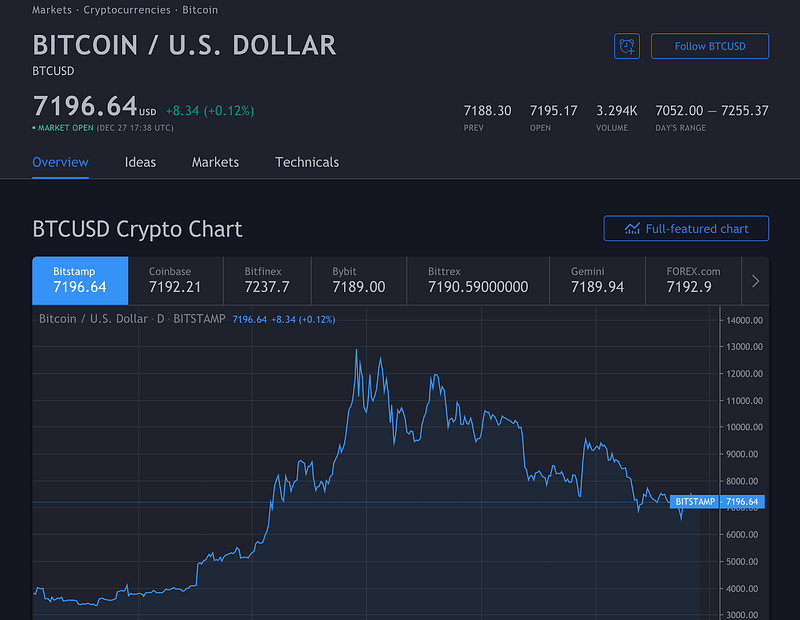
If you navigate to a ticker page, you will see the most popular trading ideas in the feed. Then, click on ‘Follow BTC-USD’ to get alerts on every trading idea for that pair. While the TradingView chart is suitable for technical analysis, it’s also good for gauging sentiment in the market, as you’ll get a feel for the mood of traders in the market by looking at their ideas.
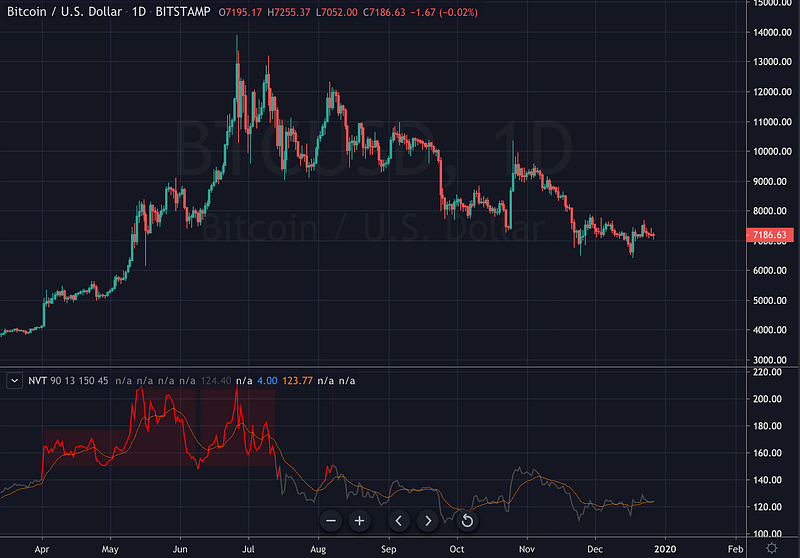
The Pine editor has led to thousands of custom indicators, some of which have been created specifically for Bitcoin. So, you can also say that TradingView Pine editor is a Bitcoin trading platform software. For example, the Network Value to Transaction ratio (shown above) can be found on TradingView. The Mayer Multiple, Hash Ribbons, the list goes on.
Plenty of exciting indicators have been developed for bitcoin on TradingView. The platform also boasts a back-testing feature to evaluate how your trading strategy performs over time, a valuable tool for traders (although it has its own weaknesses, such as abstracting from slippage).
Custom indicators also offer traders more sophisticated strategies and encourage self-improvement. Once I saw this feature, I was intrigued and wanted to learn how to create my own indicators and back-test specific strategies I had been using.
TradingView's tiered membership structure (free, Pro+, and Premium) is one downside. The paid memberships offer more functionality, such as custom timeframes, access to more indicators, and other valuable features, such as downloading OHLC and volume data directly from the charts.
One thing that annoys me the most about the free version is that it restricts you to just three indicators on the chart at any time (this rises to five with a Pro account). Also, the free accounts do not allow you to view intraday charts for more advanced charting methods like the Renko or Kagi. You also have to buy the Pro+ plan to unlock these best crypto trading charts. The highest tier is the Premium account (which permits 25 indicators on a single chart).
Another drawback of TradingView is that it does not cover the entire cryptocurrency market. Many smaller exchanges are missing (e.g., TradeOgre), and a majority of the small-cap altcoins cannot be charted here. Also, the features found in the paid versions of TradingView can sometimes be found for free on other platforms.
Also read: The Best Crypto Trading Bots
2. Altrady
Altrady is a multi-exchange cryptocurrency trading platform with a simple trading interface where users can access interactive crypto charting tools, and automatic portfolio manager, and a robust trading terminal. Founded in 2019, it is now one of the best software for crypto trading in the market that continues to create developments in its trading software.
Try Altrady and get 40% discount (annual plan) and 10% (monthly plan) using coupon code COINMONKS
In 2020, this best crypto charting app significantly improved with Altrady version 3.0, which includes a multi-charting page, trade analytics, and smart, automated trading features. Unique to Altrady is Base Scanner and Quick Scanner — innovative crypto trading tools that use algorithms to scan thousands of crypto markets, spot important coin price movements, and immediately notify users of profitable trading opportunities. Another powerful feature of Altrady is its real-time crypto alerts that allow users to be instantly updated on price changes and market movements 24/7.
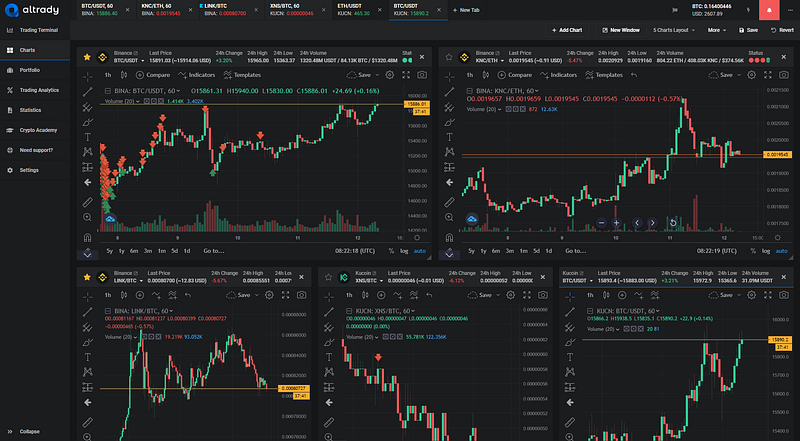
Altrady’s multi-charting software and interactive charting tools help traders better understand the crypto markets under their watchlists. Users can create custom chart layouts and add as many markets on their Charts page to easily access them without switching market tabs. Since TradingView powers it, users can enjoy over 85 technical indicators and multiple drawing tools on their Altrady charts.
The beauty of Altrady’s crypto trading charts is their high-definition design that lets you have a clear view of price movements and interactive chart drawing tools to help you better analyze patterns and trends. In addition, you can take snapshots of your charts to save them on your files or share them with the trading community. Also, read our Altrady review.
3. CryptoView
CryptoView is a multi-exchange crypto trading software and portfolio management platform equipped with a handful of useful features such as a highly customizable multi-charting interface, portfolio analytics, a multi-source news aggregator, and crypto events calendar, and other helpful cryptocurrency trading tools.
The platform has incorporated TradingView™ charts — a leader in real-time charting. With more than 85 technical indicators, 75 drawing tools, and various other charting options, TradingView offers the best performance and reliability for any trading operation.
Furthermore, CryptoView’s users can swap between 27 different multi-chart layouts and monitor up to 9 charts per screen. This chart layout customization combined with side widgets, folding trading panels, and other personalizations make CrytoView the best crypto portfolio manager for traders, technical analysts, and fund managers.
In combination with the multi-charting, a multi-screen feature also creates up to 5 screen templates and allows the users to save and switch between different screen configurations. If the user works on multiple monitors, this option could be used to set each monitor’s layout configuration with just a single click.
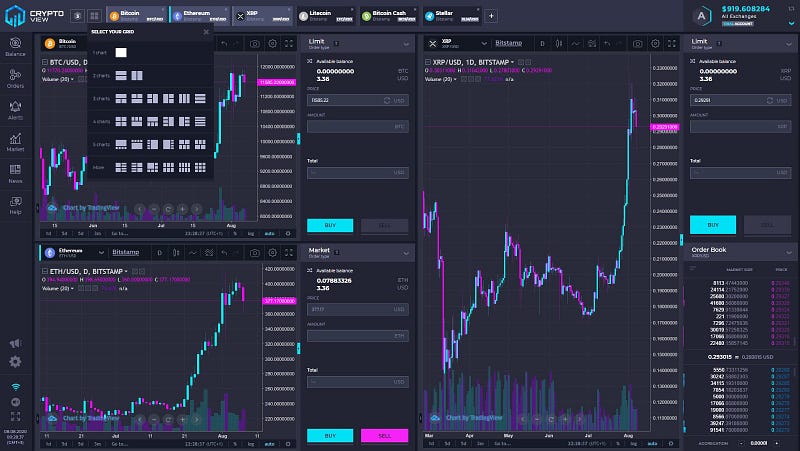
CryptoView is the best crypto trading software and an all-in-one management solution suitable for novice and professional traders. For more information, read our CryptoView review.
4. Coinigy
Coinigy makes a better attempt at covering the entire cryptocurrency market, with support for more exchanges and pairs than other platforms on the list. But despite this, Coinigy’s charts and tools are actually ported over from TradingView. (Another worthy mention is CoinTrader.Pro, which allows you to chart any coin from CoinMarketCap).
Founded in 2014, one of the best features is that you can trade directly through Coinigy if you have an account at any of the supported exchanges (of which there are more than 45). Another advantage of Coinigy is that it allows you to place stop loss and take profit orders absent from many exchanges.
Coinigy released v2 of their platform in February 2019, which includes ‘Boards,’ which allows traders to create custom views of the markets. A few other features worth mentioning are the portfolio tracker and the arbitrage scanner. The arbitrage scanner may be helpful if you trade on several exchanges, as it flags whenever there is a difference between the price of a coin on different exchanges.
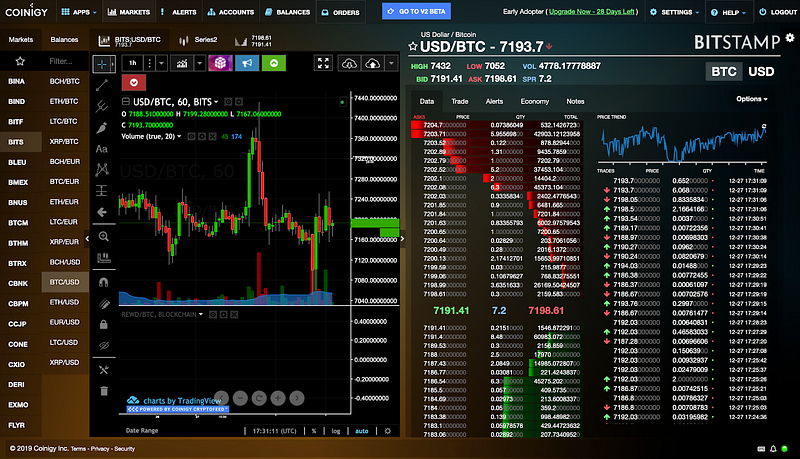
The main drawback of Coinigy is that there are no free memberships (only free trials for new users). In addition, despite being based on TradingView, it doesn’t carry over the custom indicators from this platform. However, it does have historical blockchain data (such as block rewards and mining difficulty).
5. GoCharting
GoCharting provides a good range of crypto markets, including some cryptocurrency exchanges that are not found on TradingView.
Many of the paid features on TradingView are freely available on GoCharting.
For example, you can view up to four charts at once (which is useful for multi-timeframe analysis), use Renko’s best charts for crypto trading on any timeframe, and the volume profile (which requires Pro membership or higher for TradingView).
If you’re a fan of Renko charts, then nothing at the moment beats GoCharting in this regard (check out this article to learn more about Renko charts).
While you’ll have the option to use standard Renkos (which change in appearance over time as the price volatility of an asset changes), you can also specify the brick size method to ‘ATR persistence’ to ensure historical bricks are not re-painted.
ATR is short for Average True Range.
For instance, the chart below shows the actual history of the Renko chart with the ATR at that time (i.e., the ATR persistence option instead of the standard option).
Generally, Renko charts will adjust as the asset’s ATR (or whatever you use for brick size) fluctuates over time. You can also make other customizations, which makes GoCharting an essential tool for those that apply Renko crypto technical analysis in their trading.
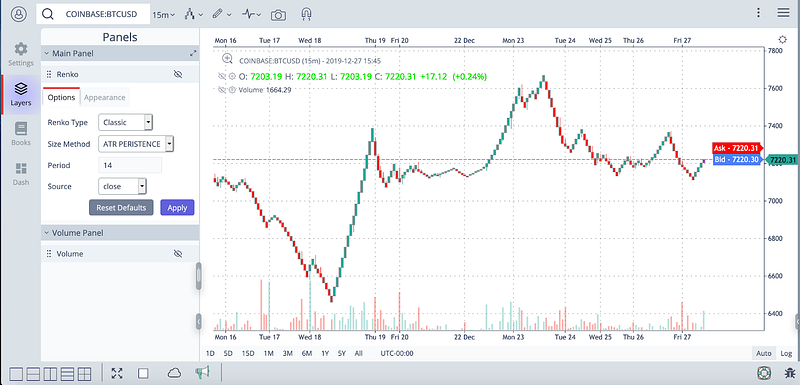
There are also some unique chart overlays, such as moon phases (were they included just for the lulz?!). Other features include the ability to add watchlists and your portfolio, which are standard for charting platforms.
One drawback of GoCharting is the lack of support for custom indicators. Also, the range of indicators is not as wide as that for TradingView or Coinigy.
Another downside to GoCharting is that it is lacking in the social aspect. For example, there’s no ability to view other people’s trading ideas (or share and like these ideas). However, you can easily share images across a variety of social media channels, such as Facebook, Twitter, Telegram, and more.
6. Cryptowat.ch
Owned by cryptocurrency exchange Kraken and founded by Artur Sapek in 2014, Cryptowatch is the OG crypto traders’ favorite thanks to its clean layout, relatively long-standing in the community, and a wide range of indicators (as well as customized ones).
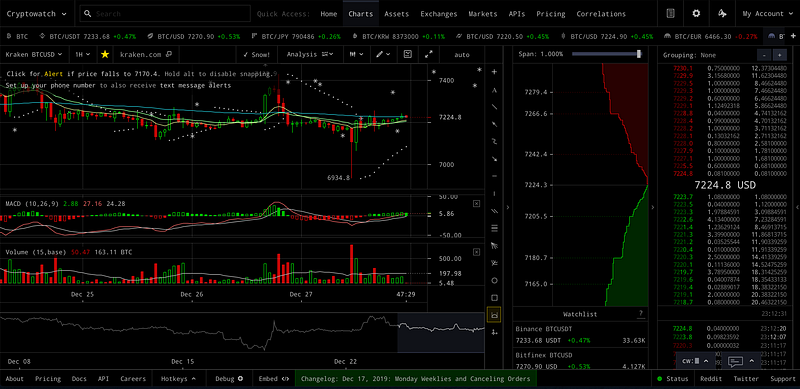
The Cryptowatch app dark theme is very pleasing to the eye, and the layout of the chart, order book, and so on are all fully customizable. The platform also provides an overview of crypto-assets and exchanges with key statistics such as price changes, liquidity ratios, and more.
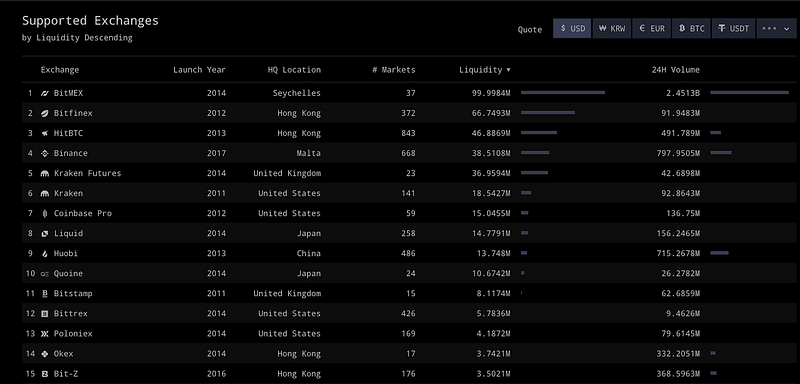
One of the best features of this charting platform is that you can link your exchange accounts and trade directly from the interface. This is great because you do not have to log in to each exchange, using your API keys to trade from Cryptowat.ch directly.
There is also a vital social element with a chat application within the platform (but you can only view the chat if you are using the free version).
However, like Coinigy, you are given a free trial and are then required to set up a payment plan to use the platform’s advanced features.
- The Free version only includes charting and very basic features.
- The Basic version includes SMS price alerts, the ability to place trades from your exchange accounts, and trading on mobile.
- The Pro version offers more functionality, including more WebSocket API bandwidth, the creation of custom indicators, and Zapier integration to place trades programmatically.
7. Koyfin
Koyfin is like TradingView because it supports markets outside of cryptocurrency but lacks indicators.
For the cryptocurrency market itself, the number of exchanges is fairly low, with just Coinbase for BTC-USD.
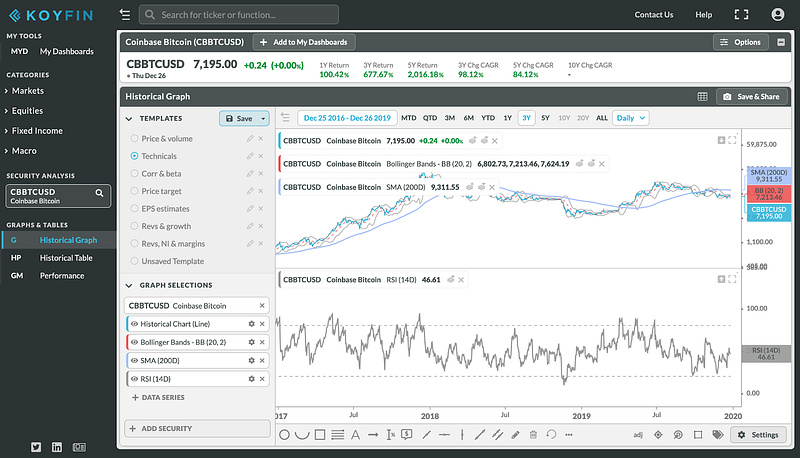
The most popular indicators like Moving Averages and Bollinger Bands are found here, but more exotic and less widely used technicals such as Ichimoku Kinko Hyo are unavailable. There are also no custom indicators that users can produce and share for others to use.
However, one positive feature is that you can easily chart correlations between assets and view the historical price action as a chart or a table. Another benefit of Koyfin is that the platform is entirely free to use.
Perhaps not the go-to platform for cryptocurrency traders, Koyfin is worth keeping an eye on, given they launched in 2016 and are relatively new. The Koyfin platform also has a research portal, but the focus is currently on traditional markets.
Verdict
Good knowledge of the charting platforms is essential if you're a cryptocurrency trader.
Of course, you will need to apply risk management and be aware of fundamentals and sentiment. Depending on your reasons for using a charting platform, the one to use will depend on what you’re trading, how you’re trading, and the analysis or indicator(s) you want to use:
Best all-rounder: TradingView
TradingView is the best all-around charting platform and provides the best tools for crypto trading. Further, it is why most exchanges incorporate their charts into their platforms. If you’re prepared to pay $25 (or upwards) per month, it’s pretty much got everything you need.
Best for small-cap cryptocurrencies: Coinigy
If you are looking to trade small-cap cryptocurrencies, the best choice is Coinigy, as its support for a range of different coins and exchanges is unrivaled. If you’re prepared to pay for a platform, Coinigy trumps TradingView in many ways for traders, especially if you have a heavy focus on altcoins/small-caps.
Best for free, advanced charting methods: GoCharting
As mentioned above, the Renko chart offered by GoCharting is free and comes with cool customizations. There are also other cool features for free, such as four charts on one screen and the market/volume profile.
Best for programmatic trading: Cryptowat.ch
Cryptowat.ch is best suited for traders using APIs across different exchanges to trade different assets. Other significant benefits include the customizable interface and comprehensive information on assets, indicators, and exchanges.
Join Coinmonks Telegram Channel and Youtube Channel get daily Crypto News
Also, Read
- Copy Trading | Crypto Tax Software
- Grid Trading | Crypto Hardware Wallet
- Best Crypto Exchange | Best Crypto Exchange in India
- Best Crypto APIs for Developers
- Crypto Telegram Signals | Crypto Trading Bot
- Best Crypto Lending Platform
- An ultimate guide to Leveraged Token
- Best VPNs for Crypto Trading
- Crypto Trading Signals for Huobi | HitBTC Review
- TraderWagon Review | Kraken vs Gemini vs BitYard
- How to trade Futures on FTX Exchange
- OKEx vs KuCoin | Celsius Alternatives | How to Buy VeChain
- 3Commas vs. Pionex vs. Cryptohopper
- Binomo Review | Stoic vs 3Commas vs TradeSanta
- Capital.com Review | Crypto Lending Platforms in Hong Kong
- Uphold Card Review | Trust Wallet vs MetaMask
- Earn Sign-up Bonus — 10 Best Crypto Platforms
- Exness Review | MoonXBT Vs Bitget Vs Bingbon
- How to Start Earning Passive Income With Crypto Lending


