
WebRTC P2P Online Meeting
I have created a peer-to-peer (P2P) online meeting application in webRTC. I have extensively explained the project building from the idea phase to the struggling phase of building the project. I will refer peer to peer as P2P for the entire article. This is my first time writing a long-form technical article.
This post is going to be longer and there is a much shorter version I have posted on LinkedIn.
https://www.linkedin.com/feed/update/urn:li:activity:7214539127218716675/
This project took me 3 weeks to build. I have always wanted to deep dive into understanding P2P webRTC video streaming. On the surface level, the webRTC API is pretty simple to use if we decide to use it blindly without understanding the underlying architecture. This project has made me research extensively into networking and each topic is a discussion on its own and I have yet to learn them in depth. Just learning the basics and understanding them took a lot of time.
What is P2P sharing?
Peer-to-peer (P2P) is defined as a decentralized network architecture in which participants, called peers, interact directly with each other without the need for a central authority or server.
What is WebRTC?
WebRTC(Web Real-Time Communication) is open-source video streaming and voice communication created by Google and enables real-time communication directly in web browsers and mobile applications. It is both an API and protocol. The WebRTC protocol is a collection of other pre-existing technologies. The API supports video and audio codecs out of the box and makes it easy to use without much hassle resulting in low latency transport. It supports H.264, VP8 and VP9 codecs. WebRTC ensures security. It ensures that all the communication shared between the two agents is encrypted and remains confidential with any third party. It has two pre-existing protocols, namely, DTLS(Datagram Transport Layer Security) and SRTP(Secure Real-time Transport Protocol).
How does a P2P connection work in webRTC?
P2P connection takes place in multiple steps and the order of execution of each step is important otherwise it will fail.
- MediaStream API(getUserMedia): The MediaStream API give access to the webcam and audio streams.
- Signalling: To make a connection webRTC agent sends SDP(Session Description Protocol) through any communication channels (websockets in my case) to the other peer and vice versa. Signalling is not part of the webRTC protocol but is necessary to form a connection. Signalling helps to find the other peer it needs to connect.
- SDP is a plain text protocol that contains a key/ value pair which consists of a list of media sections. It contains details like — a. IP and Port that the agent is reachable on. b. The number of audio and video tracks the agent wishes to send. c. The audio and video codecs each agent supports. d. The values used while connecting e. The values used while securing
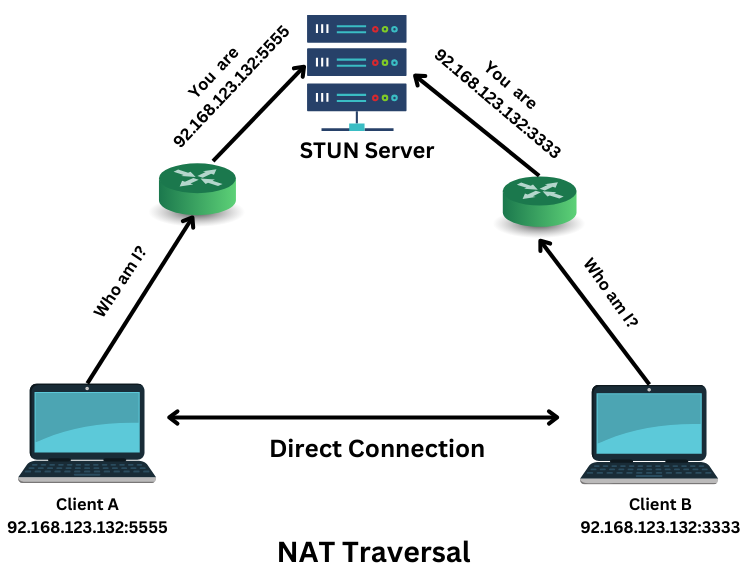
- NAT Traversal: It allows communication through firewalls between two devices through routers. For that, you need to understand NAT first. All our devices have private IPs not accessible to the internet. The NAT Translation mapping maps a device’s private IP and port with the router’s public IP and port for each device accessible to the internet.
- ICE(Interactive Connectivity Establishment) Candidate: A peer might have a different communication path for connecting. Initially, ICE tries to connect peers directly with the lowest possible latency through UDP. ICE ensures the best possible connection between the two peers even if the location of the two is difficult to connect. For these difficulties to be solved efficiently it uses two servers, STUN and TURN.
- STUN(Session Traversal Utilities NAT): Devices leverage STUN servers to help them find out their own IP address and port number which they can use to communicate. They achieve this by sending and receiving data packets to the STUN server, which returns data packets containing their public address and port number. For devices behind firewalls where the IP addresses are hidden behind NAT, STUN servers help determine the device’s public IP address and port number.
- TURN(Traversal Using Relay NAT): A TURN server acts as a relay between WebRTC devices that cannot establish a direct peer-to-peer connection due to network restrictions. For instance, when both devices are behind NATs or firewalls or when a device is behind a symmetric NAT that does not allow direct communication. TURN servers are generally the last resort as it incurs high costs and increase latency and overall performance.
So, the first week went into researching the websites.
I have built three features with webRTC -
- Video sharing
- Messaging
- File Sharing
The APIs Behind WebRTC
These are the central APIs behind WebRTC (For more technical explanations, see https://webrtc.org/):
- getUserMedia(): Requests access to a device’s camera, mic, and/or screen to capture audio and video.
- MediaRecorder: Records audio and video.
- RTCPeerConnection: Does the heavy lifting to stream audio and video between users (peers).
- RTCDataChannel: Streams data directly between users.
Using RTCPeerConnection
RTCPeerConnection is the WebRTC component that handles stable and efficient communication of streaming data between peers. Connection between two peers A and B with API -
- A will connect two browsers (Browser A and Browser B)
- A will create an offer (SDP) and set it as a local description
- B will get the offer and set it as the remote description
- B creates an answer sets it as its local description and signals the answer (SDP) to A
- A sets the answer as its remote description
- Connection established, exchange data channel
Using RTCDataChannel
On top of audio and video, WebRTC supports real-time communication for other kinds of data. The Data Channel Protocol is designed to provide a generic transport service that allows browsers to exchange generic data in a bidirectional peer-to-peer fashion. WebRTC uses the Stream Control Transmission Protocol (SCTP) transport layer protocol that was intended as an alternative to TCP or UDP. For WebRTC we use it as an application layer protocol which runs over our DTLS connection.
The syntax is deliberately similar to WebSocket with a send() method and a message event.
const localConnection = new RTCPeerConnection(servers);
const remoteConnection = new RTCPeerConnection(servers);
const sendChannel =
  localConnection.createDataChannel('sendDataChannel');
// ...remoteConnection.ondatachannel = (event) => {
receiveChannel = event.channel;
receiveChannel.onmessage = onReceiveMessage;
receiveChannel.onopen = onReceiveChannelStateChange;
receiveChannel.onclose = onReceiveChannelStateChange;
};function onReceiveMessage(event) {
document.querySelector("textarea#send").value = event.data;
}document.querySelector("button#send").onclick = () => {
var data = document.querySelector("textarea#send").value;
sendChannel.send(data);
};File Sharing is done by loading the File and first converting it into an array buffer. Then divide the file into chunks and send it after converting it into a base64 data stream through the data channel.
File chunking and sending as base64 encoded string function:
const CHUNK_SIZE=16000;
export const sendFileChunks = (file: File, dataChannel: RTCDataChannel, id: number, setProgress: (val: {id: number, progress: number}) => void) => {
  const reader = new FileReader();

  reader.onloadend = (event) => {
    if (event.target?.readyState === FileReader.DONE) {
      let buffer = reader.result, start = 0, end = 0, last = false;

      const sendChunk = () => {
        end = start + CHUNK_SIZE;

        // terminating case
        if (end > file.size) {
          end = file.size;
          last = true;
        }

        if (buffer) {
          const progress = Math.floor((end / file.size) * 100);
          setProgress({ id, progress });

          const base64Chunk =  arrayBufferToBase64(buffer.slice(start, end) as Buffer);
          dataChannel.send(base64Chunk);
        }

        if (last === true) {
          dataChannel.send(JSON.stringify({ type: MessageEnum.FILE, shareStatus: ShareStatusEnum.END }))
        } else {
          start = end;
          setTimeout(() => sendChunk(), 100);
        }

      }

      sendChunk();
    }
  }

  reader.readAsArrayBuffer(file);
}
Function to transform array buffer to base64 encoded string before sending through dataChannel:
const arrayBufferToBase64 = (buffer: Buffer) => {
  // change into binary and use btoa to change into base64
  let binary = '';
  const bytes = new Uint8Array(buffer);

  for (let i = 0; i < bytes.length; i++) {
    binary += String.fromCharCode(bytes[i]);
  }

  return window.btoa(binary);
}
Converting the array of base64 encoded string chunks to blob before downloading on the receiver side:
type// array of all the base64 string chunks
const base64ToBlob = (base64fileData: string[], contentType: string) => {
  const byteArrays = [];
  let bytes = [];
  let slice = null;

  for (let i = 0; i <  base64fileData.length; i++) {
    slice = base64fileData[i];
    bytes = new Array(slice.length);

    for (let j = 0; j < slice.length; j++) {
      bytes[j] = slice.charCodeAt(j);
    }

    byteArrays.push(new Uint8Array(bytes))
  }

  const blob = new Blob(byteArrays, { type: contentType })
  return blob;
}
The array of base64 encoded data is then converted into a blob from the receiver side and then downloaded. The progress bar is maintained by calculating the percentage of array buffer being sent.
Final Thoughts
Initially, my idea was to build something like Google Meet with multiple people in the meeting at the same time. But halfway through my project I have realized how difficult it is to build for multiple people and it will become like a 3 months project for someone with no prior experience with webRTC. I later settled on making it for two users. Even still I had issues with connectivity with public stun servers and file sharing and many other smaller issues. Scaling in webRTC takes a lot of work. So first I have decided to make a mesh network between multiple peers. However, this needs to be more optimized and consumes heavy bandwidth due to separate peer connections between each other peers. Then I will explore more advanced scaling methods like SFU(Selecting Forwarding Unit), and MCU(Multipoint Conferencing Unit). Thank you for reading till the end. Feedbacks are welcome.
Demo Video Link: https://www.youtube.com/watch?v=zim9tUx9dQM
Github Project: https://github.com/richeek45/virtual-meet
Deployed Link: https://virtual-meet-eight.vercel.app/
Resources
Hussein Nasser explains webRTC very well in this video https://www.youtube.com/watch?v=FExZvpVvYxA


