avatarJames Gillmore

Free AI web copilot to create summaries, insights and extended knowledge, download it at here

5900

Abstract

issue in terms of build time (no more double JS chunks), and now all you’re dealing with is stylesheets your users’ browsers can cache. And yes, HMR still works (better than ever in fact).</p><p id="3252"><b><i>Also note:</i></b> all 4 of these packages work together. I’m tentatively calling it the “Universal” family of packages. They can all be individually used — because that’s what flexible <i>frameworkless</i> development is about. But they work best together. Enjoy.</p><h2 id="2ae5">INSTALLATION</h2><p id="d2fc">Since today we are primarily introducing the babel plugin, that’s what we’ll focus on:</p><div id="3145"><pre><span class="hljs-symbol">yarn</span> <span class="hljs-keyword">add</span> --dev babel-plugin-dual-<span class="hljs-meta">import</span></pre></div><p id="b687"><b><i>.babelrc:</i></b></p><div id="b090"><pre>{ <span class="hljs-string">"presets"</span>: [whatever you usually have], <span class="hljs-string">"plugins"</span>: [<span class="hljs-string">"dual-import"</span>] }</pre></div><p id="fba0"><b><i>App.js:</i></b></p><div id="0414"><pre><span class="hljs-keyword">import</span>('./<span class="hljs-type">Foo</span>.<span class="hljs-title">js'</span>)

  ↓ ↓ ↓ ↓ ↓ ↓

<span class="hljs-keyword">import</span> { importCss } from 'babel-plugin-dual-<span class="hljs-keyword">import</span>/importCss.js'

<span class="hljs-type">Promise</span>.all([ <span class="hljs-keyword">import</span>( /* <span class="hljs-title">webpackChunkName</span>: '<span class="hljs-type">Foo</span>' */ './<span class="hljs-type">Foo</span>'), importCss('<span class="hljs-type">Foo'</span>) ]).<span class="hljs-keyword">then</span>(promises => promises[<span class="hljs-number">0</span>]);</pre></div><p id="4a5f"><b><i>And if you’re using dynamic requires:</i></b></p><div id="d017"><pre><span class="hljs-keyword">import</span>(<span class="hljs-string">../base/<span class="hljs-subst">${page}</span></span>)

  ↓ ↓ ↓ ↓ ↓ ↓

<span class="hljs-keyword">import</span> { importCss } <span class="hljs-keyword">from</span> <span class="hljs-string">'babel-plugin-dual-import/importCss.js'</span>

<span class="hljs-title class_">Promise</span>.<span class="hljs-title function_">all</span>([ <span class="hljs-keyword">import</span>( <span class="hljs-comment">/* webpackChunkName: 'base/[request]' */</span> <span class="hljs-string">./base/<span class="hljs-subst">${page}</span></span>), importCss(<span class="hljs-string">base/<span class="hljs-subst">${page}</span></span>)] ).<span class="hljs-title function_">then</span>(<span class="hljs-function"><span class="hljs-params">promises</span> =></span> promises[<span class="hljs-number">0</span>]);</pre></div><p id="d6e9">You of course need to use extract-css-chunks-webpack-plugin to generate the dynamic CSS “chunks” and webpack-flush-chunks to seamlessly serve it. We’ll skip the webpack plugin config, but here’s how you serve the assets corresponding to rendered components:</p><div id="3267"><pre><span class="hljs-keyword">import</span> flushChunks <span class="hljs-keyword">from</span> <span class="hljs-string">'webpack-flush-chunks'</span> <span class="hljs-keyword">import</span> * <span class="hljs-keyword">as</span> Universal <span class="hljs-keyword">from</span> <span class="hljs-string">'react-universal-component/server'</span></pre></div><div id="a343"><pre><span class="hljs-keyword">const</span> appString = ReactDOM.renderToString(<span class="hljs-variable"><App /></span>)

<span class="hljs-keyword">const</span> { js, styles, cssHash } = <span class="hljs-keyword">flush</span>Chunks(webpackStats, { chunkNames: Universal.<span class="hljs-keyword">flush</span>ChunkNames(), })</pre></div><div id="9899"><pre><span class="language-xml">res.send( <span class="hljs-tag">&lt;<span class="hljs-name">html</span>&gt;</span> <span class="hljs-tag">&lt;<span class="hljs-name">head</span>&gt;</span> $</span><span class="hljs-template-variable">{styles}</span><span class="language-xml"> <span class="hljs-tag">&lt;/<span class="hljs-name">head</span>&gt;</span> <span class="hljs-tag">&lt;<span class="hljs-name">body</span>&gt;</span> <span class="hljs-tag">&lt;<span class="hljs-name">div</span> <span class="hljs-attr">id</span>=<span class="hljs-string">'root'</span>&gt;</span>$</span><span class="hljs-template-variable">{appString}</span><span class="language-xml"><span class="hljs-tag">&lt;/<span class="hljs-name">div</span>&gt;</span> $</span><span class="hljs-template-variable">{js}</span><span class="language-xml"> $</span><span class="hljs-template-variable">{cssHash}</span><span class="language-xml"> <span class="hljs-tag">&lt;/<span class="hljs-name">body</span>&gt;</span> <span class="hljs-tag">&lt;/<span class="hljs-name">html</span>&gt;</span>)</span></pre></div><p id="2c61">If you’ve looked at how <code>webpack-flush-chunks</code> works before, the new addition is the <code>cssHash</code> which is similar to what Webpack puts in its bootstrap script mapping javascript chunks to their IDs. The <code>cssHash</code> maps css chunk names to their stylesheet files. <code>babel-plugin-dynamic-import</code> requests stylesheets from there in parallel with javascript imports.</p><h2 id="2acf">CONCLUSION</h2><p id="6af2">There’s not much left to say today. So I won’t waste your time. Git clone the demo to see all 4 packages in action:</p><div id="35a9" class="link-block"> <a href="https://github.com/faceyspacey/flush-chunks-boilerplate-webpack-chunknames"> <div> <div> <h2>faceyspacey/flush-chunks-boilerplate-webpack-chunknames</h2> <div><h3>flush-chunks-boilerplate-webpack-chunknames - universal webpack boilerplate for Webpack Flush Chunks + React Universal…

Options

</h3></div> <div><p>github.com</p></div> </div> <div> <div style="background-image: url(https://miro.readmedium.com/v2/resize:fit:320/0*yArInHtsxzjeW2f0.)"></div> </div> </div> </a> </div><p id="a0a4">If you haven’t checked out <a href="https://github.com/faceyspacey/react-universal-component"><b><i>React Universal Component</i></b></a> + <a href="https://github.com/faceyspacey/webpack-flush-chunks"><b><i>Webpack Flush Chunks</i></b></a>, do so. They’re currently the only solution bringing it all together for React developers apprehensive about frameworks. For developers that have had these problems, you know who you are. Those days are over.</p><p id="aad8">All 4 links in one place:</p><ul><li><a href="https://github.com/faceyspacey/react-universal-component"><i>React Universal Component</i></a></li><li><a href="https://github.com/faceyspacey/webpack-flush-chunks"><i>Webpack Flush Chunks</i></a></li><li><a href="https://github.com/faceyspacey/extract-css-chunks-webpack-plugin"><i>Extract CSS Chunks Webpack Plugin</i></a></li><li><a href="https://github.com/faceyspacey/babel-plugin-dual-import"><i>Babel-Plugin-Dual-Import</i></a></li></ul><h1 id="71e3">&gt; For more idiomatic javascript in Reactlandia, read:</h1><div id="dc91" class="link-block"> <a href="https://readmedium.com/announcing-react-universal-component-2-0-babel-plugin-universal-import-5702d59ec1f4"> <div> <div> <h2>React Universal Component 2.0 &amp; babel-plugin-universal-import</h2> <div><h3>Whatup Reactlandia!</h3></div> <div><p>medium.com</p></div> </div> <div> <div style="background-image: url(https://miro.readmedium.com/v2/resize:fit:320/1*rGWTuNM1hX_6C_PzRGmp_g.png)"></div> </div> </div> </a> </div><div id="455d" class="link-block"> <a href="https://readmedium.com/redux-first-router-data-fetching-solving-the-80-use-case-for-async-middleware-14529606c262"> <div> <div> <h2>Redux-First Router data-fetching: solving the 80% use case for async Middleware</h2> <div><h3>Understanding the architectural decisions behind the tools you are using is perhaps more important than the many things…</h3></div> <div><p>medium.com</p></div> </div> <div> <div style="background-image: url(https://miro.readmedium.com/v2/resize:fit:320/1*-vJvxZ97Uo8kS14tBd7WKw.png)"></div> </div> </div> </a> </div><div id="fdf4" class="link-block"> <a href="https://readmedium.com/server-render-like-a-pro-w-redux-first-router-in-10-steps-b27dd93859de"> <div> <div> <h2>Server-Render like a Pro /w Redux-First Router in 10 steps</h2> <div><h3>1. SETUP EXPRESS TO SERVE YOUR BUILD</h3></div> <div><p>medium.com</p></div> </div> <div> <div style="background-image: url(https://miro.readmedium.com/v2/resize:fit:320/1*m2NdcNfBeGHIn0GuX_GT7A.png)"></div> </div> </div> </a> </div><div id="00ca" class="link-block"> <a href="https://readmedium.com/redux-first-router-lookin-sexy-on-code-sandbox-d9d9bea15053"> <div> <div> <h2>Redux-First Router lookin Sexy on Code Sandbox</h2> <div><h3>This article could have just as accurately been titled: “How to use Redux-First Router on Code Sandbox,” but hey, when…</h3></div> <div><p>medium.com</p></div> </div> <div> <div style="background-image: url(https://miro.readmedium.com/v2/resize:fit:320/1*swVZLCxC9wYzU2SGEaZ4Ew.png)"></div> </div> </div> </a> </div><div id="6b37" class="link-block"> <a href="https://readmedium.com/pre-release-redux-first-router-a-step-beyond-redux-little-router-cd2716576aea"> <div> <div> <h2>Pre Release: Redux-First Router — A Step Beyond Redux-Little-Router</h2> <div><h3>The purpose of this article is to debunk the effectiveness of route-matching components + nested routes when using…</h3></div> <div><p>medium.com</p></div> </div> <div> <div style="background-image: url(https://miro.readmedium.com/v2/resize:fit:320/1*ka887XYrCjhNUFssk5HF6A.png)"></div> </div> </div> </a> </div><div id="4cbb" class="link-block"> <a href="https://readmedium.com/code-cracked-for-code-splitting-ssr-in-reactlandia-react-loadable-webpack-flush-chunks-and-1a6b0112a8b8"> <div> <div> <h2>Code Cracked for Code-Splitting + SSR in Reactlandia: React Universal Component + Webpack Flush…</h2> <div><h3>The code has been cracked for a long time now for server-side rendering and code-splitting individually. Until now …</h3></div> <div><p>medium.com</p></div> </div> <div> <div style="background-image: url(https://miro.readmedium.com/v2/resize:fit:320/1*Mg2_ol3Ko2l3QfUURUA-2Q.jpeg)"></div> </div> </div> </a> </div><p id="ecb6"><i>Tweets and other love are much appreciated. Find me on twitter <a href="https://twitter.com/faceyspacey">@faceyspacey</a> <b>Want to stay current in Reactlandia?</b></i><b> <i>Tap/click “FOLLOW” next to the FaceySpacey publication to receive weekly Medium “Letters” via email </i>👇🏽</b></p></article></body>

Webpack’s import() will soon fetch JS + CSS— Here’s how you do it today
the future

UPDATE (AUGUST 11th 2017): You want to use babel-plugin-universal-import now.

A month ago Webpack’s creator, Tobias Koppers, unleashed “The big plan” for CSS in Webpack in his article “The new CSS workflow (step1).”

The primary takeaway — mine at least — was that code-splitting for CSS would become a first class priority. You would be able to get css files generated for each of your dynamic “code splitting” chunks, and calls to import() would get you 2 files: JS + CSS. Here’s a quote from the article:

“The big plan

In the long term we want to make it possible to add first-class module support for CSS to webpack. This will work the following way:

  • We add a new module type to webpack: Stylesheet (next to Javascript)
  • We adjust the Chunk Templates to write two files. One for the javascript and one of the stylesheets (in a .css file).
  • We adjust the chunk loading logic to allow loading of stylesheets. We need to wait for CSS applied or at least loaded, before executing the JS.
  • When we generate a chunk load we may load the js chunk and the stylesheet chunk in parallel (combined by Promise.all).”

The foundation of course is being able to have CSS files generated for each dynamic chunk. Currently, the extract-text-webpack-plugin does not support this. The Beta 3.0 version circulating today won’t support it. My extract-css-chunks-webpack-plugin which has been around for a while does. But that’s still not good enough.

It’s not good enough because compilation is slow and doesn’t maximize caching within the browser. The reason is because it creates 2 different JS chunks for what should be just one chunk. Those chunks are:

  • one without CSS injection via style-loader
  • one with CSS injection via style-loader

The reason we do all this is so so your initial serving/rendering get the most minimal set of bytes + cacheable stylesheets AND so future calls to import() aren’t missing css.

BACKSTORY

For this all to make sense, and if this is the first time you’re hearing about any of this, you probably want to check out:

The summary is via react-universal-component and webpack-flush-chunks you can easily universally render your app while simultaneously code-splitting. For the first time as a generally available NPM package (no framework required). For those not in the know, the takeaway is this: SSR is a solved problem, splitting is a solved problem, doing both together hasn’t been.

You no longer have to trade SEO/SSR for code-splitting or vice versa.

That also means your primary mechanism for conserving bytes delivered to clients is code-splitting. And to get the full benefit of that you don’t want to be sending your private member panel’s CSS to your public visitors or vice versa. If you have multiple areas to your app, the problem just compounds.

In fact, through statically split CSS you’re sending less bytes to clients than the popular “render path” solutions du jour (since those have to send the definitions of your CSS in JS chunks in addition to css). And perhaps more importantly, that also saves you many wasted cycles generating CSS during render on the server and client.

Being able to control what static CSS files you send to clients really is a nice way to handle this problem. It’s why @sokra came to this conclusion. Being able to automatically do it is even better.

Introducing Babel-Plugin-Dual-Import + Extract CSS Chunks Webpack Plugin 2.o

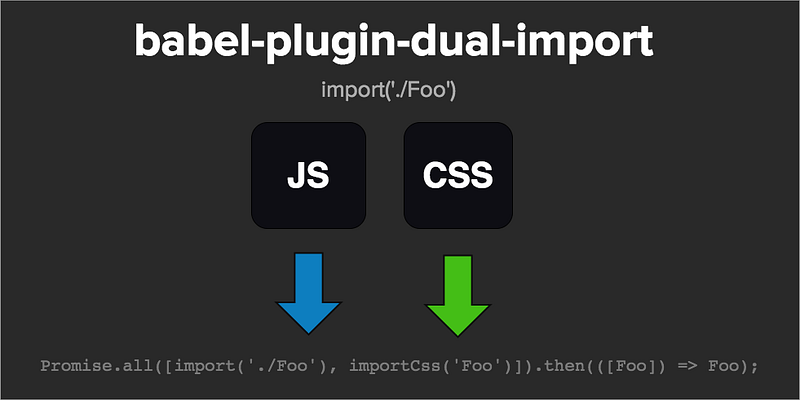
babel-plugin-dual-import transforms your request to a Promise.all just as Sokra talked about, and as bonus it automatically comes up with a webpackChunkName for you. “Magic comments” are so magical they’ve disappeared. Under the hood of course I use them to generate your chunk names.

As for extract-css-chunks-webpack-plugin 2.0, well we’ve circumvented a major performance issue in terms of build time (no more double JS chunks), and now all you’re dealing with is stylesheets your users’ browsers can cache. And yes, HMR still works (better than ever in fact).

Also note: all 4 of these packages work together. I’m tentatively calling it the “Universal” family of packages. They can all be individually used — because that’s what flexible frameworkless development is about. But they work best together. Enjoy.

INSTALLATION

Since today we are primarily introducing the babel plugin, that’s what we’ll focus on:

yarn add --dev babel-plugin-dual-import

.babelrc:

{
  "presets": [whatever you usually have],
  "plugins": ["dual-import"]
}

App.js:

import('./Foo.js')

      ↓ ↓ ↓ ↓ ↓ ↓

import { importCss } from 'babel-plugin-dual-import/importCss.js'

Promise.all([
  import( /* webpackChunkName: 'Foo' */ './Foo'),
  importCss('Foo')
]).then(promises => promises[0]);

And if you’re using dynamic requires:

import(`../base/${page}`)

      ↓ ↓ ↓ ↓ ↓ ↓

import { importCss } from 'babel-plugin-dual-import/importCss.js'

Promise.all([
  import( /* webpackChunkName: 'base/[request]' */ `./base/${page}`),
  importCss(`base/${page}`)]
).then(promises => promises[0]);

You of course need to use extract-css-chunks-webpack-plugin to generate the dynamic CSS “chunks” and webpack-flush-chunks to seamlessly serve it. We’ll skip the webpack plugin config, but here’s how you serve the assets corresponding to rendered components:

import flushChunks from 'webpack-flush-chunks'
import * as Universal from 'react-universal-component/server'
const appString = ReactDOM.renderToString(<App />)
                                          
const { js, styles, cssHash } = flushChunks(webpackStats, {
  chunkNames: Universal.flushChunkNames(),
})
res.send(`
  <html>
    <head>
      ${styles}
    </head>
    <body>
      <div id='root'>${appString}</div>
      ${js}
      ${cssHash}
    </body>
  </html>
`)

If you’ve looked at how webpack-flush-chunks works before, the new addition is the cssHash which is similar to what Webpack puts in its bootstrap script mapping javascript chunks to their IDs. The cssHash maps css chunk names to their stylesheet files. babel-plugin-dynamic-import requests stylesheets from there in parallel with javascript imports.

CONCLUSION

There’s not much left to say today. So I won’t waste your time. Git clone the demo to see all 4 packages in action:

If you haven’t checked out React Universal Component + Webpack Flush Chunks, do so. They’re currently the only solution bringing it all together for React developers apprehensive about frameworks. For developers that have had these problems, you know who you are. Those days are over.

All 4 links in one place:

> For more idiomatic javascript in Reactlandia, read:

Tweets and other love are much appreciated. Find me on twitter @faceyspacey Want to stay current in Reactlandia? Tap/click “FOLLOW” next to the FaceySpacey publication to receive weekly Medium “Letters” via email 👇🏽

JavaScript
React
Webpack
Nodejs
Reactjs
Recommended from ReadMedium