
Web Scraping (YouTube Videos)with Beautiful Soup
Yesterday I started the journey of web scraping: Start Web Scraping with Beautiful Soup, in the hope of gathering data I am interested in. But the page was loaded dynamically, which is not supported by “requests” lib. However, instead of using Selenium, we can use re/json modules to get the correct data(explained by this StackOverflow post). So continued with yesterday’s work, I will obtain video info: title, view, published date, likes, and description. (I changed the video since the last one did not show the number of likes.)
This is where I stopped yesterday.
from bs4 import BeautifulSoup
import requests
link = "https://www.youtube.com/watch?v=kj_pWv3ISAw&t=160s"
response = requests.get(link)
soup = BeautifulSoup(response.text, 'html.parser')print(soup.prettify())
print(soup.title.string)The desired information is:
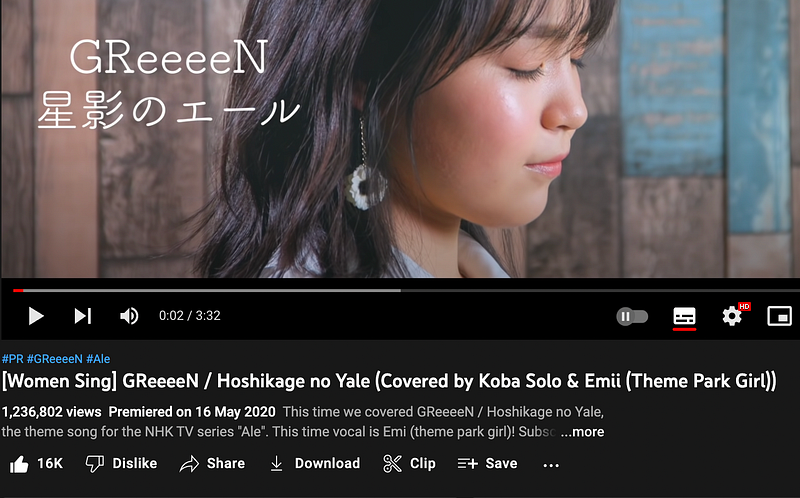
Now, add the below codes to obtain it.
import re
import json
# info in meta
title = soup.find("meta", itemprop="name")['content']
published_date = soup.find("meta", itemprop="datePublished")['content']
views = soup.find("meta", itemprop="interactionCount")['content']
description = soup.find("meta", itemprop="description")['content']# info in json - number of likes
data = re.search(r"var ytInitialData = ({.*?});", soup.prettify()).group(1)data = json.loads(data)
videoPrimaryInfoRenderer = data['contents']['twoColumnWatchNextResults']['results']['results']['contents'][0]['videoPrimaryInfoRenderer']likes_label = videoPrimaryInfoRenderer['videoActions']['menuRenderer']['topLevelButtons'][0]['toggleButtonRenderer']['defaultText']['accessibility']['accessibilityData']['label']likes = likes_label.split(' ')[0].replace(',','')print(f"Title: {title}")
print(f"Published at: {published_date}")
print(f"Views: {views}")
print(f"Likes: {likes}")
print(f"Description: {description}")Now the information is extracted.

The next step is using Selenium, since it was made for testing websites, it can click buttons for us, simulating a user visiting the website. In this way, we could get all the information hyperlinked to the initial webpage.
Refer to this blog: https://www.thepythoncode.com/article/get-youtube-data-python


