
Web Scraping With Python: Beginner to Advanced.
More data more machine learning.
Subtitle quote is a fact that if you have more data about your problem you can extract more information about problem and can solve it much more accurately. So web scraping is a technique to extract data from the web.
Table of content
- What is web scraping?
- How do we scrap data from website?
- Performing web scraping in python
- Web scraping using Selenium and BeautifulSoup
- Web scraping using request_html
- Web scraping using scrapy
1. What is web scraping?
Formal definition
Web scraping is an automated method used to extract large amounts of data from websites.
The data found on websites are often unstructured.Web scraping is a technique to collect that unstructured data and store it in structured form.
2. Now the question is how do we get data from websites?
When any web scraping code is run the request is sent to the URL that you have mentioned. The website responds to the request by sending data and allows it to read the XML or HTML page. The code will then extract the required data from that XML or HTML page.
Any web scraping code you need to follow the basic steps:
- Find the URL(address) of web page you want to scrape
- Inspect the page and find the data you want to extract
- Write the logic for extracting the data
- Store extracted data into structured form(E.g. Pandas DataFrame)
Now we’ll perform web scraping with various libraries and framework.
3. Performing web scraping with multiple libraries
Web scraping using Selenium and Beautiful Soup
let me introduce each libraries
- Selenium: Selenium is a web testing library. It is used to automate browser activities.
- BeautifulSoup: Beautiful Soup is a Python package for parsing HTML and XML documents. It creates parse trees that is helpful to extract the data easily.
- Pandas: Pandas is a library used for data manipulation and analysis. It is used to extract the data and store it in the desired format.
Let’s us information about laptops from from flipkart website.
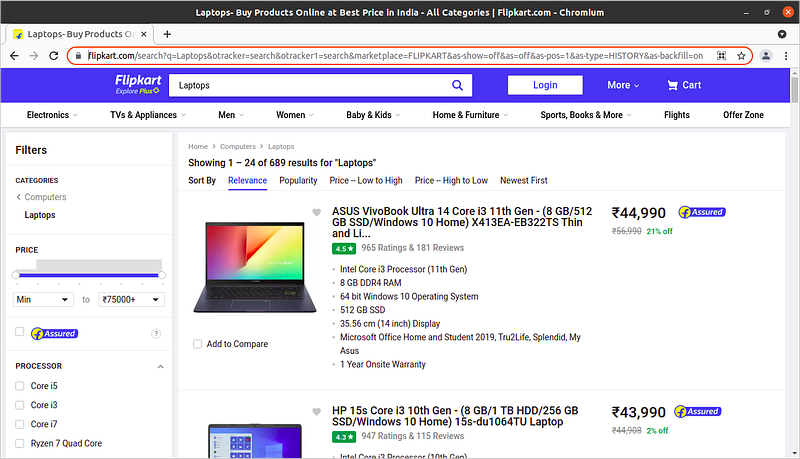
Suppose we want information like Laptop name and price
Let’s start code by importing the required libraries
from selenium import webdriver
from bs4 import BeautifulSoup
import pandas as pd
To configure webdriver to use Chrome browser, we have to set the path to chromedriver
driver = webdriver.Chrome('/usr/lib/chromium-browser/chromedriver')Now let us make some list for storing the data and get the content
products=[] #List to store name of the product
prices=[] #List to store price of the product
driver.get('https://www.flipkart.com/search?q=Laptops&otracker=search&otracker1=search&marketplace=FLIPKART&as-show=off&as=off&as-pos=1&as-type=HISTORY&as-backfill=on')
content = driver.page_source
soup = BeautifulSoup(content)
Now we have content of that web page so we need to get our useful data from it.
Now the thing to note here is that we need the class names for finding that specific content from the web page we can find it by inspecting on the page
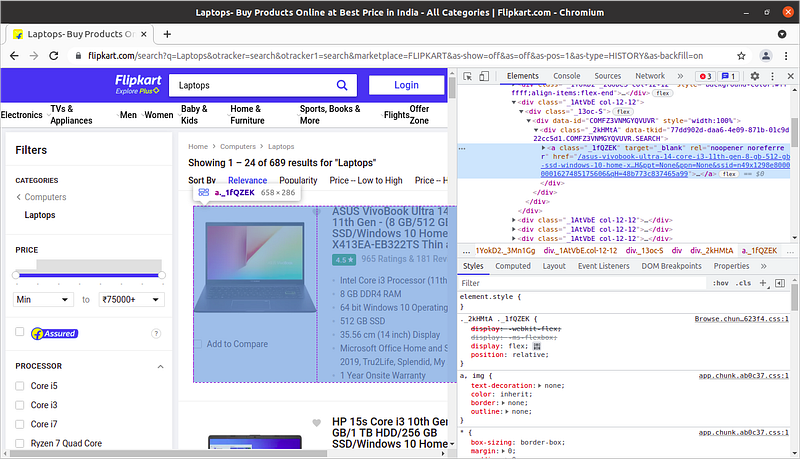
In the above image id of the content of specific laptop is shown similarly you can find all the id’s i.e for name and price.
for a in soup.findAll(attrs={'class':'_1fQZEK'}):
    name=a.find('div', attrs={'class':'_4rR01T'})
    price=a.find('div', attrs={'class':'_30jeq3 _1_WHN1'})
    products.append(name.text)
    prices.append(price.text)
Here loop is iterated on all the <div> tags having the class id as _1fQZEK and in that
Now to make this data into structured form we are storing it into pandas dataframe and furthur save it as csv file.
df = pd.DataFrame({'Product Name':products,'Price':prices})
df.to_csv('products.csv', index=False, encoding='utf-8')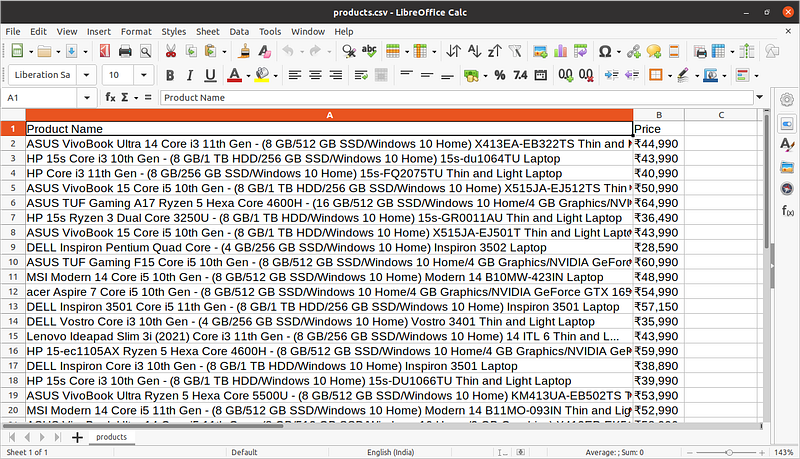
Web scraping using requests_html
We can scrape data from website by using single library only i.e. we will scrape the data using request_html
Suppose we want to get the repository name, language used and date from github repositories page.
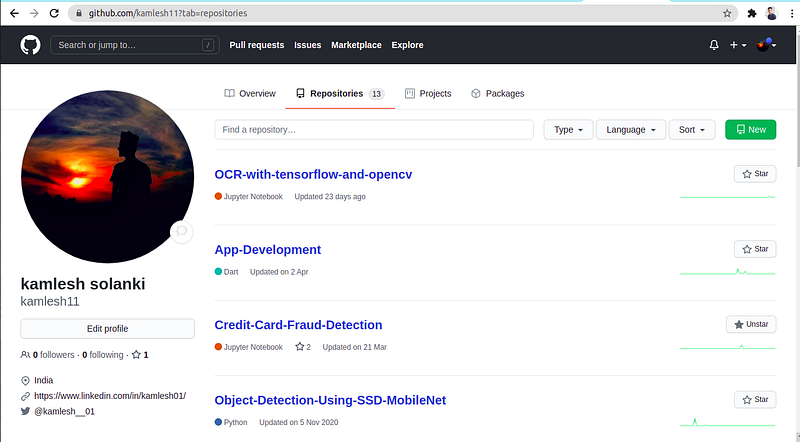
Let’s directly jump into code
import requests_html
from requests_html import HTMLSession
import pandas as pd
These are only imports we needed.
Now let’s create html session object,set URL and get content
session = HTMLSession()
url = 'https://github.com/kamlesh11?tab=repositories'
response = session.get(url)
Now we need to find the data which is actually useful to us from that web page.
container = response.html.find('#user-repositories-list',first=True)
# #user-repositories-list represents id of <div> tag
So we are extracting all the content in that
Further we only need the Li tags
list = container.find('li')Now let’s create lists for storing the information.
name = [] # for storing name of repository
lang = [] # language used in code
date = [] # date updated
for item in list:
    tmp = item.text.split('\n')
    name.append(tmp[0])
    lang.append(tmp[1])
    date.append(tmp[2])
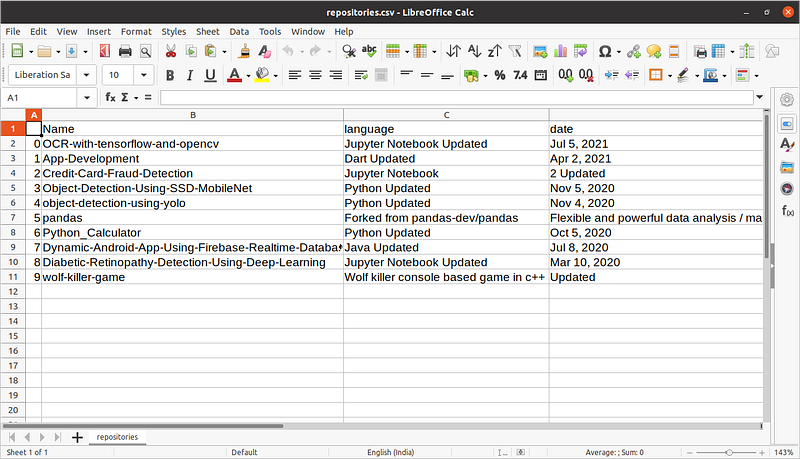
Now create the data frame to structure the data and further save as csv file.
df = pd.DataFrame({'Name':name,'language':lang,'date':date})
df.to_csv('repositories.csv')
Created csv file
Now We’ll learn Scrapy an web scraping framework.
Web scraping using scrapy
Scrapy is a Python framework for large scale web scraping. It gives you all the tools you need to efficiently extract data from websites, process them as you want, and store them in your preferred structure and format.
Set up your system
Scrapy supports both versions of Python 2 and 3. If you’re using Anaconda, you can install the package from the conda-forge channel, which has up-to-date packages for Linux, Windows and OS X.
To install Scrapy using conda, run:
conda install -c conda-forge scrapyAlternatively, if you’re on Linux or Mac OSX, you can directly install scrapy by:
pip install scrapyNow we have setup our system so let’s perform web scraping with scrapy.
Web Scraping with Scrapy
let’s extract some data again from flipkart. This time we will extract data of iphones.
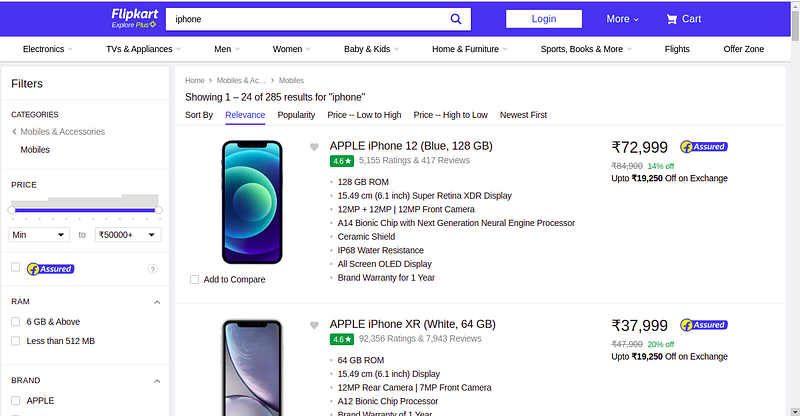
We will extract name and rating of the iphones.
In order to extract data we have to start scrapy shell we can start it by following command
scrapy shellNow we need to add URL of webpage we want to extract.In this case we want to extract Flipkart iphone page.

Now let’s see at response
response.textAbove code will print the page content in XML or HTML form.Now we have all the content so let’s start scraping the required data. Let us scrape name of iphones first.
response.css('._4rR01T::text').extract()Here ._4rR01T is the class name having title of phones. You can get this thing by inspecting. You can see first section of this article for this information.
Output: -
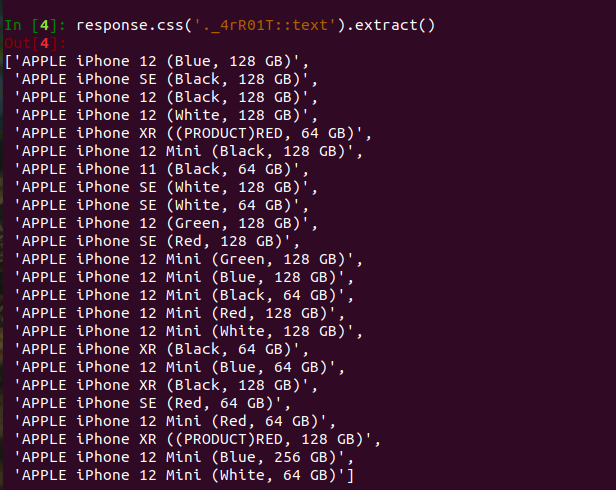
Now let us extract ratings of all iphones.
response.css('._3LWZlK::text').extract()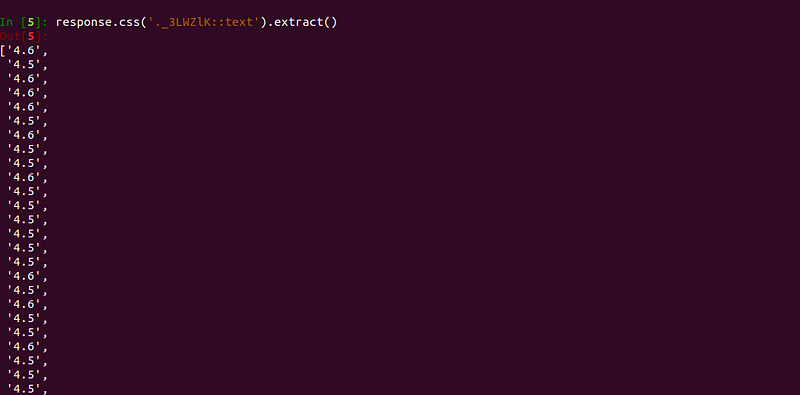
Similarly we can extract other data as well.
Now this all thing we have done in shell but we actually need data in csv file and not on shell. For doing so we need to start new project.
Let’s start new project.
scrapy startproject IphoneNow we need to write spider which will scrape data.
Wait what is spider?
A spider is a program that downloads content from web sites or a given URL.when extracting data on a large scale, you would need to write custom spider for different websites since there is no “one size fits all” approach is web scraping owing diversity in website designs.You also would need to write code to convert the extracted data to a structured format and store it in a reusable format like CSV, JSON, excel etc. That’s a lot of code to write, luckily scrapy comes with most of these functionality built in.
Creating a spider
scrapy genspider iphone www.flipkart.com/search?q=iphoneHere we are creating iphone spider.

Now we you’ll see an folder named Iphone having number of files there you’ll also find folder named spiders where the spiders are stored. In our case we have only created 1 spider named iphone. So, here iphone.py file will be found for each and every new spider it will create new spider file.
Now let’s see what code is there in iphone spider.
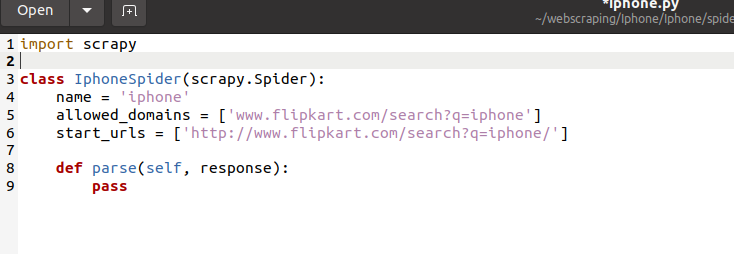
Here each time we crawl the project spider will be run and the data will be scraped from website or websites.Now we’ll write some code to scrape data.
Now we need to extract name and rating of the iphones from flipkart page.
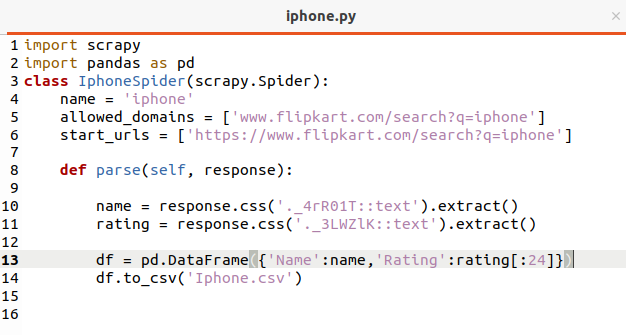
Here we are scraping name and rating same as that we’ve written in scrapy shell with some additional code of saving data in csv form.
Note that while scraping the data we may get more or less content as data is in unstructured form so we are getting 24 names of iphone and 39 ratings this may happen because the class may be used in some other places as well so the number as a result the number vary.
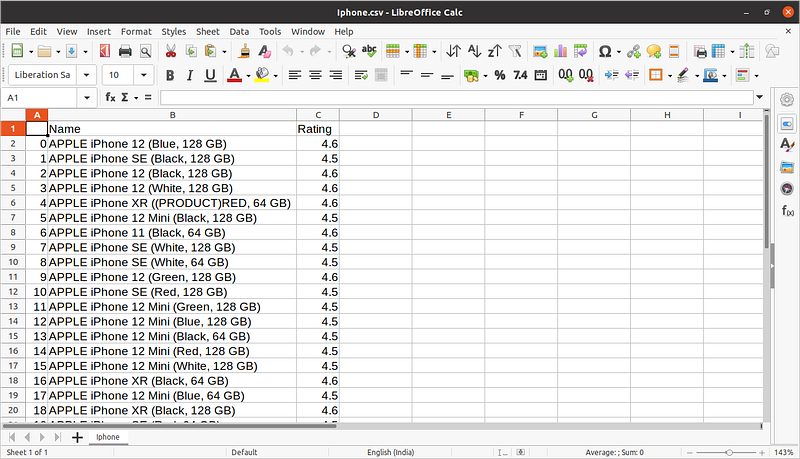
Now let us see the csv file
If you want to gain more information about scrapy I would suggest you to read this article.
Congratulations to you for going this far and I hope you’ve gained lot of information in this article.
Thanks for reading. 😃


