
Web Scraping with Python — 1. Static Content
Scrape the web with Python!

Data is an abundant resource on the Web. Maybe you’re building connected tools or software, and you need data from the Web. Most of the time you can access it using APIs, but some websites don’t provide APIs. How can you access data from these websites not providing any way to access their data? Well, that’s what web scraping is all about.
Thanks to web scraping, you can extract absolutely any data from the Web. Even data requiring interaction. For example, on some websites, you need to click on buttons to get a result. With web scraping, you can simulate a click on a button to then retrieve data.
But this article will focus on static content, which is content that doesn’t require any interaction to be retrieved.
The Theory Behind Web Scraping
When we want to scrap a website, all we’re doing is just sending GET requests to the server hosting the web page. The server then returns the source code corresponding to the page we want to access in HTML. It’s exactly the same thing you’re doing when you’re accessing a web page from a web browser.
But with web scraping, the page isn’t interpreted and won’t be displayed as it would look in a web browser.
Once we have the source code of the page, our scraper will identify the content to be extracted and will extract it. We can then do whatever we want with this content.
Is Web Scraping Legal?
Depending on the website you’re scraping, web scraping may be illegal. Indeed, some websites explicitly forbid it in their terms and conditions. Others explicitly allow it or don’t precise whether it is or not allowed.
Most of the time, it’s up to you to use common sense. Keep in mind that every request you make consumes server resources and can be costly for the site owner. So avoid spamming requests on small sites that might not be able to handle them.
Why Python?
Python is a multi-purpose language, mostly known and used for its applications in data science.
As you extract a lot of data through web scraping, you often need to process it then. So, it becomes related to data science. That’s why Python is a good choice for scraping the web.
There are still other choices such as Node.js, Ruby, or C++, but the favorite remains Python.
Getting Started
First, we need a website to scrape. We’ll scrape eBay: https://www.ebay.com/. Its policy says nothing about web scraping, so there’s no problem with it as long as we don’t spam.
We will try to scrape items we get when we search for an item on eBay. For example, I will try to extract the items corresponding to the keywords “It Stephen King” to see their title, price, link, and whether these are bids or not, from my script.
To do this, we need to find the URL to scrape. We’ll just go to eBay and type “It Stephen King” to check the URL. It gives us this: https://www.ebay.com/sch/i.html?_from=R40&_trksid=p2334524.m570.l1313&_nkw=It+Stephen+King&_sacat=0&LH_TitleDesc=0&_odkw=It+Stephen+King.
We can copy-paste this into our script, and if we want we can put our keywords in a variable:
keywords = "It Stephen King"
url = "https://www.ebay.com/sch/i.html?_from=R40&_trksid=p2334524.m570.l1313&_nkw={}&_sacat=0&LH_TitleDesc=0&_odkw={}".format(keywords, keywords)
Note: all the code in this story is on my GitHub, check this if you want a better way to visualize the code: Web Scraping Series.
Now, we need to get the source code of the page corresponding to this URL. We’ll use the requests Python package to do this. Let’s install it:
pip install requestsI won’t go into detail about requests because I will make a story about it soon. All you need to know for now is that we will use it to send a GET request to eBay, and the server will send us back the source code. Here is how we can do it:
import requestsresponse = requests.get(url)Our response is a Response object from requests . We just need the source code, accessible from the text attribute.
source_code = response.textBeautiful Soup
What to do with this source code? We can try to parse it using string manipulation but it will be hard. A package exists in Python to make our lives easier. It’s called beautifulsoup . Let’s install it:
pip install beautifulsoup4We’ll need only one class from this package: BeautifulSoup . It’s a class used to parse source code. Here is how you use it:
soup = BeautifulSoup(source_code, parser)- source_code: our source code stored in a string.
- parser: the parser we’ll use. There are several parsers available, the one we’ll use is
"html.parser".
Applying this to our code, we have now:
from bs4 import BeautifulSoupsoup = BeautifulSoup(source_code, "html.parser")Note: beautifulsoup4 is named bs4 in the imports.
Now, we can do tons of things with our soup. For example, we can extract specific HTML tags:
head = soup.head
body = soup.body
We can also make more complex queries:
item = soup.find("p", {"class": "item", "id": "item_1"})
items = soup.find_all("p", {"class": "item"})
The syntax is just:
soup.find(tag, attributes) # or find_allNow, if I want to display the text of an element, I just use:
element.textFor example:
item = soup.find("p", {"class": "item", "id": "item_1"})
print(item.text)  # It by King, Stephen
So let’s get back to our script. We’ll try to identify the class of the items we need to extract.
To do this, we open our console and try to find the HTML code corresponding to a single item. Just right-click on an item and click “inspect” to open a console inspecting the selected element. Then, you can adjust to find it in the HTML code in the console.
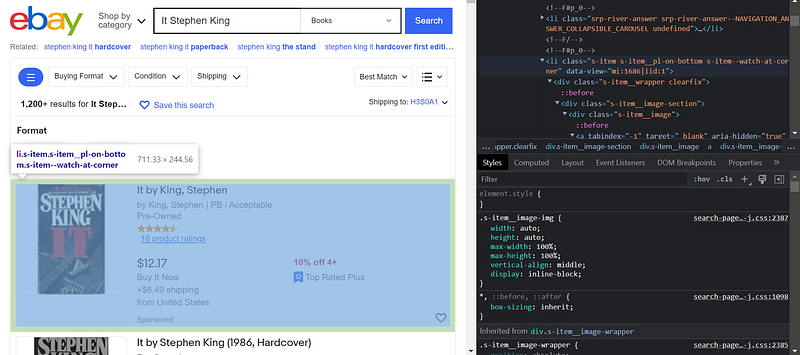
I’ve found it! The class of an item is s-item . Also, the tag of an item is li . I can now query all the items on the page:
items = soup.find_all("li", {"class": "s-item"})For each item, we want the title, the price, the link, and whether it is a bid or not. Lets’ find these in the console.
An example for the title:
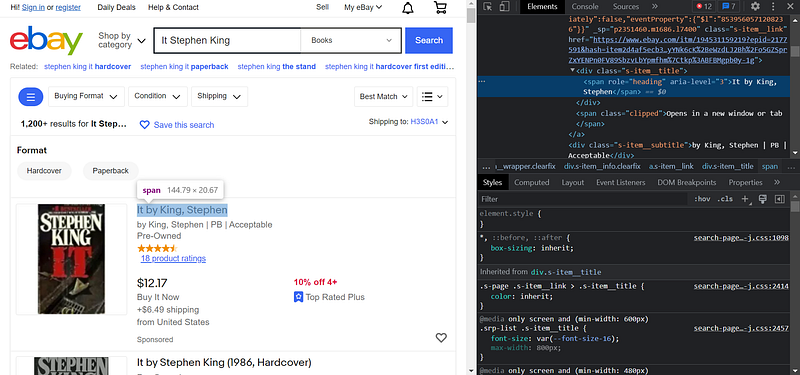
It’s a span , and it’s identified with a role="heading" . So I can query it with:
title = item.find("span", {"role": "heading"}).textYou can try to do the others by yourself.
Finally, we find this for the others:
price = item.find("span", {"class": "s-item__price"}).text
is_a_bid = item.find("span", {"class": "s-item__bids"}) is not None
link = item.find("a", {"class": "s-item__link"})["href"]
Let’s implement these into our code:
for item in items:
    title = item.find("span", {"role": "heading"}).text
    price = item.find("span", {"class": "s-item__price"}).text
is_a_bid = item.find("span", {"class": "s-item__bids"}) is not None
link = item.find("a", {"class": "s-item__link"})["href"]
Now, we can initialize a list before the loop, and store our items in this list within the for . We can even sort
scraped_items = []
for item in items:
    title = item.find("span", {"role": "heading"}).text
    price = item.find("span", {"class": "s-item__price"}).text
    is_a_bid = item.find("span", {"class": "s-item__bids"}) is not None
    link = item.find("a", {"class": "s-item__link"})["href"]
    scraped_items.append({
        "title": title,
        "price": price,
        "is_a_bid": is_a_bid,
        "link": link
    })

for item in sorted(scraped_items, key=lambda x: float(x["price"].split("$")[1].replace(",", ""))):
    print(f"{item['title']} - {item['price']} - {item['is_a_bid']} - {item['link']}")
Note: to sort the items by price accurately, we need to convert the price to float. It requires some manipulation.
Pandas
To avoid spamming, it’s a good idea to store our results in a file. We’ll use Pandas to convert our list into a DataFrame and save it as CSV. This is not a tutorial about Pandas, so I’ll be very fast on this part. The Pandas tutorial will come in another story.
Let’s install Pandas first.
pip install pandasNow, we can import it:
import pandas as pdLet’s move the price conversion to float in our for loop:
price = float(item.find("span", {"class": "s-item__price"}).text.split("$")[1].replace(",", ""))Now we can sort our items by price and put them into a DataFrame:
sorted_items = sorted(scraped_items, key=lambda x: x["price"])
items_df = pd.DataFrame(sorted_items)
Finally, we can save our DataFrame to a CSV file:
filename = "ebay_{}.csv".format(keywords.replace(" ", "_"))
items_df.to_csv(filename, index=False)
Let’s check our file to see how it looks:
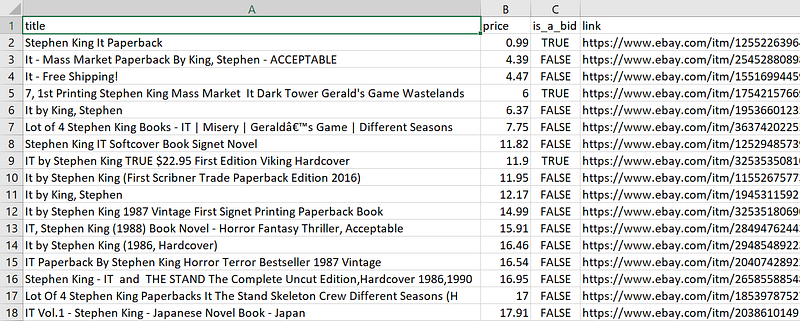
Looks good!
Final Note
Now, you know how to scrape static websites such as eBay. But some websites require actions to display data, so you can’t scrape them using Beautiful Soup. We’ll see how to deal with this in the next story of this series.
If you don’t want to miss it, be sure to follow me!
To find the other stories of this series, check this: Web Scraping with Python.
To explore more of my Python stories, click here! You can also access all my content by checking this page.
If you liked the story, don’t forget to clap, comment, and maybe follow me if you want to explore more of my content :)
You can also subscribe to me via email to be notified every time I publish a new story, just click here!
If you’re not subscribed to Medium yet and wish to support me or get access to all my stories, you can use my link:


