avatarNakul Lakhotia

Free AI web copilot to create summaries, insights and extended knowledge, download it at here

3197

Abstract

f596"><p><b>Requests</b><i> is a Python module that you can use to send all kinds of HTTP requests. It is an easy-to-use library with a lot of features ranging from passing parameters in URLs to sending custom headers and SSL Verification.</i></p></blockquote><blockquote id="fca8"><p><b>Pandas</b> <i>is a data analysis tool for the python programming language. We use Pandas Dataframe is a 2-dimensional labeled data structure with columns of potentially different types. You can think of it like a spreadsheet or SQL table, or a dict of Series objects. It is generally the most commonly used pandas<b> </b>object.</i></p></blockquote><div id="8737"><pre><span class="hljs-keyword">import</span> pandas <span class="hljs-keyword">as</span> pd <span class="hljs-comment"># library for data analysis</span> <span class="hljs-keyword">import</span> requests <span class="hljs-comment"># library to handle requests</span> <span class="hljs-keyword">from</span> bs4 <span class="hljs-keyword">import</span> BeautifulSoup <span class="hljs-comment"># library to parse HTML documents</span></pre></div><p id="5140">3. <b>Request for the HTML response using the URL</b> : We send a GET request to the Wikipedia URL whose table needs to be scraped and store the HTML response in a variable. It is not legal to scrape any website, so we check the status code. 200 shows that you can go ahead and download it.</p><div id="0dee"><pre><span class="hljs-comment"># get the response in the form of html</span> <span class="hljs-attribute">wikiurl</span>=<span class="hljs-string">"https://en.wikipedia.org/wiki/List_of_cities_in_India_by_population"</span> <span class="hljs-attribute">table_class</span>=<span class="hljs-string">"wikitable sortable jquery-tablesorter"</span> <span class="hljs-attribute">response</span>=requests.get(wikiurl) <span class="hljs-built_in">print</span>(response.status_code)</pre></div><p id="9284">4. <b>Inspect page</b> : In order to scrape the data from the website, we place our cursor on the data ,right click and Inspect. This gives us the HTML content through which we can find the tags inside which our data is stored. It is obvious that a table is stored inside the tag in HTML.<table></table></p><figure id="118b"><img src="https://cdn-images-1.readmedium.com/v2/resize:fit:800/1*ChMRG59gazTzZoXDhhT5Cw.jpeg"><figcaption>Using Inspect in Chrome</figcaption></figure><p id="21af">5. <b>Parse data from the HTML</b> : Next we create a BeautifulSoup object and using the find() method extract the relevant information,which in our case is the tag. There can be many tables in a single Wikipedia page, so to specify the table we also pass the “class” or the “id” attribute of the <table></table> tag.<table></table></p><div id="9d09"><pre><span class="hljs-comment"># parse data from the html into a beautifulsoup object</span> <span class="hljs-attr">soup</span> = BeautifulSoup(response.text, <span class="hljs-string">'html.parser'</span>) <span class="hljs-attr">indiatable</span>=soup.find(<span class="hljs-string">'table'</span>,{<span class="hljs-string">'class'</span>:<span class="hljs-string">"wikitable"</span>})</pre></div><p id="2c47"><i>Output :</i></p><

Options

figure id="4ab5"><img src="https://cdn-images-1.readmedium.com/v2/resize:fit:800/1*Fo_r6ednw6RLjtVbc3R9og.jpeg"><figcaption>Scraped HTML Code from the Wikipedia Page</figcaption></figure><p id="1adf">6. <b>Convert Wikipedia Table into a Python Dataframe</b> : We read the HTML table into a list of dataframe object using read_html(). This returns a list. Next we convert the list into a DataFrame.</p><div id="c5b3"><pre><span class="hljs-attribute">df</span>=pd.read_html(str(indiatable)) <span class="hljs-comment"># convert list to dataframe</span> <span class="hljs-attribute">df</span>=pd.DataFrame(df[0]) <span class="hljs-built_in">print</span>(df.head())</pre></div><p id="1f34"><i>Output:</i></p><figure id="87bd"><img src="https://cdn-images-1.readmedium.com/v2/resize:fit:800/1*D0u8uJn96g7XorB9zgKXlg.jpeg"><figcaption>Wikipedia Table to Python DataFrame</figcaption></figure><p id="71fc">7. <b>Clean the Data</b> : We only need the city name,state and population(2011) from this dataframe. So we drop the other columns from the dataframe and rename the columns for a better understanding.</p><div id="a6aa"><pre><span class="hljs-comment"># drop the unwanted columns</span> <span class="hljs-title">data</span> = df.drop([<span class="hljs-string">"Rank"</span>, <span class="hljs-string">"Population(2001)"</span>], axis=<span class="hljs-number">1</span>) <span class="hljs-comment"># rename columns for ease</span> <span class="hljs-title">data</span> = <span class="hljs-title">data</span>.rename(columns={<span class="hljs-string">"State or union territory"</span>: <span class="hljs-string">"State"</span>,<span class="hljs-string">"Population(2011)[3]"</span>: <span class="hljs-string">"Population"</span>}) <span class="hljs-built_in">print</span>(<span class="hljs-title">data</span>.<span class="hljs-built_in">head</span>())</pre></div><p id="440f"><i>Output :</i></p><figure id="7244"><img src="https://cdn-images-1.readmedium.com/v2/resize:fit:800/1*OzpePqCiT71oXaDUWmoS1Q.jpeg"><figcaption>Clean Data</figcaption></figure><p id="0e18">And that’s it!!</p><p id="1f80">You have your Wikipedia table converted into a dataframe which can now be used for further data analysis and machine learning tasks.That’s the beauty of using Python for web scraping. You can have your data in no time using just a few lines of code.</p><figure id="17ba"><img src="https://cdn-images-1.readmedium.com/v2/resize:fit:800/1*VqLYs481X9kw_CTosgqlcg.png"><figcaption>Support me if you enjoyed reading this article. Click on the picture above. Thank You</figcaption></figure><p id="330d">Refer to my <a href="https://github.com/NakulLakhotia/Coursera_Capstone/blob/master/Wikipedia_table.ipynb"><b>GitHub Code</b></a></p><p id="0f84"><b><i>Note</i></b><i> : All the resources that you will require to get started have been mentioned and their links provided in this article as well. I hope you make good use of it :)</i></p><p id="ae3b">I hope this article will get you interested in trying out new things like web scraping and help you add to your knowledge. Don’t forget to click on the “clap” icon below if you have enjoyed reading this article. Thank you for your time.</p></article></body>

Web Scraping a Wikipedia Table into a Dataframe

How do you convert a Wikipedia table into a Python Dataframe ?
Source: Unsplash

“It is a capital mistake to theorize before one has data.” — Sherlock Holmes

Many of you Data Science enthusiast out there who are thinking of starting a new project, be it for enhancing your skills or a corporate level project need “data” to work with. Thanks to the internet, today we have hundreds of data sources available. One of the places where you can find data easily is the Wikipedia. Here is an example of a data source : https://en.wikipedia.org/wiki/List_of_cities_in_India_by_population
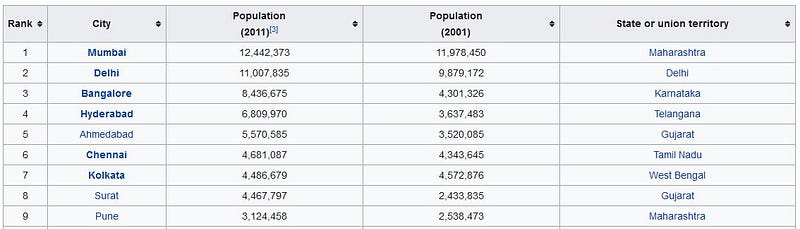
Table of Indian Cities and their population

We have the data which we need to work with. Lets say I need the names of the Indian cities, their states and their population.Now there are many ways you can extract this data like copy and pasting the content on a new excel sheet or using the Wikipedia API. But what if i tell you that this table can directly be converted to a Python Dataframe so it becomes easier for further analysis and processing. Interesting, isn’t it?

The task of extracting data from websites is called Web Scraping.It is one of the most popular methods of collecting data from the internet along with APIs. Some websites do not provide APIs to collect their data so we use data scraping technique. Some of the best programming languages for scraping purpose are Node.js, C , C++, PHP and Python.

We use Python for this particular task. But why Python?

  • šIt is the most popular language for web scraping.
  • BeautifulSoup is among the widely used frameworks based on Python that makes scraping using this language such an easy route to take.
  • These highly evolved web scraping libraries make Python the best language for web scraping.

You need to have some basic knowledge of HTML pages to understand web scraping. We also need some python libraries like BeautifulSoup, Requests and Pandas.

Following are the steps to scrape a Wikipedia table and convert it into a Python Dataframe.

  1. Install BeautifulSoup : pip install beautifulsoup4 (Go to the terminal and use this pip command to install it)
  2. Import required libraries : šRequests, Pandas, BeautifulSoup.

Requests is a Python module that you can use to send all kinds of HTTP requests. It is an easy-to-use library with a lot of features ranging from passing parameters in URLs to sending custom headers and SSL Verification.

Pandas is a data analysis tool for the python programming language. We use Pandas Dataframe is a 2-dimensional labeled data structure with columns of potentially different types. You can think of it like a spreadsheet or SQL table, or a dict of Series objects. It is generally the most commonly used pandas object.

import pandas as pd # library for data analysis
import requests # library to handle requests
from bs4 import BeautifulSoup # library to parse HTML documents

3. Request for the HTML response using the URL : We send a GET request to the Wikipedia URL whose table needs to be scraped and store the HTML response in a variable. It is not legal to scrape any website, so we check the status code. 200 shows that you can go ahead and download it.

# get the response in the form of html
wikiurl="https://en.wikipedia.org/wiki/List_of_cities_in_India_by_population"
table_class="wikitable sortable jquery-tablesorter"
response=requests.get(wikiurl)
print(response.status_code)

4. Inspect page : In order to scrape the data from the website, we place our cursor on the data ,right click and Inspect. This gives us the HTML content through which we can find the tags inside which our data is stored. It is obvious that a table is stored inside the tag in HTML.
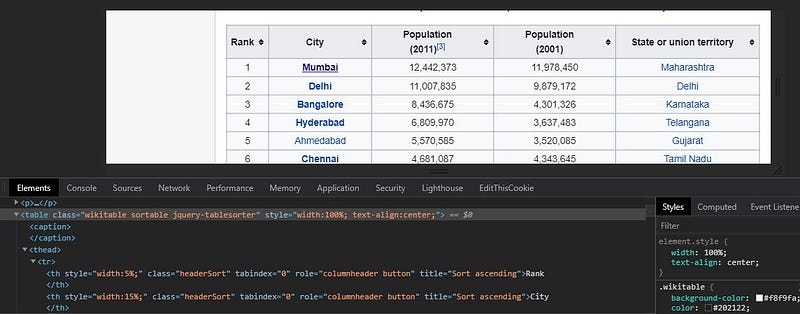
Using Inspect in Chrome

5. Parse data from the HTML : Next we create a BeautifulSoup object and using the find() method extract the relevant information,which in our case is the tag. There can be many tables in a single Wikipedia page, so to specify the table we also pass the “class” or the “id” attribute of the

tag.

# parse data from the html into a beautifulsoup object
soup = BeautifulSoup(response.text, 'html.parser')
indiatable=soup.find('table',{'class':"wikitable"})

Output :
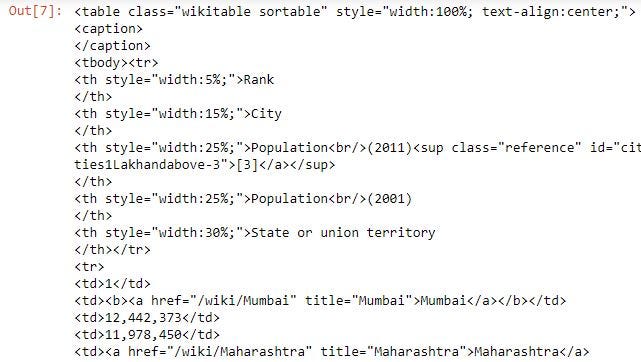
Scraped HTML Code from the Wikipedia Page

6. Convert Wikipedia Table into a Python Dataframe : We read the HTML table into a list of dataframe object using read_html(). This returns a list. Next we convert the list into a DataFrame.

df=pd.read_html(str(indiatable))
# convert list to dataframe
df=pd.DataFrame(df[0])
print(df.head())

Output:
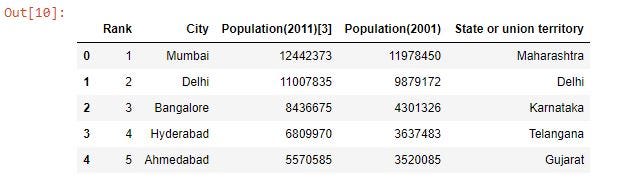
Wikipedia Table to Python DataFrame

7. Clean the Data : We only need the city name,state and population(2011) from this dataframe. So we drop the other columns from the dataframe and rename the columns for a better understanding.

# drop the unwanted columns
data = df.drop(["Rank", "Population(2001)"], axis=1)
# rename columns for ease
data = data.rename(columns={"State or union territory": "State","Population(2011)[3]": "Population"})
print(data.head())

Output :
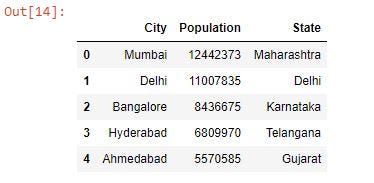
Clean Data

And that’s it!!

You have your Wikipedia table converted into a dataframe which can now be used for further data analysis and machine learning tasks.That’s the beauty of using Python for web scraping. You can have your data in no time using just a few lines of code.

Support me if you enjoyed reading this article. Click on the picture above. Thank You

Refer to my GitHub Code

Note : All the resources that you will require to get started have been mentioned and their links provided in this article as well. I hope you make good use of it :)

I hope this article will get you interested in trying out new things like web scraping and help you add to your knowledge. Don’t forget to click on the “clap” icon below if you have enjoyed reading this article. Thank you for your time.

Data
Web Scraping
Python
Data Science
Wiki
Recommended from ReadMedium