
Web Components. What are they? Pros, Cons and more.
Reusing code is a smart thing to do when developing, is more than a good practice, it should be done as much as possible to keep the code clean and make it scalable. Web components are a pretty interesting approach for reusing code which traditionally has not been so easy for custom markup structures.
On this article we will enter into the web components world, explain what is it, the technologies it uses, how can we implement it and it’s pros and cons. So at the end we should have a better understanding of the concept and a base knowledge to be able to make a informed decision when deciding to use it in our projects.
What are Web Components?
When we talk about Web Components we are basically talking about our own HTML tags which are defined in JavaScript code, are reusable, their functionality is encapsulated and can be used in any web project.
A web component will look like this:<my-web-component>, and will have its unique styling and functionality. An advantage of web components is that can be used with any JavaScript framework or library and it works across most modern browsers.
Web Components Technology
Web components are not a technology by itself, instead web components are based on the combination of three technologies that can be used together to create a versatile custom HTML tag.
- Custom Elements: This is the base of the web components, is an specification that allows developers to create new HTML tags and to define their behavior and style using nothing more than JavaScript, HTML and CSS, which can then be used as desired in the user interface. The result is less and modular code that can be reused.
To create a Custom Element we need to declare a class extending HTMLElement and then register it by using the customElements.define() method.
To use our custom element we just need to add the custom tag in our project.
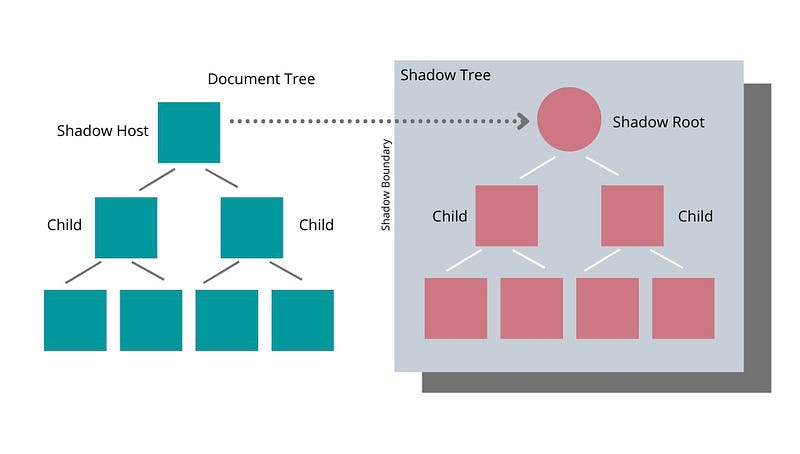
- Shadow DOM: This is the technology that allows us to encapsulate parts of the HTML and isolates the CSS and Javascript code with it, which is rendered separately from the main DOM. This is very useful because it allows the developer to control the functionality of the custom component, keeping its features private, so they can be scripted and styled without the fear of collision with other parts of the document.
In the following image you can see how the shadow tree would look like in a project. It is, as it name suggests, a document tree in the shadows, that is encapsulated as we explained before.
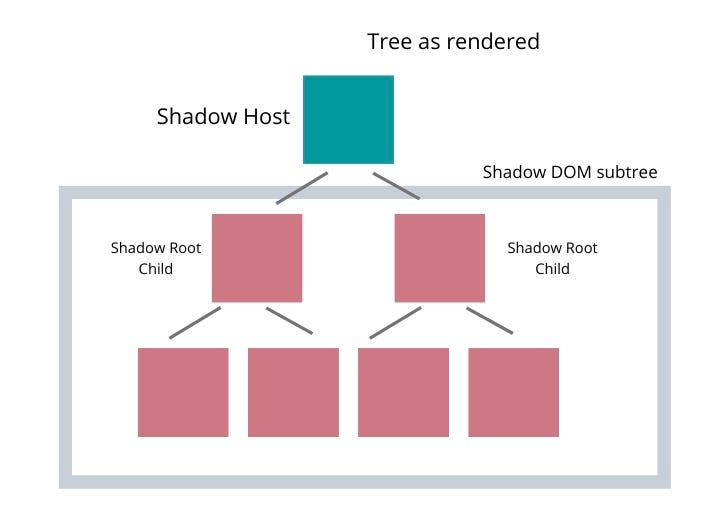
When the page is rendered the Shadow Tree elements will get rendered as well in the right position to be able to build the final structure of the DOM.
- Templates: These are the elements
andthat allow the developer to write markup templates that are not displayed in the rendered page. These elements are important because they can then be used to populate the shadow DOM of a web component.
Here you can see an example of a template declaration.
Pros of Web Components
- Framework Agnostic: Web components work with any framework (React, Vue, Angular) and with no framework at all. This is very important because it makes the web components really flexible.
- HTML Standard: Since Web Components use native HTML specifications, and regular CSS and JavaScript, there is native support for modern browsers.
- Easy to share and reuse. Using web components makes easier to handle multiple projects or ecosystems with different technology stacks where you need to share or reuse components.
- No complex dependencies. An advantage that web components provide is the option to connect a specific custom element without importing complex dependencies to the project, this is a big difference when comparing with popular frameworks.
Cons of Web Components
- Loading time. Web components might take a few milliseconds to load, process, register and render, since custom elements are registered in JavaScript. In the mid-time the custom element remains unstyled or hidden.
- SEO unfriendly . Web components are not SEO friendly yet, which is a pain point for many developers, and websites who use them may suffer from inefficient indexing. Although there are some libraries that tackle this issue.
- Style sharing between components: Sometimes the encapsulation advantage of the web components might become a disadvantage, because it doesn’t allow you to share code between components.
Browser Support
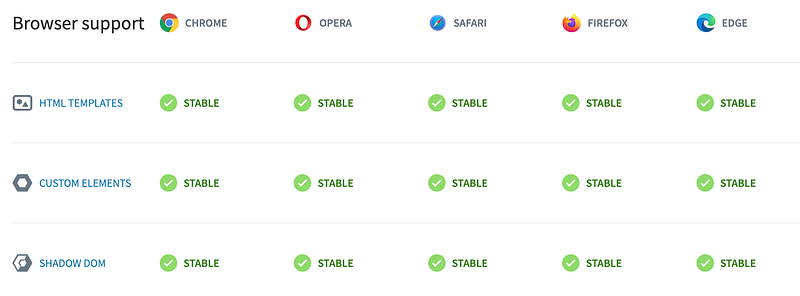
As we explained before, as web components use native HTML specifications, they are supported by most modern browsers. Here is a table that visually explain it.
Web Component Libraries
Web Components are getting more popular with time, which is good news because we have more community support and new libraries and frameworks that aim to make our life easier and provide a straightforward development process, which at the end helps us save time and effort when developing web components.
Here are some examples that might worth to investigate further because they offer plenty of features and tools that might be very helpful: Stencil, Hybrids, Lit Element, Polymer, and Slim.js.
Conclusion
With the pass of the years the are more and more technologies and tools we can use when creating a web development project. It is important to keep updated with these releases and know the base of their usage, its pros and cons and how can it could be helpful for us, so at the moment of deciding how to approach a new development we know for sure that we will be choosing the correct technology for it, or at least the one we think is best based in an educated choice, and not only on our personal preferences.
Web components has its pros and cons but ultimately is just another option to consider and to have in mind when creating a project or even updating one. So hopefully this article will be helpful on those decision making times and will put another interesting and valid option on the table.


