
Who stole my data? — Data Breach
Potential data breach scenarios and how to protect ourselves from them.
How do you protect yourself from the impact of data breaches?
1. What is a Data Breach?
2. How Can You Be Affected?
3. Actions to Be Taken After a Violation
4. Reporting Suspicious Messages
We use online technologies in almost every aspect of our lives, and data breaches have become a reality of modern life. This guide will explain what data breaches are, how they can affect you, and what to watch out for following a data breach.
What is a Data Breach?
A data breach occurs when information held by an organization is stolen or accessed without authorization.
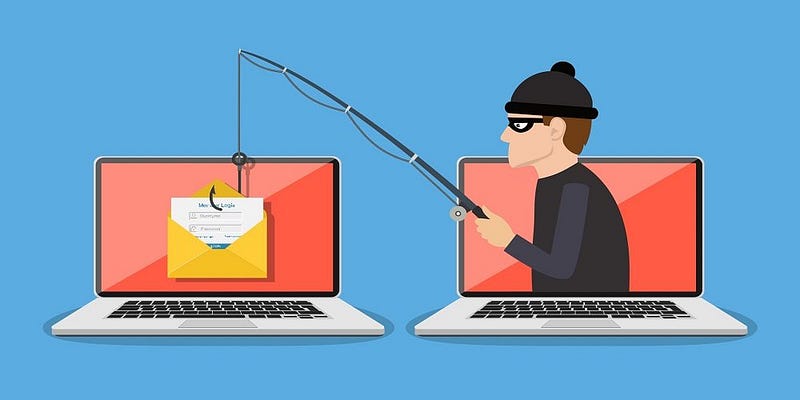
Attackers use some information when creating phishing messages (such as emails and texts) to make them look legitimate. The messages are designed to make it appear as if you were targeted one by one while the attackers were actually sending millions of these fraudulent messages. (Phishing Attack) Attackers can send you links asking you to enter or renew your information by sending messages as if they were from an organization that had recently compromised data.
How can you be affected?
In a typical scam, you may receive a message claiming to be from an organization that has recently suffered a data breach. The message may ask you to sign in and verify your account.
These scam messages typically contain links to websites that look real but retain your real information after you type them. These websites can install viruses on your computer or steal the passwords you have entered.
Like many phishing scams, these fraudulent messages are difficult to detect, and they exploit your vulnerabilities by focusing on your real-world concerns to try to trick you into clicking.
If the information stolen during the breach includes phone numbers, you may receive a suspicious call. If the approach is more direct, you may be asked to share sensitive information (such as bank details or passwords) or access your computer.
Actions to be taken after a violation:
If you are a customer of an organization with a data breach, you should take the following precautions:
1. Find out if you are affected by this data breach by contacting the organization using its official website or social media channels.
2. Do not use links or contact information in any of the messages you send.
When contacting the organization, it should be able to provide information on:
• Whether there has really been a violation,
• How you are affected,
• What route you should take.
You can also phone the organization directly, but it may be healthier to use support communication channels, as many of them will not be able to respond to all calls during a major breach.
3. You should be wary of suspicious messages that may be sent sometime after the breach has been made public. Remember, your bank (or any other government agency) will never ask you to provide personal information.
The points to be considered are:
1. Do not click on messages such as ‘password reset related mails’, ‘mails saying that you will receive money and win gifts’, ‘links saying that they will perform security scans on the device’!
2. Be wary of emails full of ‘tech talk’ designed to sound more believable.
3. Think again as you click on links on which you are encouraged to act immediately or within a limited time!
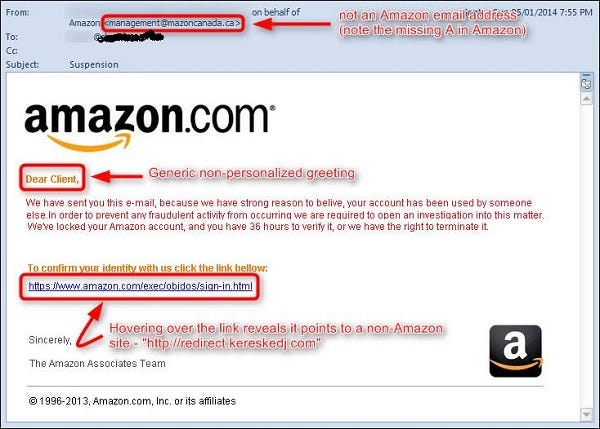
Let’s examine the above e-mail together:
First of all, we look at the e-mail address. The e-mail address does not appear to come from an official Amazon e-mail address.
Instead of a personal greeting, the expression “Dear Customer” is used in the content of the mail. We can take this statement as a warning that the email may have been sent automatically to more than one person and there may be a phishing attack. In the content of the mail, it is said that your Amazon account has been locked due to a high suspicion that your account is being used by someone else and you have 36 hours to authenticate. (Encouraged to act immediately or within a limited time)
When we look at the authentication link, we observe that the link directs us to a place other than the Amazon website.
All of these tokens are an indication that we could be the victim of a phishing attack.
4. If you receive a suspicious message containing a password you’ve used in the past, don’t panic:
• If this is a password you still use, you should change it as soon as possible.
• If any of your other accounts are using the same password, you must change them as well.
- Be careful with creating strong passwords.
5. Check your online accounts to verify that there is no unauthorized activity.
Things to watch out for include:
a. Not being able to log into your accounts
b. Changes in your security settings
c.Messages or notifications that you do not recognize from your account
d. Alerts for signing in or attempting to log in from awkward places or at unusual times
5. There are a number of online tools you can use such as https://haveibeenpwned.com to check whether your information appears in any other public data breach.
This site contains information about billions of leaked accounts and allows users to search for their own information by entering their username or email address. If you enter your e-mail address in this tool and it appears that you are pwned, do not worry immediately.
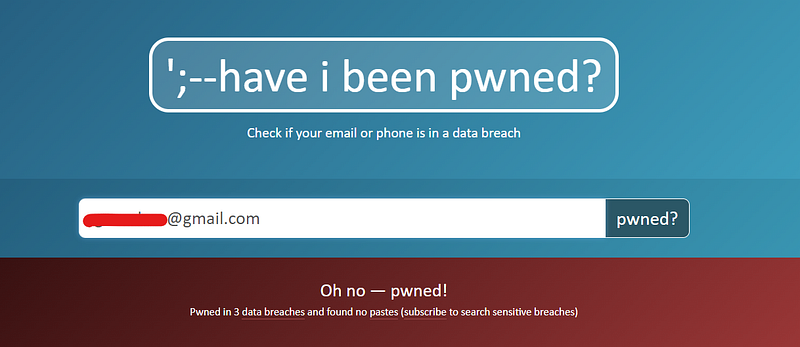
Check your email filters and forwarding rules. After confirming that there are no spam forwarding rules, change the passwords on all accounts that have the same password as the hacked account. Next, change the passwords of all other accounts that send password reminders/resets to the hacked account. Maybe it’s time for you to get a new email address? Send your important data via secure e-mail options.
What we mean by to be pwned:
Actually, Pwned can be called an internet game jargon. In this type of speech called trash talk, a new word is created by bringing together meaningful words, or a new word is derived by changing the letters of a word.
Massively popular games like League of Legends and Fortnite have brought these player terms to light, making online games a mainstream hundred billion dollar industry.
Pwned is a misspelling of the word “owned”, which means to fully and completely dominate an opponent in any situation in player slang. In Internet jargon, ‘Pwn’ means ‘to have power or dominance over (someone)’. “It is also used to describe the act of gaining illegal access to something.”
Report suspicious messages
If you receive a message or a phone call about a security breach that doesn’t sound right, if you have received nuisance, suspicious or unsolicited calls, hang up and contact your telephone provider.
For more:
Awareness is Freedom. The choice is yours.


