
Programming
Visualize dependencies between Python Modules
Better understand your code modules using Pydeps

Have you ever gone through repositories like Detectron or TF Object Detection API? How easy it is for you to navigate or understand the code? Isn’t it better if you have a tool that helps better understand the code?
The major hurdle we face in understanding these repositories is knowing dependencies or linkages. Each file in these repos is linked to many other files through import. The code is so much distributed and modular that it is confusing sometimes to navigate to the actual definition of a function.
Recently I have faced a similar issue and had a hard time navigating through files for getting function definitions.
So I was looking for a way to get a graph of all dependencies between python scripts. Then I found this tool called “Pydeps”. After I generate a graph of all dependencies, I was able to better navigate and understand the code. If you are having a hard time understanding any complex python code, use Pydeps for visualizing the module dependencies.
Installation
Installation is straightforward. The package is available as part of PIP.
pip install pydepsIf you want to create graphs with Pydeps, you also need to install Graphviz.
sudo apt install graphvizUsage
Usage is very simple. Just run pydeps <filename>. It will create a graph of all dependencies for this file. They also have many optional arguments in the command line.
usage: pydeps [-h] [--debug] [--config FILE] [--no-config] [--version] [-L LOG] [-v] [-o file] [-T FORMAT] [--display PROGRAM] [--noshow] [--show-deps] [--show-raw-deps] [--show-dot] [--nodot] [--no-output] [--show-cycles] [--debug-mf INT] [--noise-level INT] [--max-bacon INT] [--pylib] [--pylib-all] [--include-missing] [-x PATTERN [PATTERN ...]] [-xx MODULE [MODULE ...]] [--only MODULE_PATH [MODULE_PATH ...]] [--externals] [--reverse] [--cluster] [--min-cluster-size INT] [--max-cluster-size INT] [--keep-target-cluster] [--rmprefix PREFIX [PREFIX ...]] fnameThe description of all these arguments is given in their Github. Feel free to look at it for understanding all use cases. We will see examples of the most useful arguments here.
Examples
Without any optional arguments:
Just run pydeps <filename>. You will get the following output.
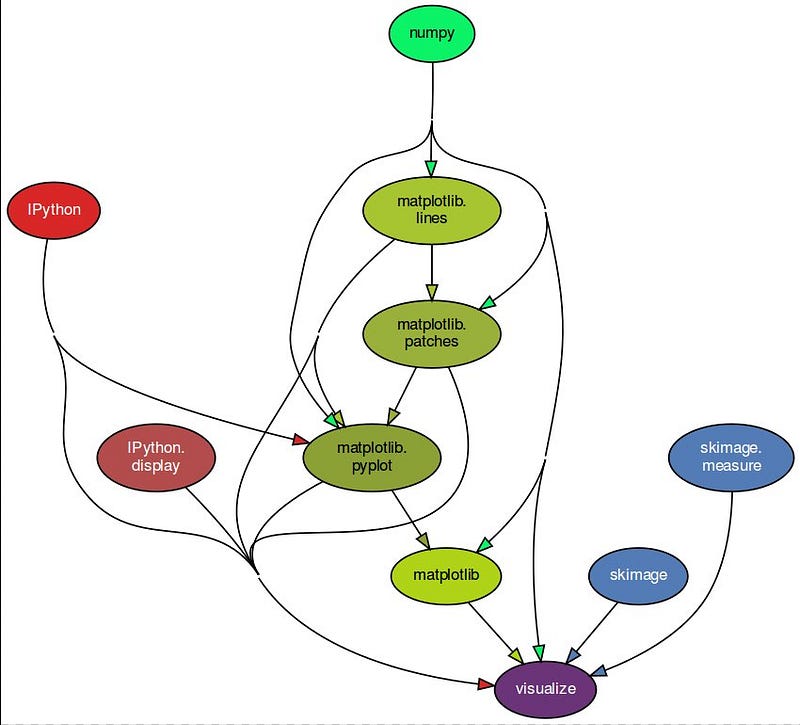
As you can see, it shows only packages which are imported. If you want to see dependencies of other python scripts, use “--include-missing”.
--include-missing:
--include-missing argument includes the python imports from other scripts as well.
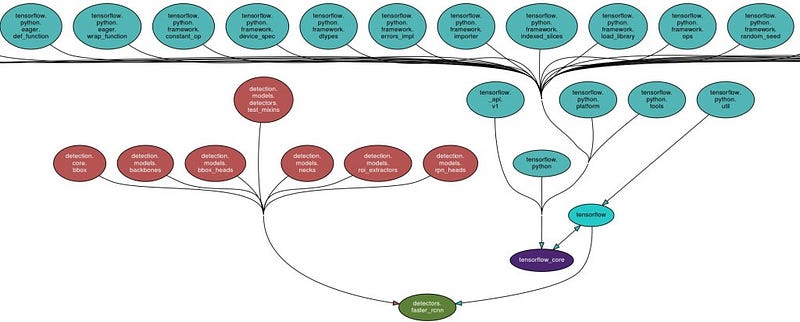
As you can see from above, It shows dependencies up to level-2. If you want to visualize only up to level-1 dependencies, use “--max-bacon 1”.
--max-bacon:
--max-bacon is used to specify the level to which the dependencies must be shown. It lets you filter out modules that are more than a given number of hops away. the default value for this is 2. Below is the example output for — max-bacon as 2 and -max-bacon as 0— which means infinite.


If you have a complex repository, — max-bacon will be useful to cut down the dependencies for better visualization.
--show-cycles:
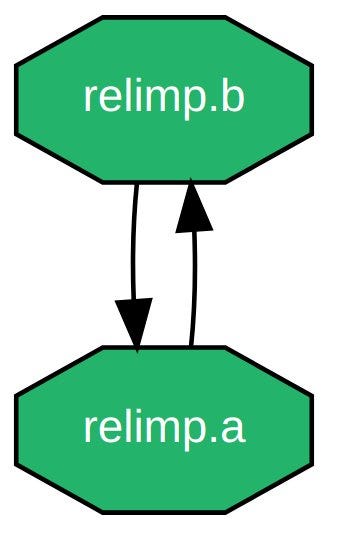
Another important argument that is useful is “ — show-cycles”. If a folder has inter-linked imports i.e., two python scripts importing from one another, It forms a cycle. This argument displays those cycles. See the below example.
relimp:
    - __init__.py
    - a.py: |
        from . import b
    - b.py: |
        from . import a
These are some of the useful arguments in Pydeps. You can of course also import pydeps from Python and use it as a library. This tool is very helpful for visualizing the dependencies of your python code. Find out more about other arguments and usage on their official Github page. Thank you!
References
- https://github.com/thebjorn/pydeps
- https://github.com/facebookresearch/detectron2
- https://github.com/tensorflow/models
Originally published at https://mlfornerd.com on May 8, 2021.


