avatarSimon-Pierre Gingras

Free AI web copilot to create summaries, insights and extended knowledge, download it at here

8604

Abstract

<span class="hljs-keyword">const</span> boundFn = fn.<span class="hljs-title function_">bind</span>(<span class="hljs-variable language_">this</span>); <span class="hljs-title class_">Object</span>.<span class="hljs-title function_">defineProperty</span>(<span class="hljs-variable language_">this</span>, key, { <span class="hljs-attr">value</span>: boundFn, <span class="hljs-attr">configurable</span>: <span class="hljs-literal">true</span>, <span class="hljs-attr">writable</span>: <span class="hljs-literal">true</span>, }); <span class="hljs-keyword">return</span> boundFn; }, }; }

<span class="hljs-keyword">class</span> <span class="hljs-title class_">MyComponent</span> { <span class="hljs-title function_">constructor</span>(<span class="hljs-params">props</span>) { <span class="hljs-variable language_">this</span>.<span class="hljs-property">props</span> = props; } @autobind <span class="hljs-title function_">handleClick</span>(<span class="hljs-params"></span>) { <span class="hljs-variable language_">console</span>.<span class="hljs-title function_">log</span>(<span class="hljs-variable language_">this</span>.<span class="hljs-property">props</span>); } }</pre></div><p id="0013">In this example, the decorator is used to decorate the function so that it automatically binds this when called and returns a new function. This way, after instantiating , you don’t need to manually bind this when calling the function.<code>autobindhandleClickMyComponentthis.handleClick()</code></p><h1 id="3ffe">Logging</h1><p id="7a28">Decorators can be used to record logs, including printing information such as function calls, function execution times, etc.</p><div id="1a70"><pre><span class="hljs-keyword">function</span> <span class="hljs-title function_">log</span>(<span class="hljs-params">target, name, descriptor</span>) { <span class="hljs-keyword">const</span> originalMethod = descriptor.<span class="hljs-property">value</span>;

descriptor.<span class="hljs-property">value</span> = <span class="hljs-keyword">function</span> (<span class="hljs-params">...args</span>) { <span class="hljs-variable language_">console</span>.<span class="hljs-title function_">log</span>(<span class="hljs-string">Function <span class="hljs-subst">${name}</span> called with <span class="hljs-subst">${args}</span></span>); <span class="hljs-keyword">const</span> start = performance.<span class="hljs-title function_">now</span>(); <span class="hljs-keyword">const</span> result = originalMethod.<span class="hljs-title function_">apply</span>(<span class="hljs-variable language_">this</span>, args); <span class="hljs-keyword">const</span> duration = performance.<span class="hljs-title function_">now</span>() - start; <span class="hljs-variable language_">console</span>.<span class="hljs-title function_">log</span>(<span class="hljs-string">Function <span class="hljs-subst">${name}</span> completed in <span class="hljs-subst">${duration}</span>ms</span>); <span class="hljs-keyword">return</span> result; }; <span class="hljs-keyword">return</span> descriptor } <span class="hljs-keyword">class</span> <span class="hljs-title class_">MyClass</span> { @log <span class="hljs-title function_">myMethod</span>(<span class="hljs-params">arg1, arg2</span>) { <span class="hljs-keyword">return</span> arg1 + arg2; } }

<span class="hljs-keyword">const</span> obj = <span class="hljs-keyword">new</span> <span class="hljs-title class_">MyClass</span>(); obj.<span class="hljs-title function_">myMethod</span>(<span class="hljs-number">1</span>, <span class="hljs-number">2</span>); <span class="hljs-comment">// Output: </span> <span class="hljs-comment">// Function myMethod called with 1,2</span> <span class="hljs-comment">// Function myMethod completed in 0.013614237010165215ms</span></pre></div><h1 id="aff7">Authentication authentication</h1><p id="bbff">Decorators can also be used to check a user’s authentication status and permissions to prevent unauthorized users from accessing sensitive data or performing actions on a regular basis.</p><div id="be1a"><pre><span class="hljs-keyword">function</span> <span class="hljs-title function_">authorization</span>(<span class="hljs-params">target, name, descriptor</span>) { <span class="hljs-keyword">const</span> originalMethod = descriptor.<span class="hljs-property">value</span>;

descriptor.<span class="hljs-property">value</span> = <span class="hljs-keyword">function</span>(<span class="hljs-params">...args</span>) { <span class="hljs-keyword">if</span> (!<span class="hljs-variable language_">this</span>.<span class="hljs-title function_">isAuthenticated</span>()) { <span class="hljs-variable language_">console</span>.<span class="hljs-title function_">error</span>(<span class="hljs-string">'Access denied! Not authenticated'</span>); <span class="hljs-keyword">return</span>; } <span class="hljs-keyword">if</span> (!<span class="hljs-variable language_">this</span>.<span class="hljs-title function_">hasAccessTo</span>(name)) { <span class="hljs-variable language_">console</span>.<span class="hljs-title function_">error</span>(<span class="hljs-string">Access denied! User does not have permission to <span class="hljs-subst">${name}</span></span>); <span class="hljs-keyword">return</span>; } <span class="hljs-keyword">return</span> originalMethod.<span class="hljs-title function_">apply</span>(<span class="hljs-variable language_">this</span>, args); }; <span class="hljs-keyword">return</span> descriptor; }

<span class="hljs-keyword">class</span> <span class="hljs-title class_">MyApi</span> { <span class="hljs-title function_">isAuthenticated</span>(<span class="hljs-params"></span>) { <span class="hljs-comment">// perform authentication check</span> <span class="hljs-keyword">return</span> <span class="hljs-literal">true</span>; } <span class="hljs-title function_">hasAccessTo</span>(<span class="hljs-params">endpoint</span>) { <span class="hljs-comment">// perform authorization check</span> <span class="hljs-keyword">return</span> <span class="hljs-literal">true</span>; } @authorization <span class="hljs-title function_">getUsers</span>(<span class="hljs-params"></span>) { <span class="hljs-comment">// return users data</span> } @authorization <span class="hljs-title function_">deleteUser</span>(<span class="hljs-params">id</span>) { <span class="hljs-comment">// delete user with id</span> } }</pre></div><h1 id="646e">Cache</h1><p id="3465">Decorators can also be used to cache the execution results of functions to avoid double evaluation.</p><div id="5257"><pre><span class="hljs-keyword">function</span> <span class="hljs-title function_">memoize</span>(<span class="hljs-params">target, name, descriptor</span>) { <span class="hljs-keyword">const</span> originalMethod = descriptor.<span class="hljs-property">value</span>; <span class="hljs-keyword">const</span> cache = <span class="hljs-keyword">new</span> <span class="hljs-title class_">Map</span>();

descriptor.<span class="hljs-property">value</span> = <span class="hljs-keyword">function</span> (<span class="hljs-params">...args</span>) { <span class="hljs-keyword">const</span> cacheKey = args.<span class="hljs-title function_">toString</span>(); <span class="hljs-keyword">if</span> (cache.<span class="hljs-title function_">has</span>(cacheKey)) { <span class="hljs-variable language_">console</span>.<span class="hljs-title function_">log</span>(<span class="hljs-string">cache hit: <span class="hljs-subst">${cacheKey}</span></span>); <span class="hljs-keyword">return</span> cache.<span class="hljs-title function_">get</span>(cacheKey); } <span class="hljs-keyword">const</span> result = originalMethod.<span class="hljs-title function_">apply</span>(<span class="hljs-variable language_">this</span>, args); <span class="hljs-variable language_">console</span>.<span class="hljs-title function_">log</span>(<span class="hljs-string">cache miss: <span class="hljs-subst">${cacheKey}</span></span>); cache.<span class="hljs-title function_">set</span>(cacheKey, result); <span class="hljs-keyword">return</span> result; }; <span class="hljs-keyword">return</span> descriptor; }

<span class="hljs-keyword">class

Options

</span> <span class="hljs-title class_">MyMath</span> { @memoize <span class="hljs-title function_">calculate</span>(<span class="hljs-params">num</span>) { <span class="hljs-variable language_">console</span>.<span class="hljs-title function_">log</span>(<span class="hljs-string">'calculate called'</span>); <span class="hljs-keyword">return</span> num * <span class="hljs-number">2</span>; } }

<span class="hljs-keyword">const</span> math = <span class="hljs-keyword">new</span> <span class="hljs-title class_">MyMath</span>(); <span class="hljs-variable language_">console</span>.<span class="hljs-title function_">log</span>(math.<span class="hljs-title function_">calculate</span>(<span class="hljs-number">10</span>)); <span class="hljs-comment">// Output: </span> <span class="hljs-comment">// calculate called</span> <span class="hljs-comment">// cache miss: 10</span> <span class="hljs-comment">// 20</span> <span class="hljs-variable language_">console</span>.<span class="hljs-title function_">log</span>(math.<span class="hljs-title function_">calculate</span>(<span class="hljs-number">10</span>)); <span class="hljs-comment">// Output: </span> <span class="hljs-comment">// cache hit: 10</span> <span class="hljs-comment">// 20</span></pre></div><h1 id="57d9">Aspect-oriented programming</h1><p id="0d61">Decorators can be used to implement facet-oriented programming, that is, to add functionality at runtime without modifying the original code.</p><div id="bc4d"><pre><span class="hljs-keyword">function</span> <span class="hljs-title function_">validate</span>(<span class="hljs-params">target, name, descriptor</span>) { <span class="hljs-keyword">const</span> originalMethod = descriptor.<span class="hljs-property">value</span>;

descriptor.<span class="hljs-property">value</span> = <span class="hljs-keyword">function</span> (<span class="hljs-params">...args</span>) { <span class="hljs-keyword">const</span> isValid = args.<span class="hljs-title function_">every</span>(<span class="hljs-function"><span class="hljs-params">arg</span> =></span> <span class="hljs-keyword">typeof</span> arg === <span class="hljs-string">'string'</span> && arg.<span class="hljs-property">length</span> > <span class="hljs-number">0</span>); <span class="hljs-keyword">if</span> (!isValid) { <span class="hljs-variable language_">console</span>.<span class="hljs-title function_">error</span>(<span class="hljs-string">'Invalid arguments'</span>); <span class="hljs-keyword">return</span>; } <span class="hljs-keyword">return</span> originalMethod.<span class="hljs-title function_">apply</span>(<span class="hljs-variable language_">this</span>, args); }; <span class="hljs-keyword">return</span> descriptor; }

<span class="hljs-keyword">class</span> <span class="hljs-title class_">MyForm</span> { @validate <span class="hljs-title function_">submit</span>(<span class="hljs-params">name, email, message</span>) { <span class="hljs-comment">// submit the form</span> } }

<span class="hljs-keyword">const</span> form = <span class="hljs-keyword">new</span> <span class="hljs-title class_">MyForm</span>(); form.<span class="hljs-title function_">submit</span>(<span class="hljs-string">''</span>, <span class="hljs-string">'[email protected]'</span>, <span class="hljs-string">'Hello world'</span>); <span class="hljs-comment">// Output: Invalid arguments</span></pre></div><h1 id="c8da">Reversible decorators</h1><p id="5322">Decorators can also be applied in reversible scenes, for example, you can add a reversible decorator to modify function behavior.</p><div id="b868"><pre><span class="hljs-keyword">function</span> <span class="hljs-title function_">reverse</span>(<span class="hljs-params">target, name, descriptor</span>) { <span class="hljs-keyword">const</span> originalMethod = descriptor.<span class="hljs-property">value</span>;

descriptor.<span class="hljs-property">value</span> = <span class="hljs-keyword">function</span> (<span class="hljs-params">...args</span>) { args.<span class="hljs-title function_">reverse</span>(); <span class="hljs-keyword">return</span> originalMethod.<span class="hljs-title function_">apply</span>(<span class="hljs-variable language_">this</span>, args); }; <span class="hljs-keyword">return</span> descriptor; } <span class="hljs-keyword">class</span> <span class="hljs-title class_">MyMath</span> { @reverse <span class="hljs-title function_">calculate</span>(<span class="hljs-params">num1, num2</span>) { <span class="hljs-keyword">return</span> num1 + num2; } }

<span class="hljs-keyword">const</span> math = <span class="hljs-keyword">new</span> <span class="hljs-title class_">MyMath</span>(); <span class="hljs-variable language_">console</span>.<span class="hljs-title function_">log</span>(math.<span class="hljs-title function_">calculate</span>(<span class="hljs-number">1</span>, <span class="hljs-number">2</span>)); <span class="hljs-comment">// Output: 3</span> <span class="hljs-variable language_">console</span>.<span class="hljs-title function_">log</span>(math.<span class="hljs-property">calculate</span>.<span class="hljs-title function_">reversed</span>(<span class="hljs-number">1</span>, <span class="hljs-number">2</span>)); <span class="hljs-comment">// Output: 3</span></pre></div><h1 id="2ddc">Automatic type checking</h1><p id="037c">Decorators can be applied to automatic type checking, for example, you can add a decorator to ensure that the type of a function parameter is correct.</p><div id="a63a"><pre><span class="hljs-keyword">function</span> <span class="hljs-title function_">checkType</span>(<span class="hljs-params">expectedType</span>) { <span class="hljs-keyword">return</span> <span class="hljs-keyword">function</span>(<span class="hljs-params">target, name, descriptor</span>) { <span class="hljs-keyword">const</span> originalMethod = descriptor.<span class="hljs-property">value</span>;

descriptor.<span class="hljs-property">value</span> = <span class="hljs-keyword">function</span> (<span class="hljs-params">...args</span>) {
      <span class="hljs-keyword">const</span> invalidArgs = args.<span class="hljs-title function_">filter</span>(<span class="hljs-function"><span class="hljs-params">arg</span> =&gt;</span> <span class="hljs-keyword">typeof</span> arg !== expectedType);
      <span class="hljs-keyword">if</span> (invalidArgs.<span class="hljs-property">length</span> &gt; <span class="hljs-number">0</span>) {
        <span class="hljs-variable language_">console</span>.<span class="hljs-title function_">error</span>(<span class="hljs-string">`Invalid arguments: <span class="hljs-subst">${invalidArgs}</span>`</span>);
        <span class="hljs-keyword">return</span>;
      }
      <span class="hljs-keyword">return</span> originalMethod.<span class="hljs-title function_">apply</span>(<span class="hljs-variable language_">this</span>, args);
    };
    <span class="hljs-keyword">return</span> descriptor;
  }

}

<span class="hljs-keyword">class</span> <span class="hljs-title class_">MyMath</span> { @<span class="hljs-title function_">checkType</span>(<span class="hljs-string">'number'</span>) <span class="hljs-title function_">add</span>(<span class="hljs-params">num1, num2</span>) { <span class="hljs-keyword">return</span> num1 + num2; } }

<span class="hljs-keyword">const</span> math = <span class="hljs-keyword">new</span> <span class="hljs-title class_">MyMath</span>(); math.<span class="hljs-title function_">add</span>(<span class="hljs-number">1</span>, <span class="hljs-string">'2'</span>); <span class="hljs-comment">// Output: Invalid arguments: 2</span></pre></div><p id="dd86"><i>More content at <a href="https://plainenglish.io/"><b>PlainEnglish.io</b></a>.</i></p><p id="5cf7"><i>Sign up for our <a href="http://newsletter.plainenglish.io/"><b>free weekly newsletter</b></a>. Follow us on <a href="https://twitter.com/inPlainEngHQ"><b>Twitter</b></a></i>, <a href="https://www.linkedin.com/company/inplainenglish/"><b><i>LinkedIn</i></b></a><i>, <a href="https://www.youtube.com/channel/UCtipWUghju290NWcn8jhyAw"><b>YouTube</b></a>, and <a href="https://discord.gg/GtDtUAvyhW"><b>Discord</b></a><b>.</b></i></p><p id="7057"><b><i>Interested in scaling your software startup</i></b><i>? Check out <a href="https://circuit.ooo?utm=publication-post-cta"><b>Circuit</b></a>.</i></p></article></body>

Verify domains for SES using CloudFormation

One of the goals of using infrastructure as code is to automate as much as possible the provisioning of your infrastructure. Thankfully, AWS provides us with its CloudFormation tool, which is aimed at just that. One area of the cloud infrastructure that can get particularly messy is DNS configuration (provided by the AWS Route53 service). If you want to (and you should!) manage your Route53 Hosted Zones using CloudFormation, chances are you will have to manage your SES domains through CloudFormation.

In order to send emails using Amazon SES, you need to verify your domain to confirm that you are the domain owner and to prevent others from using it.

This is done by adding a TXT record to your domains’s DNS server. Amazon SES will provide you the name and value for this TXT record.

If you’re using Route53 as your DNS provider, then you’re in for a treat! The SES console will offer you to add the TXT record to your Route53 hosted zone for you, by clicking the blue button:

You must resist the temptation to click that button! Do not forget the 1st commandment of Infrastructure as Code:

Thou shalt not click the dreaded blue button

What you don’t want, is to create those txt records by hand

Using CloudFormation Custom Resources, you can wire a Lambda function to add those TXT records automatically. Our system will look like this:
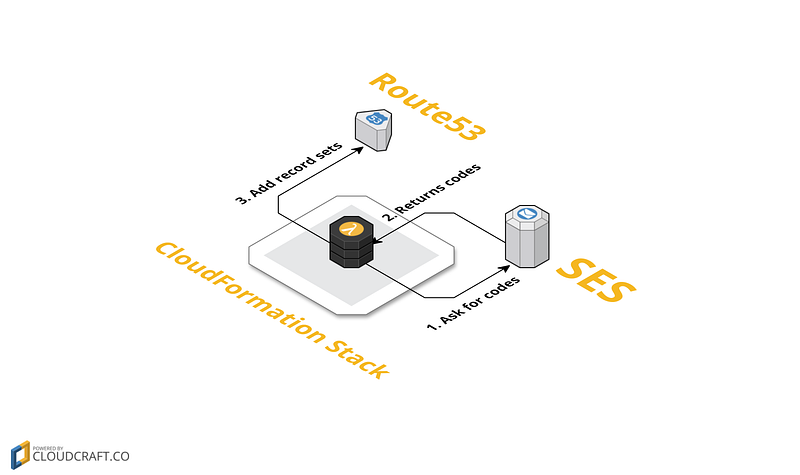
First, our Lambda function will acquire the verification codes using the SES API. Once our Lambda has these verification codes, it will modify our hosted zone records in Route53.

The Lambda function

First, let’s have a look at the Lambda function’s handler:

def _lambda_handler(event, context):
    print "Received event: "
    print event
    resource_type = event['ResourceType']
    request_type = event['RequestType']
    resource_properties = event['ResourceProperties']
    hosted_zone_id = resource_properties['HostedZoneId']
    physical_resource_id = event.get('PhysicalResourceId', unicode(uuid.uuid4()))
    try:
        if resource_type == "Custom::AmazonSesVerificationRecords":
            if request_type == 'Create':
                verify_ses(hosted_zone_id=hosted_zone_id, action='UPSERT')
            elif request_type == 'Delete':
                verify_ses(hosted_zone_id=hosted_zone_id, action='DELETE')
            elif request_type == 'Update':
                old_hosted_zone_id = event['OldResourceProperties']['HostedZoneId']
                verify_ses(hosted_zone_id=old_hosted_zone_id, action='DELETE')
                verify_ses(hosted_zone_id=hosted_zone_id, action='UPSERT')
            else:
                print 'Request type is {request_type}, doing nothing.'.format(request_type=request_type)
            response_data = {}
        else:
            raise ValueError("Unexpected resource_type: {resource_type}".format(resource_type=resource_type))
    except Exception:
        send(
            event,
            context,
            responseStatus=FAILED if request_type != 'Delete' else SUCCESS,
            # Do not fail on delete to avoid rollback failure
            responseData=None,
            physicalResourceId=physical_resource_id,
        )
        raise  # this statement is important so the exception (along with the original traceback) is logged to Cloudwatch
    else:
        send(
            event,
            context,
            responseStatus=SUCCESS,
            responseData=response_data,
            physicalResourceId=physical_resource_id,
        )

So the basic logic is simple: if our custom resource is created, we’ll create the records in the hosted zone. If it’s deleted, then we’ll delete the records in the hosted zone. If our custom resource is updated, then we’ll need to delete records from the old hosted zone and add records to the new one. Once this is all done, we signal CloudFormation (using our custom send() function, or you could use the cfn-signal helper) that our custom resource is completed.

Now, let’s have a deeper look into the verify_ses() function:

def verify_ses(hosted_zone_id, action):
    ses = boto3.client('ses')
    print "Retrieving Hosted Zone name"
    hosted_zone_name = _get_hosted_zone_name(hosted_zone_id=hosted_zone_id)
    print 'Hosted zone name: {hosted_zone_name}'.format(hosted_zone_name=hosted_zone_name)
    domain = hosted_zone_name.rstrip('.')
    verification_token = ses.verify_domain_identity(
        Domain=domain
    )['VerificationToken']
    dkim_tokens = ses.verify_domain_dkim(
        Domain=domain
    )['DkimTokens']
    print 'Changing resource record sets'
    changes = [
        {
            'Action': action,
            'ResourceRecordSet': {
                'Name': "_amazonses.{hosted_zone_name}".format(hosted_zone_name=hosted_zone_name),
                'Type': 'TXT',
                'TTL': 1800,
                'ResourceRecords': [
                    {
                        'Value': '"{verification_token}"'.format(verification_token=verification_token)
                    }
                ]
            }
        }
    ]
    for dkim_token in dkim_tokens:
        change = {
            'Action': action,
            'ResourceRecordSet': {
                'Name': "{dkim_token}._domainkey.{hosted_zone_name}".format(
                    dkim_token=dkim_token,
                    hosted_zone_name=hosted_zone_name
                ),
                'Type': 'CNAME',
                'TTL': 1800,
                'ResourceRecords': [
                    {
                        'Value': "{dkim_token}.dkim.amazonses.com".format(dkim_token=dkim_token)
                    }
                ]
            }
        }
        changes.append(change)
    boto3.client('route53').change_resource_record_sets(
        ChangeBatch={
            'Changes': changes
        },
        HostedZoneId=hosted_zone_id
    )

Using a helper function _get_hosted_zone_name() (detailed below), we get the name of the hosted zone. Next, using the SES api, we retrieve both the verification and DKIM tokens for our domain. Finally, we leverage the Route53 api to update the record sets on our hosted zone.

Here’s how you can retrieve the name of a given hosted zone. Nothing too fancy:

def _get_hosted_zone_name(hosted_zone_id):
    route53 = boto3.client('route53')
    route53_resp = route53.get_hosted_zone(
        Id=hosted_zone_id
    )
    return route53_resp['HostedZone']['Name']

Finally, here’s the code of the send() function. This is boilerplate code that we carry around our Lambda functions to signal CloudFormation of the outcome of the Lambda's execution:

def send(event, context, responseStatus, responseData, physicalResourceId):
    responseUrl = event['ResponseURL']
    print responseUrl
    responseBody = {}
    responseBody['Status'] = responseStatus
    responseBody['Reason'] = 'See the details in CloudWatch Log Stream: ' + context.log_stream_name
    responseBody['PhysicalResourceId'] = physicalResourceId
    responseBody['StackId'] = event['StackId']
    responseBody['RequestId'] = event['RequestId']
    responseBody['LogicalResourceId'] = event['LogicalResourceId']
    responseBody['Data'] = responseData
    json_responseBody = json.dumps(responseBody)
    print "Response body:\n" + json_responseBody
    headers = {
        'content-type': '',
        'content-length': str(len(json_responseBody))
    }
    try:
        response = requests.put(responseUrl,
                                data=json_responseBody,
                                headers=headers)
        print "Status code: " + response.reason
    except Exception as e:
        print "send(..) failed executing requests.put(..): " + str(e)

The CloudFormation template

First, you’ll need a Lambda function:

AmazonSesVerificationRecordsLambdaFunction:
    Type: AWS::Lambda::Function
    Properties:
      Description: This function manages the verification and DKIM records for SES
      Code:
        S3Bucket: my-bucket-name
        S3Key: ses_route53_verification.zip
      Handler: ses_route53_verification.lambda_handler
      Role:
        Fn::GetAtt:
        - AmazonSesVerificationRecordsRole
        - Arn
      Runtime: python2.7
      Timeout: 30

The timeout can be left to 30 seconds, as our Lambda is short to execute. You will also need to store your Lambda’s zip in a bucket.

Next, we’ll need an IAM role for our Lambda:

AmazonSesVerificationRecordsRole:
    Type: AWS::IAM::Role
    Properties:
      AssumeRolePolicyDocument:
        Version: '2012-10-17'
        Statement:
        - Sid: 'AllowTheLambdaFunctionToAssumeThisRole'
          Effect: Allow
          Principal:
            Service: lambda.amazonaws.com
          Action: sts:AssumeRole
      Path: "/"
      ManagedPolicyArns:
      - arn:aws:iam::aws:policy/service-role/AWSLambdaBasicExecutionRole
      Policies:
      - PolicyName: Route53Access
        PolicyDocument:
          Version: '2012-10-17'
          Statement:
          - Effect: Allow
            Action:
            - route53:GetHostedZone
            - route53:ChangeResourceRecordSets
            Resource:
            - !Sub arn:aws:route53:::hostedzone/${MyHostedZone}
      - PolicyName: SesAccess
        PolicyDocument:
          Version: '2012-10-17'
          Statement:
          - Effect: Allow
            Action:
            - ses:VerifyDomainDkim
            - ses:VerifyDomainIdentity
            Resource: "*"

We give permissions to our Lambda to use CloudWatch logs (using the built-in AWSLambdaBasicExecutionRolepolicy), change record sets on our hosted zone and generate the verification values.

Finally, here’s our custom resource:

SesVerificationRecords:
    Type: Custom::AmazonSesVerificationRecords
    Properties:
      ServiceToken:
        Fn::GetAtt:
        - AmazonSesVerificationRecordsLambdaFunction
        - Arn
      HostedZoneId:
        Ref: MyHostedZone

Our custom resource will invoke our Lambda and pass in the ID of the target hosted zone that needs to be modified.

AWS
Cloudformation
Ses
DevOps
Recommended from ReadMedium