Vector Databases as Memory for your AI Agents
LLM Persistence with Pinecone, Chroma, and LangChain

Follow the Money…
As interest rates have risen, venture funding has subsided over the past year. With the era of “free money” seemingly over, it’s always in your best interest to see where the “smart money” is investing.
Pinecone: “$28M to Bring Search into the AI Age” — March 29, 2022
LangChain: “Announcing our $10M seed round led by Benchmark” — April 4, 2023
Chroma: “Chroma raises $18M seed round” — April 6, 2023
In this post, we will look into:
- What is Vector Data?
- What are Vector Databases?
- How to integrate Vector Databases using Python
- A Comparison of Pinecone, Chroma, and LangChain
- A preview of what’s next for LLM-based AI Agent development
Database Evolution — from Relational to Vector
The evolution of data management has seen a shift from relational (SQL) databases, which are designed for structured data and rely on fixed schemas, to NoSQL databases, which offer more flexibility in handling unstructured or semi-structured data. Vector databases represent the next step in this evolution, providing an optimized solution for managing and querying high-dimensional vector data (i.e. vector embeddings), which is often generated by machine learning and AI applications.

High-Dimensional Space
Vector embeddings are numerical representations of objects such as words, images, or other data points in a high-dimensional space.
A high-dimensional space is a mathematical concept that represents a space with many dimensions, where each dimension is a separate axis or feature of the data. In practical terms, a high-dimensional space is simply a way to describe data that has many features or attributes.
They are generated using machine learning models or pre-trained neural networks. These embeddings capture the relationships and similarities between objects, making it easier for a computer to understand and process the data.

Vectors, Embeddings, and Dimensions Simplified
Let’s say you have a collection of words, and you want to represent them in a way that a computer can understand and process. One way to do this is by using something called “embeddings.”
Think of embeddings as a way to turn words into points on a map. Each word gets its own spot on the map, and similar words are close to each other, while different words are far apart. This “map” is like a grid, but with more than just two directions (up/down and left/right).
The “directions” on this map are called dimensions. Each dimension is like a different characteristic or feature of a word. For example, one dimension might represent how “happy” a word is, while another might represent whether it’s an animal or not. The more dimensions we have, the more characteristics we can capture about each word.
A “vector” is like a set of instructions that tells you how to get to a word’s location on the map. It contains numbers for each dimension that help you find the word’s exact spot. When we talk about “vector embeddings,” we’re talking about these sets of numbers that represent the location of words on our multi-dimensional map.
So, in simple terms, embeddings are a way to turn words into points on a map with many directions (dimensions), and vectors are the sets of numbers that help us find the location of each word on that map.

Vector Databases
Vector databases, also known as similarity search databases or nearest neighbor search databases, are specialized databases designed to store and query vector embeddings efficiently. They enable you to perform operations like finding the most similar items to a given vector or searching for items that meet specific similarity criteria.
Traditional databases aren’t optimized for these tasks, which is why vector databases have become increasingly popular.

How to integrate Vector Databases using Python
Now that we have defined some theory behind this topic, let’s transition into practical application of vector databases with Pinecone, Chroma, and LangChain — all using OpenAI vector embeddings.
PINECONE API
This code demonstrates how to use Pinecone and OpenAI to perform a similarity search on a set of documents using embeddings from OpenAI.
- Install the necessary libraries: pinecone-client and openai.
- Set up the Pinecone and OpenAI API keys, and the Pinecone environment.
- Initialize the Pinecone client and set the OpenAI API key.
- Define a function
create_pinecone_indexto create a Pinecone index if it does not already exist. - Define a function
completeto generate a response from the GPT-3.5-turbo model, given a prompt. - Define a function
get_ada_embeddingto obtain embeddings for input text using OpenAI's "text-embedding-ada-002" model. - Define a function
upsert_to_indexto add or update Pinecone vectors for given texts. - Define a function
query_indexto perform a similarity search on the Pinecone index. - Define a function
print_resultsto print the similarity search results. - Define the
mainfunction to execute the main operations: a. Create the Pinecone index. b. Create an instance of the Pinecone index. c. (Optional) Define texts and add them to the Pinecone index. d. Define the query text and perform a similarity search. e. Print the search results. - Execute the
mainfunction. - Define a function
fetch_vectorto fetch a specific vector from the Pinecone index. - Create an instance of the Pinecone index and (optional) print the fetched vector.
- Describe index statistics.
- (Optional) Delete specific vectors from the Pinecone index.
In summary, this code demonstrates how to use Pinecone and OpenAI to perform a similarity search on a set of documents, obtaining embeddings from the OpenAI “text-embedding-ada-002” model and using Pinecone to store and query these embeddings.

CHROMA — Ephemeral Storage Option
This code demonstrates how to use ChromaDB and OpenAI to perform a similarity search on a set of documents.
- Install the necessary libraries: chromadb and openai.
- Set up the OpenAI API key.
- Create a ChromaDB client instance.
- Define a function
completeto generate a response from the GPT-3.5-turbo model, given a prompt. - Define a function
get_ada_embeddingto obtain embeddings for input text using OpenAI's "text-embedding-ada-002" model. - Set the ChromaDB table name.
- Import the necessary utilities from the chromadb library.
- Create an OpenAI embedding function object using the OpenAI API key and the “text-embedding-ada-002” model.
- Create a ChromaDB collection with the specified table name and embedding function.
- Define a list of texts to serve as the documents to be indexed and searched.
- Iterate through the texts, obtain embeddings using the
get_ada_embeddingfunction, and add them to the ChromaDB collection along with metadata (text content) and a unique identifier. - Define the query text for the similarity search.
- Perform a similarity search on the ChromaDB collection using the embeddings obtained from the query text and retrieve the top 3 most similar results.
- Print the search results in a formatted JSON representation.
- Delete the ChromaDB collection.
In summary, this code demonstrates how to use ChromaDB and OpenAI to perform a similarity search on a set of documents, obtaining embeddings from the OpenAI “text-embedding-ada-002” model and using ChromaDB to store and query these embeddings.

LANGCHAIN VectorStore
This code installs the necessary libraries and demonstrates how to use two different vector stores (Chroma and Pinecone) to perform similarity searches on a set of documents using OpenAI’s embeddings.
- Install the required libraries: pinecone-client, chromadb, openai, langchain, and tiktoken.
- Set up the Pinecone API key, Pinecone environment, and OpenAI API key.
- Define a function
get_ada_embeddingto obtain embeddings for input text using OpenAI's "text-embedding-ada-002" model. - Create a list of texts that serve as the documents to be indexed and searched.
- Import the necessary classes and modules from the langchain library.
- Instantiate the
OpenAIEmbeddingsclass using the OpenAI API key. - Define the query text for the similarity search.
- Create a
Chromainstance from the texts and OpenAI embeddings, perform a similarity search using the query, and print the results. - Initialize Pinecone with the Pinecone API key and environment.
- (Commented out) Create a
Pineconeinstance from the texts and OpenAI embeddings, perform a similarity search using the query, and print the results. - Instead, create a
Pineconeinstance from an existing Pinecone index and OpenAI embeddings, perform a similarity search using the query, and print the results.
In summary, the code demonstrates the usage of the LangChain library to perform similarity searches on a set of documents using OpenAI embeddings, with two different vector stores: Chroma and Pinecone.

Distance vs. Similarity
While there isn’t a single preferred approach to measuring the similarity or distance between vectors created by OpenAI, cosine similarity is a common and widely used method for comparing embeddings generated by language models like GPT-4.
Cosine similarity focuses on the angle between two vectors rather than their magnitudes, making it less sensitive to the magnitude of the embeddings. This property is particularly useful when comparing embeddings from language models, as it captures the relative orientation of the vectors in the high-dimensional space, which often represents the semantic relationship between words or text samples.
However, the choice of similarity or distance measure ultimately depends on the specific task and requirements. In some cases, other similarity measures, like Euclidean distance or correlation-based measures, might be more appropriate. It’s essential to experiment with different measures and evaluate their performance on the given problem to select the most suitable approach.

Comparison of Pinecone vs. Chroma & Pinecone/Chroma vs. LangChain
Storage Location Alternatives
Chroma provides a local ephemeral storage option, which means that the vector data is stored on your local machine or the machine running your application. It doesn’t require any external service or database to store the data. As Chroma has been open-sourced, you also have the option to host your own instance.
Pinecone is a managed database persistence service, which means that the vector data is stored in a remote, cloud-based database managed by Pinecone. Your application interacts with the Pinecone service through APIs to store and retrieve the vector data.

Data Persistence Alternatives
With Chroma’s ephemeral option, the data stored in Chroma is temporary and exists only during the runtime of the application. Once the application stops or the machine is restarted, the data is lost. This option makes Chroma suitable for testing and experimentation purposes or for temporary storage.
Pinecone provides data persistence, which means that the vector data stored in the Pinecone database will be retained even after the application stops or the machine is restarted. This makes Pinecone (and Chroma’s self-host option) suitable for long-term storage and production use cases.

Scalability Alternatives
Chroma’s local storage is limited by the resources (e.g. memory and storage) of the local machine. As your data grows, you may need to scale your machine’s resources to handle the increased data.
Being a managed service, Pinecone handles the scalability aspect for you. As your data grows, Pinecone will scale the underlying infrastructure to accommodate the increased data. Pinecone is designed to handle large-scale vector data storage and retrieval efficiently, making it suitable for production use cases.

Direct Libary vs. Abstraction
Chroma/Pinecone Python libraries: These libraries are specifically designed for their respective vector database services. They provide direct access to the functionality and features of Chroma and Pinecone, allowing developers to interact with the underlying vector databases in a more straightforward and service-specific manner.
Using these libraries, developers can perform operations like upserting, fetching, and deleting vector embeddings, as well as performing similarity searches directly using Chroma or Pinecone services.
These libraries are tailored for developers who want to work specifically with Chroma or Pinecone and leverage their unique features and capabilities.
LangChain library: LangChain is a more generic library that abstracts the underlying details of different vector databases, including Chroma and Pinecone, providing a unified interface for developers to work with various vector databases.
The main advantage of using LangChain is that it simplifies the process of integrating different vector databases into an application. Developers can switch between different databases or use multiple databases without having to learn and implement separate libraries for each service.
LangChain caters to developers who want a more flexible and adaptable approach to work with vector databases, without committing to a specific service or being tied to its specific implementation.

Conclusion
Generative Agent Memory
In “Generative Agents: Interactive Simulacra of Human Behavior”, this paper describes a near future where generative agents simulate human behavior in interactive apps, using Large Language Models to store experiences, plan, and reflect — using memory that can be stored and retrieved via a vector database.
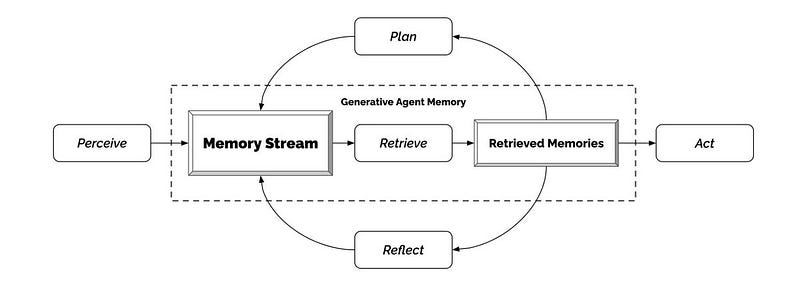
As LLM-based application development moves towards the creation of autonomous AI agents with memory (e.g. BabyAGI, AutoGPT, etc…), the demand for vector databases is expected to grow significantly.