avatarFarhad Malik

Free AI web copilot to create summaries, insights and extended knowledge, download it at here

7447

Abstract

pan class="hljs-built_in">compile</span>(pattern=<span class="hljs-string">"["</span> <span class="hljs-string">u"\U0001F600-\U0001F64F"</span> <span class="hljs-comment"># emoticons</span> <span class="hljs-string">u"\U0001F300-\U0001F5FF"</span> <span class="hljs-comment"># symbols & pictographs</span> <span class="hljs-string">u"\U0001F680-\U0001F6FF"</span> <span class="hljs-comment"># transport & map symbols</span> <span class="hljs-string">u"\U0001F1E0-\U0001F1FF"</span> <span class="hljs-comment"># flags (iOS)</span> <span class="hljs-string">"]+"</span>, flags=re.UNICODE) <span class="hljs-keyword">return</span> regrex_pattern.sub(<span class="hljs-string">r''</span>, clean_text)</pre></div><div id="2b70"><pre> def _get_tweets_for_word(self, word, top): top_tweets = [] i = 0 <span class="hljs-keyword">for</span> tweet <span class="hljs-keyword">in</span> tweepy.Cursor(self._api.search, <span class="hljs-attribute">q</span>=word, <span class="hljs-attribute">count</span>=top, <span class="hljs-attribute">result_type</span>=<span class="hljs-string">'popular'</span>, <span class="hljs-attribute">lang</span>=<span class="hljs-string">"en"</span>).items(): i += 1 top_tweets.append(tweet.text) <span class="hljs-keyword">if</span> i == top: break return self._clean(<span class="hljs-string">','</span>.join(top_tweets))</pre></div><div id="aeeb"><pre> <span class="hljs-keyword">async</span> <span class="hljs-keyword">def</span> <span class="hljs-title function_">get_trends_for_locations</span>(<span class="hljs-params">self, target_locations, top=<span class="hljs-number">3</span></span>): <span class="hljs-string">""" Get trends for locations :param target_locations: locations :param top: number of tweets :return: dictionary containing location and tweets """</span> final = {} all_places = self._api.trends_available() <span class="hljs-keyword">for</span> location <span class="hljs-keyword">in</span> target_locations: text = [] <span class="hljs-keyword">for</span> place <span class="hljs-keyword">in</span> all_places: <span class="hljs-keyword">if</span> place[<span class="hljs-string">'name'</span>] == location: code = place[<span class="hljs-string">'woeid'</span>] trends_result = self._api.trends_place(code) <span class="hljs-keyword">for</span> trend <span class="hljs-keyword">in</span> trends_result[<span class="hljs-number">0</span>][<span class="hljs-string">"trends"</span>][:top]: trend_name = trend[<span class="hljs-string">"name"</span>] ts = self._get_tweets_for_word(trend[<span class="hljs-string">'query'</span>], top) text.append(<span class="hljs-string">f'[<span class="hljs-subst">{trend_name}</span>]:[<span class="hljs-subst">{ts}</span>]'</span>) final[location] = <span class="hljs-string">","</span>.join(text) <span class="hljs-keyword">return</span> final</pre></div><div id="2834"><pre> <span class="hljs-keyword">def</span> <span class="hljs-title function_">_get_api</span>(<span class="hljs-params">self</span>): <span class="hljs-comment"># Authenticate to Twitter - Put your details here</span> auth = tweepy.OAuthHandler(<CONSUMER_KEY>,<CONSUMER_SECRET>) auth.set_access_token(<ACCESS_TOKEN>,<ACCESS_SECRET>)

    <span class="hljs-comment"># Create API object</span>
    api = tweepy.API(auth, wait_on_rate_limit=<span class="hljs-literal">True</span>)
    <span class="hljs-keyword">try</span>:
        api.verify_credentials()
        logger.info(<span class="hljs-string">"Successful Authentication"</span>)
    <span class="hljs-keyword">except</span> Exception <span class="hljs-keyword">as</span> e:
        <span class="hljs-keyword">raise</span> Exception(<span class="hljs-string">"Authentication Failed:"</span>, e)

    <span class="hljs-keyword">return</span> api</pre></div><div id="90d6"><pre>    <span class="hljs-keyword">async</span> <span class="hljs-keyword">def</span> <span class="hljs-title function_">get_tweets_for_words</span>(<span class="hljs-params">self, target_words, top=<span class="hljs-number">2</span></span>):
    <span class="hljs-string">"""
    Get tweets for words
    :param target_words: List of words
    :param top: Top target tweets
    :return: Tweets for words
    """</span>
    text = {}
    <span class="hljs-keyword">for</span> word <span class="hljs-keyword">in</span> target_words:
        ts = self._get_tweets_for_word(word, top)
        text[word] = ts
    <span class="hljs-keyword">return</span> text</pre></div><div id="c91f"><pre>    <span class="hljs-keyword">def</span> <span class="hljs-title function_">_get_tweets_for_user</span>(<span class="hljs-params">self, user, top=<span class="hljs-number">3</span></span>):
    text = []
    <span class="hljs-keyword">try</span>:
        tweets = self._api.user_timeline(screen_name=user, count=top, include_rts=<span class="hljs-literal">True</span>)
    <span class="hljs-keyword">except</span> Exception <span class="hljs-keyword">as</span> ex:
        <span class="hljs-comment"># don't do anything</span>
        <span class="hljs-keyword">return</span> <span class="hljs-string">'NO TWEET FOUND FOR USER'</span>

    <span class="hljs-keyword">for</span> tweet <span class="hljs-keyword">in</span> tweets:
        text.append(self._clean(tweet.text))
    <span class="hljs-keyword">return</span> <span class="hljs-string">','</span>.join(text)</pre></div><div id="ce2e"><pre>    <span class="hljs-keyword">async</span> <span class="hljs-keyword">def</span> <span class="hljs-title function_">get_tweets_for_users</span>(<span class="hljs-params">self, users, top=<span class="hljs-number">3</span></span>):
    <span class="hljs-string">"""
    Get tweets of users
    :param users: users
    :param top: target top tweets
    :return: tweets of users
    """</span>
    user_tweets = {}
    <span class="hljs-keyword">for</span> user <span class="hljs-keyword">in</span> users:
        tweet = self._get_tweets_for_user(user, top)
        user_tweets[user] = tweet
    <span class="hljs-keyword">return</span> user_tweets</pre></div><p id="ac28">Set your authentication details in the _get_api() function of the class above (in bold).</p><p id="4ae1"><b>Create the main file: main.py</b></p><div id="eb17"><pre><span class="hljs-keyword">from</span> twitter_extractor <span class="hljs-keyword">import</span> TwitterApi</pre></div><div id="4c37"><pre><span class="hljs-keyword">async</span> <span class="hljs-keyword">def</span> <span class="hljs-title function_">main</span>():
<span class="hljs-string">"""
Main method, call the appropriate methods
:return:
"""</span></pre></div><div id="dee1"><pre

Options

<span class="hljs-attr">twitter_api</span> = TwitterApi()</pre></div><div id="ecdb"><pre> <span class="hljs-attr">trends</span> = twitter_api.get_trends_for_locations([<span class="hljs-string">'United States'</span>, <span class="hljs-string">'United Kingdom'</span>, <span class="hljs-string">'Worldwide'</span>])</pre></div><div id="0512"><pre> <span class="hljs-attr">words</span> = twitter_api.get_tweets_for_words([<span class="hljs-string">'finance'</span>, <span class="hljs-string">'money'</span>, <span class="hljs-string">'business'</span>])</pre></div><div id="e8d2"><pre> <span class="hljs-attr">users</span> = twitter_api.get_tweets_for_users([<span class="hljs-string">'bloomberg'</span>, <span class="hljs-string">'cnbc'</span>], <span class="hljs-number">2</span>)</pre></div><div id="9cae"><pre> trends_text, words_text, tweets_users = await asyncio.gather(trends, <span class="hljs-built_in">words</span>, users)</pre></div><div id="ab5e"><pre> <span class="hljs-built_in">print</span>(<span class="hljs-string">'LOCATION TWEETS'</span>) <span class="hljs-keyword">for</span> location, trend <span class="hljs-keyword">in</span> trends_text.items(): <span class="hljs-built_in">print</span>(<span class="hljs-string">f'Location: <span class="hljs-subst">{location}</span> \n <span class="hljs-subst">{trend}</span>'</span>)

<span class="hljs-built_in">print</span>(<span class="hljs-string">'\nWORD TWEETS'</span>)
<span class="hljs-keyword">for</span> word, tweet <span class="hljs-keyword">in</span> words_text.items():
    <span class="hljs-built_in">print</span>(<span class="hljs-string">f'Word: <span class="hljs-subst">{word}</span>  \n <span class="hljs-subst">{tweet}</span>'</span>)

<span class="hljs-built_in">print</span>(<span class="hljs-string">'\nUSER TWEETS'</span>)
<span class="hljs-keyword">for</span> user, tweet <span class="hljs-keyword">in</span> tweets_users.items():
    <span class="hljs-built_in">print</span>(<span class="hljs-string">f'User: <span class="hljs-subst">{location}</span>  \n <span class="hljs-subst">{tweet}</span>'</span>)

<span class="hljs-keyword">return</span></pre></div><h1 id="249a">Let’s Understand The Code</h1><p id="485b">This code creates a class named TwitterApi.</p><p id="f78d">The constructor of the TwitterApi class calls the Tweepy API to authenticate against Twitter’s service. It requires authentication credentials. Copy them into _get_api() function</p><p id="92ff">Our class TwitterApi has three public methods.</p><ol><li>This function gets popular trends for the target locations</li></ol><div id="4859"><pre>twitter_api<span class="hljs-selector-class">.get_trends_for_locations</span>(<span class="hljs-selector-attr">[<span class="hljs-string">'United States'</span>, <span class="hljs-string">'United Kingdom'</span>, <span class="hljs-string">'Worldwide'</span>]</span>)</pre></div><p id="ee02">2. This function gets top tweets for the target words</p><div id="52b0"><pre>twitter_api<span class="hljs-selector-class">.get_tweets_for_words</span>(<span class="hljs-selector-attr">[<span class="hljs-string">'finance'</span>, <span class="hljs-string">'money'</span>, <span class="hljs-string">'business'</span>]</span>)</pre></div><p id="ef80">3. This function gets latest tweets of the target users</p><div id="6c5c"><pre>twitter_api<span class="hljs-selector-class">.get_tweets_for_users</span>(<span class="hljs-selector-attr">[<span class="hljs-string">'bloomberg'</span>, <span class="hljs-string">'cnbc'</span>, <span class="hljs-string">'gvanrossum'</span>]</span>)</pre></div><p id="c54f">The tweets can contain URLs, emoticons, symbols, flags, and so on, therefore the class has a private function called _clean() that cleans the tweet text.</p><p id="3fec"><b>Note:</b></p><p id="084c">I am using the asyncio Python library. As the implemented functions require getting data from the network, they are IO bound in nature. I don’t intend to run the functions in sequence as that will end up taking a long time.</p><p id="7033">Hence to speed up the execution, I have created coroutines.</p><p id="0dcd" type="7">AsyncIO enables us to create coroutines that we can run concurrently in our code.</p><p id="5b0c">If you want to know more about concurrency and parallelism then I highly recommend reading this article:</p><div id="5257" class="link-block">
      <a href="https://readmedium.com/advanced-python-concurrency-and-parallelism-82e378f26ced">
        <div>
          <div>
            <h2>Advanced Python: Concurrency And Parallelism</h2>
            <div><h3>Explaining Why, When And How To Use Threads, Async And Multiple Processes In Python</h3></div>
            <div><p>medium.com</p></div>
          </div>
          <div>
            <div style="background-image: url(https://miro.readmedium.com/v2/resize:fit:320/1*k6nw2VL-WxKf9_NBp-vwjg.png)"></div>
          </div>
        </div>
      </a>
    </div><h2 id="4b7f">Let’s run the code</h2><p id="88fa">The code below creates the event loop and runs the main function. Add it at the end of the main.py file and run the code.</p><p id="778b">Run the main.py file</p><div id="f28d"><pre><span class="hljs-keyword">if</span> __name__ == <span class="hljs-string">"__main__"</span>:
loop = asyncio<span class="hljs-selector-class">.get_event_loop</span>()
loop<span class="hljs-selector-class">.run_until_complete</span>(asyncio<span class="hljs-selector-class">.wait</span>(<span class="hljs-selector-attr">[main()]</span>))</pre></div><ol><li>We can see the popular trends of our target locations:</li></ol><figure id="b2e4"><img src="https://cdn-images-1.readmedium.com/v2/resize:fit:800/1*SGgRW-OCAhDp_broVsP-gA.png"><figcaption></figcaption></figure><p id="39bb">2. We can see the top tweets that contain our target words:</p><figure id="84b6"><img src="https://cdn-images-1.readmedium.com/v2/resize:fit:800/1*vt0-k9NJsatuwsOCQ7QJGA.png"><figcaption></figcaption></figure><p id="01f5">3. We can see the latest tweets of our chosen users or companies:</p><figure id="ff13"><img src="https://cdn-images-1.readmedium.com/v2/resize:fit:800/1*MZqHsMs6etZ3V5BL5BTFTA.png"><figcaption></figcaption></figure><h2 id="3a57">That’s how I stay up-to-date</h2><p id="142b" type="7">We can use advanced NLP techniques to improve it further. We can enhance this application by removing spam and fake news. We can also configure it to summarise the entire information for us in a paragraph or a few bullet points. There are a number of other ideas that I will be presenting in my upcoming articles.</p><figure id="b5a9"><img src="https://cdn-images-1.readmedium.com/v2/resize:fit:800/1*WkpvAlPFxHXyhvQvqKCQrA.png"><figcaption></figcaption></figure><h1 id="53ea">Summary</h1><p id="0c73">This article demonstrated how we can access social media tweets data from Twitter to stay up to dated.</p><p id="d5a5">We used the Tweepy Python package.</p><p id="f5a6">In the subsequent articles, I will demonstrate how we can score each tweet, remove noise, and build a dashboard to understand whether the trends are positive or negative.</p><p id="1505">This will help us get a glimpse of information, which at times is all we need due to time constraints.</p><p id="3763">This API has enormous potential and the data can help us stay up-to-date with the world.</p></article></body>

Using Twitter + Python To Stay Up-To-Date And Informed With World

How Python And Twitter Help Me Stay Updated With The World?

Today I will share a secret recipe with all of the readers.

I haven’t watched the news on TV or read the news in newspapers for over 12 years.

On top, I strongly believe in continuous learning and staying up to date with world trends. Then how do I keep myself updated?

I use my Python applications.

One of the methodologies I follow is by coding Python applications to inform me with a short summary of the latest world news and trends on a timely basis. Today I will share the code and explain how it works.

I have coded multiple applications that get data from a number of sources. One of the important applications amongst them relies on sending me the summary of recent trends from Twitter.

This article will demonstrate one of the ways we can follow to stay up to date with the world.
The technique relies on a short and succinct summary of trends and tweets from Twitter, the social media giant.

Social media has impacted our lives in one way or another. Twitter is one of the biggest players in the social media domain. Many large organisations to individuals are using Twitter to engage with their consumer base.

Twitter has a wealth of data that we can consume and stay informed. Plus data science revolves around data. Hence this article servers data scientists too.

Twitter And Information

There are numerous ways to access useful information from twitter, such as:

  • We can select a location and read the trends to be informed about the current situation in our target locations.
  • Sometimes, we search for specific words such as finance or business or python to get a better idea of what people are tweeting about our target topic and discussing amongst them.
  • Occasionally, we follow certain users or companies so that we can stay up-to-date with all of their latest developments. It also helps us understand how companies engage with their customers.

We can do all of the aforementioned techniques with the code I will demonstrate in this article.

Every day, before I start my day and at specific times of the day, I run this application and read the contents to stay informed.

Article Aim

In this article, I am going to demonstrate how we can use Python to:

  1. Connect to the Twitter API
  2. Retrieve the summary of top trends from our chosen locations
  3. Get most interacted tweets of our target words
  4. Get the latest tweets of our target users and companies

Let’s Start The Implementation

Before I begin, this is what we are intending to build.

A Python application that will communicate with Twitter via the Tweepy python package. It will fetch top individuals and companies tweets from Twitter. Our Python application will use the Tweepy package to access the data and present it to us.

Step 1. Create Twitter Development Account

Navigate to the following url

Apply for a developer account and enter your details to access your authentication credentials.

Step 2. Copy The Authentication Credentials

Twitter will generate the keys and tokens for you. Copy them.

You will need to use the Consumer Key, Consumer Secret Key, Access Token, and Access Token Secret keys to get the required data from Twitter.

There are a number of python modules and techniques which can help us retrieve data from Twitter. This article will demonstrate how we can use the Tweepy package.

Step 3. Install Tweepy

Open the terminal and enter the following command:

pip install tweepy

This will install the Tweepy package in your target environment.

Tweepy is one of the well-known packages that enable us to interact with Twitter API using Python.

We can get tweets, follow, likes, upload media, block, and even tweet via the Tweepy library.

There are a large number of functions available in the Tweepy package, such as:

add_list_member
add_list_members
create_block
create_favorite
create_friendship
create_list
create_mute
create_saved_search
destroy_block
destroy_direct_message
destroy_favorite
destroy_friendship
destroy_list
destroy_mute
destroy_saved_search
destroy_status
geo_search
geo_similar_places
get_direct_message
get_list
get_oembed
get_saved_search
get_settings
get_status
get_user
home_timeline
list_direct_messages
list_members
list_subscribers
list_timeline
lists_all
lists_memberships
lists_subscriptions
lookup_friendships
lookup_users
media_upload
mentions_timeline
related_results
remove_list_member
remove_list_members
report_spam
retweet
retweeters
retweets
retweets_of_me
search
search_users
send_direct_message
show_friendship
show_list_member
show_list_subscriber
statuses_lookup
trends_available
trends_closest
trends_place
unretweet
unsubscribe_list
update_list
update_profile
update_profile_background_image
update_profile_banner
update_profile_image
update_status
update_with_media
user_timeline

Step 4: Implement the Python Code

Create a file: twitter_extractor.py and add the imports:

import re
import tweepy
import asyncio

Copy this code into the twitter_extrator.py file

class TwitterApi:
    def __init__(self):
        """
        Constuctor of the TwitterApi class
        """
        self._api = self._get_api()
    def _clean(self, text):
        """
        Clean the tweet text and remove noise
        :param text:  tweet text
        :return: clean text
        """
        clean_text = re.sub(r'http\S+', '', text, flags=re.MULTILINE)
        regrex_pattern = re.compile(pattern="["
                                            u"\U0001F600-\U0001F64F"  # emoticons
                                            u"\U0001F300-\U0001F5FF"  # symbols & pictographs
                                            u"\U0001F680-\U0001F6FF"  # transport & map symbols
                                            u"\U0001F1E0-\U0001F1FF"  # flags (iOS)
                                            "]+", flags=re.UNICODE)
        return regrex_pattern.sub(r'', clean_text)
    def _get_tweets_for_word(self, word, top):
        top_tweets = []
        i = 0
        for tweet in tweepy.Cursor(self._api.search, q=word, count=top, result_type='popular',
                                   lang="en").items():
            i += 1
            top_tweets.append(tweet.text)
            if i == top:
                break
        return self._clean(','.join(top_tweets))
    async def get_trends_for_locations(self, target_locations, top=3):
        """
        Get trends for locations
        :param target_locations: locations
        :param top: number of tweets
        :return: dictionary containing location and tweets
        """
        final = {}
        all_places = self._api.trends_available()
        for location in target_locations:
            text = []
            for place in all_places:
                if place['name'] == location:
                    code = place['woeid']
                    trends_result = self._api.trends_place(code)
                    for trend in trends_result[0]["trends"][:top]:
                        trend_name = trend["name"]
                        ts = self._get_tweets_for_word(trend['query'], top)
                        text.append(f'[{trend_name}]:[{ts}]')
            final[location] = ",".join(text)
        return final
    def _get_api(self):
        # Authenticate to Twitter - Put your details here
        auth = tweepy.OAuthHandler(<CONSUMER_KEY>,<CONSUMER_SECRET>)
        auth.set_access_token(<ACCESS_TOKEN>,<ACCESS_SECRET>)

        # Create API object
        api = tweepy.API(auth, wait_on_rate_limit=True)
        try:
            api.verify_credentials()
            logger.info("Successful Authentication")
        except Exception as e:
            raise Exception("Authentication Failed:", e)

        return api
    async def get_tweets_for_words(self, target_words, top=2):
        """
        Get tweets for words
        :param target_words: List of words
        :param top: Top target tweets
        :return: Tweets for words
        """
        text = {}
        for word in target_words:
            ts = self._get_tweets_for_word(word, top)
            text[word] = ts
        return text
    def _get_tweets_for_user(self, user, top=3):
        text = []
        try:
            tweets = self._api.user_timeline(screen_name=user, count=top, include_rts=True)
        except Exception as ex:
            # don't do anything
            return 'NO TWEET FOUND FOR USER'

        for tweet in tweets:
            text.append(self._clean(tweet.text))
        return ','.join(text)
    async def get_tweets_for_users(self, users, top=3):
        """
        Get tweets of users
        :param users: users
        :param top: target top tweets
        :return: tweets of users
        """
        user_tweets = {}
        for user in users:
            tweet = self._get_tweets_for_user(user, top)
            user_tweets[user] = tweet
        return user_tweets

Set your authentication details in the _get_api() function of the class above (in bold).

Create the main file: main.py

from twitter_extractor import TwitterApi
async def main():
    """
    Main method, call the appropriate methods
    :return:
    """
    twitter_api = TwitterApi()
    trends = twitter_api.get_trends_for_locations(['United States', 'United Kingdom', 'Worldwide'])
    words = twitter_api.get_tweets_for_words(['finance', 'money', 'business'])
    users = twitter_api.get_tweets_for_users(['bloomberg', 'cnbc'], 2)
    trends_text, words_text, tweets_users = await asyncio.gather(trends, words, users)
    print('LOCATION TWEETS')
    for location, trend in trends_text.items():
        print(f'Location: {location}  \n {trend}')

    print('\nWORD TWEETS')
    for word, tweet in words_text.items():
        print(f'Word: {word}  \n {tweet}')

    print('\nUSER TWEETS')
    for user, tweet in tweets_users.items():
        print(f'User: {location}  \n {tweet}')

    return

Let’s Understand The Code

This code creates a class named TwitterApi.

The constructor of the TwitterApi class calls the Tweepy API to authenticate against Twitter’s service. It requires authentication credentials. Copy them into _get_api() function

Our class TwitterApi has three public methods.

  1. This function gets popular trends for the target locations
twitter_api.get_trends_for_locations(['United States', 'United Kingdom', 'Worldwide'])

2. This function gets top tweets for the target words

twitter_api.get_tweets_for_words(['finance', 'money', 'business'])

3. This function gets latest tweets of the target users

twitter_api.get_tweets_for_users(['bloomberg', 'cnbc', 'gvanrossum'])

The tweets can contain URLs, emoticons, symbols, flags, and so on, therefore the class has a private function called _clean() that cleans the tweet text.

Note:

I am using the asyncio Python library. As the implemented functions require getting data from the network, they are IO bound in nature. I don’t intend to run the functions in sequence as that will end up taking a long time.

Hence to speed up the execution, I have created coroutines.

AsyncIO enables us to create coroutines that we can run concurrently in our code.

If you want to know more about concurrency and parallelism then I highly recommend reading this article:

Let’s run the code

The code below creates the event loop and runs the main function. Add it at the end of the main.py file and run the code.

Run the main.py file

if __name__ == "__main__":
    loop = asyncio.get_event_loop()
    loop.run_until_complete(asyncio.wait([main()]))
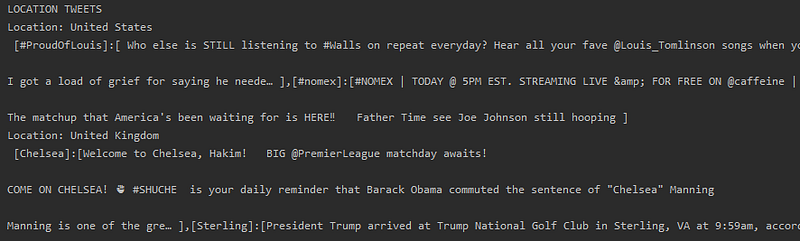
  1. We can see the popular trends of our target locations:
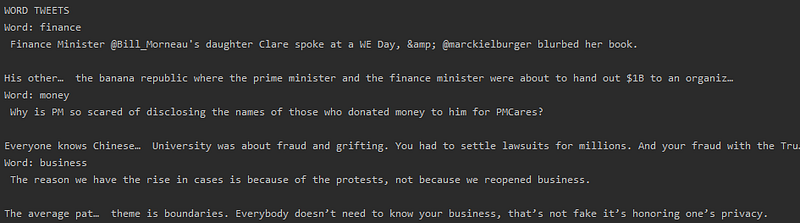
2. We can see the top tweets that contain our target words:
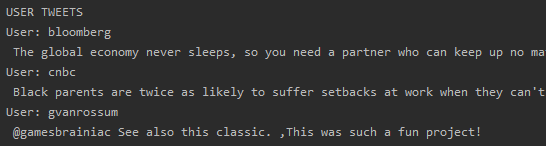
3. We can see the latest tweets of our chosen users or companies:
That’s how I stay up-to-date

We can use advanced NLP techniques to improve it further. We can enhance this application by removing spam and fake news. We can also configure it to summarise the entire information for us in a paragraph or a few bullet points. There are a number of other ideas that I will be presenting in my upcoming articles.
Summary

This article demonstrated how we can access social media tweets data from Twitter to stay up to dated.

We used the Tweepy Python package.

In the subsequent articles, I will demonstrate how we can score each tweet, remove noise, and build a dashboard to understand whether the trends are positive or negative.

This will help us get a glimpse of information, which at times is all we need due to time constraints.

This API has enormous potential and the data can help us stay up-to-date with the world.

Python
Data Science
Programming
Fintech
Technology
Recommended from ReadMedium