
Using Text-to-speech to Pace Your Reading
Text-to-speech helps you scroll at a reasonable rate and gives you more quality time with articles.
As I have made clear in a previous article, I am a big-time proponent of the Follow | Clap | Comment | Highlight routine inspired by that writer chick Jan Sebastian.
Following this routine, I have been able to make new friends, enjoy reading a wide variety of different content, and, yes, pick up a buck or two.
Nevertheless, I have also been doing my own research about the Medium Partner Program (MPP) and the new text-to-speech reading function in hopes of tweaking my basic routine and improving my community engagement. Before I share my findings, a few disclaimers are in order.
DISCLAIMERS
- I ain’t no guru!
- I joined Medium in late December 2021, so I am still very much an ignorant newbie. The conclusions I draw here are based on the limited knowledge I have picked up here and there through my reading.
- If you spot any problems with my assumptions, conclusions, or logic, please feel free to let me know in the comments.
Types of MPP Payments
From what I have been able to gather so far, Medium makes the following three types of payments to members:
- Payments based on article reading time
- Special bonuses
- Referral payments
Here, I will be discussing MPP payments for article reads only. I will not be covering the special bonuses (paid out at Medium’s discretion) or referral payments (half of the membership fee of a new reader who signs up via a member’s link).
How MPP earnings are calculated
The official word on how MPP earnings are calculated can be found in the Medium Help Center article titled “Calculating earnings in the Partner Program.”
I would like to present my personal, unofficial understanding of how MPP read earnings are calculated.

MPP read earnings are calculated based on reading time. Medium’s official information suggests that half of a person’s earnings for an article are based on the time members spend reading the article. The other half is based on the percentage of each reader’s total reading time for the period being calculated.
The time members spend reading an article The more time members spend reading an article (member reading time), the more that article earns. A viewer’s scrolling characteristics and activity as they view the article are taken into consideration when determining the article’s read time. So, keeping an article displayed for a long time without reading it will increase its reading time, right?
Wrong!
Long periods of non-scrolling are disregarded because they are interpreted as meaning the viewer is not actively reading the article.

The percentage of each member reader’s total reading time that they spend reading an article My understanding (which may be flawed) of the Medium Help Center article is that a portion of each member reader’s subscription fee is allocated to something called “a share.” Suppose a member spends a total of 100 minutes reading articles during a given period, and 10 of those minutes are spent reading a particular article. In that case, that article will earn 10% of the member reader’s “share” for the period.
Reading is good, as long as you do it the right way
So there it is. To support each other, we need to read stories the right way. Flitting through an article to find salient points deserving of a highlight or comment will probably not be evaluated very highly. Apparently, the algorithm can sense whether or not scroll operations are those of a person actually reading the text.
Like many people, I tend to perform my Medium writing chores in binge-like bursts — write a bunch, edit a bunch, read a bunch, research a bunch, etc. Even if the articles I have in my reading queue are interesting, reading a large batch of them can become a mind-numbingly tedious chore. This is especially true when you get to the point where you are following a large number of authors.
Text-to-speech — a good way to pace your reading?
I think the new Medium text-to-speech function is an excellent way to get more and give more from your reading. It ensures you are scrolling an article at a reasonable speed. It also helps make sure you spend sufficient time digesting the article contents.
To use text-to-speech, click Listen at the top of an article
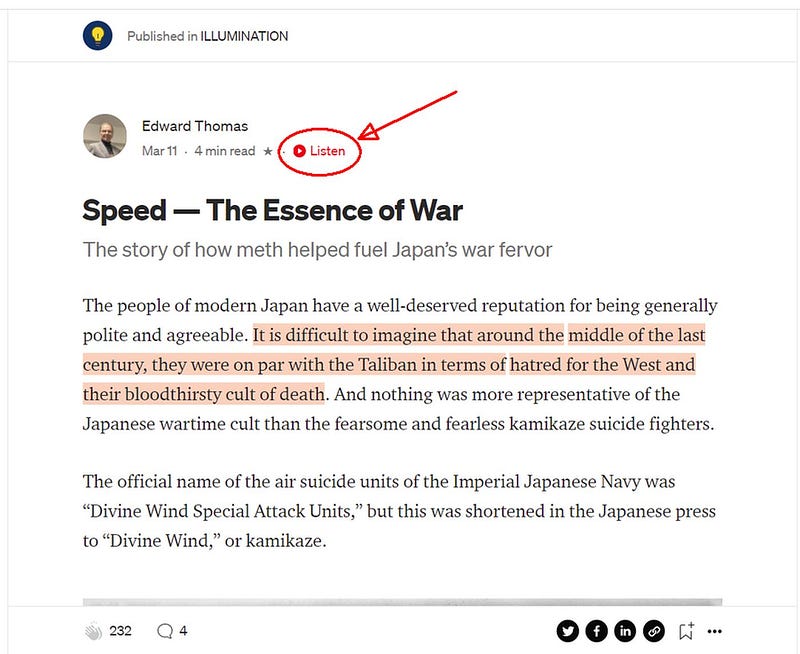
This causes the text to be read by an AI voice from beginning to end. The quality of the reading is quite good, and you can even select from various different voices.
Personally, I find the function relatively efficient and easy to use. Not perfect, but much less tedious than slowly and carefully reading a large batch of stories in one sitting.
PROS
- The voice reads at a normal reading pace, so you spend almost precisely the estimated read time shown at the top of articles on Medium.
- You can listen to articles as you do something else, pausing when something catches your ear. You can highlight text while the reading is paused, and skip forward or back sentence-by-sentence.
- Text-to-voice playback forces you to spend more quality time with an article and better digest its content.
CONS
- The reading has problems with certain words and expressions. For example, $35 is read as “dollar three five,” the American voice reads “about” as “aboot,” etc.
- The control window displayed in the lower right corner of the screen while text-to-speech is enabled does not float very well. You cannot drag it to another location. If you try to comment on an article while reading is paused, the control window covers the comment box and cannot be moved or closed once it is opened. The only way I have been able to find to close the window is to reload the article.
- The voice reads EVERYTHING in the article’s space, even text that is not part of the article.
- Text-to-voice is not supported in the article editor, which too bad because it would be an excellent tool for detecting clumsy passages, spelling problems, etc. prior to publication.
How I have been using text-to-speech
This is the procedure I have been using to go through articles with text-to-speech.
- Open the full article.
- Click Listen at the top of the page.
- Listen to the reading. Sometimes I listen without reading along, but generally I try to read along with the voice. The latter practice slows things down a beat and helps me better digest what is written on the page.
- Pause the reading and highlight as required. Commenting while reading is paused is not so easy because the text-to-speech control window partially covers the comment box.
- When the reading is finished, refresh the article page. This closes the text-to-speech control window.
- Comment, highlight, and clap as desired.
FINAL DISCLAIMER
Everything in this article is based on my unofficial interpretation of the published Medium rules for MPP read time calculations and payments. Regardless of whether or not my understanding is correct, everything is always subject to change with little or no notice. In Medium’s own words:
All in all, we hope our system supports all thoughtful work, long or short, and we plan to keep a careful eye on the outcomes as we learn and iterate into the future.
Thanks for reading this article.
Please click Listen at the top to try reading it again with the text-to-speech function and let me know what you think.
Also, please consider making text-to-speech reading a regular part of your article reading routine.


