
Using shared helm-charts
As I’ve been progressing with my journey in setting up a Kubernetes cluster at home, I have found myself with a sprawl of Helm repositories using different templates required by the application that I am deploying.
I would like to be in a position where I can have a single repository containing my Helm templates and deploying a new application is as simple as creating a new repository with a Chart.yaml and values.yaml file.
This not only speeds up deployments, but has the additional benefit of allowing me to update a template with an improvement and gradually roll this out to my existing deployments without having to update each repo individually (unless the change is breaking!)

Some considerations
Before starting there are a few questions that have come to mind already:
- How can I host this privately?
- How will I handle versioning (so updating a shared template does not affect other deployed applications)
- How will this work with my CD platform (ArgoCD)
Overview diagram
I found the easiest way to find the correct tooling to fit my need to write out a small flow chart of how I wanted this to work.
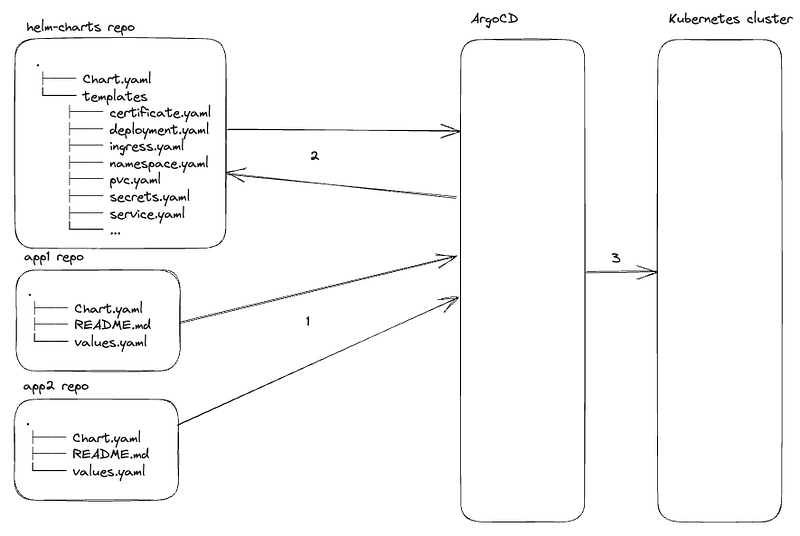
When a new application is required, it is written very thin with only the values which would provide the resources that are required to be deployed in a values.yaml file.
The helm-charts repository will contain the Helm templates which will be used by all of the applications being deployed. These templates will be loaded during the CD workflow before everything is deployed onto the Kubernetes cluster.
Configuring the helm-charts repository
As I already have my CD platform (ArgoCD) and Kubernetes cluster up and running, the only other dependency I have here is to look at how I am going to provide these shared templates to be used by my application repositories.
The first thing to do was to create a new repository named helm-charts, copy in my templates from my existing repositories.
The directory structure in this repo is as follows:
➜  helm-charts git:(main) tree
.
├── Chart.yaml
├── README.md
├── templates
│   ├── certificate.yaml
│   ├── clusterrolebinding.yaml
│   ├── configmap.yaml
│   ├── daemonset.yaml
│   ├── deployment.yaml
│   ├── docker_secret.yaml
│   ├── ingress.yaml
│   ├── namespace.yaml
│   ├── pvc.yaml
│   └── service.yaml
└── values.yaml
I added a Chart.yaml file indicating the intention for the project.
apiVersion: v2
name: helm-charts
description: A Helm chart of helm charts for use for standard deployments
type: application
version: 1.0.0
appVersion: "1.0.0"
While I was creating the repository, I also setup automatic releasing using semantic-versioning as described in this article I wrote: Semantic versioning with Helm.
Helm template structure
All of my Helm templates in this repository are structured as below example:
{{ range .Values.ingresses }}
---
apiVersion: networking.k8s.io/v1
kind: Ingress
metadata:
  name: {{ .name }}
  namespace: {{ $.Values.namespace }}
spec:
  ingressClassName: nginx
  tls:
  - hosts:
    - {{ .commonName }}
    secretName: {{ .secretName }}
  rules:
  - host: {{ .commonName }}
    http:
      paths:
      - path: /
        pathType: Prefix
        backend:
          service:
            name: {{ .name }}
            port:
              number: {{ .port }}
{{ end }}
This allows me to add/remove resources simply by adding a new item to a list in the values.yaml file in the application repository. Eg
ingresses:
  - name: example
    commonName: example.tjth.co
    secretName: example-tjth-co
    port: 8000
- name: example2
    commonName: example2.tjth.co
    secretName: example2-tjth-co
    port: 8080
Now, with my repository of templates ready — It’s time to start looking at how to share these with the CD platform.
Sharing the templates
This page on the Helm website was very handy for understanding my options:
To summarise, you need to have a web server of sorts listening to requests for helm commands in order to be able to dynamically load the templates into your installation.
As I’m going to be using this at home for my personal projects, I don’t need anything Cloud hosted (or not free!).. I’ve also had bad experiences with GitHub pages (as I describe in this article I wrote about why I moved to Cloudflare Pages) so initially opted to use Chartmuseum, however, while looking to deploy I realised that this project has been abandoned.
Doing some more research I found that any OCI (Open Container Initiative) registry can be used for storing Helm charts as of Helm 3.8 (https://helm.sh/blog/storing-charts-in-oci/) so decided to use my docker registry that I already had set up, for storing my container images.
I added the following job to my GitHub workflow that bumps the Helm charts and push to the registry, then part one of this project was complete!
  push-to-oci:
    needs: semantic-release
    runs-on: self-hosted
    steps:
      - name: Checkout
        uses: actions/checkout@v4

      # Setup helm
      - name: Setup Helm
        uses: azure/setup-helm@v3

      # Login to OCI
      - name: Login to OCI
        run: |
          helm registry login -u ${{ secrets.REGISTRY_USERNAME }} -p ${{ secrets.REGISTRY_PASSWORD }} my.registry.com

      # Push to OCI
      - name: Push to OCI
        run: |
          helm package .
          helm push helm-charts-${{ needs.semantic-release.outputs.VERSION }}.tgz oci://my.registry.com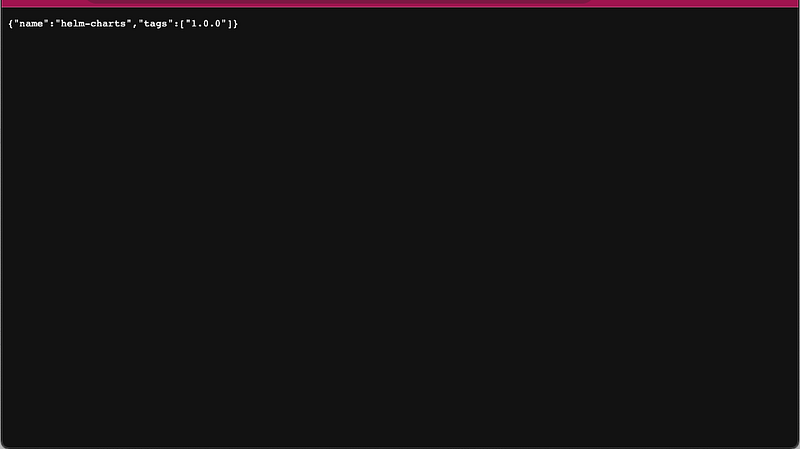
Using the shared templates locally
The next hurdle to jump was how to use the shared-templates in my application repositories locally, before I go on to look at how this will work in ArgoCD.
I started by creating a new application repository which will be my testbed for using the shared-templates. I created a Chart.yaml with the following contents:
apiVersion: v2
name: argocd
description: A helm chart to deploy test resources into Kubernetes
type: application
version: 1.0.0
appVersion: "1.0.0"
dependencies:
  - name: helm-charts
    version: 1.0.3
    repository: oci://my.registry.com
Running the following command downloads my shared templates repository (helm-charts) into the local directory ready for use:
helm dependency updateOnce downloaded, I could create a values.yaml file and override the values in the shared template as follows:
helm-charts:
  name: test
Running the following confirmed that the install will work correctly!
helm install test . --dry-run --debugConfiguring OCI access in ArgoCD
The final item that I needed to look at was how to load these dependencies dynamically into ArgoCD during my CD workflow.
Adding OCI credentials into ArgoCD is as simple as creating a secret in the ArgoCD namespace with the following configuration:
apiVersion: v1
kind: Secret
metadata:
  name: <appropriate name>
  namespace: <argocd namespace>
  labels:
    argocd.argoproj.io/secret-type: repository
stringData:
  name: <appropriate name>
  url: <URL of the registry - eg my.registry.com>
  enableOCI: "true"
  type: helm
  username: "<oci-registry-username>"
  password: "<oci-registry-password>"
  ForceHttpBasicAuth: "true"
As I use sealed-secrets to encrypt secrets in my cluster, I piped this into kubeseal and applied the manifest.

Browsing to ArgoCD web UI you can see the OCI registry successful state and ready to be used!
I now added the Application for my test repository into ArgoCD and the templates were loaded correctly from my helm-charts repository, with credentials for the registry loaded from the secret we have just created!
Next steps
Now that I have confirmed that this process works, the next step is to remove all of the individual templates directories across my deployed applications and port them to use the new dependencies.
In theory each deployment should be zero-op (with no changes) but I am sure there will be some differences in the template along the way.
I hope you’ve found this interesting reading through the challenge of setting up shared Helm templates!


