
Using Python’s LSEG Refinitiv financial data library from Google Colab

Refinitiv, established in 2018 as a Thomson Reuters subsidiary, is a global provider of financial market data and infrastructure. After its acquisition by the London Stock Exchange Group (LSEG) in October 2019, Refinitiv now serves users in about 190 markets, marking it as a leading data service provider in the financial industry. Proficiency in using Refinitiv has become crucial for the financial industry, and this article explores its capabilities through Python.
The Refinitiv Data Library (RD Lib) for Python provides a user-friendly API that accesses a vast array of financial data. While many utilize this data via their propietary desktop or browser app called “LSEG Workspace”, this article introduces a dynamic alternative by using Google Colab (Please note that this article is an extension of the work of Jonathan Legrand, you can read his article by clicking in the link below).
Google Colab is a hosted Jupyter Notebook service that requires no setup and offers cloud access to computing resources like GPUs and TPUs, Google Colab represents an ideal development environment for data scientists and analysts, that are accustomed to python. Integrating Google Colab with Refinitiv creates a powerful toolset for financial data expert. In this article we will explore firts, how to get the API credential that will allow us to use refinitiv services. Then we will explore how to setup the refinitiv environment via the creation of a config.json file. Finally we will install, import and start using refinitiv via the creation of a session.
This article is part of a series of articles related to the application and functionalties of Refinitiv data library. If you want to know more I recommnd you that you explore the series below.
Article index:
- Accessing LSEG Refinitiv API credentials
- Creating a refinitiv-data.config.json file
- Create a Refinitiv LSEG session
- Conclusions
Accessing LSEG Refinitiv API credentials
To access your LSEG refinitiv, credentials you will need to have a refinitiv paying account.
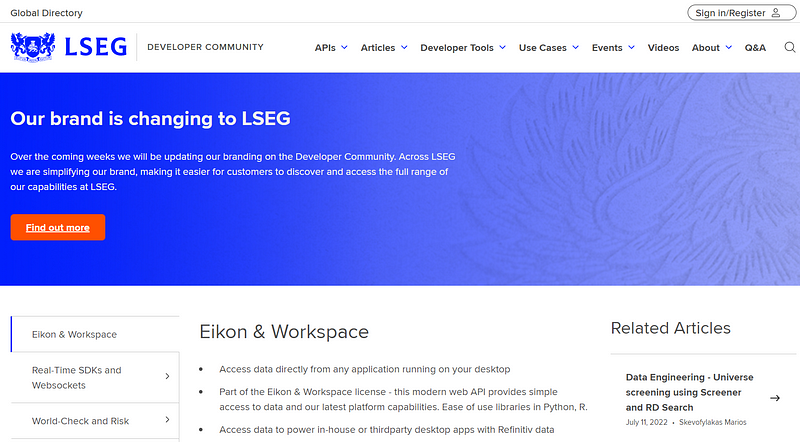
- First go to the LSEG refinitiv developers portal by clicking on https://developers.lseg.com/en and sign in into your account.
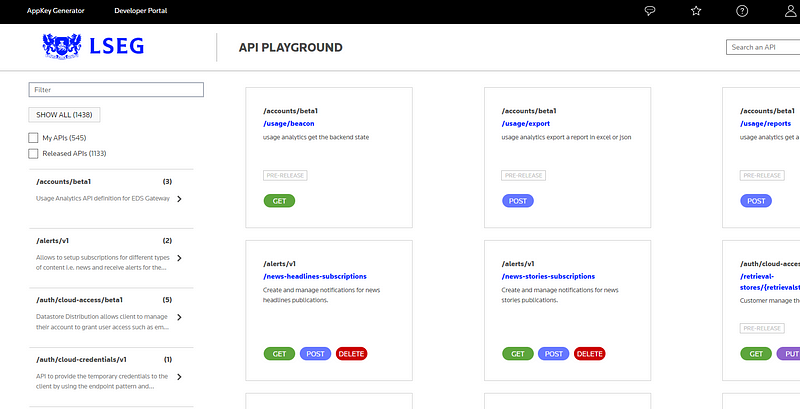
2. Once you are logged in, on the top click on developer tools, and then on API playground. Please note that it might be required that you re-enter your username and password. Then click on AppKey generator.
Developer tools → API playground → AppKey generator
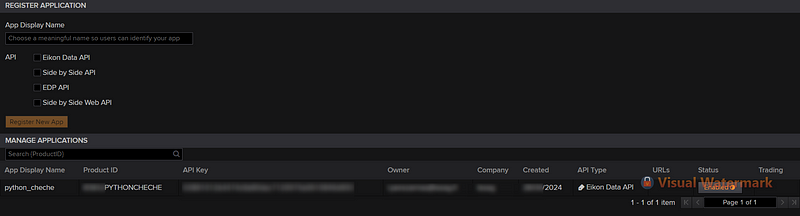
3. Create a new application by typing a name for it on the “App display name” form, then select “Eikon Data Api” and then click on “Register new app”. Once your app is created, copy the API Key number.
Creating a refinitiv-data.config.json file
The refinitiv-data.config.json file is critical for using Refinitiv's API, as it holds all the necessary details to establish a connection with Refinitiv's servers. There are two main methods to connect: the “desktop” and the “platform” forms. The “desktop” form relies on having the Workspace/Eikon Desktop Application active on your local machine, and it only requires an API key to connect. However, this method isn’t suitable for Google Colab.
On the other hand, the “platform” form doesn’t require the Workspace/Eikon Desktop Application to be running. Instead, it needs additional credentials including your API key, username, and password. This information is securely passed through the refinitiv-data.config.json file, which also specifies your default connection mode. This method is ideal for Google Colab, allowing for a seamless integration that facilitates access to Refinitiv’s extensive financial data without local software constraints.
To setup the refinitiv LSEG google colab environment, first create a new notebook in google colab. Then click on the “files” folder located on the left side panel, and then proceed to right click on the empty directory to create a new file.
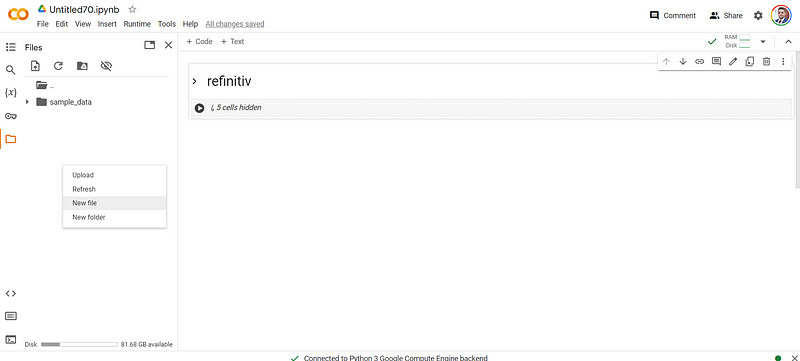
Once the file is created, please rename it as refinitiv-data.config.json .
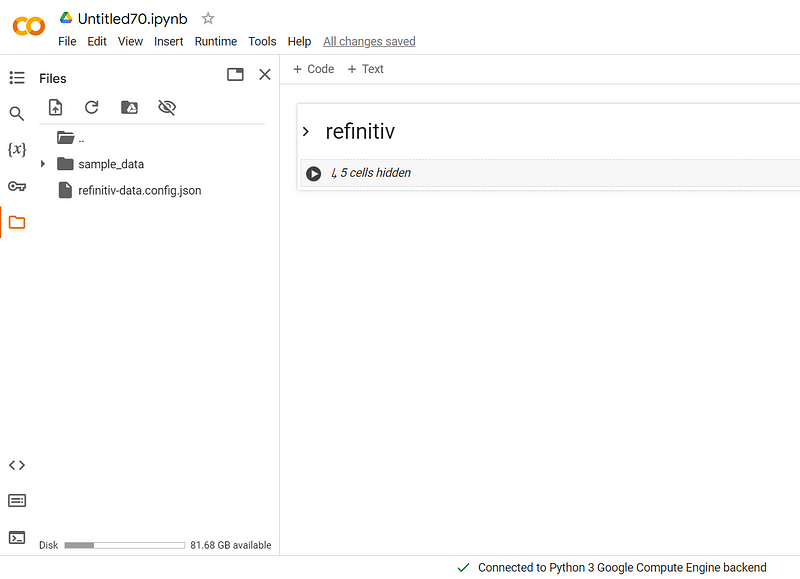
Double click on the JSON file and paste the content below. The config file can also be downloaded from LSEG’s official github.
{
    "logs": {
        "level": "debug",
        "transports": {
            "console": {
                "enabled": false
            },
            "file": {
                "enabled": false,
                "name": "refinitiv-data-lib.log"
            }
        }
    },
    "sessions": {
        "default": "platform.rdp",
        "platform": {
            "rdp": {
                "app-key": "YOUR APP KEY GOES HERE!",
                "username": "YOUR RDP LOGIN OR MACHINE GOES HERE!",
                "password": "YOUR RDP PASSWORD GOES HERE!"
            },
            "deployed": {
                "app-key": "YOUR APP KEY GOES HERE!",
                "realtime-distribution-system": {
                    "url" : "YOUR DEPLOYED HOST:PORT GOES HERE!",
                    "dacs" : {
                        "username" : "YOUR DACS ID GOES HERE!",
                        "application-id" : 256,
                        "position" : ""
                    }
                }
            }
        },
        "desktop": {
            "workspace": {
                "app-key": "YOUR APP KEY GOES HERE!"
            }
        }
    }
}
To connect using the platform mode, you simply need to update a few values in the refinitiv-data.config.json file. This file is preset to use the “platform.rdp” option as the default connection method. You’ll need to input the “app-key” (the key number generated in the previous section of this article) along with your Refinitiv account’s username and password. Please ensure you only modify the “rdp” section of the JSON file and leave the other sections unchanged to maintain the integrity of the file settings. Please note that all the credential values must be between quotation marks, like in the example below.
"rdp": {
                "app-key": "6354588aabhj45549633poopipi455215",
                "username": "[email protected]",
                "password": "Buythedip12345."
            },
Close the file and now you are ready to start using Refinitiv LSEG python API.
Create a Refinitiv LSEG session
The first step is to install the refinitiv-data python library, we easily do this in google colab by typing !pip install refinitiv-data in a code cell.
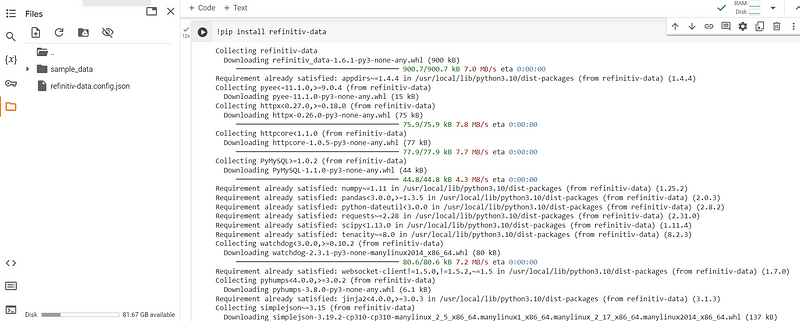
Once the library is installed, then proceed to import the library by using the code below. Additionally we will import Numpy, Pandas as well as matploblib for visualizations.
import refinitiv.data as rd
import pandas as pd
import numpy as np
import matplotlib.pyplot as plt
Once all the libraries have been correctly imported, we can proceed to create a refinitiv session. The session object allows the user to stablish a connection with the different refinitiv data services and start interacting with their different products. To stablish a connection, it is as simple as typing the code below:
rd.open_session(name='platform.rdp',
                config_name="./refinitiv-data.config.json")
In our specific case, we just need to specify two things: first the connection type by typing platform.rdp in the name argument and secondly, the location of the configuration JSON file, by providing the location in the config_name argument. With the connection stablished, can already start asking for data. Let’s proceed to retrieve the yearly revenues of Google between January 2015 up until January 2024. We can easily get this information with the code below:
google_revenues = rd.get_history(
        universe="GOOG.O",
        fields=["TR.Revenue"],
        interval="1Y",
        start="2015-01-01",
        end="2024-01-01",
    )
The data is fetched in the form of a pandas dataframe, that can be easily manipulated with all the pandas functions and methods.
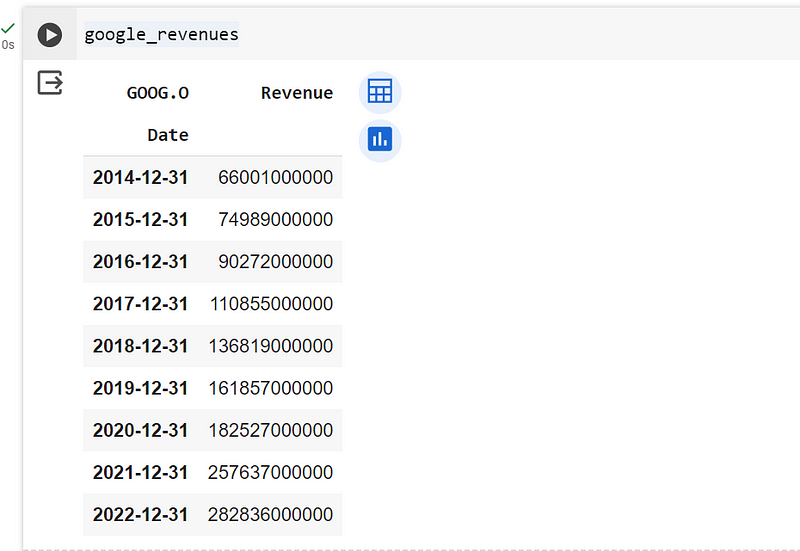
The refinitiv library offers a myriad of functions and method, if you require more information you can explore the official documentation of the library. Once you are finished with your notebook, please do not forget to close your session via rd.close_session() . Once you have closed and disconnected your colab session, your refinitiv-data.config.json will be deleted, so before disconnecting download it into your computer so you can easily upload it the next time that you want to use refinitiv.
A very common question that I receive when I teach about this tool, is if there is a list of all the fields available in the Refinitiv data library? Sadly for the time being there is no such a list, however if you want to know the name of a particular indicator, you can always go to the Data Item Browser, from the Refinitiv workspace and look for the field name of the indicator you are interested in. The column “data item code” contains the name that you will use as field argument in python.
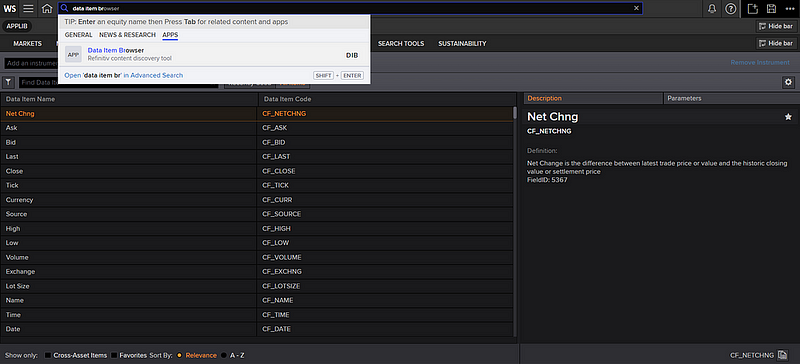
In the following link below you will find a .csv file with the field name and description of the indicators included in the most used financial statements.
Conclusions
In conclusion, this article has taken you through a detailed explanation on how to configure and start using your Refinitiv LSEG environment from the confort of Google Colab.
If you wish to learn more about Refinivit data library. I recommend you that you read my series of articles on this topic. On this series we explore multiple applications like relative valuations, DCF analysis, etc.
I sincerely hope you found this article useful and entertaining. If so, I’d love to hear your thoughts! Please feel free to leave a comment or show your appreciation with a clap 👏. And if you’re interested in staying updated on my latest articles, consider following me on Medium. Your support and feedback are what drive me to keep exploring and sharing in this fascinating field. Thank you for taking the time to read, and stay tuned for more insights in my next article!
References
- https://developers.lseg.com/en/article-catalog/article/summary-of-common-lseg-refinitiv-apis
- https://developers.lseg.com/en/api-catalog/refinitiv-data-platform/refinitiv-data-library-for-python/documentation#reference-guide
- https://github.com/LSEG-API-Samples/Example.DataLibrary.Python/blob/main/Quick%20Start/QS_1.0%20-%20Sessions.ipynb
- https://developers.lseg.com/en
- https://readmedium.com/lsegs-refinitiv-data-library-for-python-and-its-configuration-process-17df297e6fde
- https://medium.com/@luisfernandopa1212/list/refinitiv-data-library-for-python-786474742ab8
In Plain English 🚀
Thank you for being a part of the In Plain English community! Before you go:
- Be sure to clap and follow the writer ️👏️️
- Follow us: X | LinkedIn | YouTube | Discord | Newsletter
- Visit our other platforms: Stackademic | CoFeed | Venture | Cubed
- Tired of blogging platforms that force you to deal with algorithmic content? Try Differ
- More content at PlainEnglish.io


