
Using Python and Selenium to Scrape Infinite Scroll Web Pages

Web scraping can be an important tool for data collection. While big social media, such as Twitter and Reddit, supports APIs to quickly extract data using existing python packages, you may sometimes encounter tasks that are difficult to solve using APIs. For instance, the Reddit API allows you to extract posts and comments from subreddits (online communities in Reddit), but it is hard to get posts and comments by keyword search (you will see more clearly what I mean in the next section). Moreover, not every web page has API for web scraping. In these cases, manual web scraping becomes the optimum choice. However, nowadays many web pages implement a web-design technique: infinite scrolling. Infinite scroll web pages automatically expand the content when users scroll down to the bottom of the page, to replace the traditional pagination. While it is very convenient for the users, it adds difficulty to the web scrapping. In this story, I will show the python code I developed to auto-scrolling web pages, and demonstrate how to use it to scrape URLs in Reddit as an example.
Selenium for infinite scroll web pages: What Is The Problem?
Let’s say that I want to extract the posts and comments about COVID-19 on Reddit for sentiment analysis. I then go to Reddit.com and search “COVID-19”, the resulting page is as follow:
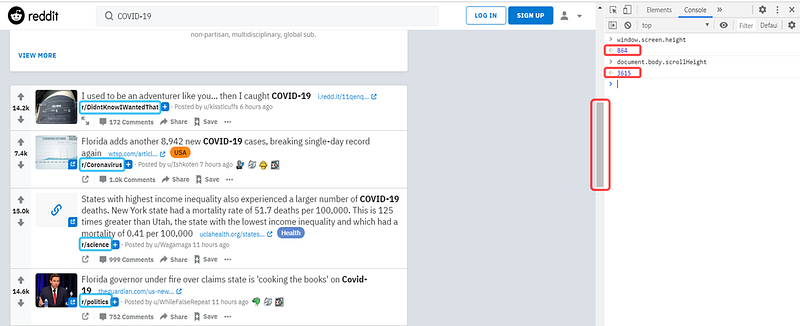
The texts highlighted in blue boxes are the subreddits. Notice that they are all different. Therefore, if I want to get all these posts through Reddit API, I would have to first get the posts from each subreddit, and write extra code to filter the posts that are related to COVID-19. This is a very complicated process, and thus in this case, manual scraping is favored.
The icon and numbers highlighted in red boxes are the scroll bar and the screen height and scroll height. The screen height represents the entire height of the screen, and the scroll height represents the entire height of the web page. The scroll bar tells where my current screen is located with respect to the entire web page, and the length of the scroll bar indicates how large the screen height is with respect to the scroll height. In this case, the screen height is 864 and the scroll height is 3615. So, the scroll bar is relatively long.
However, after I scroll down to the very bottom of the web page, the scroll bar shrinks, because the screen height is unchanged, but the scroll height now becomes 27452:
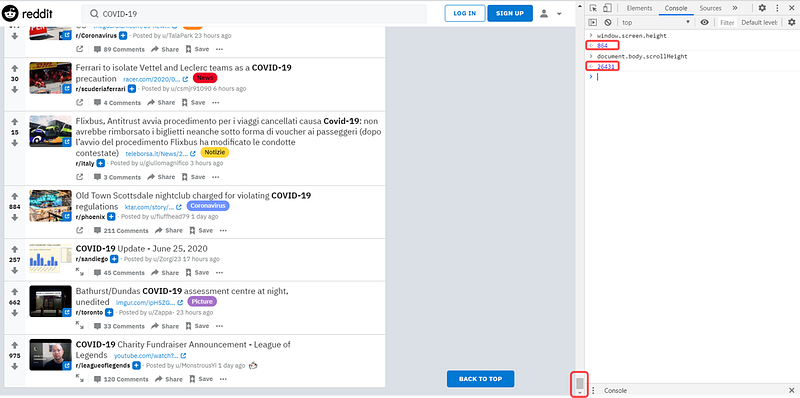
This is infinite scrolling: at the initial stage, only a small number of posts are on the page, and new posts will show up after I scroll down. Unfortunately, Selenium always opens the web pages in their initial forms. Therefore, the HTML we extract from this web page is incomplete, and we are unable to get the posts that show up after scrolling down.
Solution? Simulate Scrolling!
So how can we extract the complete HTML and get all the posts from this Reddit web page? Well, we ask Selenium to scroll it! The following code shows how to implement the auto-scrolling feature in Selenium:
Selenium can execute Javascript in the console of the web page. Therefore, I first obtain the screen height (the total height of my screen, which is less than the scroll height). Then, I ask Selenium to scroll one screen height at a time. After running the loop for a couple of times, Selenium will scroll to a position that is low enough to trigger the expansion of the page, and the new posts will start to load. Usually, the web page takes some time to update the new scroll height and load new content, so I add a pause time to allow the web page has enough time to complete the update. If the pause time is too short, the new scroll height will not be updated and the loop will break sooner. The updated scroll height is then recorded, and the loop will break when we ask Selenium to scroll to a position that is larger than the scroll height (which means that we reach the end).
Now, Let’s Demonstrate!
Firstly, we need to inspect the page and check where to find the URLs:
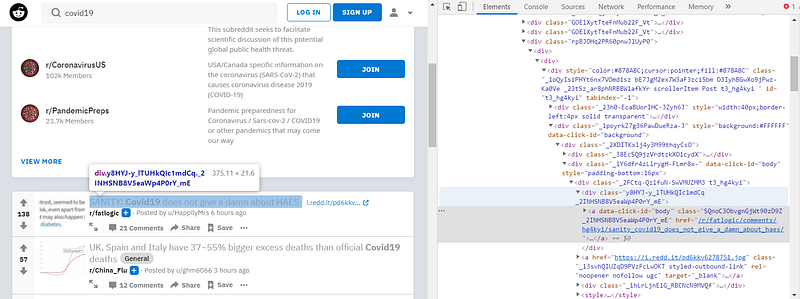
The URLs we want are just in the first a-tag under a div with class “y8HYJ-y_lTUHkQIc1mdCq _2INHSNB8V5eaWp4P0rY_mE”. Looks simple! let’s try scraping the URLs without the auto-scrolling code:
The resulting number of URLs is 22.

Now, let’s implement the auto-scrolling code and see how many URLs we can get:
The resulting number of URLs increase to 246!

That’s it!
I have tested my auto-scrolling code on many different websites, including Linkedin.com, Sephora.com (not for myself though), and etc. It performs quite well unless I choose a pause time that is too small (as I mentioned above). If you are interested to see what I used my code for on Sephora.com, it’s right here:
https://github.com/KuanWeiBeCool
If you find this story useful, please give it a clap! It will help me a lot!