
Using miro for Journey Lines

In a hybrid working world, it can be difficult to do some of the things we used to do in person.
One of those things I’ve had to adapt is a team formation exercise called Journey Lines.
I love using this method for helping people get to know each other a bit better and I wanted to show you how I’ve moved it to a more asynchronous, online version using the excellent white-boarding tool miro.com.
Here’s an example journey line written by hand:
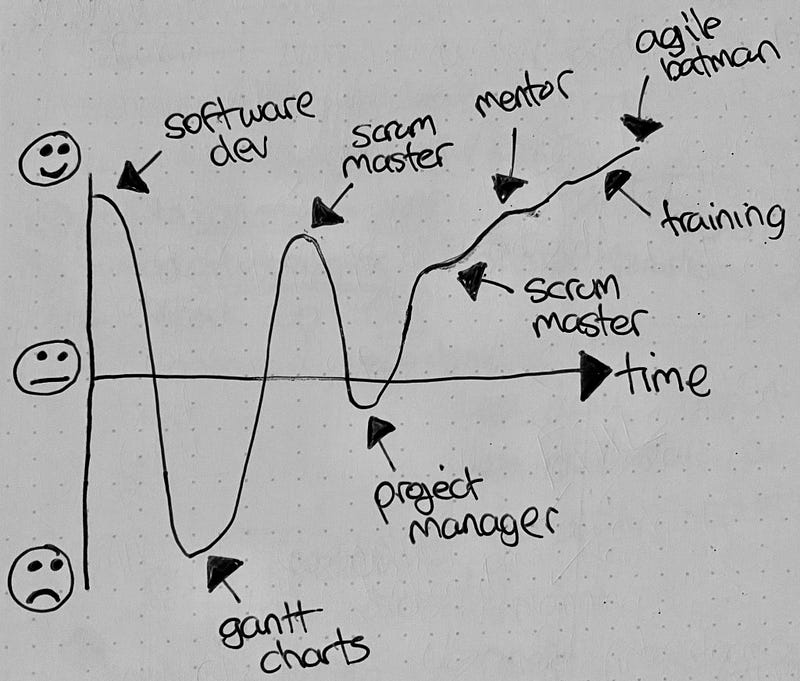
What is Journey Lines?
Journey Lines is a technique for learning about each other as people.
It’s therefore great for brand new teams where people don’t really know each other yet.
You could also use the technique anywhere where you want to discuss a timeline of events e.g. a review of the last sprint or an entire project.
I first read about the technique in a book called Coaching Agile Teams by Lyssa Adkins. It allows you to understand each person’s past, what they have achieved and what they were disappointed in. It helps you get under the surface a bit, to be a little bit vulnerable with each other.
It builds empathy which leads to trust between a group of people.
Using miro for Journey Lines
I’ve put together a set of steps so that you can get started
1. Create an empty board in miro with an appropriate title
Make sure the board is private by default. We want to create a safe space for people to sharing their lives. Make it clear this board is private and will never be shared.
2. Create an empty journey line frame for each person participating
Here’s an example of something I set up, the empty frame has happiness plotted on the vertical axis, and time on the horizontal axis.
I put the persons name at the top (Daniel), and then just copied and pasted it for the number of people in my Journey Lines session.
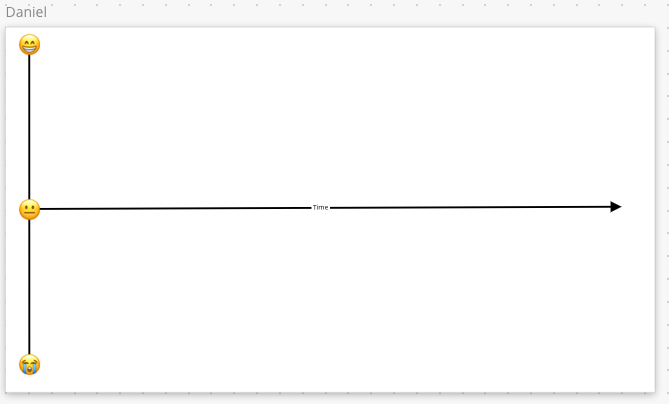
3. Create an instructions frame
Next up, I create an instructions frame.
An instructions frame is vital to activate asynchronous working. When someone receives a link to this board, this should be the first thing they see.
Make sure you also set the start view for the miro board appropriately.
A new person on the board will read through this and know exactly what they need to do without having to check with you first.
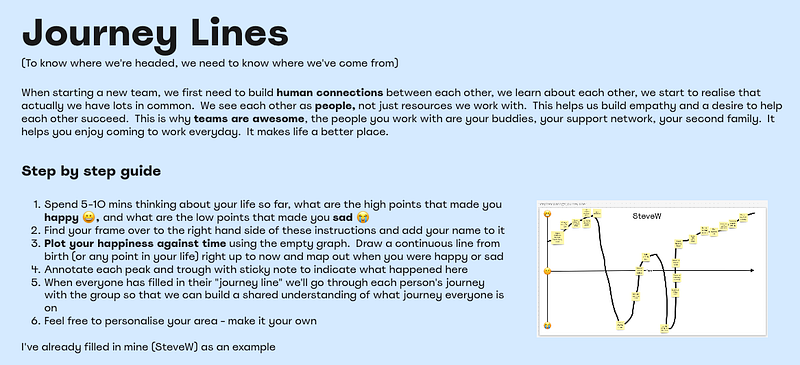
4. Share the board with each person participating
Now that the board is ready for use, we can share the link only with those people participating. Use a password if you think it’s necessary.
When sharing the link, make sure you tell each person to read the instructions first, and ask them to fill in their own journey line — set a target date of when this should be done by so that people can plan their time effectively.
There’s nothing wrong with everyone looking at each other's work as they fill it in.
5. Schedule a meeting with everyone to discuss
The final part of the process is to get together and discuss, to build a shared understanding and learn a bit more that’s not written. A chance to ask questions.
I find that about an hour is good for 8 people’s journey lines. I facilitate the meeting this way:
- Introduce the purpose of the meeting (to learn about each other as people)
- Ask each person to spend 5–10 mins walking through their own journey line — to build trust you might want to go through your own journey line first. I set a time limit up front to ensure it’s an efficient use of our time — use your own judgement.
- Encourage people to comment and ask questions as each person is talking about their own journey line. Interruptions are OK. This isn’t a presentation, it’s a chance to get to know about each other; talking is good.
- At the end of the meeting, ask each person to note one thing they learnt about someone else that they didn’t already know. This reinforces the learning.
Summary
Journey Lines are a great way of building connections with a group of people working with each other for the first time. They help build the foundations of trust in a team.
Typically I’ve used a giant whiteboard, sticky notes and sharpies to accomplish this in person. With hybrid working, that’s more difficult. With miro, or any other virtual whiteboard tool that has a free format pen and some virtual sticky notes, you can create an asynchronous version of Journey Lines that helps you connect.
It’s important that you follow up with an actual meeting to discuss what was created, to reinforce the links between people. This can be in person, or online, the talking is the important bit.
Give Journey Lines a try, it could just be the boost your new team needs to be awesome.


