Using Docker Operator on Airflow running inside a Docker Container
If you’re reading this article, there is chance that you have encountered this issue:
During handling of the above exception, another exception occurred:Traceback (most recent call last):
File "/home/airflow/.local/lib/python3.6/site-packages/docker/api/client.py", line 214, in _retrieve_server_version
return self.version(api_version=False)["ApiVersion"]
File "/home/airflow/.local/lib/python3.6/site-packages/docker/api/daemon.py", line 181, in version
return self._result(self._get(url), json=True)
File "/home/airflow/.local/lib/python3.6/site-packages/docker/utils/decorators.py", line 46, in inner
return f(self, *args, **kwargs)
File "/home/airflow/.local/lib/python3.6/site-packages/docker/api/client.py", line 237, in _get
return self.get(url, **self._set_request_timeout(kwargs))
File "/home/airflow/.local/lib/python3.6/site-packages/requests/sessions.py", line 555, in get
return self.request('GET', url, **kwargs)
File "/home/airflow/.local/lib/python3.6/site-packages/requests/sessions.py", line 542, in request
resp = self.send(prep, **send_kwargs)
File "/home/airflow/.local/lib/python3.6/site-packages/requests/sessions.py", line 655, in send
r = adapter.send(request, **kwargs)
File "/home/airflow/.local/lib/python3.6/site-packages/requests/adapters.py", line 498, in send
raise ConnectionError(err, request=request)
requests.exceptions.ConnectionError: ('Connection aborted.', PermissionError(13, 'Permission denied'))The cause of this is that the permission to /var/run/docker.sock is not set up properly. When you google for this issue, you will see a ton of different answers. The most common being is by changing the permission of /var/run/docker.sock in the host system.
While some people reported that it solved their problem, It’s not a universal solution, as you can see in the comments, it does not work for everyone.(my self included)
So how did I solve the issue? By looking a few threads in the airflow slack group.
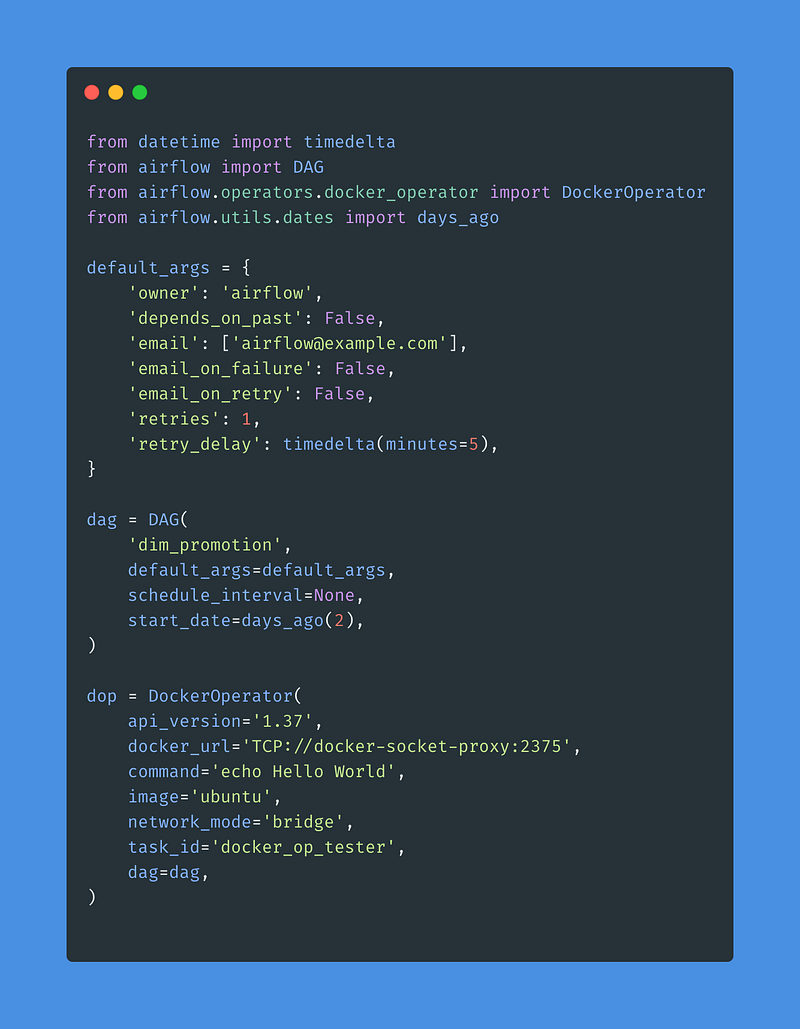
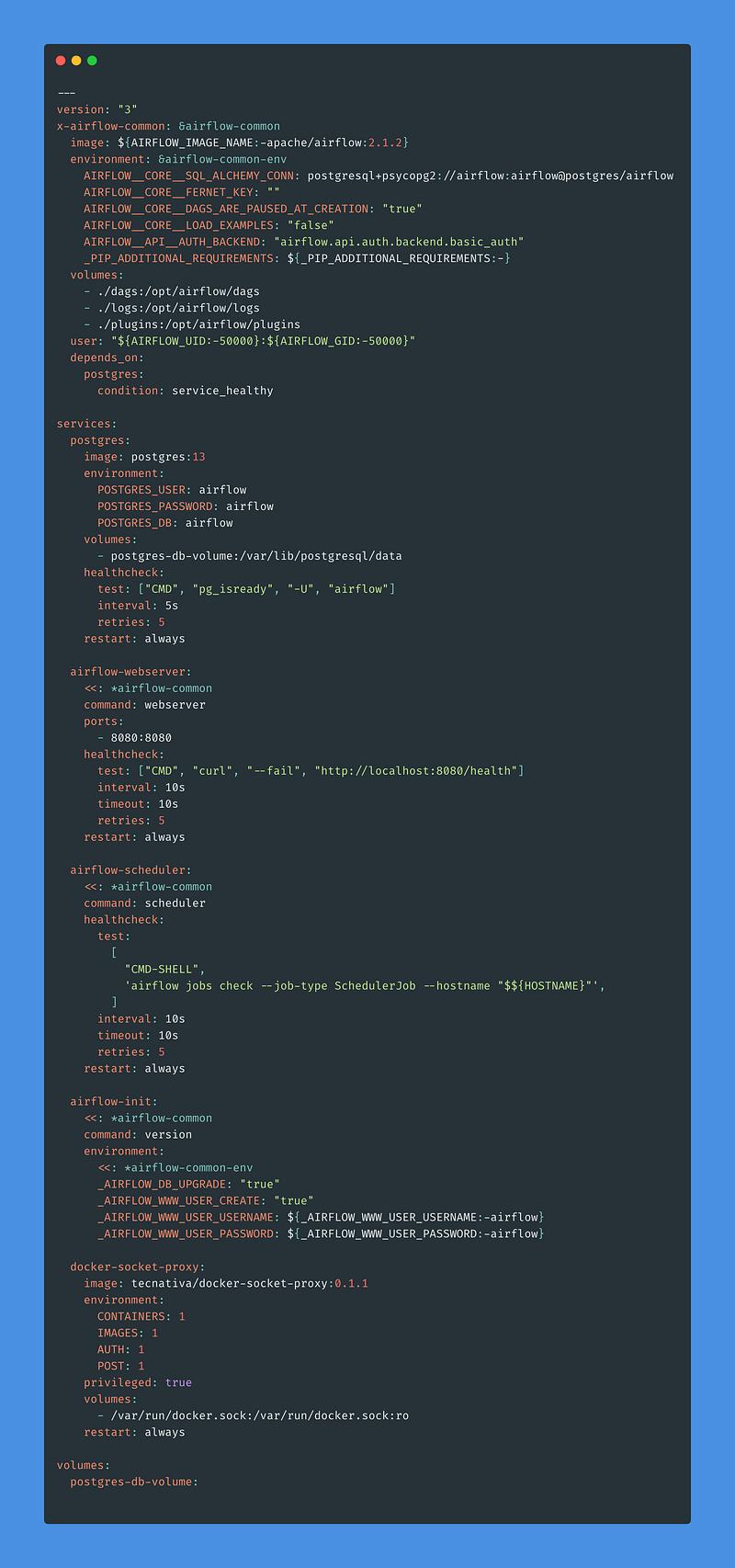
You can check the docker-compose file as well as the dag in my github repo https://github.com/benjcabalona1029/DockerOperator-Airflow-Container
So basically, the solution is a two step process:
- You need to add a docker-socket-proxy by using the image.
- You have to update the
api_versionparameter in yourDockerOperatorto use version 1.30+ - Add this to your
apache-airflow-providers-docker=2.1.0rc2in your_PIP_ADDITIONAL_REQUIREMENTSenvironment variable.
Then that’s it! Your DockerOperator will now work as a charm. I hope this helps.
.env
AIRFLOW_UID=502
AIRFLOW_GID=0
_PIP_ADDITIONAL_REQUIREMENTS=apache-airflow-providers-docker==2.1.0rc2
docker-compose.yml
dags/example.py