
Using a React 16 Portal to do something cool
React 16 is here, and one of the more interesting additions is ‘Portals’.
Portals let you render a bit of React-controlled DOM outside of the parent component. The React docs explain it nicely, using the example of a modal. It works well for tooltips, too (here’s one I made earlier).
But none of that is very interesting. Let’s do something weird…
Since all a portal does is take an element and append it to some other element, you aren’t limited to sticking it elsewhere in the current document. You can append it to the body in a different document, perhaps a document in an entirely different window.
Below I have a base page (on ze left) that has a counter and a crimson button, and a window (on the right) that’s part of the same React app, and also a forest (in the background).
The fact that the window on the right is the same React app is what you’re supposed to be excited about.
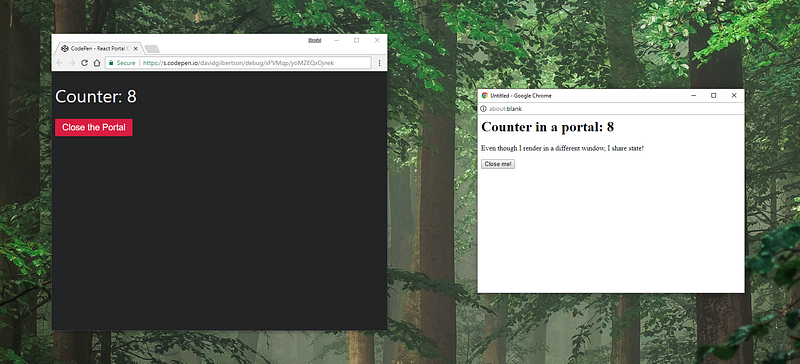
Everything you see in the picture above (except the trees) is in the one component below.
You’ve worked out by now that <MyWindowPortal> is a little bit special, and anything inside it is going to get rendered in a different window.
You are correct, and I am proud of you. Specifically, <MyWindowPortal> does two things:
- Opens a new browser window when it mounts
- Creates a ‘portal’ and appends
props.childrento the body of the new window
Isn’t that the coolest thing?
I’m so excited I have to go for a walk.
I saw a duck!
Below is the body of the component from above. The part that’s new in React 16 is ReactDOM.createPortal on line 11 — that’s where the magic happens.
Does that make sense? The component doesn’t return something, it does something elsewhere.
Maybe another way to think about it is this: normally, a parent component says to a child component: “hey, render some DOM, then append the results to me”, and the child component does what it’s told. But in this case, the obstreperous child says “No! I’m gonna render stuff in a different window and write a blog post about it!”
Now, I know what you’re thinking.
You’re thirsty and you’re wondering if you should have some water. Yes, go have a drink.
The other thing you’re probably thinking is: what good is it being able to inject some DOM into a blank window if it’s unstyled? Maybe if it’s Craigslist or Wikipedia no one will notice, but your site is beautiful, you can’t have your little chat window pop out thing being all times-new-romany.
Well, good news, everybody!
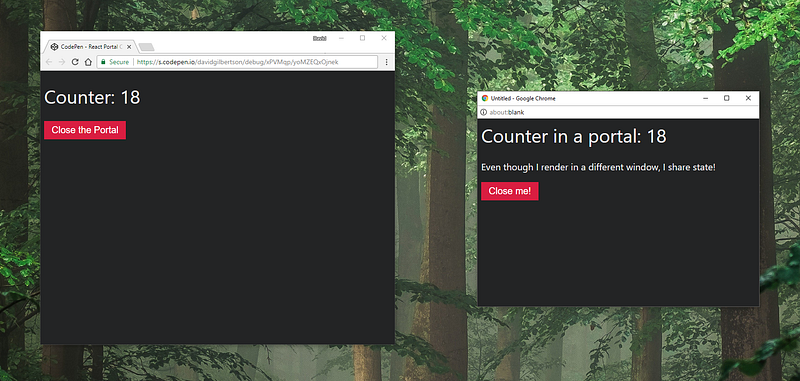
At first I hoped there would be an easy way to copy the styles into the new window. Then I remembered that my life is little more than a series of meaningless tasks to fill the minutes and hours, their only purpose to keep me distracted from the deep, howling emptiness inside.
So writing the function myself was fun!
Here it is:
All this styleSheet business is not stuff that I actually know about, so I look forward to being told the smart way to do this in the comments.
Now I can copy the styles across just after opening the new window, like so:
Here it all is in a codepen:
I don’t think it will work from within the Medium app on iOS/Android, so hit the codepen icon in the top right to open it in a browser.
I think this is the end of the blog post.
Bye, everybody!


