
User stories, not requirements: why UX needs to be at Agile backlogs
Keeping user stories user-centric is simple but incredibly necessary

“Wait, are these user stories or requirements?” I said, as I looked over the workshop itinerary. People were flying in from all across the country for a Lean UX-style workshop to hash out all the product needs.
One of the product owners said that he had a list of 10+ user stories formed, and we’d need to probably need to turn that into 15–20 total user stories by the end of the first workshop day. However, he kept using the terms User Stories and Requirements interchangeably.
It could have been a simple mistake. However, using these two terms interchangeably set off warning bells in my head. I’ve found that clarifying these two terms is often the reason I’m at Agile backlogs, along with trying to avoid losing the user perspective.
It’s also (probably) the reason that you’re invited to Agile backlog meetings.
User Stories vs. requirements
You might have heard these terms being thrown around in Agile settings. But what exactly is the difference between them?
The short of it is that the user story focuses on the experience (i.e., what the person using the product wants to do). Requirements focus on functionality (i.e., what the product should do).
Confusing these two terms is one of the first steps businesses make in (unintentionally) de-prioritizing user needs. To explain why, let me show you a ‘user story’ I encountered in the past.
“As a Field Office worker, I want the ability to seamlessly interface between the internal systems to generate text automatically.”
What is this? It’s a requirement, disguised as a user story. Whether it’s because of inexperienced product managers, or people not understanding UX, more than a few people confuse the two.
These ‘user stories’ miss out on explaining the user perspective, and often ignore specific user wants, needs, and motivations that drive them.
A user doesn’t want to incorporate Single-Sign-On functionality due to cost-saving measures. Users want SSO because they keep forgetting their password and only want to enter it once.
But you might say, what’s the big deal? After all, if the product manager doesn’t write user-centric stories, what’s the harm in focusing on the features?
The answer is because user stories are often the first line of defense against losing touch with what the user needs. That matters a lot in creating your MVP.
UX attends Backlog meetings to keep user stories user-centric
It’s a little embarrassing to admit, but for the longest time, I never quite realized why I was being invited to Backlog meetings. It was just another set of meetings on my calendar. However, it took a new Product Owner asking for my feedback to realize why I was there.
The most important thing that UX professionals can do during backlog meetings is ensure that the user stories remain user-centric.
To explain why, I’ll show two famous images that Henrik Kniberg created to show the right and wrong ways of the Minimal Viable Product.
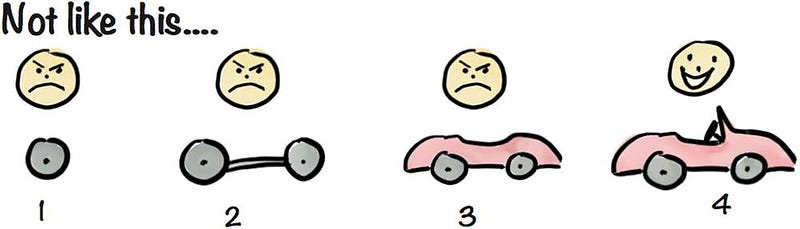
In the past, businesses often approached the Minimal Viable Product (MVP) by offering essentially parts of a product until the 1.0 release. They’d offer their customers one polished feature at a time, but the customer didn’t get the full experience until the last step. More importantly, businesses didn’t get feedback about sections they didn’t release to the public.
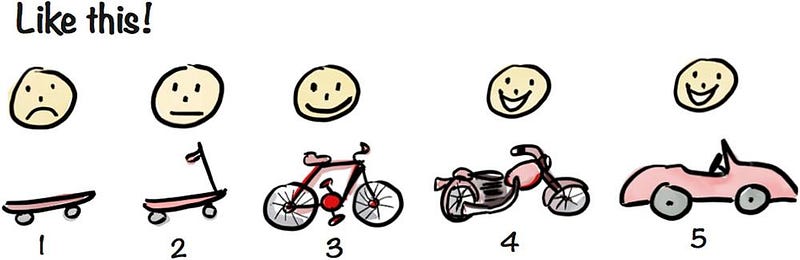
Fortunately, the market is shifting towards approaching MVP in a better way that requires a user-centric approach. In this version, we focus on the functionality that the customer wants fulfilled.
If the main customer need is “Get from A to B faster”, then each iteration achieves that goal. The early stages aren’t treated like full releases: it’s about getting the customer to use and interact with the product.
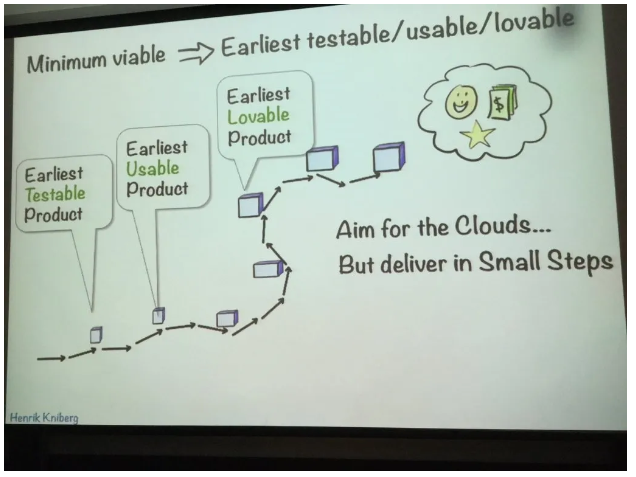
This is essentially iterative design. But for that to happen, businesses need some way of tracking progress and iterations, which is the Agile backlog.
But the problem comes when the user stories start losing the user’s perspective. When that happens, it becomes easy to start define the user story as a list of features (i.e. “This will be a table that has columns X,Y,and Z”) instead of by the goal (“Mary, the warehouse manager, needs a way to filter data.”)
The former becomes a design prompt with only one possible solution, while the other is still open enough to consider other options (button filters, dropdown menus, checkboxes that change tables, etc). Also, if you do this early enough, you might skip any divergent thinking you might do for design solutions: the team just decides what you’ll design instead.
Therefore, it’s necessary to keep your user stories user-centric, instead of feature-centric.
But what if you don’t have any experience writing user stories? There’s a useful resource and a phrase we can turn to.
User story mapping
User story mapping is a method that was developed by Jeff Patton as a Lean-UX mapping technique. It’s an iterative, low-fidelity method that helps you figure out what are the underlying user needs and goals are.
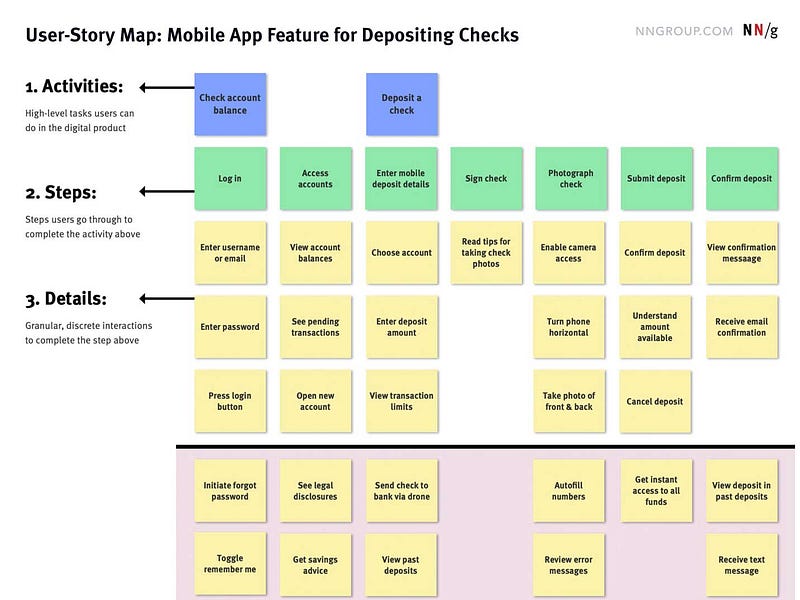
I’ve talked about topic multiple times, from preventing your team from selecting the first good option, reducing the need for design documentation, and engaging your team more. However, if you don’t have time to implement the entire process, keep one thing in mind:
“As a [type of user], I want to [goal], so that [benefit].
It seems simple, but always considering the user’s goals and motivations in your user stories will help maintain that user-centric perspective across your user stories.
Write your user stories like that, and you’ll be able to consider the user-centric perspective across your user stories.
Ensure that the user’s perspective isn’t lost in Agile backlogs
It’s easy for your user stories to devolve into a feature-request related backlog. But doing this just makes your job much harder in the long run. It won’t mark the end of the world, but it will make your job harder.
Why? The reason for this is that backlog sessions are often about refining and adding details to the user story. When people invest more time adding details, they become more reluctant to change it.
As a result, if a functionality is gaining details that make it sound like design is being done at the moment (i.e., a Backlog item becomes “X will be a table that includes the following bullet points as columns.”), it’s your job to speak up and ensure that the user story is not turning into a requirement.
These small stories are the backbone of a product, and making sure your user’s needs are seen makes it more likely that you can iterate towards a product that your users want.
Kai Wong is a Senior UX Designer, Design Writer, and author of the Data and Design newsletter. His new book, Data-informed UX Design, explains small changes you can make regarding data to improve your UX Design process


