Free AI web copilot to create summaries, insights and extended knowledge, download it at here
2466
Abstract
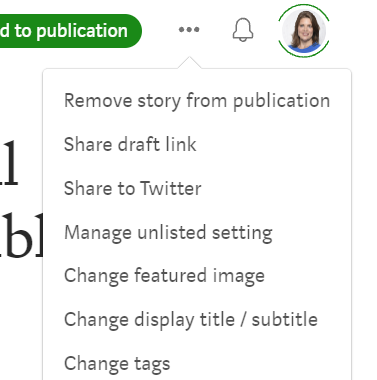
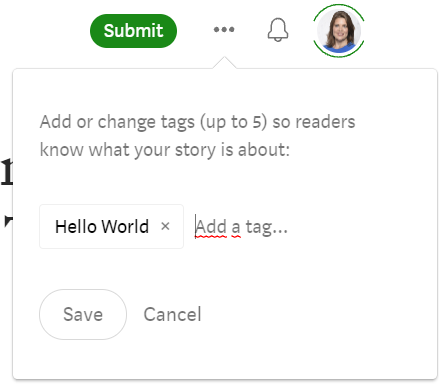
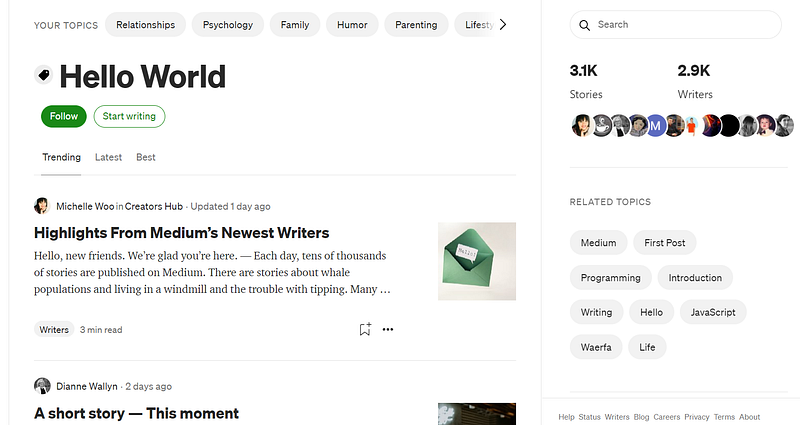
in a future roundup by Medium too.</p><h1 id="9417">What’s a tag?</h1><p id="28b3">When you publish a post on Medium, you can add tags (=labels) to your post that describe what your post is about.</p><p id="942d">You can write whatever you think describes your post.</p><p id="75b1">Medium uses these labels to inform their algorithms for showing content and organizing it.</p><h1 id="e160">How do I tag my article correctly with #Hello World?</h1><p id="e35c">Let me give you an example:</p><ul><li>When you’ve written your first article click on the <b>three dots</b> next to your notification button and choose <b>‘Change tags’.</b></li></ul><figure id="abf1"><img src="https://cdn-images-1.readmedium.com/v2/resize:fit:800/1*-SV-4yfktWyvHb7v1IpAGQ.png"><figcaption>screenshot by <a href="undefined">Kristina God</a></figcaption></figure><ul><li>Then type <b>‘Hello World’</b>, as I did below, and <b>add further labels</b> that describe your post.</li></ul><figure id="0ce1"><img src="https://cdn-images-1.readmedium.com/v2/resize:fit:800/1*-HHlTyJUwxhKs8fpJ7Uejw.png"><figcaption>screenshot by <a href="undefined">Kristina God</a></figcaption></figure><p id="44ee">You can add 5 tags max to your post.</p><h1 id="9ea3">Final Takeaways</h1><p id="154e">I wanted to introduce the <b>#HelloWorld</b> tag to you, in order to help you get promoted by Medium, boost your followers and success on Medium.</p><p id="7696">Additionally, the tag makes it easy for everyone to find stories from brand new Medium writers.</p><figure id="f2f2"><img src="https://cdn-images-1.readmedium.com/v2/resize:fit:800/1*lNBzjL1-T-PJ-86VvfaKkg.png"><figcaption>screenshot by <a href="undefined">Kristina God</a>; Official tag page for ‘Hello World’</figcaption></figure><p id="b460"><a href="https://medium.com/tag/hello-world">Here’s the official tag page</a> to discover more:</p><div id="8d2e" class="link-block">
<a href="https://medium.com/tag/hello-world">
<div>
<div>
<h2>The most insightful stories about Hello World - Medium</h2>
<div><h3>Read stories about Hello World on Medium. Discover smart, unique perspectives on Hello World and the topics that matter…</h3></div>
<div><p>medium.com</p></div>
</div>
<div>
<div style="background-image: url(https://miro.readmedium.com/v2/resize:fit:320/0*jDQKZTrgRCnwZR41)"></div>
</div>
Options
   </div>
      </a>
    </div><p id="b89a">Check it out and try the tag <b>#HelloWorld!</b></p><p id="2137"><i>© <a href="https://kristinagod.medium.com/"></a></i><a href="https://kristinagod.medium.com/">Kristina God</a></p><div id="6213"><pre>Kristina God is <span class="hljs-number">11</span>x Top Writer <span class="hljs-keyword">and </span>one of Medium’s Top <span class="hljs-number">2</span>,<span class="hljs-number">000</span> Writers. <span class="hljs-number">4</span>x <span class="hljs-keyword">she </span>received the Medium <span class="hljs-keyword">bonus. </span><span class="hljs-keyword">She </span>loves to <span class="hljs-keyword">share </span>her Medium <span class="hljs-number">101</span>’s, hacks as well as tips <span class="hljs-keyword">and </span>tricks.</pre></div><div id="bc9a"><pre>👉 Get her <span class="hljs-string">'Medium 101'</span> <span class="hljs-keyword">new</span><span class="hljs-type">sletter</span> with more tips and tricks 📨!</pre></div><h1 id="2c8c">👇Here’s more for new writers:</h1><div id="15d6" class="link-block">
      <a href="https://readmedium.com/dear-new-writers-heres-how-medium-calculates-how-much-money-you-make-6dfa2f65bd46">
        <div>
          <div>
            <h2>Dear New Writers, Here’s How Medium Calculates How Much Money You Make</h2>
            <div><h3>with a step-by-step guide on how to use your stats dashboard</h3></div>
            <div><p>medium.com</p></div>
          </div>
          <div>
            <div style="background-image: url(https://miro.readmedium.com/v2/resize:fit:320/1*aLmX0aGQPM2uMq3wy3XvSw.jpeg)"></div>
          </div>
        </div>
      </a>
    </div><div id="76bb" class="link-block">
      <a href="https://readmedium.com/a-new-and-self-published-writer-won-the-grand-prize-and-60k-bb48c6cba209">
        <div>
          <div>
            <h2>A New and Self-Published Writer Won The Grand Prize and $60K</h2>
            <div><h3>with zero followers and little engagement — here’s how you can succeed too, as a new writer</h3></div>
            <div><p>medium.com</p></div>
          </div>
          <div>
            <div style="background-image: url(https://miro.readmedium.com/v2/resize:fit:320/1*l5bn8OMBYsj7n1aHrMJNYQ.png)"></div>
          </div>
        </div>
      </a>
    </div><p id="7ffd">.</p></article></body>