avatarBryan Dijkhuizen

Free AI web copilot to create summaries, insights and extended knowledge, download it at here

2049

Abstract

0">Not without an external extension.</p><p id="d69b">With <a href="https://github.com/marianamv112/medium-curation-topics-extension/archive/master.zip">Medium Curated Topics</a>, created by <a href="undefined">Mariana Vargas</a>, you can add the tags back to your story stats page.</p><figure id="88d5"><img src="https://cdn-images-1.readmedium.com/v2/resize:fit:800/1*3uNk_RGS-WhI-DxpHFTHsg.png"><figcaption>Screenshot of story stats by <a href="undefined">Bryan Dijkhuizen</a> 1/2</figcaption></figure><p id="5718">It says ‘Chosen for further distribution’. After you’ve installed the plugin for chrome. You see this.</p><figure id="1235"><img src="https://cdn-images-1.readmedium.com/v2/resize:fit:800/1*zcV-07U_bCVWRm1bItA38A.png"><figcaption>Screenshot of story stats by <a href="undefined">Bryan Dijkhuizen</a> 2/2</figcaption></figure><p id="5733">You see the topic it was distributed in.</p><h1 id="ce78">2. Fractions, Medium Dashboard</h1><p id="66fa">This is a new one, but it’s looking so good. You can now download this extension for several browsers and its developer is highly active on it.</p><p id="2110"><a href="https://chrome.google.com/webstore/detail/fractions-medium-partner/fileepgfmlpabmkbocijoaggdmlhenbf">Fractions</a> is the new Medium dashboard, made by <a href="undefined">Can Durmus</a>.</p><figure id="b540"><img src="https://cdn-images-1.readmedium.com/v2/resize:fit:800/1*Ne1Aw420y3w1AhSxj3SKNQ.png"><figcaption>Screenshot of Fractions stats by <a href="undefined">Bryan Dijkhuizen</a> 1/2</figcaption></figure><p id="0773">You can see the total amount of money that you’ve earned on the top and even select your preferred currency.</p><p id="c697">One of the things that I like the most about the plugin, is that you can view your most valuable story of yesterday and the whole month.</p><p id="11bc">And it predicts what you’ll earn in the month.</p><h1 id="f128">3. Medium Next Generation Stats</h1><p id="2e8b">Just a quick disclaimer before you’ll download this — it’s a heavy extension and not every computer

Options

can handle this one. But if you do, it’s quite amazing.</p><p id="3fa0"><a href="https://chrome.google.com/webstore/detail/medium-next-generation-st/fhopcbdfcaleefngfpglahlpfhagendo">You can download the plugin here.</a></p><p id="ac57">It will generate a whole new medium stats dashboard inside the browser page. It’s a visualization and analytical view of your stories and you can filter them per 30–1800 days.</p><figure id="182d"><img src="https://cdn-images-1.readmedium.com/v2/resize:fit:800/1*2Mp7zccIEyHma8qt1bHqVg.png"><figcaption>Screenshot of <a href="undefined">Bryan Dijkhuizen</a>’s Medium Next Generation Stats 1/2</figcaption></figure><p id="6b29">It’s so pretty and as you look at the top of the page, you’ll be able to view the number of views, reads, claps, fans, and earnings from a certain period in time.</p><p id="d808">The follower count doesn’t seem to work, unfortunately. You can export the data and use it on your own as well.</p><figure id="35dd"><img src="https://cdn-images-1.readmedium.com/v2/resize:fit:800/1*yQYeqXvU_xj89yGWtC8xDQ.png"><figcaption>Screenshot of <a href="undefined">Bryan Dijkhuizen</a>’s Medium Next Generation Stats 2/2</figcaption></figure><p id="815b">You can switch to a chart as well to view which stories performed the best over the period you have selected.</p><p id="d48b">Use these plugins to your advantage.</p><div id="f884" class="link-block"> <a href="https://bdijkhuizen.medium.com/membership"> <div> <div> <h2>Join Medium with my referral link - Bryan Dijkhuizen</h2> <div><h3>As a Medium member, a portion of your membership fee goes to writers you read, and you get full access to every story…</h3></div> <div><p>bdijkhuizen.medium.com</p></div> </div> <div> <div style="background-image: url(https://miro.readmedium.com/v2/resize:fit:320/0*rAwJNwvdgRTS5KYi)"></div> </div> </div> </a> </div></article></body>

Use These 3 Chrome Extensions To Get Better Medium Stats

Curation tags, better dashboards, and visualization

Image by Liza Summer via Pexels

In the almost two years that I’ve been publishing my content on Medium, the platform has gone through many changes and visual updates. But the statistics page hasn’t changed much.

The page might look great and clean, it’s accessible on mobile and all that but I can’t do some analysis on my content.
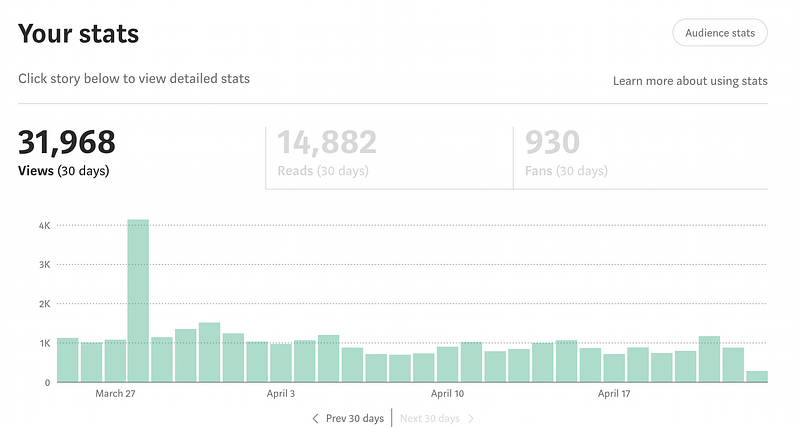
Screenshot of my Bryan Dijkhuizen’s stats page 1/2

When we now take a look at the stats, we see a good-looking overview of our views, reads, and fans per 30 days.

If we look further down.
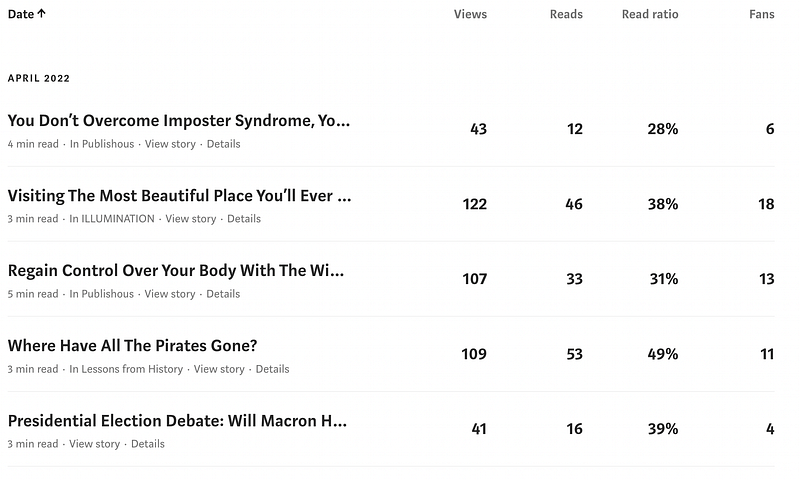
Screenshot of my Bryan Dijkhuizen’s stats page 2/2

We see these categories per story, including a read ratio. But it isn’t much data to look at — medium even removed the curated topics from the story stats pages.

But I’ve got three brilliant Google Chrome Exentions that improve your medium stats.

1. Medium Curated Topics

When around 2020/2021, Medium got rid of their ‘Curation’, they didn’t get rid of curation. It got changed to ‘further distribution’. But it’s still a kind of curation.

With categories appointed to your story. But we can’t see them anymore.

Not without an external extension.

With Medium Curated Topics, created by Mariana Vargas, you can add the tags back to your story stats page.
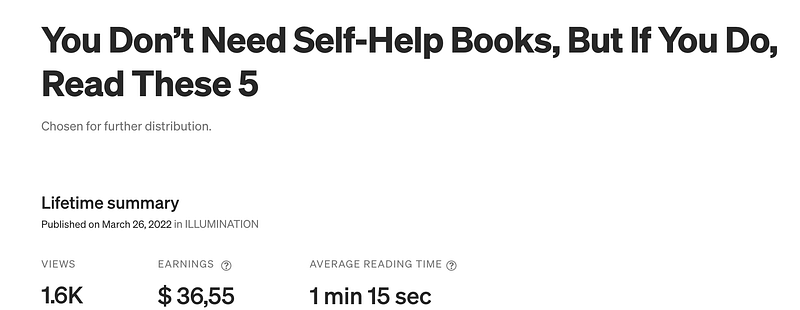
Screenshot of story stats by Bryan Dijkhuizen 1/2

It says ‘Chosen for further distribution’. After you’ve installed the plugin for chrome. You see this.
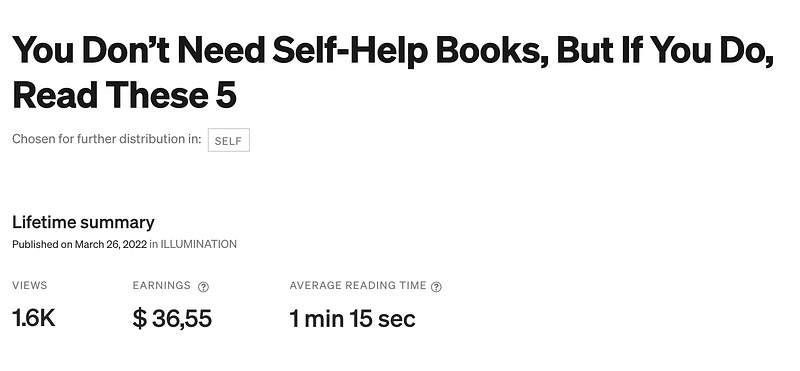
Screenshot of story stats by Bryan Dijkhuizen 2/2

You see the topic it was distributed in.

2. Fractions, Medium Dashboard

This is a new one, but it’s looking so good. You can now download this extension for several browsers and its developer is highly active on it.

Fractions is the new Medium dashboard, made by Can Durmus.
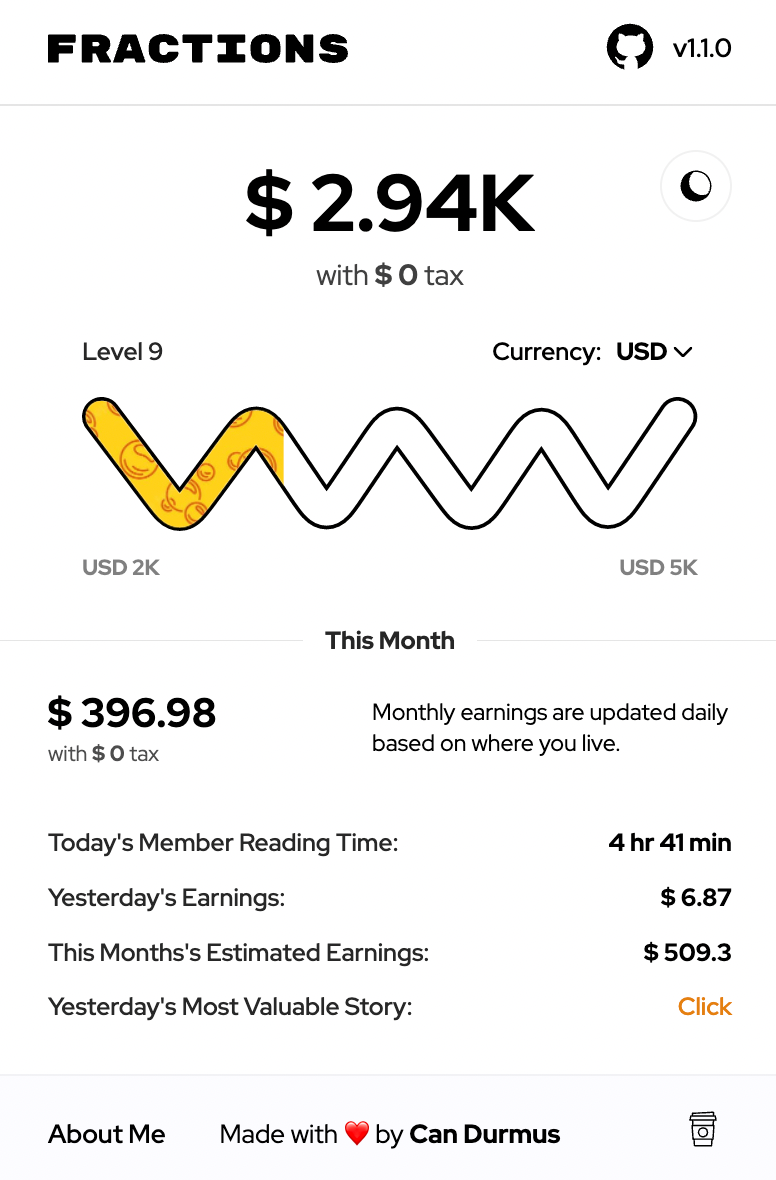
Screenshot of Fractions stats by Bryan Dijkhuizen 1/2

You can see the total amount of money that you’ve earned on the top and even select your preferred currency.

One of the things that I like the most about the plugin, is that you can view your most valuable story of yesterday and the whole month.

And it predicts what you’ll earn in the month.

3. Medium Next Generation Stats

Just a quick disclaimer before you’ll download this — it’s a heavy extension and not every computer can handle this one. But if you do, it’s quite amazing.

You can download the plugin here.

It will generate a whole new medium stats dashboard inside the browser page. It’s a visualization and analytical view of your stories and you can filter them per 30–1800 days.
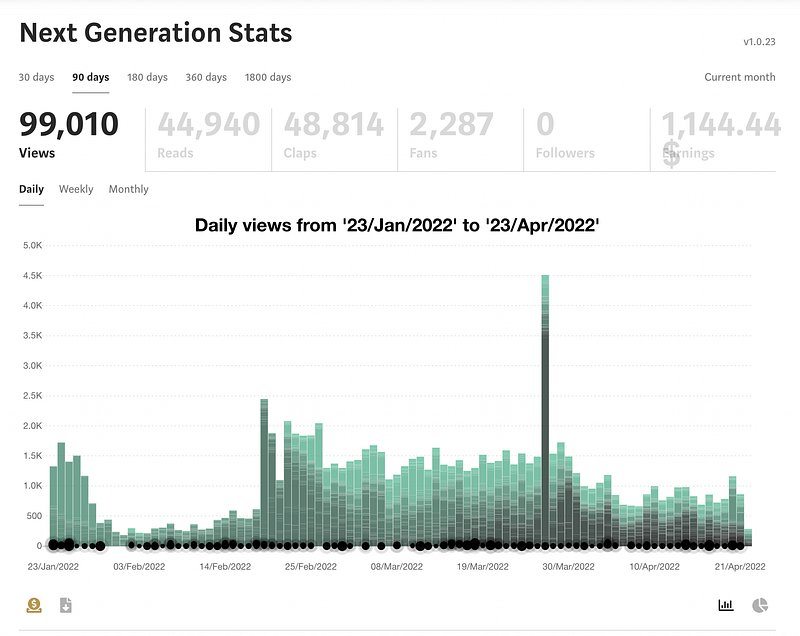
Screenshot of Bryan Dijkhuizen’s Medium Next Generation Stats 1/2

It’s so pretty and as you look at the top of the page, you’ll be able to view the number of views, reads, claps, fans, and earnings from a certain period in time.

The follower count doesn’t seem to work, unfortunately. You can export the data and use it on your own as well.
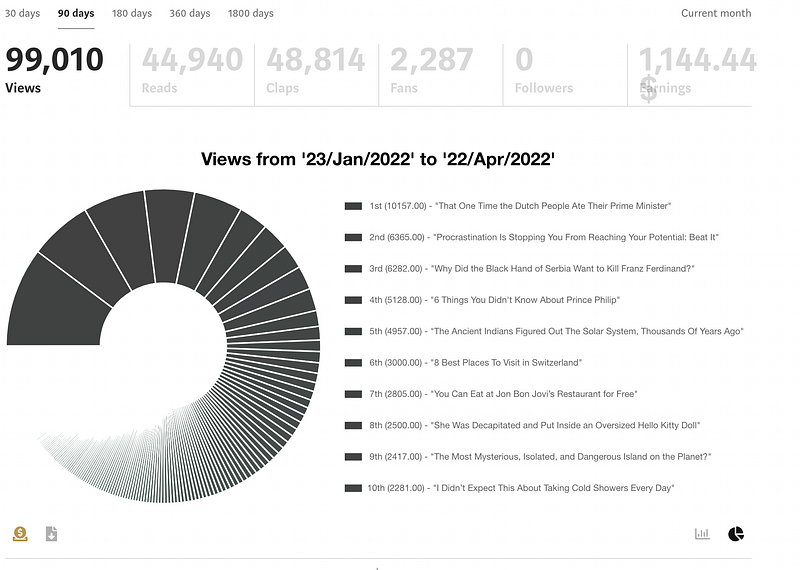
Screenshot of Bryan Dijkhuizen’s Medium Next Generation Stats 2/2

You can switch to a chart as well to view which stories performed the best over the period you have selected.

Use these plugins to your advantage.

Medium
Writing
Creativity
Social Media
Technology
Recommended from ReadMedium