
Use native XSD (nXSD) file formats in OIC to process complex structured files
Recently, I came across a complex Bank Statement file from one of our customer. Currently, one shell script reads each line of each file and loads it into an interface table. However, because the shell script is reading the file line by line, processing this script took longer. In the migration project in OIC we are supposed to read those file with better performance.
The file format appears as follows, with the specifications listed below:
- If starts with 01 there will be total 8 column and end line with “/”
- If starts with 02 there will be total 6 column and end line with “/”
- If starts with 03 there will be total 10 column and end line with “/”
- If start with 16 there will be total 6 column and end line will considered a new line, and so on…
In this POC we will try to process below file:
01,,BNZA,240329,0400,1,78,78/
02,BNZA,NATAXXXX,1,240328,0000/
03,123456789,AUD,015,XXXX68321,100,1026989,102,100,400/
88,000,402,000,500,000,501,000,502/
16,905,1026989,0,0,Posting Interest Normal Execution Credit Individual
49,111111111,293422399/
03,111111111,AUD,015,221667564,100,833583,102,400,400/
88,4923,402,300,500,000,501,000,502/
16,911,26031,0,0,CASH/CHEQUESB/POST
16,936,10900,0,0,BXXXXDISTRI
16,905,795087,0,0,Posting Interest Normal Execution Credit Individual
16,920,1565,0,0,HIXXXXREDIT
16,699,429,0,0,ACCOUNTFEES
16,501,3086,0,0,XXXX 005127954 XXXXTDISTRICTH 003206
16,501,1408,0,0,XXXX 003021548 XXXXTDISTRICTH 003206
49,XXXXX5276,XXXXX5276/
98,111111,2,111111/
99,111111,1,24,111111/
The implementation of a native schema (nXSD) becomes crucial in intricate business circumstances where a symmetric file structure is not always available. In these kinds of scenarios, it turns out to be time-efficient, contributing to the reduction of code complexity and facilitating the proper parsing and interpretation of complicated file formats.
To build a nXSD, we need to identify a couple of things first.
- Delimiter: We have to identify what the delimiters are. We may infer that the delimiter is (,) from the sample above. But you can use any delimiter as per your requirements. A Schema for a fixed-length Length File Structure may be defined similarly.
- End of Line: The majority of the lines in the example above have “/{eol}” as the end of the line. Which means a front slash(/) along with a new line. Only in one scenario where line starts with 16, there are no such front slash(/). Same thing you can define in a nXSD.
- Type of Records: The sole method, as previously explained, to identify each record by start value. Few records are start with 01, few 02 and so on. As a result, as indicated below, you must construct a complicated type in the nXSD for each data type.
   <element name="BankStatementData">
     <complexType>
       <choice maxOccurs="unbounded" minOccurs="0">
         <element ref="tns:RecType1" minOccurs="0" nxsd:startsWith="01," />
         <element ref="tns:RecType2" minOccurs="0" nxsd:startsWith="02," />
         <element ref="tns:RecType3" minOccurs="0" nxsd:startsWith="03," />
         <element ref="tns:RecType4" minOccurs="0" nxsd:startsWith="88," />
         <element ref="tns:RecType5" minOccurs="0" nxsd:startsWith="16," />
         <element ref="tns:RecType6" minOccurs="0" nxsd:startsWith="49," />
         <element ref="tns:RecType7" minOccurs="0" nxsd:startsWith="98," />
         <element ref="tns:RecType8" minOccurs="0" nxsd:startsWith="99," />
        </choice>
     </complexType>
   </element>
Now, each RecType will differ from row to row if you examine it. For example, the row that starts with “01,” (RowType1) will have total 8 columns and we already defined RecType1 startsWith “01,”. Hence, we can configure RexType1 as below:
  <element name="RecType1">
      <complexType>
         <sequence>
            <element name="C1" type="string" minOccurs="0" nxsd:style="terminated" nxsd:terminatedBy="," />
            <element name="C2" type="string" minOccurs="0" nxsd:style="terminated" nxsd:terminatedBy="," />
            <element name="C3" type="string" minOccurs="0" nxsd:style="terminated" nxsd:terminatedBy="," />
            <element name="C4" type="string" minOccurs="0" nxsd:style="terminated" nxsd:terminatedBy="," />
            <element name="C5" type="string" minOccurs="0" nxsd:style="terminated" nxsd:terminatedBy="," />
            <element name="C6" type="string" minOccurs="0" nxsd:style="terminated" nxsd:terminatedBy="," />
            <element name="C7" type="string" minOccurs="0" nxsd:style="terminated" nxsd:terminatedBy="/${eol}" />
         </sequence>
      </complexType>
   </element>
Similar to this, we have set up each RecType as follows, based on the terminatedBy and column count. In below snapshot, I tried to demonstrate how the nXSD will looks like once we capture all RecType. We are going to use same nXSD to read the data in OIC.
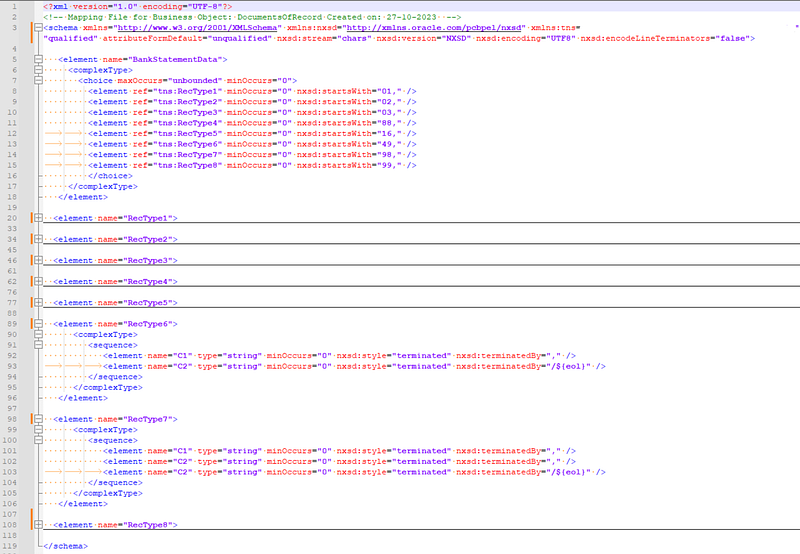
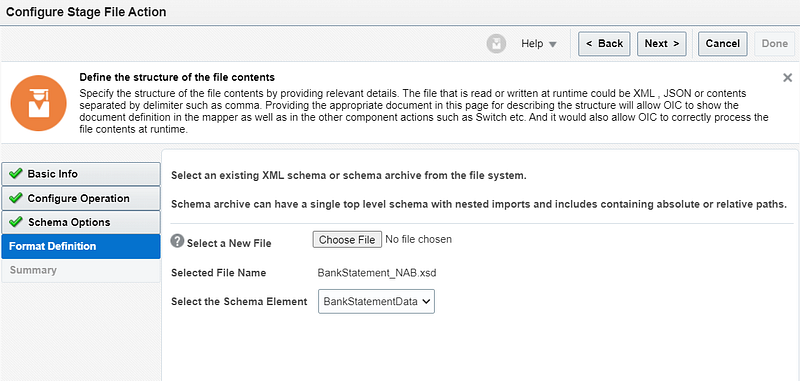
As you can see in below snapshot, we have used above nXSD as XSD schema. So that nXSD can verify the document and process accordingly.
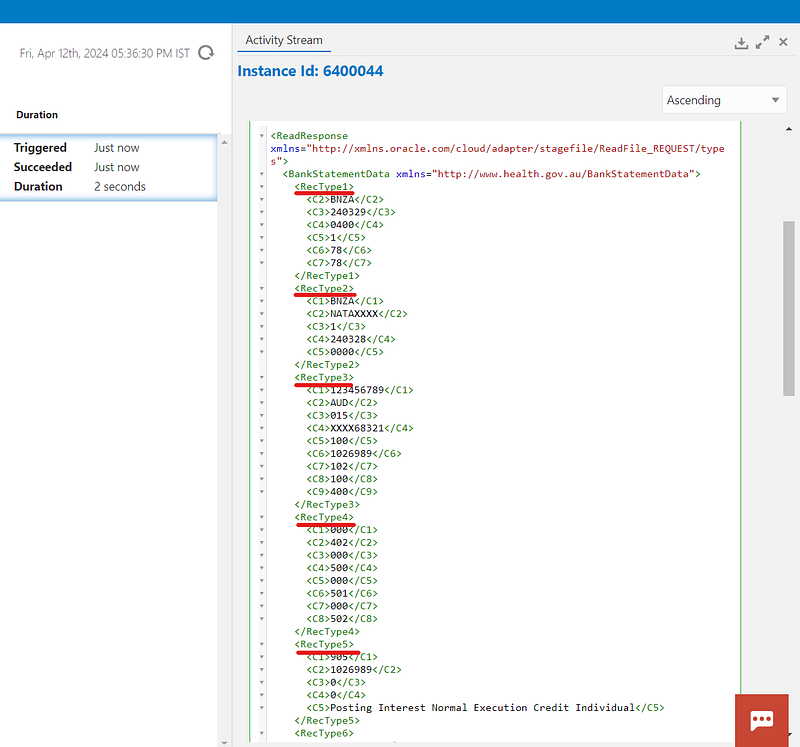
If we execute the integration and open the audit trail, you can see each RecType has captured each type of record. As shown below RecType1 represents all the data starts with “01”, RecType2 represents all the data starts with “02” and so on.
I hope this blog helps you to understand the use of nXSD and how the implementation of a native schema(nXSD) becomes crucial in intricate business circumstances where a symmetric file structure is not always available.
Happy Reading.


