
Use a single load balancer for multi sub-domains in AWS EKS (Kubernetes) ingress rule and reduce the cost
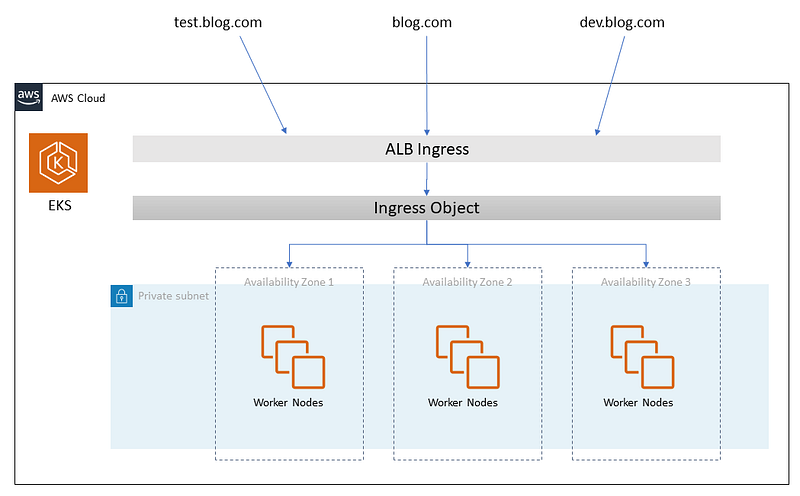
One of the most frustrating problems using AWS EKS and the AWS Load Balancer controller is the cost of a Load Balancer when using Ingress for a domain and sub-domains.
What I will explain here is a way around that problem and save you $20+ for each Ingress you are using for a sub-domain.
If you thinking why need a lot of subdomains in an AWS EKS cluster and not multi-domains? there can be many reasons for that, and one of them can be you have lots of tools you will give your team access to whiteout there need to install kubectl on the machine and not get access directly into the Kubernetes cluster that way.
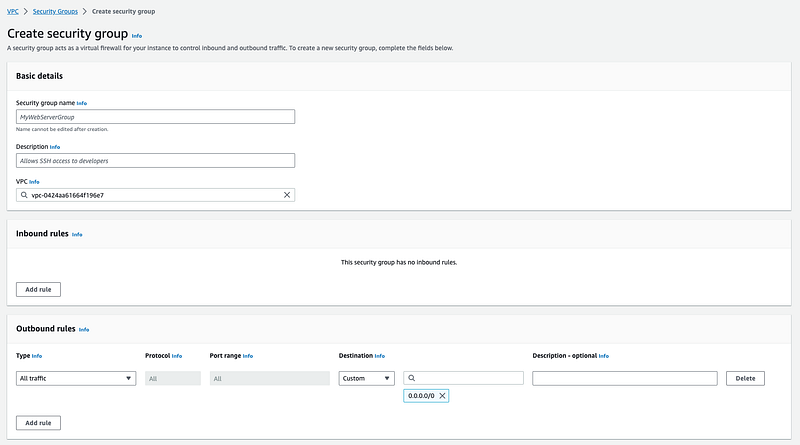
The way I can recommend is to create a security group where you whitelist IP addresses and then attach this security group id to your load balancer, I will show that below, I expect you have the AWS Load Balancer controller installed into your AWS EKS else you can read my article about it first.
Create a new whitelist security group for AWS EKS ALB
Create a new security group under AWS VPC, inside here name it logic, and select your AWS EKS (Kubernetes) VPC. Now add all the rules you want to have before using your new security group.
Create your Ingress with ALB support in AWS EKS
When you are ready you can create an ingress to Kubernetes with a manifest file, you need to change a small thing before you can apply it to your project.
line 9: replace with your certificate arn for your domain, the certificate needs to be in the same region as your AWS EKS cluster.
line 11: Replace with your newly created security group id to be used it applies your rules, if you don't have this line it automatically creates a security group for you and allows all traffic into your select hostname.
line 13: choose the name you will use to group another ingress to this load balancer.
line 17: Write your domain/subdomain here
line 24: write your service name, it's required the services are in the same namespace.
line 26: write your port to the service it received traffic on.
Remember the right service type
If you have forgotten how to create a service for your deployment, I give a sample of it here, remember your service needs to have the type: NodePort the AWS Load Balancer controller can’t find the service if not you use that, so it's very important.


