ml?src=https%3A%2F%2Fwww.youtube.com%2Fembed%2FcVRagTf0BYo%3Ffeature%3Doembed&display_name=YouTube&url=https%3A%2F%2Fwww.youtube.com%2Fwatch%3Fv%3DcVRagTf0BYo&image=https%3A%2F%2Fi.ytimg.com%2Fvi%2FcVRagTf0BYo%2Fhqdefault.jpg&key=a19fcc184b9711e1b4764040d3dc5c07&type=text%2Fhtml&schema=youtube" allowfullscreen="" frameborder="0" height="480" width="854">
</div>
</div>
</figure></iframe></div></div></figure><p id="6474"><b>Step 1:</b> Firstly, you need to install the Wirestock bot onto your Discord account. Just follow this <a href="https://discord.com/oauth2/authorize?client_id=1093202948781260871&permissions=67584&scope=bot">link</a>, and you’ll be good to go.</p><p id="c8df"><b>Step 2:</b> Now it’s time to link your Wirestock account to Discord. Head over to your Wirestock account and find the Account Settings section. Once you’re there, make sure to copy your Discord token. This token will serve as the connection between your Wirestock account and the Discord bot.</p><p id="d9df"><b>Step 3: </b>Alright, let’s switch back to your Discord server. To initiate the connection process, type in the command “/login” in Discord. This command will prompt the bot to ask for your Discord Token. Simply paste the token you copied from your Wirestock account settings into the text channel and hit enter. This will establish the link between your Discord account and Wirestock.</p><p id="2528"><b>Step 4:</b> Find your generated image you want to sent, in the Midjourney interface. You’ll see a More icon. Click on that, and a dropdown menu will appear. Select “Apps” and then choose “Upscale & Publish”. The Wirestock bot will take care of upscaling the image for you and post it directly to your Wirestock portfolio.</p><p id="7582"><b>Step 5:</b> Now that you’ve sent your image to Wirestock, the bot will upscale it for you. Once the process is complete, the bot will send you a message with a link. Clicking on that link will take you directly to your Wirestock portfolio, where you can find the image you just posted.</p><h1 id="8030">Making Money with Midjourney and Wirestock</h1><p id="3de9">As I mentioned before, Wirestock is a platform that allows you to upload your AI art to multiple stock photo platforms within seconds.</p><p id="1a38">They also offer challenges with a specific theme, where you can create AI art based on that theme. If you’re lucky, you can win up to $500 for the first place.</p><figure id="b3cf"><img src="https://cdn-images-1.readmedium.com/v2/resize:fit:800/1*HeR8iJt1M-2Oo6zvBYPrBA.png"><figcaption></figcaption></figure><p id="0ce7">However, free accounts have a monthly upload limit of 100, and submissions to these challenges also count towards that limit.</p><figure id="8956"><img src="https://cdn-images-1.readmedium.com/v2/resize:fit:800/1*7w6WyKvzYMTdjU5ERnDVGg.png"><figcaption></figcaption></figure><p id="92e5">The question is, can you make money with AI art through Wirestock?</p><p id="0e65">To me, this is quite simple. I manually upload my AI art to stock photo sites like Adobe Stock and 123RF. Then, I use Wirestock to upload the same AI images to other platforms where I don’t have an account.</p><p id="4e83">Does this work?</p><p id="0f38">Hmm… let’s discuss the issue with AI images.</p><p id="ab14">Many platforms are flooded with them, and th
Options
e review process takes quite a long time. For example, in the case of Adobe Stock, it takes more than 2 months for your AI images to get approved.</p><p id="e029">This is huge disadvantage.</p><p id="7c56">In my opinion, it is important not to expect fast results. Patience is key in this situation.</p><p id="eeed">But, if you’re looking to speed up your uploading process, you can give Wirestock and its Discord bot a try. It’s definitely an opportunity worth considering.</p><p id="b520"><i>Thanks for reading!</i></p><p id="3c63"><i>If you enjoy reading stories like these and want to support me as a writer, consider signing up to become a <a href="https://medium.com/@nechcloud/membership"><b>Medium member</b></a>. It’s $5 a month, giving you unlimited access to stories on Medium. If you sign up <a href="https://medium.com/@nechcloud/membership"><b>using my link</b></a>, I’ll earn a small commission.</i></p><p id="422e"><b>BONUS: </b>Discover genuine and creative way to make money using AI tools. <a href="https://nechcloud.systeme.io/b8bcbfb4"><b>Download the free guide</b></a>.</p><p id="2f3e"><b>Also, Read</b></p><ul><li><a href="https://readmedium.com/semrush-vs-ahrefs-vs-moz-vs-ubersuggest-6b6b711a1be0">Semrush vs. Ahrefs vs. Moz vs. Ubersuggest</a></li><li><a href="https://readmedium.com/best-free-qr-code-generators-d80ffb309f52">Best Free QR Code Generators</a></li><li><a href="https://readmedium.com/top-12-best-seo-content-writing-tools-for-marketers-writers-2b4fe78417a5?source=user_profile---------1----------------------------">Top 12 Best SEO Content Writing Tools</a></li><li><a href="https://readmedium.com/6-best-free-keyword-research-tools-2b7f58f8f53a?source=user_profile---------2----------------------------">6 Best Free Keyword Research Tools</a></li><li><a href="https://readmedium.com/top-10-best-jira-project-management-alternatives-cd1a5ce113a4?source=user_profile---------3----------------------------">Top 10 Best JIRA Project Management Alternatives</a></li><li><a href="https://readmedium.com/5-best-ai-art-image-generator-tools-38a7ae85f666?source=user_profile---------6----------------------------">5 Best AI Art & Image Generator Tools</a></li></ul><blockquote id="0a3b"><p><b><i>Follow our Social Accounts- <a href="https://www.facebook.com/aimonks.io">Facebook</a>/<a href="https://www.instagram.com/aimonks_io/">Instagram/</a><a href="https://www.linkedin.com/company/aimonks/">Linkedin</a>/T<a href="https://twitter.com/aimonks_io">witte</a>r</i></b></p></blockquote><blockquote id="c635"><p><b><i>Join AImonks <a href="https://www.youtube.com/@aimonks-io">Youtube Channel</a> to get interesting videos.</i></b></p></blockquote>
<figure id="1a8e">
<div>
<div>
<img class="ratio" src="http://placehold.it/16x9">
<iframe class="" src="https://cdn.embedly.com/widgets/media.html?src=https%3A%2F%2Fwww.youtube.com%2Fembed%2FPAmSyF_ruUY%3Ffeature%3Doembed&display_name=YouTube&url=https%3A%2F%2Fwww.youtube.com%2Fwatch%3Fv%3DPAmSyF_ruUY&image=https%3A%2F%2Fi.ytimg.com%2Fvi%2FPAmSyF_ruUY%2Fhqdefault.jpg&key=a19fcc184b9711e1b4764040d3dc5c07&type=text%2Fhtml&schema=youtube" allowfullscreen="" frameborder="0" height="480" width="854">
</div>
</div>
</figure></iframe></div></div></figure></article></body>
Uploading Midjourney Images Directly to Stock Photo Websites

If you’re like me, you understand the importance of reaching a wide audience in order to sell your AI photos online.
And even in the age of social media, this can still be quite a task.
That is why I am always searching for tools that can help me work faster and more effectively.
I was immediately intrigued when I learned that Wirestock, a platform I frequently use, now supports the direct transfer of Midjourney AI-generated images from Discord to Wirestock for upscaling and posting. This new feature allows for a more streamlined and efficient process for content creators.
And in this article, I will guide you through the steps and provide you with all the information you need to know.
What is Wirestock?
Wirestock is an platform that takes away the hassle of managing your stock images across multiple agencies.
With Wirestock, you only need to upload your images once, and the platform takes care of distributing them to various stock agencies automatically.
They are currently collaborating with stock photo platforms such as Getty Images, Adobe Stock, Pond5, and Shutterstock.
However, it is important to note that many of these stock photo websites do not accept AI-generated images. Therefore, I recommend to only upload images to sites that allow for such content.
One of the features Wirestock offers is the ability to save you valuable time.
Instead of spending hours on manual uploads and management, you can let them do the heavy lifting while you dedicate more time to generate your images.
So far, so good. However, there are a few downsides.
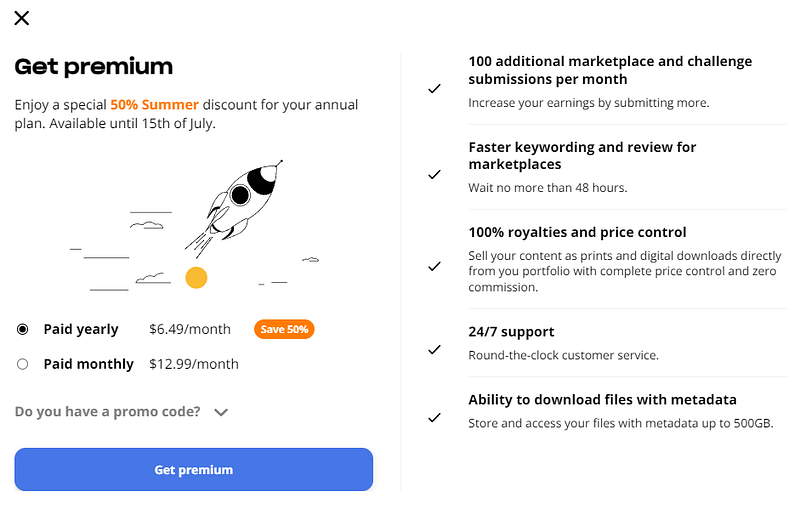
First, Wirestock is taking a cut from an each image or photo you sell through their platforms. It is not much, but it can adds up. Second, they are recently launched a subscription model (Premium) and are pushing their users to join the premium plans. In other words, they are limiting the amount of images a month you can upload for free.
Uploading to Wirestock Directly from Midjourney
Recently, Wirestock has introduced a feature that aims to make the life of AI creators much easier.
They have created a Discord bot that allows you to seamlessly send images generated by Midjourney directly from Discord to Wirestock.
Here is a simple tutorial how to connect the bot to the Wirestock platform.
If you want, you can also watch a video tutorial here.
Step 1: Firstly, you need to install the Wirestock bot onto your Discord account. Just follow this link, and you’ll be good to go.
Step 2: Now it’s time to link your Wirestock account to Discord. Head over to your Wirestock account and find the Account Settings section. Once you’re there, make sure to copy your Discord token. This token will serve as the connection between your Wirestock account and the Discord bot.
Step 3: Alright, let’s switch back to your Discord server. To initiate the connection process, type in the command “/login” in Discord. This command will prompt the bot to ask for your Discord Token. Simply paste the token you copied from your Wirestock account settings into the text channel and hit enter. This will establish the link between your Discord account and Wirestock.
Step 4: Find your generated image you want to sent, in the Midjourney interface. You’ll see a More icon. Click on that, and a dropdown menu will appear. Select “Apps” and then choose “Upscale & Publish”. The Wirestock bot will take care of upscaling the image for you and post it directly to your Wirestock portfolio.
Step 5: Now that you’ve sent your image to Wirestock, the bot will upscale it for you. Once the process is complete, the bot will send you a message with a link. Clicking on that link will take you directly to your Wirestock portfolio, where you can find the image you just posted.
Making Money with Midjourney and Wirestock
As I mentioned before, Wirestock is a platform that allows you to upload your AI art to multiple stock photo platforms within seconds.
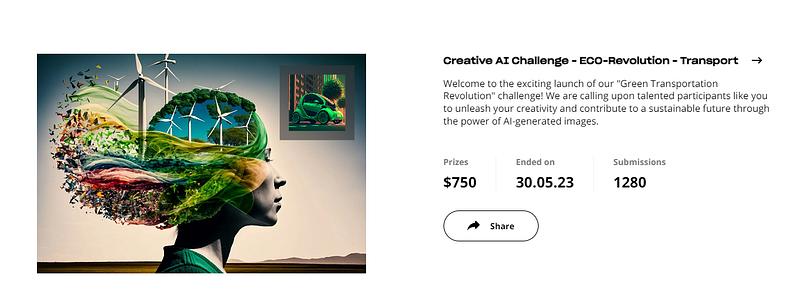
They also offer challenges with a specific theme, where you can create AI art based on that theme. If you’re lucky, you can win up to $500 for the first place.
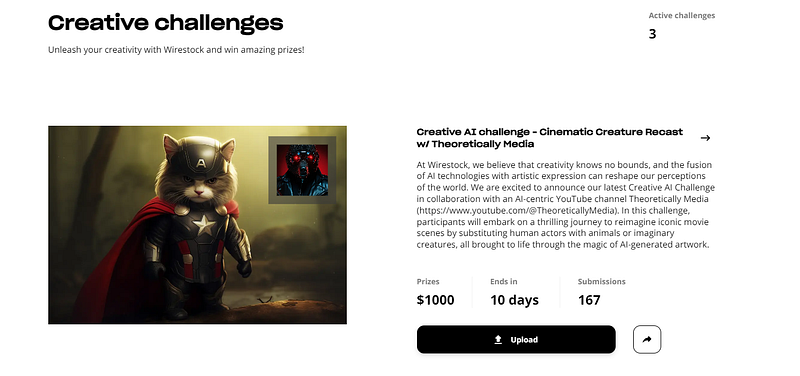
However, free accounts have a monthly upload limit of 100, and submissions to these challenges also count towards that limit.
The question is, can you make money with AI art through Wirestock?
To me, this is quite simple. I manually upload my AI art to stock photo sites like Adobe Stock and 123RF. Then, I use Wirestock to upload the same AI images to other platforms where I don’t have an account.
Does this work?
Hmm… let’s discuss the issue with AI images.
Many platforms are flooded with them, and the review process takes quite a long time. For example, in the case of Adobe Stock, it takes more than 2 months for your AI images to get approved.
This is huge disadvantage.
In my opinion, it is important not to expect fast results. Patience is key in this situation.
But, if you’re looking to speed up your uploading process, you can give Wirestock and its Discord bot a try. It’s definitely an opportunity worth considering.
Thanks for reading!
If you enjoy reading stories like these and want to support me as a writer, consider signing up to become a Medium member. It’s $5 a month, giving you unlimited access to stories on Medium. If you sign up using my link, I’ll earn a small commission.
BONUS: Discover genuine and creative way to make money using AI tools. Download the free guide.