avatarAria Dev

Summary

This article guides readers through setting up an AWS S3 bucket, generating access keys, and writing Node.JS server code to upload, compress, and delete images using an API route.

Abstract

The article titled "Upload, Compress and Delete Images In a AWS S3 Bucket With Node.JS + Express" aims to equip readers with the skills to create an API for managing images in an AWS S3 bucket. It begins with the goal of enabling readers to upload images to their own S3 bucket and perform various operations on them. The non-code setup involves creating an S3 bucket and generating access keys on AWS. The article emphasizes the importance of choosing appropriate security settings for the bucket and securing access keys. It provides step-by-step instructions for these initial setup procedures, complete with screenshots for clarity. The server code, which is provided in a single file for simplicity, includes comments for better understanding. The author encourages experimentation with the code and suggests a related article for those interested in image handling on the client side with React.JS.

Opinions

  • The author believes in the importance of security, advising readers to handle their access keys responsibly.
  • The article is designed to be an entry point for beginners, with an emphasis on clarity and understanding.
  • The author encourages a hands-on approach to learning, suggesting that readers should play around with the code and consult documentation for further clarification.
  • The author values readability and simplicity in code, choosing to present the server code in a single file with comments to aid comprehension.

Upload, Compress and Delete Images In a AWS S3 Bucket With Node.JS + Express

The goal of this article

By the end of this article you will be able to create a simple API route to take an image and upload that image to your own AWS S3 Bucket, and then do amazing things with those images!

First, some non-code setup

To get started we will need to create an S3 Bucket as well as make some security credentials to be able to interact with the bucket via code.

1. Creating your S3 Bucket

  • Log into your AWS account (don’t have one?) and then head over to the s3 service (via the dropdown or search).
  • Then we are going to want to click the orange “Create Bucket” button.

  • After that you will enter your bucket name along with security settings. Choose the ones that best fit your applications needs!

2. Generate your access keys on AWS

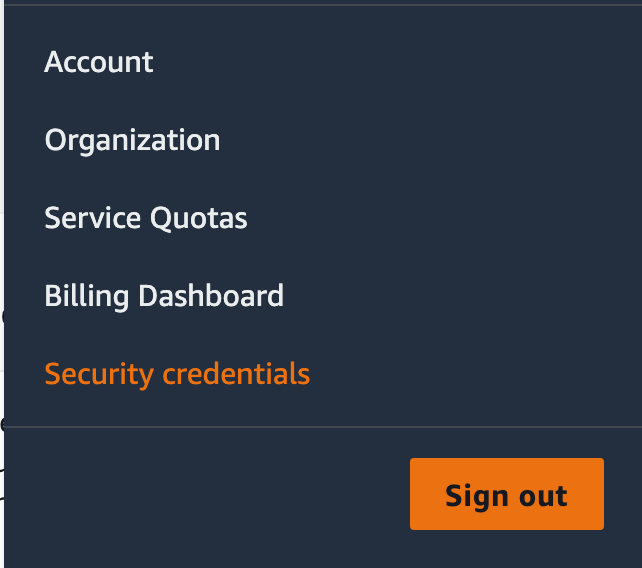
  • On the top right you will see your AWS username. Click this and a dropdown should appear, once it does click “Security Credentials”
  • Then you will want to click the “Access Keys” dropdown and click on “Create New Access Keys”
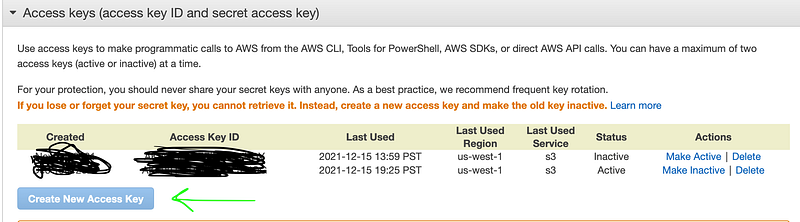
  • And viola! Just write those down somewhere, we will need them for our code in the next step. ( It should go without saying, don’t share these! )

Our Server Code

For the means of simplicity and readability, the code will all be in a single file. All code is commented, and if you need a starting point on how you may get files on a client, here is a related article I wrote on how to do so in React.JS.

And as always I want my articles to be an entry point. If something is confusing or you are wondering why I did something in a particular way, play around with the code, look at some documentation, and just have fun!

AWS
Nodejs
Expressjs
JavaScript
Development
Recommended from ReadMedium