
Adding Environments to An AWS Infrastructure Naming Convention
ACM.411 Adding permissions and aligning with naming convention changes to include the environment
~~~~~~~~~~~~~~~~~~~~~~~~~~~~~~~~~~~~~~~~~~~~~~~~~~~~~~~
⚙️ Check out my series on Automating Cybersecurity Metrics | Code.
🔒 Related Stories: AWS Organizations | IAM | Deploying a Static Website
💻 Free Content on Jobs in Cybersecurity | ✉️ Sign up for the Email List
~~~~~~~~~~~~~~~~~~~~~~~~~~~~~~~~~~~~~~~~~~~~~~~~~~~~~~~
In the last post I was taking a look at the result of changing the parent ID of an Organizational Unit in a CloudFormation stack.
Next up I started demonstrate what happens when you delete a resource managed by a CloudFormation stack but I hit a glitch in my admin policies that I needed to fix which I adjusted below.
I initially created the policies here:
I also wanted to align my resources with my new naming convention for stacks which is now:
[principal name]-[category]-[type]-[env of resource]-[resource-name]
Principal names now include the environment so my orgadmin principal name is:
root-orgadmin
I wanted to align my rootadmin with that so the name of my rootadmin is:
root-admin
This last one is a bit weird but makes it easier to find stacks. The root stacks are prefixed with:
root-root-
That makes it easier to crate policies and find resources deployed by the root user in the root account.
I added drift detection and the ability for the root-admin user to modify their own stacks and view any other stacks.
I also fixed all the outputs while I’m at it to include an ID and an ARN. If an ID is not present, the ARN is returned for both. If an ARN is not available, the ID is returned in both outputs.
Also, I wrote about a way to handle checking for a Null value for MFA in my service control policy post so leveraging that here.
Here are the changes:
resources/iam/user/user.yaml
The user.yaml template did not change, only the username passed to it which is: root-admin
Note that you cannot enforce MFA on ChangePassword if you force a user to change their password on first login. I think AWS needs to fix this somehow.
I am not allowing this user to create automation keys, service specific credentials, or virtual MFA.
resources/iam/managedpolicy/root-accountrolepermissionsboundary.yaml
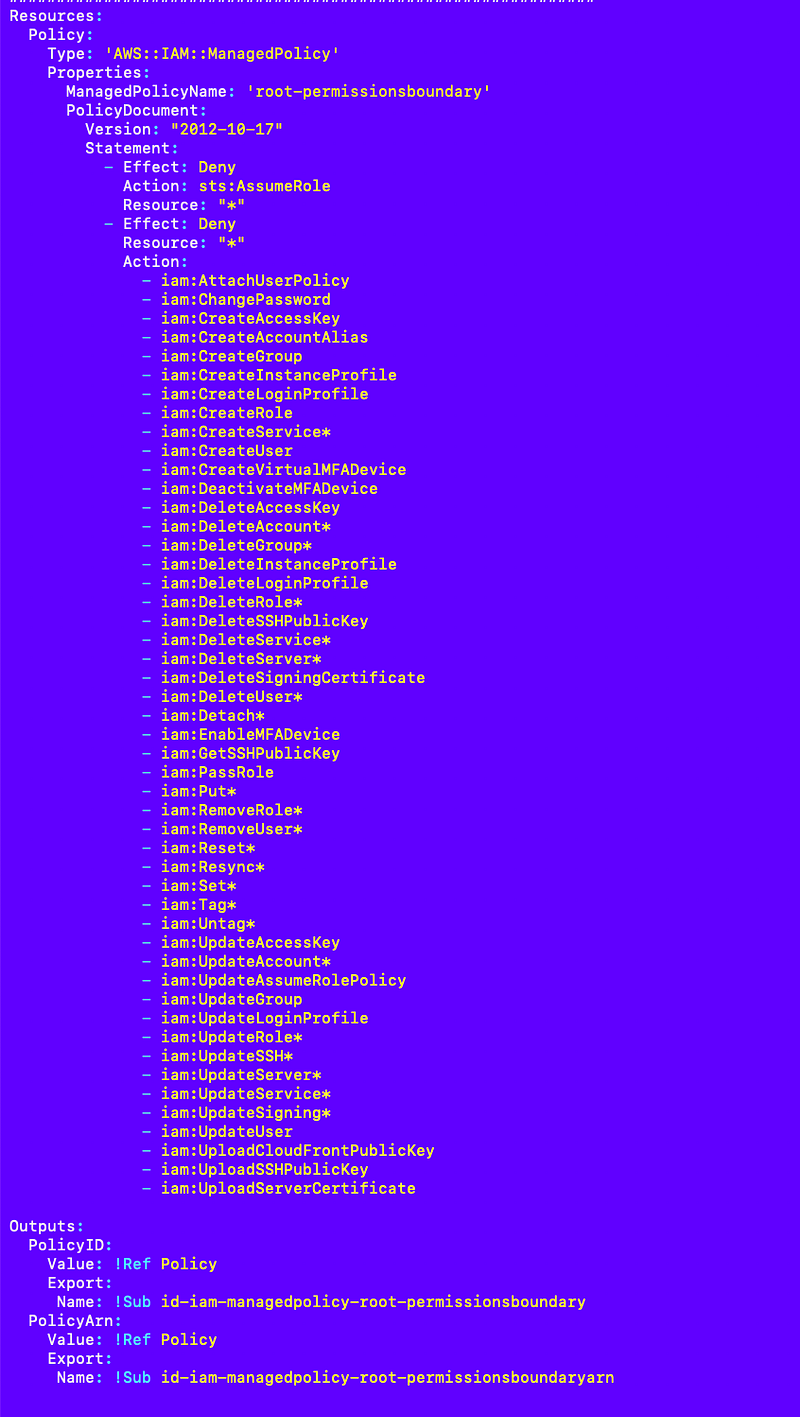
resources/iam/userpolicy/root-orgadminuserpolicy.yaml
If you force the user to change their password on first login, they won’t have MFA enabled. That means you would have to add ChangePassword to allow it without MFA which is not ideal. Otherwise, you have to figure out a way to securely transfer the new user password created in secrets manager to the user and make sure the root admin who has it doesn’t use it. No easy answer here and I’ve written about it extensively before, but for now I’m going to not enforce change password on first login because I don’t want to allow password changes without MFA. You could argue that the person who changes the password can’t do anything with it without MFA but then the user gets locked out. Like I said, no good answer.
Something else odd happened when I was updating this policy. I am sure ListUsers worked before when limited to the current user but now it does not. The ListUsers action according to CloudTrail acts on a generic user resource so it doesn’t work. I had to move that into the no-mfa and not specific to a user statement.
User: arn:aws:iam::xxxxxxxxxxxxx:user/root-admin is not authorized to perform: iam:ListUsers on resource: arn:aws:iam::xxxxxxxxxxxxx:user/ with an explicit deny in an identity-based policy
The other thing I’ve never seen before is I ran out of space for my user policy so I had to shorten it up. This should not be a problem in other accounts where SCPs can limit some actions across the board, like my MFA SCP, and then that doesn’t need to be included in the policy in accounts to which MFA applies. On that note, I need to go back and double check and test my MFA SCP.
Here’s the user root-admin user policy with actions abbreviated in deny to reduce the size of the policy:
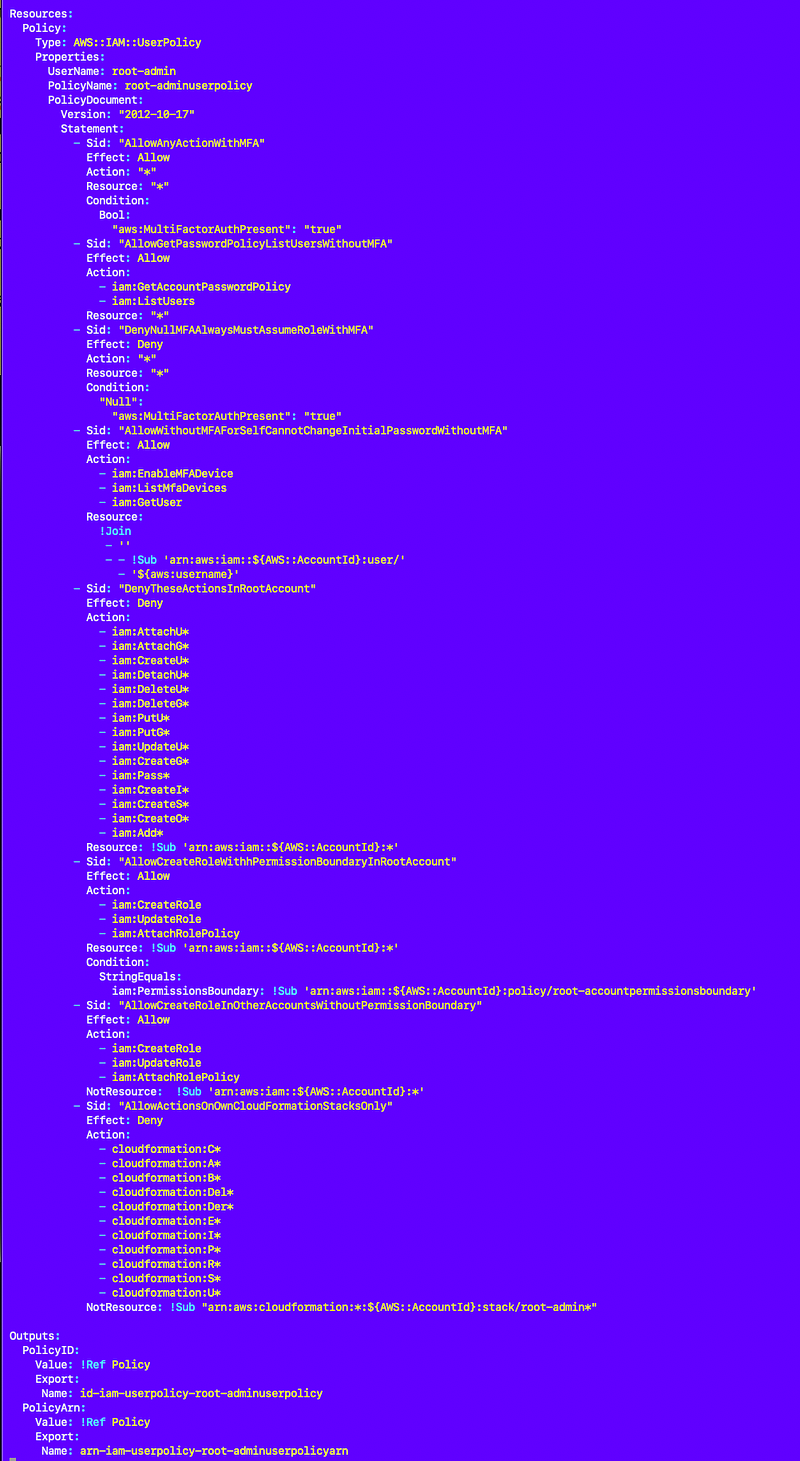
Note that I initially blocked a few things I shouldn’t hvae like creating virtual MFA devices so I removed those upon further testing.
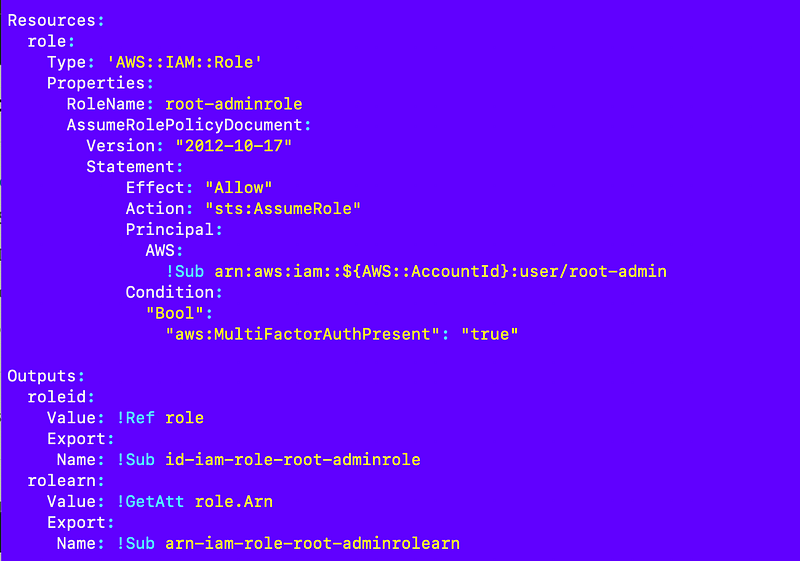
resources/iam/role/root-adminrole.yaml
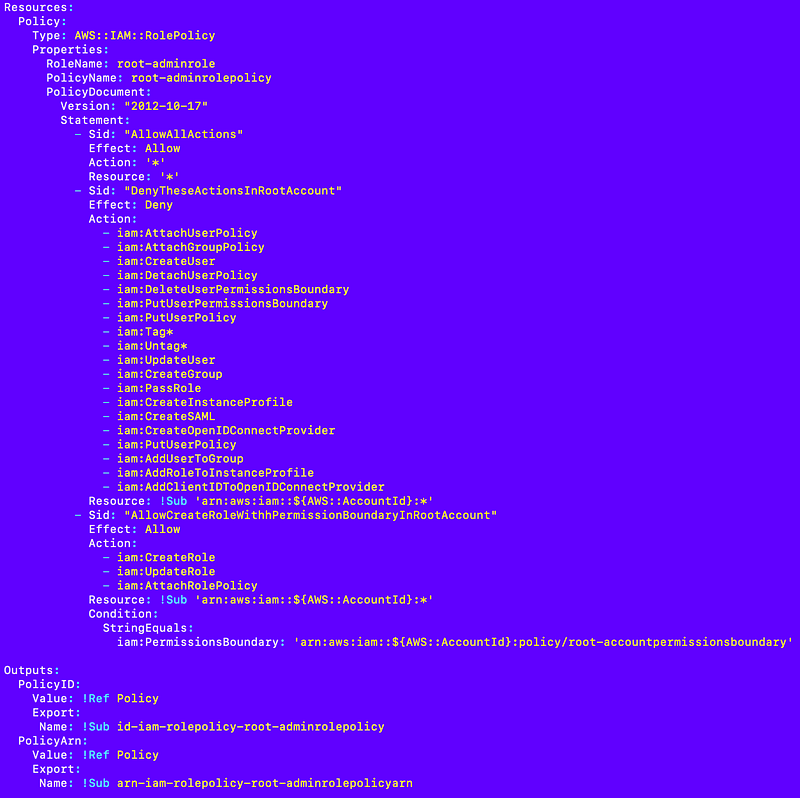
resources/iam/rolepolicy/root-adminrolepolicy.yaml
Deploy script run in a new AWS account with the root user via CloudShell:
awsdeploy/deploy/root/iam_user_root-admin.sh
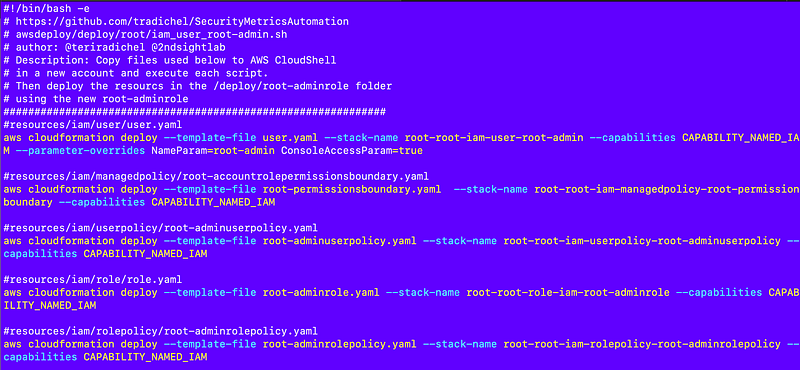
I’m sure I’ll find other changes to make later but this is it for now.
Follow for updates.
Teri Radichel | © 2nd Sight Lab 2023
About Teri Radichel:
~~~~~~~~~~~~~~~~~~~~
⭐️ Author: Cybersecurity Books
⭐️ Presentations: Presentations by Teri Radichel
⭐️ Recognition: SANS Award, AWS Security Hero, IANS Faculty
⭐️ Certifications: SANS ~ GSE 240
⭐️ Education: BA Business, Master of Software Engineering, Master of Infosec
⭐️ Company: Penetration Tests, Assessments, Phone Consulting ~ 2nd Sight Lab
Need Help With Cybersecurity, Cloud, or Application Security?
~~~~~~~~~~~~~~~~~~~~~~~~~~~~~~~~~~~~~~~~~~~~~~~~~~~~~~~~~~~~~
🔒 Request a penetration test or security assessment
🔒 Schedule a consulting call
🔒 Cybersecurity Speaker for PresentationFollow for more stories like this:
~~~~~~~~~~~~~~~~~~~~~~~~~~~~~~~~~~~~~~~~~~~~~~~~~~~~~~~~~~~~~
❤️ Sign Up my Medium Email List
❤️ Twitter: @teriradichel
❤️ LinkedIn: https://www.linkedin.com/in/teriradichel
❤️ Mastodon: @teriradichel@infosec.exchange
❤️ Facebook: 2nd Sight Lab
❤️ YouTube: @2ndsightlab


