
Update Your Browser Now ! Critical Security Vulnerability in Chrome Patched by Google.

Google has recently released an urgent update for its Chrome Desktop browser to address a critical security flaw that is actively being exploited by cybercriminals. This alarming development underscores the importance of keeping your software up to date to safeguard your online security.
If you’re a Chrome user on Windows, Mac or Linux it is imperative that you update your browser as soon as possible to protect yourself from potential threats. Google has made the process easy but it’s essential to ensure you are running the latest version of Chrome.
Automatic Updates Are the Easiest
The simplest and most effective way to keep your Chrome browser secure is to enable automatic updates. This feature ensures that your browser is always up to date without requiring your intervention. However it’s worth noting that if you rarely close your browser or encounter any issues such as extensions preventing updates, you might fall behind on critical updates.
Manually Check for Updates
While automatic updates are convenient it’s a good practice to manually check for updates occasionally especially when critical vulnerabilities are disclosed. Checking for updates manually is straightforward:
1. Open Chrome on your device.
2. Click on the three vertical dots in the top-right corner of the browser to open the menu.
3. Select “Settings”.
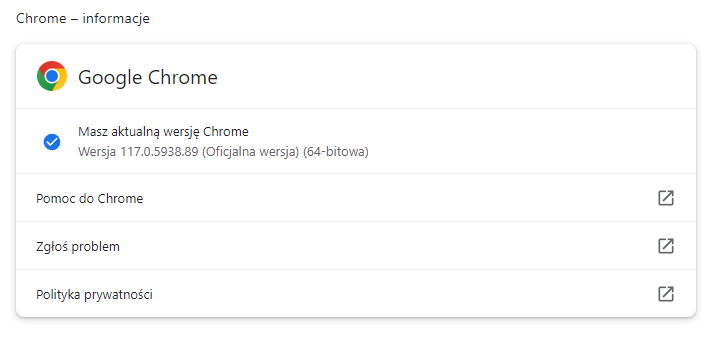
4. Scroll down and click on “About Chrome”.
This will take you to the update status page where Chrome will automatically check for updates. If a new version is available Chrome will notify you and begin downloading it. To complete the update simply relaunch the browser.
Confirm You’re Running the Latest Version
After updating confirm that you are running the latest secure version of Chrome. For Mac and Linux, the version should be 116.0.5845.187 or later. For Windows users it should be 117.0.5938.89 or later.
The Vulnerability
While Google typically keeps details about vulnerabilities under wraps to prevent further exploitation some information about the patched vulnerability has been revealed. The Common Vulnerabilities and Exposures (CVE) database identifies this zero-day vulnerability as CVE-2023–4863.
This particular vulnerability is a heap buffer overflow in the WebP image format potentially leading to arbitrary code execution or a system crash. A heap buffer overflow occurs when a program writes data beyond the boundary of a memory region which can have serious security implications.
Credit for discovering this vulnerability goes to Apple Security Engineering and Architecture (SEAR) and The Citizen Lab at The University of Toronto’s Munk School with the report dated September 6, 2023. It’s worth noting that this discovery aligns with a CitizenLab report on two Apple vulnerabilities utilized by the NSO group to distribute the Pegasus spyware. Furthermore both Apple CVE-2023–41064 and Chrome CVE-2023–4863 are related to image processing, suggesting a possible connection between the two.
In light of these developments it’s crucial to update your Chrome browser immediately to protect your system from potential threats. Regularly keeping your software up to date is a simple yet effective way to enhance your online security and protect your digital assets from cybercriminals.