
Unveiling the Integration of Multimodal ReAct Agent with Llamaindex: A Paradigm Shift in AI Interaction

Introduction
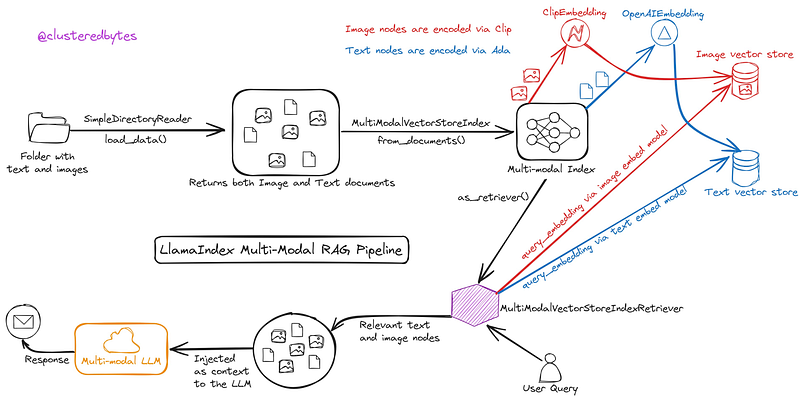
The relentless march of technology has birthed a transformative synergy: the marriage of the Multimodal ReAct Agent with the pioneering Llamaindex system. This amalgamation has rewritten the rules of engagement in AI, ushering in an era where GPT-4V harnesses the power of chain-of-thought reasoning and tool-use across text and images.
Exploring the Components:
Multimodal ReAct Agent: An Evolution in AI Interaction
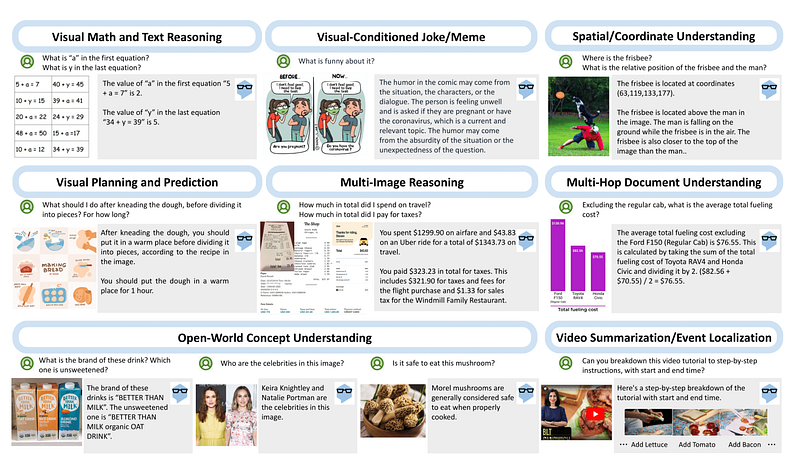
The Multimodal ReAct Agent, a pinnacle of AI innovation, represents a quantum leap in multimodal comprehension. Its capabilities extend far beyond mere text analysis, embracing a visual spectrum to engage with images, text, and even gestures. Powered by GPT-4V and a modified ReAct prompt, this agent traverses a landscape of multi-sensory inputs, employing machine learning, natural language processing, and computer vision to decode and generate responses.
Llamaindex: Redefining Data Indexing
In the realm of data organization and retrieval, Llamaindex stands tall as a groundbreaking indexing framework. Departing from traditional methods, Llamaindex operates on semantic indexing principles, not just categorizing data but comprehending it within contextual webs. Its ability to intricately weave connections within data landscapes enhances retrieval, ensuring responses are not just accurate but rooted in deeper contextual understanding.
Integration Unveiled: Unleashing the Power of Multimodal ReAct Agent with Llamaindex
The fusion of Multimodal ReAct Agent with Llamaindex is nothing short of a technological marvel. It equips GPT-4V to embark on chain-of-thought reasoning and tool-use across both text and images — a feat that revolutionizes how AI interfaces with information.
The updated ReAct prompt empowers the Multimodal ReAct Agent to visually reason over images, connecting them seamlessly with tools like a RAG (Retriever-Reader-Generator) pipeline or web searches. This integration enables the agent to deliver responses grounded not just in textual understanding but deeply anchored in the visual context provided by images.
Embarking on Practical Use Cases:
The unveiling of this integration is accompanied by a compelling showcase of its prowess through two core use cases:
- Multimodal RAG Agent: Armed with text and images, the agent can query a RAG pipeline, extracting answers from a given screenshot, say, from the OpenAI Dev Day 2023. This showcases the agent’s ability to contextualize information across text and visuals, delivering precise and comprehensive responses.
- Multimodal Web Agent: Presented with text and images, the agent adeptly queries a web tool to retrieve relevant information. For instance, when shown a picture of shoes, it navigates web resources to offer pertinent insights, showcasing its capacity to seamlessly integrate information from the vast expanse of the internet.
Code Implementation
Utilize GPT-4V’s Multimodal ReAct Agent integrated with Llamaindex: feed text and images, prompt for RAG pipeline or web tool queries, and receive contextualized responses grounded in both text and visual data
Step I: Install Libraries
curl https://ollama.ai/install.sh | sh
ollama run mixtral
pip install -qU wandb llama-hub matplotlib qdrant_client transformers openai pypdf tiktoken "llama-index"
Step II: Download Data
!mkdir -p other_images/openai
!wget "https://images.openai.com/blob/a2e49de2-ba5b-4869-9c2d-db3b4b5dcc19/new-models-and-developer-products-announced-at-devday.jpg?width=2000" -O other_images/openai/dev_day.png
!wget "https://drive.google.com/uc\?id\=1B4f5ZSIKN0zTTPPRlZ915Ceb3_uF9Zlq\&export\=download" -O other_images/adidas.png
Step III: Import Libraries and Initiate Openai and Wandb
import os

import logging
import sys
from IPython.display import Markdown, display

from llama_index.llms import OpenAI
from llama_index.callbacks import CallbackManager, WandbCallbackHandler
from llama_index import load_index_from_storage

from llama_index.llms import Ollama
from llama_index.tools import QueryEngineTool, ToolMetadata

from llama_hub.web.simple_web.base import SimpleWebPageReader

from pprint import pprint
from llama_index import (
    VectorStoreIndex,
    SimpleKeywordTableIndex,
    SimpleDirectoryReader,
    StorageContext,
    ServiceContext,
)


#Setup  OPEN API Key
os.environ["OPENAI_API_KEY"] = ""

logging.basicConfig(stream=sys.stdout, level=logging.INFO)
logging.getLogger().addHandler(logging.StreamHandler(stream=sys.stdout))

# initialise WandbCallbackHandler and pass any wandb.init args
wandb_args = {"project":"llama-index-nomi"}
wandb_callback = WandbCallbackHandler(run_args=wandb_args)

# pass wandb_callback to the service context
callback_manager = CallbackManager([wandb_callback])
Step IV: Vectorize Content
url = "https://openai.com/blog/new-models-and-developer-products-announced-at-devday"
reader = SimpleWebPageReader(html_to_text=True)
documents = reader.load_data(urls=[url])


llm = Ollama(model="mixtral")
service_context = ServiceContext.from_defaults(llm=llm, embed_model="local", chunk_size=1024, callback_manager=callback_manager)

vector_index = VectorStoreIndex.from_documents(documents, service_context=service_context, vector_store_kwargs={"deep memory": True})
query_tool = QueryEngineTool(
query_engine=vector_index.as_query_engine(),
metadata=ToolMetadata(
name=f"vector_tool",
description=(
"Useful to lookup new features announced by Ollama"
# "Useful to lookup any information regarding the image"
),
),
)Step V: Setup Agent
from llama_index.agent.react_multimodal.step import MultimodalReActAgentWorker
from llama_index.agent import AgentRunner
from llama_index.multi_modal_llms import MultiModalLLM, OpenAIMultiModal
from llama_index.agent import Task

mm_llm = OpenAIMultiModal(model="gpt-4-vision-preview", max_new_tokens=1000)

# Option 2: Initialize AgentRunner with OpenAIAgentWorker
react_step_engine = MultimodalReActAgentWorker.from_tools(
    [query_tool],
    multi_modal_llm=mm_llm,
    verbose=True,
)
agent = AgentRunner(react_step_engine)


query_str = (
    "The photo shows some new features released by OpenAI. "
    "Can you pinpoint the features in the photo and give more details using relevant tools?"
)

from llama_index.schema import ImageDocument

# image document
image_document = ImageDocument(image_path="/workspace/other_images/openai/dev_day.png")

task = agent.create_task(
    query_str,
    extra_state={"image_docs": [image_document]},
)
def execute_step(agent: AgentRunner, task: Task):
step_output = agent.run_step(task.task_id)
if step_output.is_last:
response = agent.finalize_response(task.task_id)
print(f"> Agent finished: {str(response)}")
return response
else:
return None
def execute_steps(agent: AgentRunner, task: Task):
response = execute_step(agent, task)
while response is None:
response = execute_step(agent, task)
return response
response = execute_step(agent, task)
print(str(response))
#Output
The image shows a user interface that seems to be part of an OpenAI platform,
possibly a coding or development environment. There is a code snippet visible,
along with a calculation involving distance, time, and speed, which might be
part of a demonstration of a new feature. However, without specific text
references to new features, I cannot pinpoint exact features or provide more
details. If you can provide text descriptions or names of the features you're
interested in, I can use the vector_tool to gather more information about themStep VI: Augment Image Analysis with Web Search
from llama_hub.tools.metaphor.base import MetaphorToolSpec
from llama_index.agent.react_multimodal.step import MultimodalReActAgentWorker
from llama_index.agent import AgentRunner
from llama_index.multi_modal_llms import MultiModalLLM, OpenAIMultiModal
from llama_index.agent import Task

metaphor_tool_spec = MetaphorToolSpec(
    api_key="<api_key>",
)
metaphor_tools = metaphor_tool_spec.to_tool_list()

mm_llm = OpenAIMultiModal(model="gpt-4-vision-preview", max_new_tokens=1000)

# Option 2: Initialize AgentRunner with OpenAIAgentWorker
react_step_engine = MultimodalReActAgentWorker.from_tools(
    metaphor_tools,
    # [],
    multi_modal_llm=mm_llm,
    verbose=True,
)
agent = AgentRunner(react_step_engine)
from llama_index.schema import ImageDocument
query_str = "Look up some reviews regarding these shoes."
image_document = ImageDocument(image_path="other_images/adidas.png")
task = agent.create_task(
query_str, extra_state={"image_docs": [image_document]}
)
response = execute_step(agent, task)
print(str(response))
# Output
The Adidas Ultraboost is reviewed as an expensive but versatile shoe suitable
for various activities, from running a half marathon to going out on a date.
They are considered a good value due to their durability, with the reviewer
getting hundreds of miles out of them. The shoes are described as lightweight,
breathable, and comfortable enough to wear without socks. However, they are not
recommended for wet climates as they do not perform well in the rain. The
reviewer also mentions owning seven different models of Adidas Boost,
indicating a strong preference for the brand.Conclusion
In conclusion, the fusion of the Multimodal ReAct Agent with Llamaindex heralds a new era in AI interaction and information retrieval. This integration empowers GPT-4V to navigate seamlessly through both textual and visual realms, harnessing the depth of Llamaindex’s contextual understanding. The concise code snippet encapsulates the simplicity and power of this integration, showcasing its potential to revolutionize how AI processes multimodal data and delivers nuanced, contextually rich responses. As this synergy continues to evolve, its impact on AI-driven problem-solving and contextual comprehension is poised to redefine the landscape of artificial intelligence.
Resources:
Stay connected and support my work through various platforms:
Github Patreon Kaggle Hugging-Face YouTube GumRoad
Like my content? Feel free to Buy Me a Coffee ☕ !
Requests and questions: If you have a project in mind that you’d like me to work on or if you have any questions about the concepts I’ve explained, don’t hesitate to let me know. I’m always looking for new ideas for future Notebooks and I love helping to resolve any doubts you might have.
Remember, each “Like”, “Share”, and “Star” greatly contributes to my work and motivates me to continue producing more quality content. Thank you for your support!
If you enjoyed this story, feel free to subscribe to Medium, and you will get notifications when my new articles will be published, as well as full access to thousands of stories from other authors.


